How to Track Work Progress Across Teams Using AI
Why tracking work progress across teams requires shared data, not separate tools
AI delivers value when your team agrees on the core meanings within your data. Using fragmented tools often results in incompatible data definitions. Establish a common understanding among your teams regarding what each data type represents.
Work item: The basic unit of action. Examples include a ticket, task, document request, or deal update.
Objective: The outcome to which every work item should be tied.
Milestone: A specific result with a set date and clear acceptance criteria.
Account: The customer or partner record associated with the work.
Risk: Any potential blocker, categorized by probability and potential impact.
Decision: A documented choice with an owner and timestamp.
Represent progress using factual events, not subjective opinions. Maintain an event log, such as created, started, reviewed, blocked, shipped, and accepted, so AI can reliably evaluate project pace and health without ambiguity. For a deeper data rationale, refer to this article on why personal productivity apps don’t work for teams and how structured data solves the problem.
How to define cross-team progress metrics that AI can understand
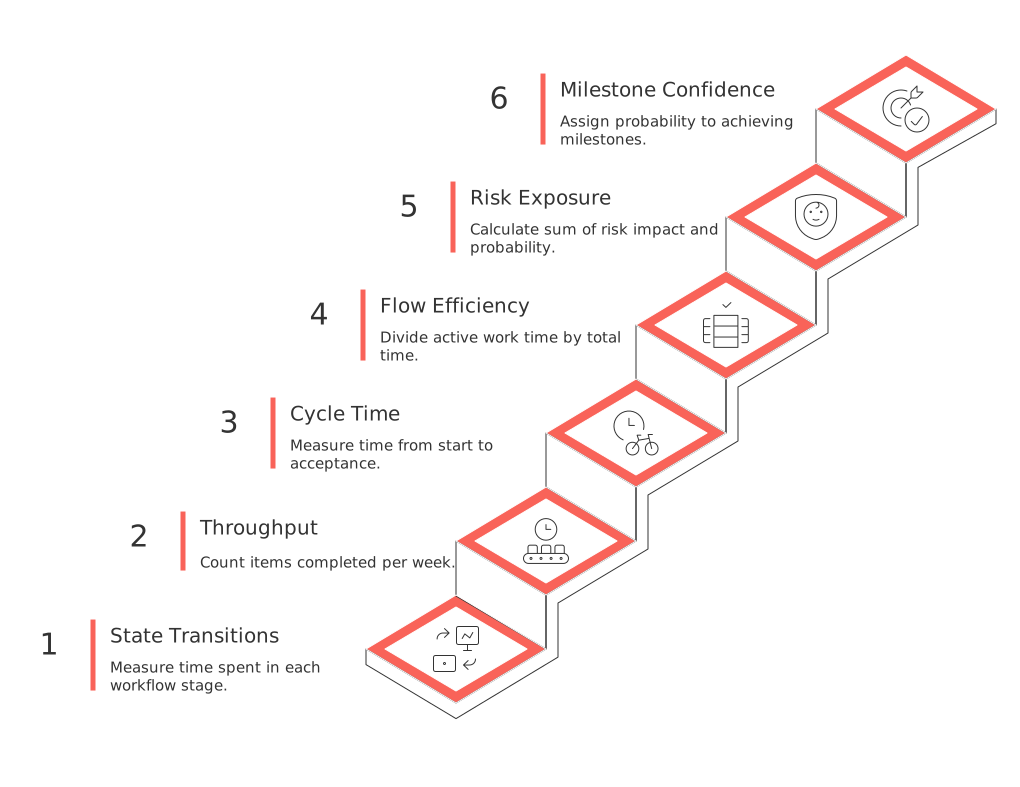
Choose metrics that reflect changes in progress rather than subjective judgments. Ensure these metrics are strictly defined and results are testable.
State transitions: Measure the time spent in each stage of a well-defined workflow.
Throughput: Count the number of items completed per week by type and by team.
Cycle time: Measure how long it takes from started to accepted, omitting planned waiting periods.
Flow efficiency: Divide active work time by total elapsed time to gauge efficiency.
Risk exposure: Calculate the sum of risk impact multiplied by probability for all open risks.
Milestone confidence: Have AI assign a probability to achieving each milestone by its target date.
For sales teams, focus on metrics like stage duration, conversion rate, and slippage. For product teams, monitor lead time, escaped defects, and deployment frequency.
How to connect project management, knowledge, and CRM systems into an AI-ready graph
Connect systems around shared IDs, thereby enabling AI to analyze and interpret the relationships among your disparate data sources.
Adopt stable IDs for work items, objectives, milestones, and accounts across all systems.
Map relevant fields from your project management tools, knowledge base, and CRM.
Create an event stream that captures commits, tickets, reviews, and decision records from meetings.
Ensure consistency in user identification by normalizing user data with a single identity source.
Tag work items with attributes like team, product area, and priority for easy cross-referencing.
Store raw text data separately to enable AI-driven summarization and maintain traceability.
While a single workspace like Routine or ClickUp can simplify the process by reducing mapping work, if you prefer using multiple tools, remember to consistently enforce the same data schema across all of them.
How AI summarizes status, risks, and blockers across teams in real time
When your data is unified, AI can produce consistent and trustworthy status updates, while also flagging emerging risks.
Daily cross-team brief: Summarizes what progressed, what encountered delays, and why.
Blocker radar: Highlights unresolved dependencies and overdue reviews.
Risk watch: Surfaces patterns such as rising defect counts or signals of customer churn.
Forecast delta: Tracks changes in milestone confidence since the last update.
For example, an AI-generated report might read: “Milestone M2 is at 62% confidence. Two reviews are stalled for 3 days. Account Northstar requested a change that adds 5 days risk.”
Keep outputs concise, link them directly to sources, and ensure they are easy to compare day-to-day.
How to visualize cross-team progress with AI-assisted dashboards
Dashboards should represent ongoing project flow rather than static snapshots. Combine traditional charts with AI-powered insights for maximum clarity.
Flow load view: Displays work-in-progress grouped by team and workflow state.
Burn-up chart: Shows scope versus completion trends over time with AI-generated notes.
Milestone grid: Details milestone confidence levels by owner, target date, and dependency risk.
Deal velocity: Visualizes stage duration and predicts likely close dates.
For further options on effective visualization, read the guide on visualization tools for simple project management, from Gantt charts to modern trackers. The best dashboards answer “what changed” at a glance.
Governance for AI-generated progress reporting across teams
Treat AI-generated reports with the rigor of financial statements by implementing clear rules and regular audits.
Access control: Control access to data by team and by sensitivity, especially for customer-specific information.
Redaction: Remove personally identifiable information before feeding data to AI models.
Retention: Expire raw transcripts after use, but maintain structured event data for auditing.
Grounding: Require all AI conclusions to cite item IDs and event timestamps for traceability.
Quality gates: Regularly sample AI outputs and verify them against ground-truth data.
Change logs: Track prompts, AI model versions, and schema updates for transparency.
A practical plan to track work progress using AI
Establish the foundation
Define key entities and event states to be tracked by AI.
Map relevant fields from your project tools, knowledge base, and CRM.
Set up the first event feed and user identity mapping processes.
Publish clear metric definitions and acceptance criteria.
Pilot cross-team reporting
Launch daily AI-generated briefs for two pilot teams.
Enable automatic scoring of milestone confidence and detection of blockers.
Hold regular review meetings to either accept or override AI assessments, with documented reasons.
Scale and harden
Expand reporting to Sales and Customer Success teams for account-linked work.
Implement additional governance checks and start regular output sampling.
Deploy an executive dashboard that supports drill-down exploration.
Common pitfalls when tracking work progress with AI across teams
Using “percent complete” without a clear state-machine process behind it.
Allowing teams to freely rename fields after initial rollout, harming data consistency.
Mixing objectives and tasks within a single list, blurring the lines between different work types.
Depending on manual summaries that lack direct links to source data.
Providing AI models with outdated or duplicate data.
How to measure the business impact of AI-based progress tracking
Reporting time saved: Measure how many hours are saved in weekly status reporting after automation.
Forecast accuracy: Track the difference between predicted and actual delivery dates or revenue amounts.
On-time delivery rate: Monitor the percentage of milestones met on or before their planned dates.
Risk lead time: Evaluate how quickly teams respond from initial risk identification to action.
Deal velocity: Compare the median time spent in each sales stage before and after AI adoption.
Track these outcomes for at least 12 weeks and share trends in an objective, context-rich manner.
When an all-in-one workspace helps track progress across teams
Using a central platform can minimize the effort of integrating data from multiple sources. A workspace like Routine or ClickUp can unify project details, knowledge management, CRM data, and meeting decisions in one location. The key is maintaining a consistent data model and complete event history. If you continue using specialized tools, rigorously enforce a shared schema and automate synchronization between systems.
FAQ
Why is a shared data schema important across teams?
Without a shared data schema, teams risk misalignments and inefficiencies due to incompatible data definitions. It ensures that all teams work with a common understanding, allowing AI to effectively analyze and provide meaningful insights.
How can AI improve cross-team progress tracking?
AI can automate status updates, flag emerging risks, and provide reliable forecasts, saving time and reducing human error. However, it requires unified data and strict governance to ensure accuracy and relevance.
What are the risks of using multiple tools without data consistency?
Fragmented tool use can lead to inconsistent data, making it difficult for AI to deliver accurate analysis. Maintaining a consistent data model, possibly through a unified platform like Routine, is crucial.
How do you ensure AI-generated reports are trustworthy?
Adopt rigorous governance strategies including access control, regular audits, and ensuring traceability of AI outputs. Comparing AI assessments to ground-truth data reinforces report reliability.
What are common pitfalls in AI-based progress tracking?
Common pitfalls include using vague metrics like \"percent complete,\" allowing data field changes post-implementation, and relying on outdated data. These errors can compromise data integrity and AI efficacy.
How can I measure the business impact of AI-based progress tracking?
Assess improvements in reporting efficiency, forecast accuracy, and on-time delivery rates. Analyzing these metrics can reveal the tangible benefits and pain points of AI integration in workflow management.
Why use an all-in-one workspace for progress tracking?
A unified workspace minimizes integration efforts and data inconsistencies, optimizing project visibility and coordination. While platforms like Routine simplify processes, they require disciplined data management.

Julien Quintard
Founder & CEO at Routine01/19/2026
