Notion AI Alternatives That Understand Work Context
Why work context is essential for effective knowledge and project AI
Unlike generic AI that solely generates text, context-aware AI comprehends the specific structure of your organization. It familiarizes itself with the various areas that matter most, such as accounts, deals, projects, tickets, and documents. More than just processing words, it interprets the relationships between different elements and understands their real-world significance. This ability leads to more accurate answers and enables safer automation.
Teams operate efficiently when AI understands intent, status, ownership, and deadlines. Advanced solutions should respect role-based permissions, reference the most recent data, and trace outputs directly to their sources. Without these features, AI may offer confident answers that lack grounding, ultimately wasting valuable time.
AI that understands structure significantly outperforms AI that only sees paragraphs.
How to evaluate context-aware Notion AI alternatives for business teams
Schema awareness: This refers to the system’s capability to recognize and utilize data structures (objects), such as Accounts, Contacts, Deals, Epics, and Tickets, as native elements within its operations.
Graph relationships: The ability to connect and link objects, supporting many-to-many relationships and rollups spanning projects and CRM data sources.
Actionability: AI should be able to safely execute tasks, not just create drafts. It should also support approvals and allow for test runs before applying changes.
Permissions: Ensure the platform enforces row-level access controls, data masking, and tenant isolation to support secure collaboration in shared workspaces.
Traceability: The system should display citations, links to relevant objects, and timestamps indicating when each AI-generated output was last updated.
Integrations: Look for solutions that offer seamless, two-way synchronization with CRM systems, ticketing tools, data warehouses, and identity providers.
Quality controls: Availability of test sets, feedback mechanisms, and sandbox environments to support ongoing quality evaluation.
Governance: Robust audit logs, data retention settings, and regional hosting options to fulfill governance and compliance requirements.
Notion AI alternatives that truly understand work context
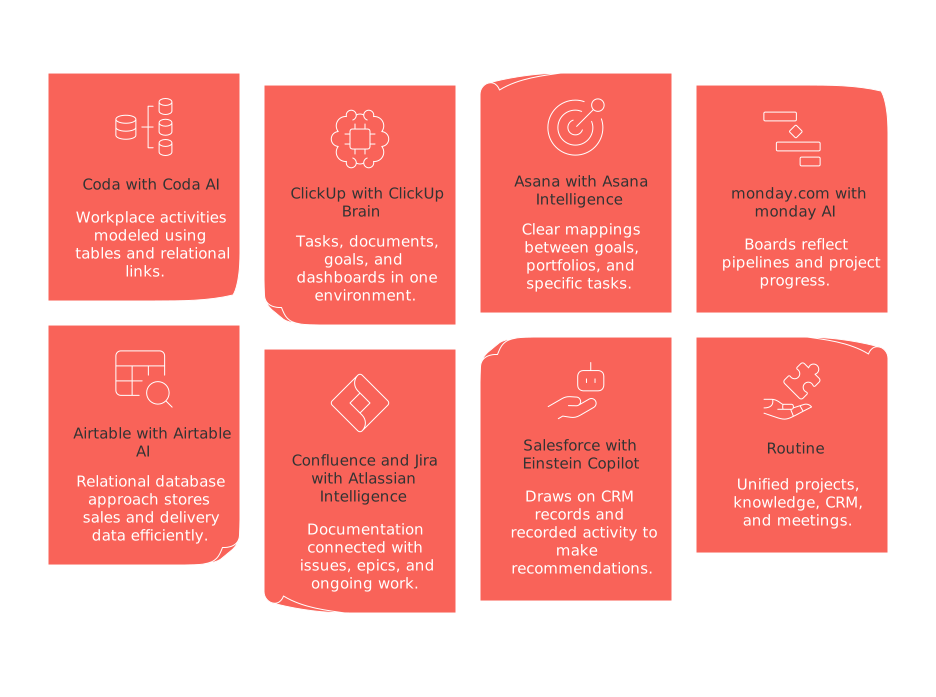
Coda with Coda AI
Coda models workplace activities using tables and relational links. Coda AI leverages these structures to answer questions and perform automated actions. Integrations (“Packs”) allow connection to CRM, planning tools, and data warehouses.
ClickUp with ClickUp Brain
ClickUp brings together tasks, documents, goals, and dashboards in one environment. ClickUp Brain uses current task data and ownership information to generate updates, and can produce project briefs and actionable items based on project data.
Asana with Asana Intelligence
Asana creates clear mappings between goals, portfolios, and specific tasks. Its AI drafts project status updates, flags potential risks, and recommends assignees while honoring custom fields and team-level permissions.
monday.com with monday AI
monday.com employs boards to reflect pipelines and project progress. monday AI summarizes item histories, generates formulas, and can suggest new automation rules aligned with existing workflows.
Airtable with Airtable AI
Airtable’s relational database approach stores sales and delivery data efficiently. Airtable AI assists by classifying records, summarizing content, and auto-filling structured fields. It also supports role-based custom interfaces.
Atlassian Confluence and Jira with Atlassian Intelligence
Atlassian connects documentation with issues, epics, and ongoing work. Its AI prepares changelogs and postmortem reports based on Jira field data, referencing related pages and sprint histories.
Salesforce with Einstein Copilot
Einstein Copilot draws on first-party CRM records and recorded activity to make recommendations, draft client communications, and update database fields in line with company policies and controls.
Routine: unified projects, knowledge, CRM, and meetings
Routine centralizes project, knowledge, and CRM information and enables AI to work across all these domains. When comparing alternatives such as Coda or Asana, assess differences in how schemas, permissions, and integrations are handled before choosing.
Workflows where context-aware AI brings tangible business value
Sales: Generate account plans using deal stage, activity logs, and outstanding tasks.
Customer success: Automatically flag customers at risk of churn, drawing from support tickets, NPS, and product usage data.
Product: Summarize user feedback by feature and connect insights directly to development epics.
Engineering: Compile release notes from merged issues and linked code commits.
Marketing: Draft case studies that are tied to validated customer outcomes.
Finance: Compare forecasted and actual figures, highlighting blocking dependencies for review.
Operations: Suggest SLA improvements based on incident histories and ownership changes.
Implementation playbook for migrating from Notion AI without losing context
Establish a single, authoritative data model for your CRM, projects, and knowledge bases.
Create a complete inventory of your current Notion databases, fields, and relationships.
Map each data entity to its equivalent on the new platform, aligning schemas and permissions rules.
Assign clear identifiers and owners to every record prior to migration.
Start with a pilot migration for one team, using read-only synchronization to minimize risk.
Verify that all records, relationships, summaries, and automations work correctly in a staging environment.
Train reviewers to spot AI mistakes, including missing citations or unsupported statements.
Migrate in phases, with backup plans and the ability to revert if needed.
Data architecture that empowers AI to understand your business
Ensure core entities are modeled as first-class objects rather than loose pages. Use validated fields with consistent data types. Rely on drop-down lists, linked records, and references to keep information meaningful and interconnected. Record event histories for each data object, providing AI with complete timelines instead of isolated snapshots.
Every object should have a single source of truth. Avoid creating multiple versions of crucial data fields. Use unidirectional relationships and provide lineage views so auditors can easily trace output back to each input.
Security and compliance expectations for AI workspaces in 2026
Support for single sign-on (SSO) and automated user management (SCIM provisioning and deprovisioning).
Attainments such as SOC 2 Type II and ISO 27001 certifications.
Options for customer-managed encryption keys or field-level encryption for sensitive information.
Granular, row-level security controls, with special procedures in place for emergency (break-glass) access scenarios.
Data residency options to support regulated industries and compliance needs.
Comprehensive and accessible audit logs that record prompts, automated actions, and outputs.
Executives generally look for tangible, demonstrable control mechanisms rather than assurances. Maintaining thorough documentation of how AI systems access and modify business data is highly recommended.
Cost considerations executives care about when selecting an AI workspace
Consider all relevant factors in your budget planning, such as the number of users needing access to the platform (platform seats), the anticipated extent of AI usage, the cost of integrating existing systems and processes, as well as resources required for managing changes. Include expenses tied to transferring data and the phasing out of legacy features (migration and deprecation costs), as well as the work required to uphold data accuracy and consistency. Remember, poor data quality directly increases operational costs of AI systems.
Licensing: Costs linked to user access tiers, automation usage, and add-ons for large organizations.
AI usage: Spending for generating outputs, retrieving data, and executing automated workflows.
Integration: Fees for integration platforms, additional compute resources, and third-party connectors.
Operations: Outlay for administration, quality assurance, and ongoing evaluations.
Savings: Benefits from tools that are no longer needed, reduced status meetings, and less time spent correcting mistakes.
Decision matrix to shortlist the right platform for your organization
Evaluate how well the schema matches your CRM, project, and knowledge requirements.
Test the platform’s permission controls using real roles and restricted test data.
Check that traceability tools (citations and lineage) meet your minimum standards.
Run realistic task and action workflows, leverage approval and rollback features.
Assess integration breadth and depth, aiming for minimal custom code.
Calculate total cost of ownership for two years, factoring in migration and recurring expenses.
Gather feedback from at least two separate departments to ensure wide usability.
Recommended resources for deeper evaluation
To better compare platform capabilities and key trade-offs, see this detailed guide to all-in-one workspaces versus best-of-breed project platforms. For insights on data quality and scaling, refer to why personal productivity apps fall short for teams and how structured data makes the difference. You can also explore the article on “Best No-Code AI Agent for Productivity in 2026” for upcoming evaluation checklists.
FAQ
What is context-aware AI and why is it important?
Context-aware AI understands the specific details and structures within an organization, like projects and CRM data. Unlike generic AI, it provides more accurate, relevant, and actionable insights by interpreting relationships and real-world significance.
How does schema awareness improve AI performance?
Schema awareness allows AI to recognize and utilize structured data elements like Accounts and Tickets natively. This capability leads to more precise results, reducing errors and wasted time on rework or misinterpretation.
Why are permissions critical in AI solutions for businesses?
Strict permissions ensure that sensitive information is only accessible to authorized users. Role-based access control is vital for maintaining security and compliance, preventing accidental exposure or misuse of data.
What risks are associated with AI lacking traceability features?
Without traceability, AI outputs lack verifiable sources, making it hard to trust or audit decisions. This opens organizations to errors and compliance risks, leading to potential financial and reputational damage.
How do integrations enhance the utility of context-aware AI?
Seamless integrations enable AI to sync effortlessly with existing tools like CRM systems. This connectivity ensures that the AI operates with the latest and most comprehensive data, enhancing decision-making and efficiency.
Why is the cost of data migration a crucial factor in AI selection?
Migrating to a new AI platform can be costly and complex, involving data transfer and system integration expenses. Organizations must calculate total costs upfront to avoid underestimating financial and operational impacts.
What role does Routine play in context-aware AI solutions?
Routine centralizes project, knowledge, and CRM data, enabling AI to work across these domains effectively. It emphasizes schema handling, integration features, and access controls, providing robust solutions compared to alternatives.
How do context-aware AI systems help in risk management?
By interpreting organizational structures and updating data, these AI systems proactively flag potential risks. This preemptive action prevents issues from escalating, saving time and reducing the cost of reactive solutions.
What are the consequences of poor data quality on AI systems?
Poor quality directly escalates the operational costs of AI systems due to increased errors and inefficiencies. Accurate, consistent data is foundational to maximizing AI potential and maintaining strategic advantage.

Julien Quintard
Founder & CEO at Routine01/29/2026
