Designing a CRM Data Model for Field Service Operations
Why field service requires a CRM-specific data model
Truck rolls drain margin when critical service data is siloed across separate systems. A CRM model tailored for field service operations addresses this limitation. It consolidates customer records, assets, work orders, and billing information into a single, reliable source of truth, ensuring that information is accessible when and where it’s needed.
Field service relies on precise location and asset data. Technicians must have the correct entitlement, part inventory, and procedure details before arriving on-site. Your data model should ensure this workflow is both streamlined and reliable.
Design the data, by way of proper work schedule planning, accurate part prediction, and efficient service routes, so that the technicians are equipped to finish the job at the first visit.
Business outcomes your CRM data model for field service must support
Improved first‑time fix rates for installed assets.
Consistent SLA compliance supported by clear “stop the clock” rules.
Accurate tracking of parts usage and real-time truck stock visibility.
Transparent margins by work order, asset, and contract.
Fast, correct invoicing and warranty recovery processes.
Traceable safety checks and comprehensive audit histories.
Feedback systematically captured at job close and routed to relevant teams.
Core entities in a CRM data model for field service operations
Account: The customer organization receiving service.
Contact: Individuals at the customer account with authority for access and approvals.
Site or location: A specific, serviceable address with associated access details.
Asset or installed base: An item with unique serial, model, and warranty information tracked over its lifecycle.
Service agreement or contract: Defines service coverage, rates, and included assets or parts.
Entitlement: Logic and rules that determine whether a service request is covered by contract or policy.
Service request or case: The initial problem report or demand trigger from customers.
Work order: The formal job authorized to address a service request.
Work type: A set template outlining required tasks, estimated effort, and guidelines.
Task or activity: Individual technician actions tied to standardized checklists.
Technician or user: Service professionals with specific skills and certifications.
Team or crew: Groups of technicians dispatched together.
Territory: Geographical regions or account-based assignments for scheduling and inventory management.
Part or product: Consumable or installed items tracked during service work.
Inventory location: Stores, vehicles, or other places where parts are kept.
Part movement or reservation: Transactions tracking changes in inventory levels.
Time entry: Recorded labor linked to work performed, including rules for billable time.
Expense: Additional charges such as travel, tolls, or billable incidentals.
Checklist or inspection: Step-by-step safety and quality procedures.
Failure code, cause, resolution: Categorization of root causes and solutions for recurring issues.
Knowledge article: Documentation such as service procedures, technical specs, and diagrams.
Quote or estimate: Pricing proposal for work not already under contract.
Invoice: Official billing document issued to the customer.
Return or RMA: Process for tracking defective part returns and credit issuance.
IoT alert or event: Device-generated event that can initiate a proactive service action.
Customer feedback: Collected customer satisfaction data: CSAT, NPS, and end-of-job comments.
Attachment: Supporting files such as photos, signed forms, or diagrams linked to records.
Relationship and cardinality rules for field service CRM objects
One account can cover multiple sites and assets.
One service request may result in several work orders.
Each work order can contain multiple tasks, time entries, and part usages.
An asset may be linked to numerous work orders over time.
Technicians can have various skills, and skills can be matched to multiple work types.
Contracts may include several assets, and an asset can potentially relate to more than one contract.
Every part movement is uniquely associated with a single part and inventory location.
Use clearly named foreign keys, standardize status fields through controlled picklists, and employ reference tables for rates and taxes to maintain consistency.
Status lifecycles and SLA timers in a field service CRM design
Define the standard lifecycle
Establish a controlled progression: New → Triage → Scheduled → En route → On site → Paused → Awaiting parts → Completed → Invoiced → Closed.
Attach timers to service levels
Response time is measured from New through Triage.
Resolution time concludes at Completed.
The SLA clock pauses at Awaiting parts or Customer hold statuses.
Log every status update with the responsible user, timestamp, and reason. Detailed auditing is critical for dispute resolution and regulatory compliance.
Work order decomposition into tasks, parts, labor, and billing in the CRM model
Decompose each work order into granular tasks associated with predetermined work types. Each task links to safety checklists and gating criteria. Labor should be documented through time entries, with billable time and applicable rates.
Assign price books based on contract terms, region, or currency.
Record tax rules exclusively on the invoice for simplicity.
Differentiate between parts used and parts installed with explicit line items.
Let warranty items show zero price but actual cost for financial transparency.
Trigger invoicing only when all tasks are marked Complete and proper approvals are captured. Distinguish between cost, price, and margin in each record to ensure clarity in financial reporting.
Territories, skills, certifications, and entitlement logic in the CRM schema
Geographical territories play a significant role in assigning tasks and managing inventory access. A particular territory can only be accessed by the technicians assigned to that region, limiting the distribution of tasks and usage of inventory stocks.
Map required skills and certifications to each work type and safety protocol.
Determine entitlement status through contract, asset warranty, and SLA analysis.
Log denials with specific reasons to expedite issue resolution and prevent back-office delays.
Employ automated assignment logic combining territory, skill fit, and entitlement approval. Maintain an explainable rule engine and save the assignment decision with the work order record.
Mobile sync and offline conflict resolution for field service CRM records
Technicians often operate in areas with poor connectivity. Design mobile sync processes to transfer small, focused record sets, delivering only the work, asset, and documentation relevant to the assigned technician.
Apply version numbers to records for conflict detection.
Favor merging changes at the field level, especially for time and parts records.
Queue photos and signatures locally with support for upload retries.
Batch and display status updates with visible sync states for users.
Set clear conflict resolution policies: “last writer wins” is adequate for some notes and GPS pings, but more robust approaches may be needed for critical records. Keep processes straightforward and well documented.
Analytics and forecasting built on the field service CRM model
Separate core transactional tables from analytics warehouse tables. Create fact tables for work orders, labor hours, and parts. Use dimension tables to manage date, account, asset, technician, and territory data.
Monitor first‑time fix rate, mean time to repair, and the frequency of revisits.
Analyze margin accurately for each asset and contract.
Forecast parts demand using work types and seasonal trends.
Track SLA breaches, grouped by root cause and site.
Maintain an up-to-date record of asset ownership. This record should reflect changes made over time, providing valuable historical insights when assets, or the sites they reside in, change ownership.
Data governance, security, and privacy for field service CRM data
Apply granular role and field-level security to data access by functional area and region. Restrict the use of PII on work orders, keeping it only on account and contact records, ensuring proper consent flags are always present.
Use immutable audit fields for all core entities.
Set specific retention periods for photographs and signatures collected during service work.
Encrypt all sensitive attachments while in storage.
Ensure subcontractors have the least-privilege access consistent with their duties.
Document ownership and stewardship for every significant data object, assigning specific executives or managers as accountable contacts for critical datasets.
Integration patterns that connect CRM with ERP, IoT, and support channels
ERP systems provide parts, pricing, tax, and invoicing data; IoT events can trigger proactive service; support tools offer incoming cases and contextual detail.
Leverage change data capture mechanisms to synchronize invoices with ERP systems.
Harmonize part numbers and units of measure for consistency across platforms.
Link IoT device alerts to the appropriate assets and work types for rapid response.
Incorporate tickets and emails, with strict identity matching for accuracy.
For more actionable advice, see this step-by-step guide to merging customer data from Intercom, Front, and email without code, offering safe and effective low-code integration strategies.
Choosing platforms for a unified workspace and CRM for field service
The choice between an all-in-one workspace and a dedicated CRM suite is crucial. Focus on how the platform’s data model supports your service processes, rather than simply comparing feature lists.
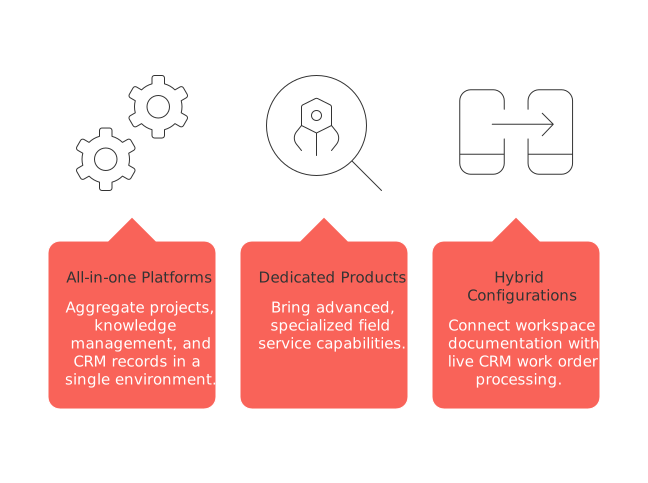
All-in-one platforms aggregate projects, knowledge management, and CRM records in a single environment.
Dedicated products like Salesforce Field Service, Dynamics 365, or ServiceNow bring advanced, specialized field service capabilities.
Hybrid configurations connect workspace documentation with live CRM work order processing.
Consider these options carefully, using comprehensive comparisons of all-in-one workspaces and specialized project tools to match your operating model and business requirements.
Field service CRM blueprint: a pragmatic implementation path
Start by clarifying business outcomes and developing sample reports to define requirements.
Agree on data object names, IDs, and mandatory fields as a shared standard.
Design object lifecycles, including clear “stop the clock” rules for SLA compliance.
Develop straightforward, auditable logic for parts and pricing management.
Run a pilot in one territory and with a focused asset class to validate assumptions.
Launch mobile tools and offline protocols, combined with targeted training for field teams.
Strengthen integrations and invoice automation before scaling the solution more broadly.
Track every schema change with a dedicated change log, and once piloted, freeze object and field names to safeguard integration stability.
Related reading that deepens your CRM data model for field service
For a detailed look at project phase management, see Mastering the Project Lifecycle, which covers dispatch, execution, and closeout strategies. Sales automation best practices are also valuable, particularly around approvals and seamless handoffs, which can help smooth transitions between quotation and work order execution.
FAQ
What is the importance of a CRM-specific data model in field service?
A CRM-specific data model for field service consolidates critical data, reducing inefficiencies caused by siloed systems. It centralizes information, improving accessibility and reliability, which directly impacts service quality and operational margins.
How does a CRM data model enhance first-time fix rates?
By integrating precise asset and location data with service workflows, a CRM data model ensures technicians have the right information before visiting a site. This preparedness reduces repeat visits, improving first-time fix rates.
What role do SLAs play in field service CRM?
SLAs establish performance expectations, and a robust CRM model supports this by maintaining clear statuses and triggers. Effective SLA management ensures service reliability and helps avoid penalties, promoting customer satisfaction.
How can mobile sync processes affect field technicians?
Mobile sync processes are crucial in poor connectivity areas, ensuring technicians have necessary records without interruptions. Inefficient syncs lead to data conflicts and delays, highlighting the need for robust conflict resolution strategies.
What are the consequences of inadequate data governance in field service CRM?
Poor data governance can lead to security breaches and operational chaos. Field service operations require strict access controls and data integrity measures to prevent unauthorized access and ensure compliance with privacy standards.
Why is it important to integrate CRM data with ERP and IoT systems?
Integrating CRM with ERP and IoT systems enhances data accuracy and service efficiency. It ensures seamless data flow and synchronization, which prevents discrepancies and enables proactive service actions, ultimately improving service delivery and business performance.

Julien Quintard
Founder & CEO at Routine02/17/2026
