How To Buid an AI Task Planner That Schedules Your Week Automatically
What an AI task planner changes for B2B teams
Backlogs grow. Deadlines do not. An AI task planner transforms this pressure into a weekly, evidence‑based plan that executives can trust. The AI task planner weighs commercial impact, risk, and capacity, providing clear reasoning for prioritization. It clarifies choices so teams understand and accept trade-offs. Additionally, the planner centralizes project work, CRM follow-ups, and knowledge-related tasks into one operational view.
“A credible plan is one where every slot has a business reason.”
Define the inputs your planner must parse and respect
Your planner needs clear, structured inputs. Start with:
Work items: title, description, effort, dependencies, and requester.
Business context: account tier, revenue at risk, SLA, and strategic theme.
People data: skills, role, location, and weekly available hours.
Policies: WIP limits, freeze periods, and regulatory constraints.
Quality gates: definition of done, review steps, and approvers.
Tag items using consistent classifications or categories. Use shared picklists for impact, risk, and skills. This approach ensures the AI remains factual and repeatable.
Use this prompt to auto-classify the backlog before scheduling. Act as a portfolio coordinator. Classify each task with impact ( High / Medium / Low ), risk ( High / Medium / Low ), and required_skills ( 3 max ). Return a table with: task_id, short_rationale ( 25 words max ), impact, risk, required_skills. Prefer customer impact and revenue risk in your rationale.
Convert business priorities into weekly allocation rules
Policies become measurable directives that your planner can apply. Translate strategy into practical rules that shape the week:
Prioritize first response tasks for your highest-tier customers, such as Gold tier, within 24 hours, according to your company's customer tier classifications.
Stop scheduling new work for team members once they reach the WIP (work-in-progress) limit.
Reserve 10% of team capacity for incidents and research spikes.
Sequence tasks by value over effort unless there is a fixed commitment.
Document the order of precedence for your rules, then make sure to reflect this order in every plan you publish.
Turn your policies into weights with this prompt. You are a PMO analyst. Convert these policies into normalized weights ( 0-1 ) for scoring: revenue_risk, customer_tier, strategic_theme_fit, regulatory_deadline, effort_penalty. Explain each weight in one sentence. Then show the final score formula.
Policy before preference. When the AI explains a slot, it cites policy, not opinion.
Build a lightweight scheduling algorithm your ops team can own
You do not need complex solvers to start, often a transparent heuristic gains better adoption among teams.
Score each task using your policy weights.
Group tasks by team and required skills.
Apply WIP limits and block tasks with conflicted dependencies.
Fill the week from highest to lowest scoring tasks, within each person's capacity.
Hold a brief review, document overrides along with their reasons, then publish the plan.
A simple, explainable approach
Apply tie-breakers in this sequence: revenue at risk, SLA, then oldest task age. Log decisions for easy auditability and transparency.
Ask your assistant to draft a first pass plan. Plan a 5-day workweek for your team. In this example, we'll use a hypothetical Team Delta. Inputs: member_capacity ( hours ), skills, and the scored backlog. Apply WIP limit ( 3 per person ). Avoid splitting tasks under 2 hours. Output a table: day, person, task_id, effort, rationale ( 20 words ). Flag any dependency conflicts.
Orchestrate data from your CRM, project tracker, and knowledge base
Your planner is only as effective as its data integration. Channel all work into a single queue:
Sync CRM requests and renewals, ensuring each task contains detailed account context.
Import items from project trackers, linking them to objectives and owners.
Extract documentation gaps and recurring questions to create maintenance tasks.
Eliminate duplicates and merge near-identical tickets across all sources.
Assign each task a unique source of truth and a stable identifier. Map accounts, epics, and objectives using consistent keys.
Speed up the data merge step. Unify tasks from CRM ( fields: account_tier, arr, renewal_date ) and project tracker ( epic, component ). Propose merge rules and a canonical schema. Return a list of suspected duplicates with confidence scores and short reasons.
Choose a platform that supports automation and explainability for AI planning
Evaluate solutions that centralize project management, knowledge, CRM context, and meeting records within a single workspace. Platforms like Routine and ClickUp can automate intake, tagging, and allocation, while maintaining a full audit trail. If you are deciding between integrated workspaces and specialized project tools, consider first to compare unified workspaces with dedicated project tools. For orchestration logic, you can also review the current best no-code AI agent options and choose an approach your team can easily maintain. For solutions on visualizing plans, see the guide “From Gantt Charts to Project Trackers: Visualization Tools for Simple Project Management.”
Establish governance so executives trust the weekly plan
Trust strengthens when the system shows the reasoning behind each decision. Incorporate governance directly into your planner:
Rationale on every slot: detail which policy and data drove the decision.
Override logging: record who made each change and the reasoning behind it.
Change control: set freeze periods and clear exception processes.
Access rules: apply least-privilege access for customer and HR information.
Attach a brief methodology note to every plan so executives see intent, trade-offs, and risks up front.
KPIs that show your planner is actually working
Track a concise set of honest metrics. Focus on trends, not one-time data points:
Throughput: completed tasks per week by team and class of work.
Plan adherence: percent of planned tasks completed as scheduled.
Carryover rate: items that roll over to the next week.
Lead time: time from request to completion, broken out by account tier.
Load balance: variance of assigned hours across individuals.
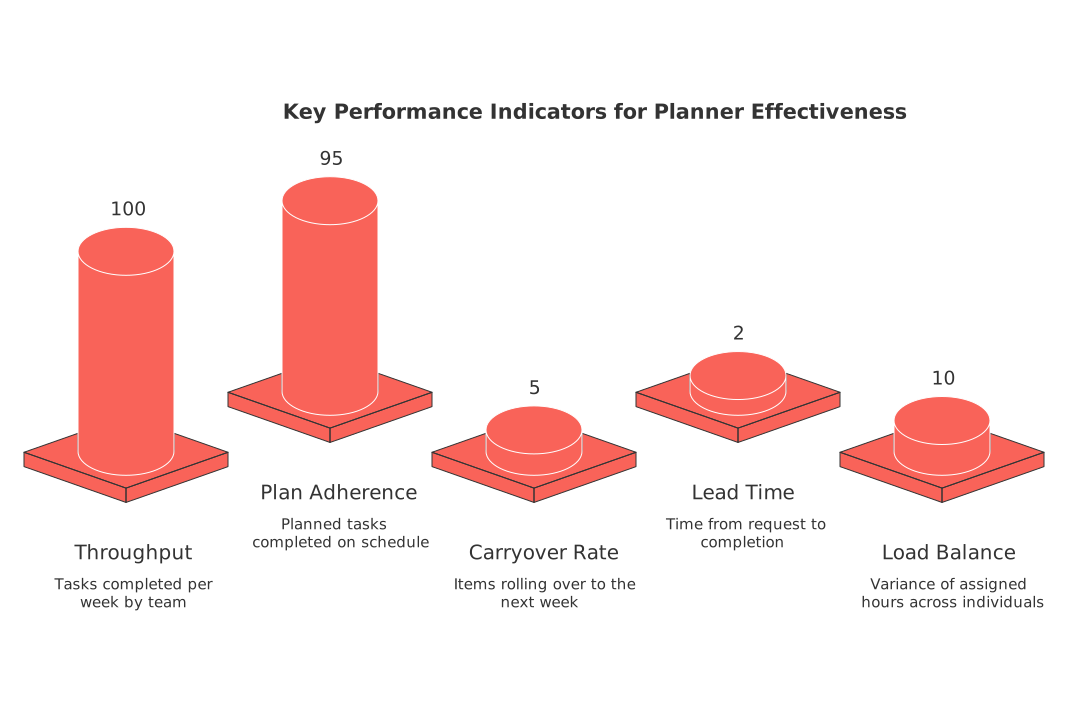
Set thresholds for each metric so you can trigger alerts. When trends deviate, your planner should recommend rule adjustments.
A repeatable weekly operating cadence your team can run
Keep your process simple and memorable, teams stick with rhythms they can easily recall:
Thursday: freeze significant changes and review backlog for accuracy.
Friday: the AI creates a draft plan for next week and highlights any risks.
Monday morning: quick team review, record any overrides, then publish the plan.
Midweek: allow only limited re-planning for incidents or fixed contractual commitments.
Friday noon: document insights or lessons learned and update policies accordingly.
Guide your review with this focused prompt. Audit the proposed weekly plan. List the top five risks, the biggest over-allocation, and any policy violations. Recommend two small rule changes that improve adherence without cutting scope.
Risks, privacy, and compliance you must address before rollout
Identify risks early and design guardrails right into your system:
Keep customer PII (personally identifiable information) separate from planning-related metadata where possible.
Retain rationale logs to meet your audit and policy requirements.
Provide easy export options for regulatory or customer data requests.
Communicate the implementation of automated decisions to affected teams.
Throttle automation activity to prevent unintended mass changes.
Case example: a cross-functional handoff without chaos
Suppose customer success flags a renewal risk. The planner checks the account tier and annual recurring revenue (ARR). It then schedules a playbook task for the customer success team, a bug fix for engineering, and a micro-demo for product marketing. Each assigned slot includes its rationale, such as revenue at risk and SLA requirements. The teams execute without a lengthy meeting, and the renewal closes successfully.
Next steps to deliver value in 14 days
Start with a single team, don’t attempt company-wide change immediately. Define your policies, connect two primary data sources, and publish a transparent plan. Track both adherence and carryover. Improve the rules iteratively, rather than the toolset itself.
Kick off your pilot with this concise request. Create a two-week implementation plan for a trial run of the AI task planner. Include milestones, owners, risks, and success metrics. Optimize for a 10-person go-to-market squad. Output a checklist with dates and one-sentence instructions per item.
FAQ
How does an AI task planner prioritize tasks?
An AI task planner prioritizes tasks by evaluating factors like commercial impact, risk, and capacity. It bases decisions on clear criteria, providing evidence-backed plans that help teams navigate trade-offs and prioritize effectively.
What inputs are essential for an AI task planner?
An AI task planner requires structured inputs such as work items, business context, people data, policies, and quality gates. Consistent classification of these inputs ensures factual and replicable task scheduling.
How can business priorities be turned into scheduling rules?
Business priorities are translated into scheduling rules by creating measurable directives that guide weekly planning, such as customer tier response times and reserving capacity for specific tasks. This ensures strategy aligns with resource allocation.
What are the risks associated with implementing an AI task planner?
Risks include potential exposure of sensitive customer information and unintended mass changes. Implementing robust privacy measures, audit logs, and change control processes are critical for safe adoption.
How does Routine provide a single operational view for B2B teams?
Routine centralizes project tasks, CRM follow-ups, and knowledge-based work into one unified platform. This integration simplifies task management and boosts transparency across teams.
What KPIs demonstrate the effectiveness of an AI task planner?
Essential KPIs include throughput, plan adherence, carryover rate, and lead time. Monitoring these metrics uncovers trends, guiding necessary adjustments for optimized task management.
Why is governance important in AI planning?
Governance ensures the AI planner provides accountability and transparency by detailing the rationale and logging overrides. This builds executive trust and mitigates the risk of arbitrary decision-making.
How can Routine assist in integrating multiple data sources?
Routine streamlines data integration by syncing CRM requests, project trackers, and identifying documentation gaps. It maintains a cohesive task management system that eliminates duplication and inefficiency.
What are the initial steps to implement an AI task planner effectively?
Start with a focused team, establish clear policies, and connect primary data sources. Gradually refine planning rules based on performance metrics, rather than immediately expanding toolsets for a broader reach.
What role do policies play in task scheduling?
Policies become actionable rules that direct task allocation, ensuring prioritization aligns with strategic business goals. Clarity in these policies prevents personal bias and promotes objective decision-making.

Julien Quintard
Founder & CEO at Routine04/06/2026
