Best TickTick Alternatives in 2026
When TickTick starts to feel too light for serious teamwork
TickTick serves as a great platform for personal tasks and simple reminders. However, as tasks grow to require project context, client history, and input from team members, working across scattered apps can bog you down. The tipping point comes when you start asking: “Where’s the task’s spec? Who owns the account? What changed after last week’s meeting?” If this describes your 2026 reality, the alternatives below are ranked by how well they upgrade simple lists into connected projects, shared knowledge, CRM, and collaboration, without burying your workflow in unnecessary complexity. For more on why this evolution is needed, read our analysis on why personal productivity apps fall short for teams and how structured data closes the gap.
Quick comparison table: best TickTick alternatives in 2026
Tool | Best for switching from TickTick when… | vs TickTick | Collaboration | Knowledge / Docs | CRM / Contacts | Setup effort | Pricing cue |
|---|---|---|---|---|---|---|---|
Routine | You need tasks linked to projects, docs, CRM, and meetings, all in one hub | Fully integrated workspace; less stitching apps | Team-centric | Integrated knowledge base | Native CRM features | Low–medium | Free + paid tiers |
Notion | Your workflow starts with documents and builds databases around them | Flexible, database-backed pages | Strong with structure | Excellent | Basic via templates | Medium (design required) | Per user |
ClickUp | You need layered process, automation, and permissions | Depth in workflow and settings | Advanced | Docs included | Light CRM patterns | Medium–high | Per user |
Asana | You want built-in project structure and built-in accountability | Clear task ownership, timelines | Robust | Light docs | Via integrations | Low–medium | Per user |
monday.com | Your client work and workflows span teams and need visibility | Visual boards for pipelines | Strong | Basic docs | Full-featured CRM | Medium | Per user |
Todoist | You want a speedier, more streamlined task list | Labels, filters, quick navigation | Limited | None/native | None/native | Low | Free + paid |
Trello | Your thinking is visual and stages-based | Clear, visual Kanban flow | Solid | Limited | Add-ons required | Low | Free + paid |
Microsoft To Do | Your task-tracking revolves around Outlook/Microsoft 365 | Tight Microsoft integration | Personal; team via Planner | External docs (OneDrive/SharePoint) | External (Excel/Dynamics) | Low | Included with M365 |
Things 3 | You’re Apple-focused and want effortless task management | Refined, distraction-free experience | Solo only | None/native | None/native | Low | One-time license |
Routine: when tasks need project, knowledge, and client context
Most teams grow beyond TickTick when tasks are more than simple reminders, when they contain specs, client threads, and meeting notes scattered across different tools. Routine merges project management, knowledge resources, CRM, and meeting management. This lets each task point directly to connected docs, the right client, and every milestone, so you’re never toggling between tabs to gather context.
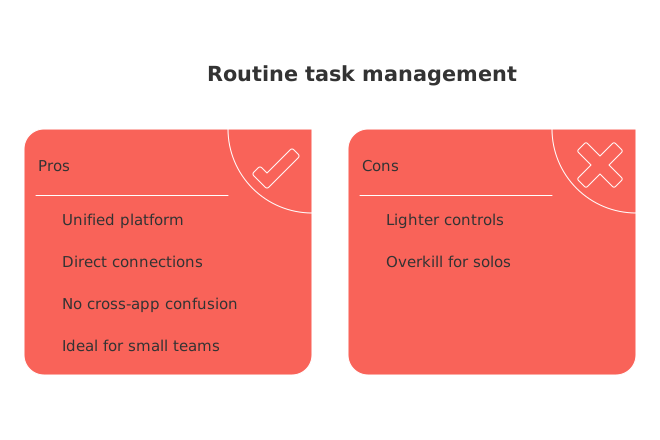
Best for: Small to midsize teams (or solos with clients) needing unified project, documentation, and client tracking.
Key benefit: Automatically links documents, contacts, and meetings to projects with no cross-app confusion.
Stands out for: Direct connections between project tasks, knowledge, contacts, and meetings without “duct tape” integrations.
Trade-off: Lighter on complex project controls than heavyweight PM tools; too much for users needing only personal lists.
Who should use it: Teams tired of combining a task tool, wiki, and CRM separately.
When to switch: “You’ll know you need Routine when tasks shift from reminders to mini-projects, full of client follow-ups and knowledge dependencies.” Not sure about all-in-one vs separate tools? See our comparison of all-in-one workspaces vs dedicated project tools.
Tip: Notion suits teams who live in structured documents, and ClickUp is better if process automation and permission controls matter most.
Notion: for teams that put documents first
If your workflow starts with a spec or a wiki, Notion is a leading upgrade from TickTick. Create detailed pages for every decision and embed tasks as structured databases. It’s the natural fit for teams that need to build process and context around each task, step by step.
Best for: Documentation-heavy teams, content agencies, organizations that write before they assign.
Strength: Blend of flexible documents and powerful database views; an unmatched team wiki.
Trade-off: Requires disciplined template creation and team conventions; CRM features are less robust unless built out.
Who should use it: Teams willing to invest in shaping their own productivity system rather than adopting a fixed workflow.
When to switch:“Choose Notion when task context and details are found in the doc more often than on the task list.” If you want instant structure without design effort, Routine or Asana suit you better.
ClickUp: for teams that run on process and automation
ClickUp’s strength is consistency, applying the same workflow templates, rules, and permissions across all teams. Compared to TickTick, you gain advanced hierarchies, automation, and granular control, making it ideal for teams that need structure to ensure quality execution.
Best for: Operations, cross-functional delivery teams, PMOs needing standardization.
Standout features: Detailed task configuration, built-in docs, customizable workflows.
Trade-off: Set up can be complex; can overwhelm casual or new contributors.
Who should use it: Teams prioritizing process adherence and detailed reporting.
When to switch:“Switch to ClickUp when your biggest problem is keeping everyone on the same process, not just tracking tasks.” Routine provides more context with less setup; Asana is quicker for simple structures.
Asana: for teams seeking clarity and accountability from the start
Asana moves you from TickTick to dedicated project and team management, emphasizing ownership and due dates. Its built-in workflows help even large teams plan, execute, and deliver without forcing custom design from day one.
Best for: Cross-team projects where clear ownership and schedules are a must.
Strength: Fast, predictable onboarding and project rollout.
Trade-off: Limited documentation; CRM requires external integrations.
Who should use it: Teams looking for reliability and accountability rather than custom tooling.
Consider: Choose Routine or Notion if deep documentation and project context matter for each task. If automation and workflows are non-negotiable, ClickUp or monday.com can add more control.
monday.com: for visual pipelines and client work across teams
monday.com helps teams visualize client pipelines, project statuses, and task progress with adjustable boards. It’s an easy way to bridge personal task lists and full team project management, and it provides a specialized CRM for sales-driven teams.
Best for: Client-facing teams, internal ops, and groups that move work through clear pipeline stages.
Strength: Customizable dashboards, visual boards, CRM options.
Trade-off: Documentation features are basic; more flexibility often requires purposeful admin setup.
Who should use it: Organizations that need clear overviews of projects and client work.
When to switch: If your work needs richer knowledge connections or meeting context, Routine or Notion fit better. For stricter workflow automation, ClickUp is the better choice.
Todoist: for individuals needing speed, filters, and a refined list manager
Todoist echoes TickTick’s simplicity while delivering increased speed and advanced views via custom filters and labels. For solo productivity, it’s hard to beat for pure task handling.
Best for: Individuals who don’t need built-in docs or CRM; freelancers; personal organization.
Strength: Fast navigation, natural language input, custom views.
Trade-off: Limited collaborative features; depends on external docs for additional context.
Who should use it: Personal users who value an efficient, uncluttered task experience.
When to choose another: For client context, try Routine; for document-first planning, try Notion; or Asana for multi-person scheduling.
Trello: for those who prefer visual boards and simplicity
When linear lists aren’t enough, Trello brings the Kanban style, with visual clarity at a glance. Move cards across columns, track checklists, and collaborate easily on small team projects or content workflows.
Best for: Visual project planning, marketing calendars, light team work.
Strength: Rapid learning curve; instant workflow visualization.
Trade-off: Advanced reporting or CRM require third-party integrations (power-ups).
Who should use it: Teams starting out with structured project management.
When needs grow: For linked documentation, Routine or Notion reduce the need for add-ons. For process depth, ClickUp or Asana add scalability.
Microsoft To Do: for those working within the Microsoft ecosystem
If your daily workflow anchors around Outlook and Microsoft 365, To Do slots in with zero friction. It’s ideal for basic personal task capture and can be paired with apps like Planner/Loop for light team tasks.
Best for: Microsoft-based personal task management.
Strength: Direct connection to Outlook, Teams, email, and calendar.
Trade-off: Team workflows, documentation, and CRM must be managed in other Microsoft tools.
Who should use it: Individuals wanting lists within their existing Microsoft workspace.
For more collaboration or visibility: Try Asana or monday.com; if you want knowledge, contacts, and meeting notes linked to tasks, opt for Routine.
Things 3: for Apple users prioritizing individual flow
Things 3 turns personal task management into a distraction-free, elegant experience. It’s more guided and polished than TickTick, but strictly solo, with no real collaboration or advanced context.
Best for: Apple-centric individuals who want a seamless, personal planning tool.
Strength: Beautifully designed, focused, and smooth.
Trade-off: No team features or web app; minimal knowledge or context features.
Who should use it: Users wanting a private, uninterrupted system for their own to-dos.
When needs expand: For client or team needs, consider Routine as your hub or Notion if documentation is your starting point.
Decision framework: choose the tool that fits your workflow
Workflow stage Pure lists, low context: Todoist, Things 3, Microsoft To Do.
Document-first teams: Notion.
Unified context (project/tasks + docs + CRM): Routine.
Process-reliant teams and reporting: ClickUp, monday.com; Asana for plug-and-play structure.
Conclusion: prioritize reducing friction over feature-chasing
Moving beyond TickTick isn’t just about new features, it’s about making work, knowledge, and collaboration accessible in one place. If you want tasks with built-in context, docs, contacts, and milestones together, Routine is your solution. If your workflow is document-driven, Notion has you covered. For teams that need process discipline, ClickUp and monday.com are built for scale, while Asana makes team onboarding seamless. Solo users focused on simplicity and speed will thrive with Todoist or Things 3. Choose the tool that shortens the path from “What’s this task about?” to “What’s next?”, because wasted time hunting for answers is the real cost you want to eliminate.
FAQ
Why should I move beyond a simple to-do list app like TickTick?
A basic to-do list often fails to capture the complexities of tasks that require collaboration, context, or integration with other systems. As your tasks become more intricate, you need a solution that offers more than just checkbox functions—even if it means reevaluating your current tool stack.
What are the key considerations when choosing a TickTick alternative?
Focus on how a tool supports project views, knowledge documentation, CRM capabilities, and automation features. Beware of platforms with hidden costs or complex integrations that could disrupt your workflow.
How can Routine benefit my team compared to a simple task app?
Routine centralizes project management, knowledge wikis, and CRM functions, offering richer context for tasks and decisions. This integration reduces tool switching and enhances collaboration, but requires adjusting to a more comprehensive interface.
Is migrating from TickTick to another platform complicated?
Migration involves careful planning to maintain task context and data integrity. Without a strategic approach, including audits and template preparation, you risk a chaotic transition that can disrupt productivity.
Why consider a CRM-friendly task management tool?
Many teams don’t need a complex CRM system but benefit from integrated capabilities to track leads and manage client interactions. When overlooked, fragmented data can result in missed opportunities and inefficient client management.
What drawbacks might come with a tool like Routine?
While Routine offers a unified workspace for various functions, adopting it requires overcoming a steeper learning curve and ensuring it fits your existing workflows. Failing to adapt could lead to underutilizing critical features.
How can visual planning tools complement my task management?
Visual tools offer clear insights into task progress and team workload, but implementing them demands an initial investment in learning and framework setup. Without proper acclimation, their potential might remain untapped.
When should I switch from personal productivity apps to team-centered tools?
If tasks increasingly involve shared responsibilities and require structured data management, sticking to personal apps can hinder team efficiency and task-handling precision. A timely switch prevents operational bottlenecks and role ambiguity.
Can individuals still benefit from platforms like ClickUp or Routine?
While primarily tailored for teams, these platforms offer multifunctional efficiencies that individuals can leverage for holistic task and knowledge management. However, users should assess the learning curve and feature relevance to personal workflows.
What should I prioritize when choosing a task management tool in 2026?
Focus on finding a tool that adapts to how you naturally organize and execute tasks. Over-complicating your workflow to fit an app is a recipe for inefficiency. Your chosen tool should complement, not dictate, your work style.
Is Todoist a good alternative for project management?
While Todoist excels in creating structured and organized lists, it falls short for complex project management due to its minimal project wiki feature. It's best used for individual task tracking rather than intricate team projects.
Why might Notion be a better choice for managing tasks and information together?
Notion allows you to combine task management with rich documentation, making it ideal for those requiring both features in tandem. Its comprehensive approach ensures everything from projects to documents is interconnected, avoiding the scatter of crucial information across apps.
How does Microsoft To Do integrate within its ecosystem?
Microsoft To Do seamlessly integrates within Microsoft's suite, providing an efficient way to handle tasks without additional clutter. However, it's not tailored for complex project management, making it best suited for simple tasks and quick reminders.
Are tools like Routine and Coda suitable for handling client relationships?
Yes, Routine and Coda combine task management with lightweight CRM capabilities, catering to freelancers and small businesses. They allow for efficient tracking of client interactions and deliverables, crucial for maintaining client relationships and project clarity.
What should I consider regarding privacy and data portability?
Ensure that your chosen tool offers straightforward data export options to prevent being locked into a single platform. Evaluate where and how your data is stored, and consider the implications of insufficient privacy measures on your business.
Why might Trello or Asana be better for visualizing projects?
Trello and Asana provide visual workflows that make it easy to track progress at a glance, offering both simplicity and structure. However, be cautious of oversimplifying complex projects, as visual boards can obscure underlying task dependencies.
Is ClickUp too feature-heavy for individual users?
ClickUp offers an impressive array of features, but its complexity can be overwhelming if not actively managed. For individuals, disabling unnecessary elements is key to maintaining a streamlined and focused workspace.
Why should I consider switching from TickTick to another tool?
When task demands expand beyond simple reminders into complex projects, TickTick may fall short. Integration with documents, contacts, and team collaboration features is crucial for more advanced needs.
Is Routine suitable for small teams?
Routine is ideal for small to midsize teams as it offers a unified platform for project management, knowledge bases, and CRM. It eliminates the headaches of managing tasks across multiple apps.
How does Notion compare to Routine for team collaboration?
Notion excels in structured documentation and flexible database creation. However, Routine offers more integrated project, client, and task context, making it better for teams needing an all-in-one hub.
What makes ClickUp a good choice for process and automation?
ClickUp offers advanced task configurations and automation capabilities that streamline workflows. Its setup can be intricate, demanding, and potentially overwhelming, especially for newcomers.
Can Trello handle detailed project management?
Trello is effective for visual task management but may require third-party integrations for comprehensive features like CRM or advanced reporting, which can complicate your workflow.
Is Todoist better than TickTick for personal task management?
For personal use, Todoist offers a more streamlined, speedy interface with advanced custom filters, making it a robust choice for individuals not needing deep collaboration or documentation features.
What are the limitations of using Things 3 for task management?
Things 3 offers an elegant, focused task management experience but lacks features for team collaboration and project context integration. It's strictly for solo use within the Apple ecosystem.
Does monday.com provide a good CRM solution?
monday.com features a full-featured CRM module, ideal for sales-driven teams needing visual pipelines. However, it may require additional setup effort to adapt to specific organizational needs.
What's the advantage of using Routine over separate tools?
Routine reduces the need for disparate apps by integrating projects, knowledge, and client context in one platform, enhancing workflow efficiency without extensive tool-switching.

Julien Quintard
Founder & CEO at Routine04/14/2026
