Top Alternatives to Evernote (2026)
Evaluation criteria for Evernote alternatives that serve business teams
Structured content: databases, typed fields, relationships, and rollups connecting projects, accounts, and meetings.
Governance: page-level permissions, audit trails, SSO, and role templates for efficient user management.
Security: SOC 2 compliance, encryption at rest and in transit, data residency, and retention policies.
Workflow: reviews, status fields, SLAs, and automation triggers managed by objects, not just free text.
CRM alignment: bi-directional links to accounts, opportunities, and support tickets.
Project fit: tasks, roadmaps, dependencies, and reporting to inform delivery goals and timelines.
Search: semantic search, filters, and scoped permissions for consistent and reliable discovery.
APIs: stable APIs, webhooks, and admin endpoints to manage the platform’s lifecycle.
Migration: bulk import, mapping tools, and field-level transformations compatible with ENEX exports.
All-in-one workspaces that can replace Evernote for teams
Notion
Notion combines documents and databases in a unified environment.
Best for: adaptable knowledge, lightweight projects, and shared playbooks.
Consideration: set clear property standards to avoid inconsistent data across workspaces.
Coda
Coda lets users build docs as apps, featuring packs and advanced formulas.
Best for: operational runbooks and data-rich documents with embedded logic.
Consideration: governance requires clear workspace boundaries and standardized templates.
ClickUp Docs
ClickUp pairs documentation directly with tasks, goals, and dashboards for streamlined workflow.
Best for: delivery-focused teams working within a comprehensive project management suite.
Consideration: verify document permission inheritance when handling sensitive content.
Routine
Routine brings together projects, knowledge, CRM context, and meetings in one centralized platform.
Best for: organizations wanting a unified system that seamlessly links work streams and account information.
Consideration: compare the flexibility to alternatives like Notion or Coda based on your team’s needs.
Knowledge base platforms built for scale and compliance
Confluence: offers structured spaces, hierarchical pages, macros, and deep admin controls.
Slab: prioritizes a clean writing experience with robust search and topic organization.
Guru: enables verification workflows and provides browser extensions for timely answers.
Document360: includes versioning, content workflows, and public help center capabilities.
GitBook: developer-oriented documentation with collections and integrations.
These tools are suitable for regulated teams requiring strong audit trails and controlled publishing.
CRM-connected documentation for revenue teams that outgrow Evernote
Salesforce Knowledge: links articles to cases and service entitlements within Salesforce.
HubSpot Knowledge Base: provides search, permissions, and analytics within HubSpot Service Hub.
Zoho Desk Knowledge Base: delivers portals and categories with direct ticket linkage.
Sales and customer success teams gain critical context at the account level instead of isolated silos.
Project management suites with structured docs for cross-functional delivery
Asana Docs connects documentation to tasks, goals, and portfolios.
Monday WorkDocs enables collaborative specifications and integrates with boards.
Linear Docs combine seamlessly with issues and product roadmaps.
Basecamp centralizes project communications alongside related documents.
Pick these solutions when documentation must be dynamically aligned with project delivery data and milestones.
How to shortlist an Evernote alternative using a business-grade checklist
Identify essential business objects such as projects, accounts, incidents, and decisions.
Define fields and relationships for each object based on business needs.
Map existing repositories and assign owners for each team.
Evaluate vendors against governance, search effectiveness, and API stability.
Test the platform with a real-life initiative or release, not just a demo environment.
Conduct security and legal reviews concurrently.
Design required reports before platform rollout.
Test platform choices by using them in actual workflows, rather than relying on artificial scenarios.
Migration plan from Evernote to a business platform
Export notebooks into ENEX format, preserving tags wherever feasible.
Review and standardize titles, adding missing ownership metadata in a staging document.
Map tags to structured fields and establish clear relationships between records.
Perform a bulk import, then relink all relevant tasks, accounts, and projects.
Archive initial imports and activate only curated, validated records.
Train reviewers on publishing, versioning, and retention policies to ensure consistency.
Tip: To prevent discrepancies or divergence from the new system, consider freezing legacy notebooks after the new system is implemented.
Comparing when an all-in-one workspace or separate tools is better for replacing Evernote
Platform consolidation offers benefits when teams need to manage projects, knowledge, and CRM context together. Using a single schema can help reduce duplication and prevent mismatched data fields. However, in certain contexts, dedicated tools may provide a better strategic fit. For more, review this detailed comparison of all‑in‑one workspaces versus dedicated project management tools to assess the trade-offs important to your business.
Why some personal apps may struggle to scale at team level and possible alternatives
Many personal productivity tools lack shared structures, comprehensive access policies, and lifecycle management rules. These gaps can hinder reporting and governance at the organizational level. However, some personal apps offer team-focused features that may overcome these limitations. It’s important to assess whether a tool truly meets your team's needs. Consider why personal productivity apps sometimes fail teams and how structured data solutions can help before deciding on a platform.
Quick reference guide for CXOs comparing Evernote alternatives
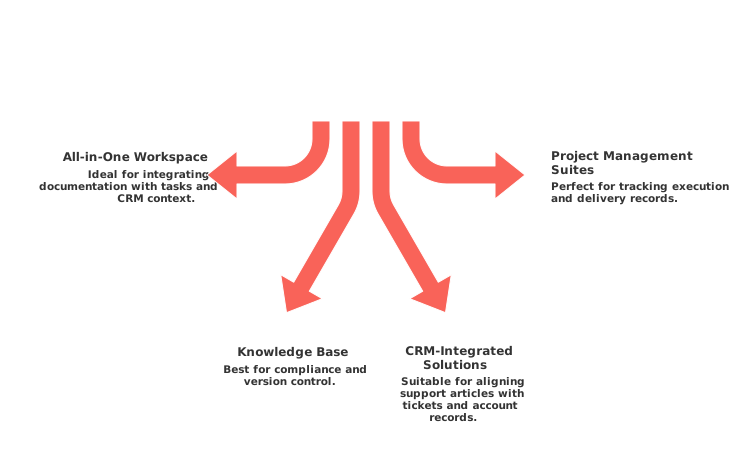
Choose an all-in-one workspace if your documentation must drive tasks and CRM context.
Choose a knowledge base for maximum compliance and version control.
Choose CRM‑integrated solutions if support articles must reside alongside tickets and account records.
Choose project management suites when execution and delivery records must be the proof points for documentation status.
Document your selection, appoint an accountable owner, and define measurable targets. Revisit your choice and outcomes after one quarter to ensure alignment with business objectives.
FAQ
Why should Evernote replacements handle structured knowledge and not just text?
Handling structured knowledge enables teams to link information effectively, ensuring decisions and projects are accurately tracked. Traditional text solutions often fail to manage the complexity and accountability that structured content supports.
What are the risks of using personal productivity apps at a team level?
Personal apps often lack the necessary governance and access controls, leading to data silos and compliance issues. They may fail to provide the collaborative framework required for team coordination and accountability.
How does Routine enhance the management of projects and knowledge?
Routine offers a centralized platform that efficiently ties together projects, knowledge, CRM, and meetings. Its structure prevents data misalignment and ensures seamless integration across workflows.
What should be prioritized when migrating from Evernote to a more robust platform?
Focusing on data structure standardization and clear metadata ownership is crucial to avoid data loss. Performing test imports and training reviewers is essential for maintaining consistency and ensuring a smooth transition.
Why integrate project management suites with structured documents?
Integrating these suites facilitates dynamic alignment between project data and documentation, eliminating inconsistencies and ensuring that documentation evolves with project milestones.
What factors should teams consider when selecting an Evernote alternative?
Prioritize structured content capabilities, governance, and alignment with your CRM. Testing vendors with real-life scenarios rather than demos can reveal their practical strengths and weaknesses.
When should a business opt for all-in-one workspaces instead of separate tools?
Opt for all-in-one solutions when managing interconnected workflows, projects, and CRM context is necessary. Separate tools might introduce complications and inefficiencies when cross-functional integration is needed.
How do CRM-connected documentation systems benefit sales teams?
They provide contextual knowledge directly tied to accounts and cases, facilitating informed decision-making and seamless customer interactions. Isolated systems can lead to fragmented insights and delayed responses.

Julien Quintard
Founder & CEO at Routine12/31/2025
