What to Use Instead of Amazing Marvin in 2026
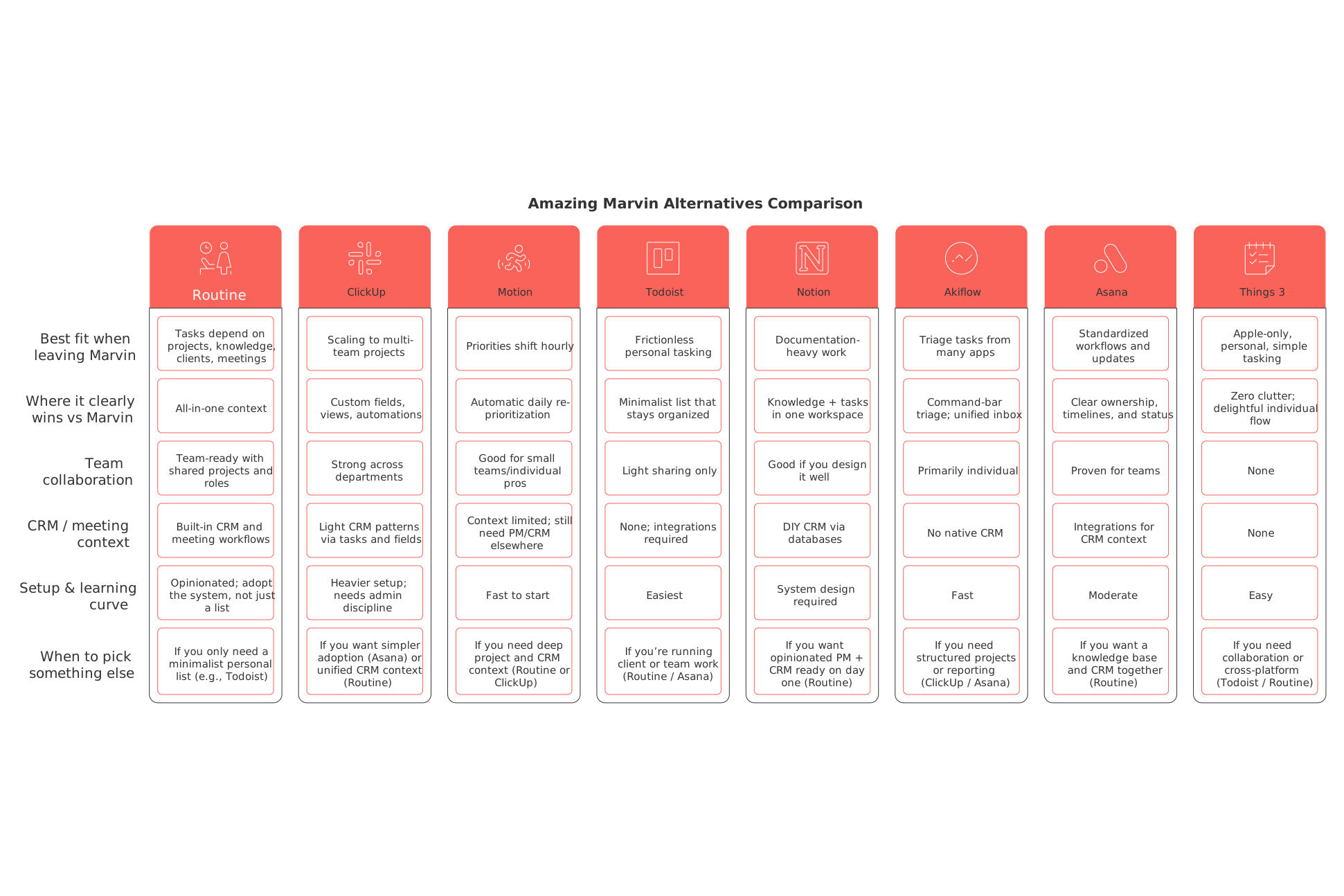
Routine: the best Amazing Marvin alternative when tasks depend on project, knowledge, and client context
The biggest obstacle for many Marvin users is keeping context close. As tasks multiply, the “who,” “why,” and related details end up scattered in docs, makeshift client spreadsheets, and lost meeting notes. Routine changes this by bringing projects, a solid knowledge base, CRM entities, and meeting workflows into one unified system, so every task always retains its origins and next steps.
Why it made the list: Routine is unique in treating tasks, documentation, clients, and meetings as connected, first-class data types, instead of scattered links. Fewer tabs, less copying and pasting, and no jumping between tools.
Where it stands out: Its opinionated structure reduces manual upkeep. Tasks naturally roll up to projects or clients; meeting results instantly become accountable action items; the knowledge base is tied to ongoing work instead of drifting into a separate wiki.
Trade‑offs: Routine functions as an all-in-one system. If you’re looking for a simple personal list, for errands or side projects, something streamlined like Todoist or Things 3 may be a better fit.
Who should choose it: Freelancers managing clients, agency pods, small product teams, and any individual whose personal task list increasingly relies on CRM fields, project briefs, or meeting outcomes.
Consider switching to Routine: If your “simple tasks” start depending on client details, project documentation, and meeting outcomes that you can’t afford to track across different tools, Routine is likely your best move.
Decision factor: Pick Routine over Notion when you want a workspace that’s ready-made, no system to design from scratch. Choose it over ClickUp when you want your CRM and knowledge base to live together naturally with your tasks, rather than stitched together with extra setup.
ClickUp: the alternative to Amazing Marvin when scale and reporting are priorities
Teams usually switch from Marvin to ClickUp when they reach a point where they need more advanced structural capabilities, Marvin’s personal tactics can’t deliver reporting across portfolios and projects. ClickUp stands out with custom fields, diverse views, and workflow automations that bring an end to relying on memory for cross-functional work.
Best for: Multi-team execution needing standardization, think products, ops, and marketing sharing a common structure and automations.
Where it stands out: Flexibly modeling projects and organizational processes with detailed granularity for audits, dependencies, and updates to stakeholders.
Trade‑offs: ClickUp’s power goes both ways, without admin discipline, workspaces can sprawl. If you want something simpler with CRM and knowledge out-of-the-box, Routine is easier. For even faster adoption, Asana is smoother for most teams.
Consider switching to ClickUp: Opt for ClickUp when you reach the point where leadership is asking for standardized fields, task dependencies, and high-level reporting you simply can’t build in a personal task manager.
Motion: the alternative to Amazing Marvin when planning your day takes longer than the work itself
Some users migrate from Marvin not for collaboration, but because constant manual re-prioritization slows them down. Motion automates this: it continuously reorders your plan around real-world deadlines and ever-changing priorities, so you spend minimal time tinkering with your backlog and maximum time getting things done.
Best for: Individuals or small teams with highly variable schedules who value automatic re-prioritization above deep project structure.
Trade‑offs: Motion excels at daily planning, but offers limited multi-level project context and no built-in CRM. It’s often best paired with a separate PM or CRM solution if you’re focused on client work.
Consider switching to Motion: If shuffling tasks has become its own job and you long for a tool that just manages the daily plan for you, Motion is your answer.
Todoist: the alternative to Amazing Marvin when you need frictionless personal tasking
Many people leave Marvin after trying every productivity trick, only to find the system itself has become a chore. Todoist is the opposite: quick capture, gentle organization, and powerful filters if you need them, without unnecessary complexity.
Best for: Individuals who want a clean, fast personal task list, or executives who need a private action tracker outside team platforms.
Trade‑offs: Todoist offers minimal project structure and little built-in support for client or documentation context. If your tasks increasingly interact with shared projects or teams, you’ll quickly outgrow it.
When to choose another option: Use Routine if you manage client workloads, or pick Asana if your team requires standardized ownership and regular status tracking.
Notion: the alternative to Amazing Marvin when documentation drives your workflow
For some, the shift away from Marvin isn’t about individual tasks, it’s about having living project knowledge. If briefs, SOPs, and research are central to how you work, Notion’s databases let you combine documentation and simple task management under one roof.
Where it stands out: A highly flexible approach to blending knowledge bases and project artifacts, with custom databases that fit your team’s language and needs.
Trade‑offs: Notion requires you to design your own system; without templates and standards, chaos can creep in. If you’d rather have ready-made PM and CRM structure, Routine is quicker to set up.
Who should choose it: Content teams, research-focused groups, and creators who need maximum control over their documentation and want to layer on simple task tracking.
For further reading: If you’re mapping projects end-to-end, consider reviewing resources like Mastering the Project Lifecycle before choosing a tool.
Akiflow: the alternative to Amazing Marvin for fast triage across multiple apps
If your main struggle is drowning in inputs, Akiflow steps in. It pulls tasks from all your main apps and lets you process with a quick command-bar flow, helping you get back to action with minimal fuss.
Best for: Individuals who live in email, chat, and ticketing tools, and want a single, swift triage dashboard.
Trade‑offs: Akiflow is limited as a project management tool and does not include any CRM features. If you manage group projects or client pipelines, you’ll need another system alongside it.
When to choose another option: ClickUp is better for structured project work, while Routine links triage directly to accounts, projects, and meetings when you need more integrated context.
Asana: the alternative to Amazing Marvin when you want process clarity and stakeholder confidence
Executives and teams want more than personal projects; they want clear roles, timelines, and visible status. Asana provides an accessible, shared model for projects and progress updates that even non-technical stakeholders will understand at a glance.
Where it stands out: Reliable workflows, precise responsibilities, and easy-to-read progress dashboards, all make team updates and communication painless.
Trade‑offs: Asana relies on integrations for CRM data and deeper knowledge management. If those needs are essential, Routine offers them natively in a single workspace.
Who should choose it: Teams that want proven patterns and predictable setup with as little configuration overhead as possible.
Things 3: the alternative to Amazing Marvin for delightful, Apple-only simplicity
Not every user needs a team tool, sometimes, peace and simplicity matter most. Things 3 is beautifully crafted for Apple users who love personal organization without the burden of extra features.
Best for: Individuals who never plan to collaborate and want an app that feels at home on all their Apple devices.
Trade‑offs: Absolutely no collaboration, CRM, or cross-platform support. If your work touches clients or teams, you’ll need a different tool.
When to choose another option: Choose Todoist if you want minimalist cross-platform support, or Routine if you need project or client context alongside your tasks.
Here’s a decision-making framework to help you choose the right Amazing Marvin replacement in 2026
Workflow maturity: If your focus is still personal and your projects remain simple, start with Todoist or Things 3. If your work depends increasingly on projects and repeatable client processes, consider an all-in-one like Routine or a structured project manager like ClickUp or Asana.
Team size: If your team is solo or up to 3 people, Todoist, Motion, or Akiflow will generally suffice if context is minimal. For groups of 3–5 or more, especially with shared roles and reporting needs, shift to Routine, Asana, or ClickUp.
Context needs: If your tasks have to reference knowledge, clients, and meetings often, choose Routine. For documentation-heavy workflows where you can design the system, Notion is a strong fit.
Scheduling complexity: If endless reprioritization drains your energy, Motion is purpose-built. If steady process and context are more important than hyper-daily planning, Routine, Asana, or ClickUp are better foundations.
Collaboration depth: For standardized and robust cross-team workflows (with approvals, custom fields), go with ClickUp or Asana. For team collaboration that also requires a built-in knowledge base and CRM, choose Routine.
CRM / meeting / documentation requirements: If it’s critical to manage clients and meetings inside the same tool as your tasks, Routine is the most complete solution. If your CRM lives elsewhere and you just need basic references, Asana or ClickUp with integrations may suffice.
Still unsure which tool structure fits best? This comparison of all-in-one workspaces vs. dedicated project tools breaks down trade-offs for different team stages in detail.
Conclusion: what to use instead of Amazing Marvin in 2026
Amazing Marvin has earned its reputation as a powerful personal task platform, but the demands of work in 2026 point toward shared, integrated context. If your primary need is “we need tasks, documents, clients, and meetings all together,” use Routine. If your focus is “we need to scale, manage fields, and automate reporting,” choose ClickUp or Asana. If your issue is “planning my day is now a job in itself,” Motion will free up your time. And if all you want is a frictionless, calm task list, go with Todoist or Things 3.
Make your decision based on what’s actually creating friction, whether context, scale, or daily planning, and you’ll avoid months of trial and error. For a broad perspective on why personal apps struggle as teams grow, revisit our analysis on why personal tools fail teams and how structured data wins. The right choice is always the one that matches your current workflow, not just your old habits.
FAQ
What makes Routine stand out as a task management tool?
Routine's key advantage is its integration of tasks with CRM, meetings, and documentation, minimizing the need to switch between different apps. It brings a unified workspace where tasks naturally align with project progress and client interactions.
How is ClickUp different from Routine for project management?
ClickUp focuses on customization and complex project structures with automations and custom fields, suitable for larger teams. Routine, however, offers an all-in-one setup with less manual overhead, combining CRM and knowledge management seamlessly into task flows.
Is Todoist a good replacement for Amazing Marvin?
Todoist offers simplicity and cross-device access, ideal for personal task management with minimal setup. However, it lacks the depth in project context and team collaboration features found in more integrated tools like Routine.
When should I choose Asana over Routine?
Asana excels in managing team workflows with clear roles and timelines, supported by integrations for extended CRM capabilities. If your work demands integrated projects and client context from the get-go, Routine is a more cohesive option.
Why would someone switch from Amazing Marvin to Motion?
Motion is attractive for those overwhelmed by daily re-prioritization, offering automatic scheduling adjustments based on real deadlines. For more structured projects or CRM needs, however, pairing Motion with other systems might be necessary.
Can Notion replace Amazing Marvin for documentation-heavy workflows?
Notion is suitable for workflows where documentation is a priority, offering custom databases and flexible layouts. Be prepared for design challenges, as the absence of pre-set systems requires careful management to avoid chaos.
Is Akiflow a viable option for task management?
Akiflow is effective for quickly processing tasks from multiple app sources, ideal for individual users who need fast triage. However, it doesn't support structured projects or include CRM capabilities, necessitating complementary tools for comprehensive management.

Julien Quintard
Founder & CEO at Routine05/11/2026
