Top 5 Project Management Tools for 2026
Selection criteria executives should use to evaluate project management tools in 2026
Evaluate platforms with a comprehensive, cross-functional lens, aiming for centralization while maintaining appropriate levels of control.
Data governance: SSO, SCIM, audit logs, and regional data hosting.
Cross-project visibility: portfolios, dependencies, and resource views that span multiple teams.
Structured knowledge: the ability to link documents and decisions to work items and CRM records.
Automation depth: robust automation across tasks, deals, and assets with safe error handling.
Reporting: dashboards suitable for finance, burndown charts, cycle time, and workload views.
Integration fabric: native connectors, webhooks, and open APIs for extensibility.
Migration path: seamless importing from spreadsheets and legacy tools, with precise field mapping.
Change management: sophisticated roles, permissions, and workspace templates for scaling up.
Total cost: consider per-seat pricing as well as administrative time and add-on modules.
If you are still deciding on a platform strategy, consider reviewing this analysis of all-in-one workspaces versus dedicated project tools before shortlisting the vendors.
Routine: unified project management, CRM, and knowledge base for centralized operations
Routine unifies projects, a lightweight CRM, and a robust knowledge base within a single solution. Each item cross-references the others, so deals, documentation, and tasks remain interconnected.
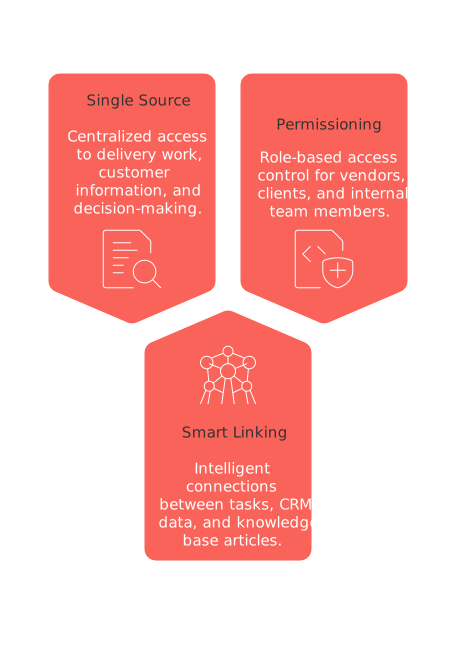
A single source for delivery work, customer context, and shared decisions.
Smart linking among tasks, CRM records, and knowledge pages.
Permissioning supports boundaries for vendors, clients, and internal teams.
Consider alongside: Notion or Smartsheet if alternative data models or pricing arrangements are preferred.
Asana: project planning and portfolio management for cross-functional enterprises
Core strengths
Clear work hierarchies across tasks, projects, and portfolios.
Robust automations for approvals and handoffs.
Strong timeline, workload, and goal tracking for executive visibility.
Considerations
Advanced features for Asana require higher-tier plans.
Complex permission schemes need careful setup.
Best for: organizations that require portfolio oversight and consistent execution rhythms.
Monday.com: configurable work management for operations-heavy teams
Monday.com excels at offering configurable boards and the ability to rapidly design processes. Operations teams can map workflows quickly without complex scripting.
Variety of column types for status, owners, and numeric data.
Automations streamline repetitive updates and notifications.
Dashboards surface throughput and potential bottlenecks for routine reviews.
Watch out for: board sprawl. Set up naming conventions and lifecycle policies from the outset.
Jira Software: agile and issue tracking for engineering at scale
Jira remains a cornerstone for software delivery across many organizations, supporting Scrum, Kanban, and DevOps workflows.
Custom issue types, workflows, and fields provide granular control.
Roadmaps bring together epics, dependencies, and release plans.
Marketplace apps extend capabilities for testing, compliance, and release gates.
Map your governance first, then let the tool mirror it, not define it.
Use when: engineering teams drive programs and deep traceability is needed between code and project work.
ClickUp: flexible workspace for teams that value customization and tool configuration
ClickUp delivers broad flexibility within a unified interface. Teams can bring together tasks, documentation, dashboards, and automations with minimal setup effort.
Multiple views per workspace, including timelines and workload charts.
Automations link status changes with notifications and assignments.
Templates help standardize repeatable projects across teams.
Note: Align your ClickUp spaces and folders to your organization’s structure to ensure clear and intuitive navigation.
Visualizing work in 2026: Gantt charts, timelines, and trackers tailored for executive oversight
Clarity comes from choosing the right view for each audience and meeting. Use timelines to align milestones, boards to manage flow, and workload reports for resource planning.
For a comprehensive walkthrough, consult this guide to modern Gantt and project visualization tools.
When each 2026 project management tool fits best
Asana: ideal for portfolio reviews, cross-department initiatives, and OKR alignment.
Monday.com: best for operations, marketing production, and managing vendor coordination.
Jira Software: suited for software delivery, platform teams, and release governance needs.
ClickUp: optimal for fast-moving teams seeking a single, highly adaptable workspace.
Routine: recommended for companies that wish to centralize project management, CRM context, and knowledge in one platform.
Procurement checklist executives can send to vendors today
Provide SOC 2 Type II certificates and details regarding data residency.
Demonstrate SSO, SCIM, and role inheritance in a live environment.
Export a full project, including custom fields, to both CSV and JSON formats.
Show dependency management capabilities across three programs.
Construct a dashboard that meets monthly finance reporting needs.
Conduct a migration test from spreadsheet data and a legacy tool.
Choose a unified solution instead of piecing together several tools. A consolidated platform minimizes confusion, reduces context-switching, and clearly defines roles and ownership.
FAQ
What should executives prioritize when choosing a project management tool in 2026?
The focus should be on finding a platform that offers centralized control without sacrificing cross-functional flexibility. It's crucial to ensure strong data governance and integration capabilities to future-proof the system against rapid technological shifts.
How important is data governance in project management tools?
Data governance is crucial as it ensures compliance and trust within the organization. Without robust governance features like SSO and audit logs, companies risk facing data breaches and operational inefficiencies.
What role does automation play in project management?
Automation reduces repetitive tasks and minimizes errors, but it should be implemented thoughtfully. Over-automation can lead to inflexibility and failure to adapt to unexpected changes.
Is migrating from legacy tools to a new platform straightforward?
Migrating can be complex and fraught with challenges, particularly if there’s a lack of precise field mapping. It requires thorough planning and testing to prevent data loss and ensure a smooth transition.
Why is Routine positioned as a centralized solution for operations?
Routine excels by combining project management, CRM, and knowledge base into a single cohesive system, reducing the need for multiple tools. This unified approach minimizes context-switching and keeps teams aligned.
How does one manage board sprawl in tools like Monday.com?
Uncontrolled board growth can lead to chaos, requiring strict naming conventions and lifecycle policies. Without these controls, teams may face difficulties in navigation and accountability.
Why is it essential to align project management tools with company structure?
Alignment ensures intuitive navigation and enhances collaboration. Mismatches can result in inefficiencies and confusion, impeding productivity and decision-making efficiency.
What are the critical features executives should demand from vendors?
Executives should demand evidence of robust security certifications, integration features, and versatile data exporting capabilities. Overlooking these can lead to vulnerabilities and hinder information flow.
How does visualization affect executive oversight in project management?
Proper visualization provides clarity, enabling executives to track progress and allocate resources aptly. Without the right visual tools, strategic planning is hampered, leading to potential project derailment.

Julien Quintard
Founder & CEO at Routine12/30/2025
