WBS vs PBS: What’s the Difference and When to Use Each in Product Development
Why teams confuse WBS and PBS in product development
Product launches can falter when teams debate whether to focus on tasks or product components. This confusion often masks gaps in the project scope. A work breakdown structure (WBS) is a way of breaking down deliverables and work packages into manageable parts. In contrast, a product breakdown structure (PBS) breaks down the product into its constituent systems and parts. While they answer different questions, both must remain aligned to avoid project risks.
Structure the product, then structure the work. Keep them linked.
What a work breakdown structure (WBS) covers in product development
A WBS provides a hierarchical, deliverable-oriented view of the work required. It helps define the scope, clarify ownership, support estimation, and establish control accounts. Teams manage budgets, risks, and schedules against the defined work packages.
Purpose: Plan and control the work to deliver the agreed results.
Output: Structured tree with numbered elements (e.g., 1.0, 1.1, 1.1.1) and an accompanying WBS dictionary.
Good practice: Focus descriptions on results, not detailed tasks. Pair with RACI matrices and cost codes for accountability.
For example, in a new hardware device project: done→1.0 Release 1.0→1.2 Compliance evidence complete. Each final branch is measurable and clearly defines what 1.2.3 EMC test report approved means.
What a product breakdown structure (PBS) describes and why it matters
A PBS offers a structural view of what will be delivered, much like a bill of materials for hardware projects or a module map for software solutions. It supports configuration management, handles product variants, and ensures traceability to requirements throughout the lifecycle.
Purpose: Illustrate the product’s systems, modules, and components.
Output: Configuration item tree, including versioning and interfaces.
Good practice: Remember to include less obvious items: packaging, firmware, data models, and service playbooks.
As an example, for a B2B SaaS platform: Account subsystem→Billing module→Invoice service→Tax adapter. Every node corresponds with quality criteria and ownership assignments.
Key differences between WBS and PBS business teams should know
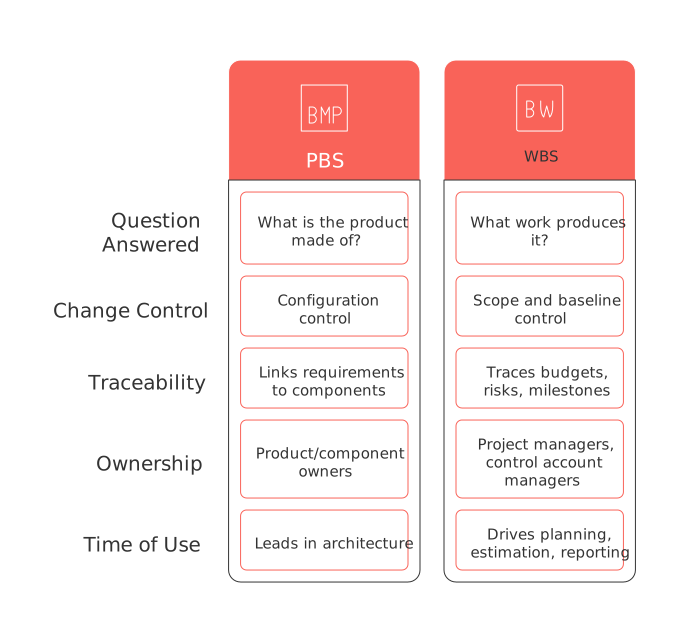
Question answered: PBS addresses “What is the product made of?” while WBS focuses on “What work produces it?”
Change control: PBS modifications use configuration control; WBS changes follow scope and baseline control procedures.
Traceability: PBS links requirements to product components. WBS traces budgets, risks, and delivery milestones.
Ownership: PBS is associated with product or component owners; WBS aligns with project managers and control account managers.
Time of use: PBS leads in fleshing out architecture; WBS drives planning, estimation, and progress reporting.
When to start with PBS and when to start with WBS for product work
Start with PBS when the product architecture drives scope
Hardware or mechatronics are significant cost and risk drivers.
Complex interfaces and multiple variants are involved.
Regulatory compliance requires documentation at the component level.
Start with WBS when delivery flow drives scope
Feature releases evolve an established platform.
Outsourced teams need clear deliverables and milestones to stay on track.
Early budget control is necessary and tied to specific work packages.
Many programs alternate between the two: they sketch a PBS to clarify architecture, then expand a WBS to plan and execute the delivery. Both structures should be revisited after major design milestones.
How to connect PBS and WBS for traceability, budgets, and schedules
For instance, if one were to act as a PMO analyst building a PBS for a connected thermostat, it would include nodes for elements like the enclosure, PCB, sensors, mobile app, cloud API, and packaging. The next step is to create a strong connection between these product elements and associated work packages through a PBS–WBS crosswalk:
Assign each PBS node a unique PBS ID(e.g., P-100 Battery Pack).
Assign each WBS work package a unique WBS ID(e.g., 2.3.1 Validate thermal safety).
Maintain a register, linking PBS nodes to related WBS work packages (many-to-many, as needed).
Roll up costs and track progress in both structures for expanded visibility.
PBS ID | Component | WBS ID | Work Package | Owner | Cost Account | Planned Finish | Acceptance Criteria |
|---|---|---|---|---|---|---|---|
P-001 | Enclosure | 1.1.1 | Design enclosure CAD model | Mechanical Lead | CA-101 | 2024-07-07 | Approved design released for tooling |
P-002 | PCB | 1.2.1 | Produce prototype PCB | Hardware Lead | CA-102 | 2024-07-14 | Functional prototype passes all tests |
P-003 | Sensors | 1.3.1 | Integrate temperature and humidity sensors | Hardware Engineer | CA-103 | 2024-07-21 | Sensor data accuracy within ±2% |
P-004 | Mobile app | 2.1.1 | Develop MVP mobile app | App Product Owner | CA-201 | 2024-08-01 | User login and device pairing successful |
P-005 | Cloud API | 2.2.1 | Deploy cloud API v1 endpoint | Backend Lead | CA-202 | 2024-08-10 | Uptime ≥ 99.9%, functional against spec |
P-006 | Packaging | 1.4.1 | Finalize package design | Operations | CA-301 | 2024-08-15 | Packaging meets drop test and compliance |
How WBS and PBS fit into agile and hybrid delivery methods
In agile methodologies, the PBS directly informs the design architecture and provides a framework for the Definition of Done. The WBS then captures release-level deliverables, integration points, and compliance evidence. In hybrid delivery programs, it is essential to link project stages and increments to both structures for clarity. Discover more about how these stages fit together in the five phases of the project lifecycle.
Map epics and features to PBS modules for clear dependency tracking.
Use WBS to structure release increments, user acceptance testing cycles, and audits.
Report progress against WBS scope rather than relying on ad hoc task lists.
Rapid 90-minute method to draft a PBS and WBS for a new release
Define the product scope boundary and version, including what is out of scope.
Sketch the PBS to two or three levels deep; identify major interfaces.
Tag compliance, localization, and support/service areas within the PBS.
Translate PBS nodes into deliverable-based WBS work packages.
Write concise, measurable acceptance criteria for every work package.
Assign clear ownership and link each package to a cost account. Avoid shared ownership.
Estimate durations and highlight key risks, especially at interfaces.
Sequence work, building a visual schedule, see options in simple project management visualization tools.
Baseline the scope and scheduled dates, recording all assumptions and dependencies.
Publish both the WBS dictionary and PBS register to ensure alignment.
Below is an example from the perspective of a release manager. Here is a deliverable-based WBS (3 levels) for a B2B SaaS Billing module upgrade to v2.0. This WBS covers data migration, tax engine integration, PCI compliance evidence, training assets, and customer rollout. Task lists are excluded. The accompanying WBS dictionary provides acceptance criteria and owners.
WBS ID | Work Package | Owner | Acceptance Criteria |
|---|---|---|---|
1.0 | Billing Module v2.0 Release | Release Manager | All sub-deliverables accepted, release approved |
1.1 | Data Migration Complete | Data Lead | All transactional data validated and migrated; zero loss reported |
1.1.1 | Migrate Customer & Invoice Data | Data Analyst | Data coverage ≥ 99.9%, post-migration checks passed |
1.2 | Tax Engine Integrated | Billing Product Owner | All key billing scenarios return accurate tax calculations |
1.2.1 | Integrate Tax API v2 | Backend Developer | API response within 500ms, 100% test coverage on core API endpoints |
1.3 | PCI Compliance Evidence Package | Compliance Lead | All PCI DSS controls evidenced, signed auditor attestation received |
1.4 | Training Materials | Training Lead | All training sessions delivered; materials uploaded to LMS; 90%+ test pass rates for users |
1.5 | Customer Rollout Complete | Customer Success Lead | Rollout plan executed; customers notified and live on v2.0; feedback tracked |
Common pitfalls and pragmatic fixes for PBS and WBS
Mixing tasks into the WBS: Tasks belong in schedules, ensure your WBS remains deliverable-focused.
Ignoring non-product deliverables: Always include audits, packaging, training, SLAs, and rollout documentation in your WBS or PBS.
No versioning on PBS: Version both PBS nodes and interfaces, track all product variants explicitly.
Unlinked structures: Maintain a clear PBS–WBS crosswalk with owners and cost allocations for effective oversight.
Overly complex structures: Avoid making the breakdown structures too detailed. Stop when the control over tasks or product components is clear and measurable.
Opaque acceptance: Make done definitions measurable and transparent within the WBS dictionary.
Practical tooling to model PBS and WBS without friction
Many teams benefit from a unified workspace linking product data, work deliverables, and CRM information. Tools such as Routine, Notion, or Asana allow you to model both PBS and WBS, complete with references and attribute fields. Regulated projects should link these records to compliance evidence storage and integrate with issue trackers like Jira. If your team is selecting a solution, be sure to compare all essential project planning template needs across tools before committing. Align your WBS approach with PMI’s standard and your internal governance model for best results.
FAQ
What is the primary function of a Work Breakdown Structure (WBS)?
WBS offers a hierarchical view focused on deliverables and work packages, serving as a control tool for planning, budgeting, and tracking project progress. It is critical to align its use with project milestones to avoid scope creep.
When should a team prioritize using a Product Breakdown Structure (PBS)?
A team should prioritize PBS when product architecture or component intricacies heavily influence the project scope, such as in hardware projects or where compliance and variant management are crucial. Misaligning PBS with actual needs could lead to design flaws and non-compliance.
What common mistakes do teams make with WBS and PBS?
Teams often mistakenly mix tasks into WBS or fail to version PBS nodes. These errors can result in overcomplicated structures or misaligned responsibilities, ultimately risking delayed or failed deliveries.
How does integrating Routine benefit the management of PBS and WBS?
Routine allows seamless integration and linking of product data, deliverables, and essential team tools like CRM. Unified data visualization and linkages to compliance evidence ensure effective oversight and alignment with governance standards.
Why is it important to maintain a PBS–WBS crosswalk?
A PBS–WBS crosswalk provides clarity in tracking the relationship between product components and corresponding work packages. Failing to maintain this link may lead to budget overruns and mismanaged schedules.
How can poor WBS design impact project outcomes?
A poorly structured WBS can lead to misaligned project tasks, confusion over deliverables, and ineffective effort tracking. This mismanagement often results in scope drift, compromised quality, and failure to meet deadlines.
What role does PBS play in agile methodologies?
In agile, PBS informs design architecture and provides a measurable structure for defining 'done' criteria. Ignoring PBS in agile settings risks unclear dependencies and compromised deliverable quality.
How does Routine enhance compliance tracking in projects?
Routine facilitates comprehensive project management by linking records to compliance evidence and integrating with tools like Jira. Ensuring compliance tracking helps prevent regulatory setbacks and project misalignments.

Julien Quintard
Founder & CEO at Routine02/11/2026
