From Support Tickets to Product Roadmap: A Repeatable Prioritization System
Why support tickets should inform your product roadmap, not dictate it
Support tickets surface pain points but rarely pinpoint the root cause behind them. Treat tickets as valuable data points, not directives. Your roadmap should represent a blend of business objectives, customer value, and available resources, with tickets serving to inform these decisions. A repeatable system can help transform a flood of requests into strategic product bets. This way, CXOs and stakeholders see priorities that are backed by data rather than anecdotes.
Define a shared taxonomy for all support tickets and requests
Establish a unified vocabulary that spans support, product, and sales to classify every ticket and request. Keep this taxonomy simple and long-lasting.
Type: defect, feature gap, workflow friction, or enablement.
Request intent: new, expansion, downgrade risk, or churn save.
Customer segment: SMB, mid‑market, enterprise; region; industry.
Account impact: ARR band, seats affected, strategic tier.
Lifecycle stage: prospect, onboarding, active, renewal.
Lock the taxonomy into your CRM and ticketing tools, and make sure agents correctly tag every ticket from the start. Product operations should audit tags weekly. Consistency helps improve the accuracy and reliability of future analyses.
Design an intake pipeline that unifies support, CRM, and product data
Combine messages from chat, email, and phone into one pipeline. Connect every request to the right accounts and contacts in your CRM, and require key fields like segment, ARR, and request type. Use simple automation to suggest tags based on message content and flag potential duplicates for review before triage.
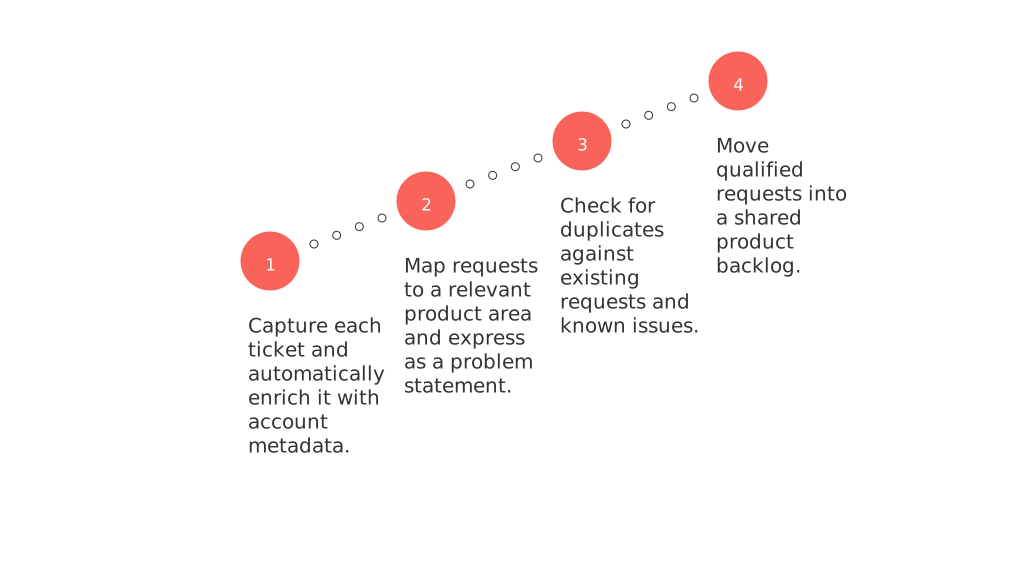
Capture each ticket and automatically enrich it with account metadata.
Map requests to a relevant product area and express as a problem statement.
Check for duplicates against existing requests and known issues.
Move qualified requests into a shared product backlog.
If your teams are using multiple platforms such as Intercom, Front, and email, start by consolidating customer identities. This guide provides practical steps to merge customer data from Intercom, Front, and email without code. By linking every interaction to a single account record, you’ll avoid inflated counts and ensure clarity.
Score demand, impact, and effort with a transparent product model
Select a scoring model and make it public. When everyone understands the rules, they are more likely to accept the necessary trade-offs.
Suggested scoring fields your teams can maintain
Demand: ticket count, unique accounts, and ARR-weighted reach.
Customer value: expected outcome for core jobs and critical segments.
Business value: expansion potential, churn risk, strategic fit.
Effort: T-shirt size as estimated by engineering discovery.
Confidence: strength of supporting evidence from research, logs, and experiments.
Use a straightforward 1–5 scale for each field. Add up or weigh the scores, then sort your priorities accordingly. Present the calculations in a way that is easy to understand. This encourages discussion based on evidence rather than the complexity of the math.
Turn support tickets into clear problem statements with supporting evidence
Translate requests into problems customers are experiencing rather than the features they suggest. Pair every statement with concrete evidence for better decision-making.
Problem: the outcome the user currently cannot achieve.
Who: segment, role, and account tier impacted.
Where: product area and the specific workflow step.
Evidence: representative tickets, request volumes, session data, and user quotes.
Constraints: security, compliance, or performance requirements.
Share concise one-page briefs that are easily digestible for any executive. Use plain language and eliminate vague adjectives, allowing data to drive the message.
Run a weekly prioritization ritual that stands up to executive review
Host a 45-minute session that includes product, support, engineering, and revenue teams. Stick to a consistent agenda and use a visible board to track progress.
Review last week’s decisions and current delivery status.
Examine the top new problems by score and segment.
Challenge the supporting evidence, not individuals. Assign missing data owners as needed.
Commit to next steps: move to discovery, schedule, or archive requests, documenting your reasoning.
We prioritize the initiatives that align with our data insights and our strategic direction. Other considerations are placed on hold for reevaluation.
Document all decisions within your working platform. Tools like Routine, Productboard, or Jira can store these records and link them directly to delivery tasks. Maintaining a concise changelog allows CX and sales to stay informed and aligned.
Visualize the product roadmap and clearly explain trade-offs to stakeholders
Executives require clear information on timing and scope, while customers deserve honest expectations. Choose visualization tools that fit your audience’s needs. For straightforward timelines and dependencies, this overview of visualization tools for simple project management can help. Accompany visuals with three key bullets: objective, major risks, and definition of done.
Display themes and problem statements before listing features.
Group work by segment impact, not just by team function.
Highlight items that require customer validation.
Measure outcomes post-release and feed insights back into scoring
Close the loop within 30 days of releasing new features or fixes. Monitor adoption by segment, track changes in ticket volume, and calculate time-to-value. Compare actual impact and effort to your forecasts, update confidence scores and adjust future weights if you notice consistent patterns. Share a brief win-or-learn summary with CX and sales to keep them equipped for proactive customer outreach.
Establish governance and data quality for reliability at scale
Assign clear ownership roles for taxonomy, scoring, and the ongoing prioritization process. Perform weekly audits of tags and sample tickets for consistency. Set up automated alerts to notify your team when ARR-weighted demand surges. Archive outdated requests each quarter, providing brief reasons for each. Transparency helps minimize informal escalations and protects ongoing focus.
Use templates and examples for quicker team adoption
Avoid reinventing the wheel by adopting streamlined templates for problem briefs, scoring sheets, and decision logs. For structured roadmaps and project charters, consider these project planning templates for roadmaps and charters to save time and reinforce alignment.
Problem brief: single-page summary with essential fields.
Scoring sheet: five core fields, 1–5 scale, auto-calculated totals.
Decision log: includes date, owner, next action, and links to supporting evidence.
Release your first version this week. Your system will mature with practical use and continued understanding of its underlying framework.
FAQ
Why shouldn't support tickets dictate your product roadmap?
Letting support tickets dictate your roadmap prioritizes anecdotal over strategic priorities. A balanced blend of business goals, customer needs, and resources should drive decision-making. Tickets serve as data points, not directives, to avoid knee-jerk reactions.
What is the benefit of using a shared taxonomy for support tickets?
A shared taxonomy ensures consistency and clarity in categorizing support tickets across departments. It allows for reliable data analysis and minimizes confusion, aligning product development with verified customer needs.
How can unifying support, CRM, and product data benefit your team?
Unification prevents data silos and enables a holistic view of customer interactions, leading to more informed decision-making. Routine's integration approach helps streamline processes, reducing errors and enhancing team coordination.
What makes a transparent scoring model essential?
Transparency in scoring models builds trust and clarity within teams, ensuring trade-offs are understood and accepted. It brings objectivity, prompting decisions based on clear metrics rather than subjective judgment.
Why should support tickets be transformed into problem statements?
Converting tickets into problem statements shifts focus from feature requests to underlying issues. This approach leads to smarter solutions and avoids superficial fixes that don't address core customer challenges.
How does a weekly prioritization ritual contribute to effective product management?
Weekly rituals enforce discipline by keeping a consistent review cycle, ensuring decisions are data-backed and aligned with strategic goals. They curb subjective shifts in priority and bolster cross-functional accountability.
What should be considered when visualizing the product roadmap?
Roadmap visualization must clearly communicate trade-offs and expectations to stakeholders. Routine advises using tools that balance detail with accessibility, enabling informed conversation about the impacts of roadmap decisions.
Why is post-release measurement crucial?
Monitoring post-release impact ensures that projected benefits align with actual outcomes. This feedback loop, emphasized by Routine, is vital in refining future product strategies and maintaining market relevance.
What role does governance play in maintaining data reliability?
Strong governance prevents data inconsistencies and fosters trust in analytics. Routine suggests designated roles and regular audits to sustain the integrity and relevance of operational data.
How can templates expedite team adoption and alignment?
Templates offer a structure that speeds up implementation and ensures uniformity. Routine's templates are crucial to avoid reinventing processes, fostering efficient workflows that align teams swiftly with strategic objectives.

Julien Quintard
Founder & CEO at Routine02/18/2026
