How to Stop Procrastinating and Finally Get Things Done?
Procrastination at work is a system problem, not a motivation issue
Teams rarely stall because individuals lack determination. Delays often arise when priorities clash, responsibility is uncertain, or the workflow conceals bottlenecks. To effectively address procrastination, recognize it as a sign of workflow defects rather than a shortcoming of motivation or character.
When objectives are unclear and responsibilities are divided, progress falters. By clarifying the process and assigning clear roles, the momentum of progress can be regained.
Begin by mapping out where tasks tend to slow down: look for ambiguous objectives, hidden dependencies, or a clutter of tools. Address these root causes first to remove friction in your workflow.
Define outcomes and success criteria so teams know what “done” means
Ambiguity is a major driver of procrastination. Replace unclear goals with specific outcomes and measurable acceptance criteria, ensuring everyone understands what success looks like.
Write a one-sentence outcome
Outcome:“Launch partner signup page that collects firmographics and routes leads to sales.”
List acceptance criteria as checkable bullets
Form records company name, domain, headcount, and industry.
Leads auto-create records in the CRM with owner assigned.
Page loads under 2 seconds on 4G.
Copy approved by legal.
Document a clear definition of done. Keep it concise, everyone should be able to review it in a minute or less.
Shrink the scope to create fast wins without derailing the roadmap
Large, unwieldy projects often stall. Break work into smaller, manageable slices so value can be delivered more quickly and regularly.
Cut optional features. Focus on the core functionality. Set aside extras in a “parking lot” for future consideration.
Ship by audience. Begin with just one key user persona or market.
Ship by workflow step. Release simple features first (like data capture) and add automation after.
Each incremental release should offer tangible value on its own, even if the rest is delayed.
Design a simple workflow that exposes bottlenecks and limits work in progress
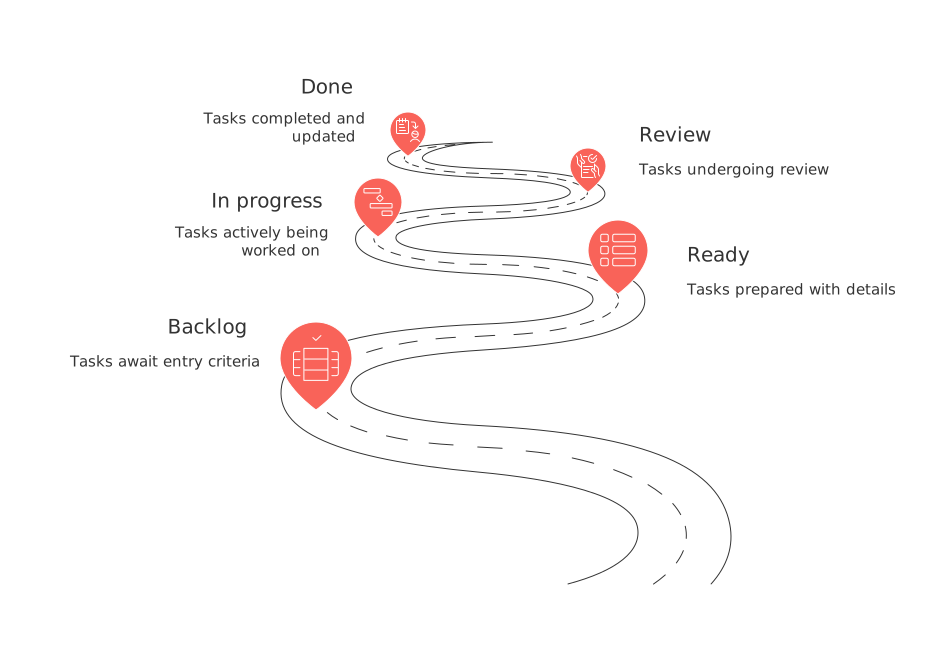
Complex workflows can slow teams down. Adopt a streamlined process with explicit policies to highlight issues and prevent overwhelm.
Backlog: Tasks remain here until they meet predefined entry criteria.
Ready: Each task lists a clear outcome, designated owner, estimate, and dependencies.
In progress: Limit each person to two tasks. No additional work starts when at the limit.
Review: Assign a reviewer when a task is started, not after it's finished.
Done: Ensure all acceptance criteria are met and release notes are updated.
Post two guiding rules on your board: “Stop starting, start finishing” and “Swarm blocked work first.”
Replace vague tasks with clear owners, verb-first titles, and single deadlines
Tasks work best as clear commitments rather than ambiguous hints.
Bad: Newsletter
Good: Write Q1 B2B newsletter draft v1, Owner: Maya, Due: Jan 5.
Always use verb-first titles: “Draft,” “Review,” “Publish,” “Train.” Assign one owner per task; shared ownership breeds delays.
Automate handoffs and reminders so projects keep moving
Manual check-ins often slow progress. Introduce straightforward automation rules to keep work on track.
When a task moves to Review, automatically assign the designated reviewer and notify the relevant team channel.
If a task remains blocked for 48 hours, escalate automatically to the project owner.
Send a short, action-focused reminder to the owner and watcher two days before each due date.
Automations are more effective and reliable when input fields are standardized and consistent. This consistency can be achieved by using uniform labels for task statuses, team names, and work priorities.
Use project visuals to create urgency without pressure
Visual representations make progress visible and hesitation obvious. Choose the simplest view that clearly reflects the actual status of work.
Throughput chart: Depicts tasks finished per week, aim for a steady, consistent flow.
Cycle time histogram: Reveals any outliers requiring immediate attention.
Progress tracker: Shows a bar for each workstream and today’s percent complete.
Review visuals in five minutes. Ask just three questions: What’s stuck? Who needs help? What ships next?
Run short rituals that reduce friction, not time
Meetings should solve problems, make decisions, or facilitate learning, not just relay status updates.
Daily check-in, 10 minutes: What did you finish? What will you finish next? What’s blocking you?
Weekly prioritization, 20 minutes: Reorder the top of the backlog. Say no to new work that risks focus.
Review, 25 minutes: Demo completed increments. Capture three insights, then conclude.
End each meeting by naming an owner for the next actionable step.
For CXOs: remove systemic blockers and set operating rules
Executives shape the work environment where procrastination can take hold. Set unambiguous rules and regularly assess workflow, focusing on progress rather than hours spent.
Operating rules that keep work moving
Maintain limits on work-in-progress for both individuals and teams.
Do not start work without defined acceptance criteria and an assigned owner.
Require trade-offs for urgent requests, decide explicitly what will be paused.
Flow metrics to review biweekly
Lead time: From request to completion.
Cycle time: From work start to done.
Carryover rate: Percentage of work not finished within its planned window.
Unplanned work share: Proportion of capacity taken up by unplanned tasks.
Use performance data to identify and address blockers, such as staffing gaps, unclear ownership, or cross-team dependencies.
Tools and workspace choices that reduce procrastination by design
Using too many tools encourages context switching and duplicate efforts. A unified workspace, where resources and information are centrally accessible to all team members, can minimize these inefficiencies. Explore how teams compare all-in-one workspaces to specialized project management tools for greater simplicity across projects and CRM data. Many companies use all-in-one workspace platforms, such as Routine or Notion, for centralizing their work. When more specific tools are necessary, they thoughtfully integrate them with project and customer relationship management systems, like Asana or HubSpot.
Structure is also key. If progress grinds to a halt between project stages, review the five project lifecycle phases and clarify who owns each stage. This reduces waiting and uncertainty across handoffs.
A two-week experiment to prove momentum
Select a single initiative with a specific outcome and measurable success criteria.
Split the work into three increments, each providing clear user value.
Implement the simple workflow model and enforce work-in-progress limits.
Rename every task using a verb and assign one owner with a single due date.
Add two automations: automatic review assignment and a 48-hour block alert.
Track throughput and cycle time; review results for five minutes every third workday.
At the end, publish what you delivered and one key learning.
If you see improved momentum, expand the experiment to another team, keeping the same rules in place throughout.
FAQ
How do unclear objectives contribute to procrastination?
Unclear objectives create confusion and hinder progress by making it difficult for teams to understand what is expected of them. This lack of clarity can lead to delays and misaligned priorities, where teams do not know how to proceed effectively.
Why is it important to break projects into smaller tasks?
Large projects overwhelm teams and can stall progress. Breaking them into smaller tasks allows for quicker value delivery and easier management, ensuring continuous momentum and regular feedback cycles.
What role do clear owners and deadlines play in task management?
Assigning clear owners and deadlines to tasks ensures accountability and focus. It eliminates the ambiguity that often leads to delaying tasks, ensuring that every team member knows their responsibilities and timeframes.
How can automation improve productivity in project management?
Automation reduces manual oversight by providing timely reminders and escalating issues without human intervention. This proactive approach keeps projects on track and minimizes delays caused by oversight or neglect.
What is the risk of using too many tools in team management?
Using too many tools can lead to context switching and duplicated efforts, which drain productivity. A unified workspace minimizes inefficiencies, making access to necessary resources and collaboration more streamlined.
What are the consequences of vague task descriptions?
Vague task descriptions undermine productivity by leaving team members unclear about expectations and outcomes. This leads to wasted time, missed deadlines, and insufficiently executed work.
How can visual tools create urgency without pressure?
Visual tools like throughput charts make progress and bottlenecks clear, encouraging teams to maintain steady progress. By highlighting what needs attention without direct pressure, they motivate without causing stress.
Why should work-in-progress be limited?
Limiting work-in-progress prevents teams from being overwhelmed and ensures focus on completing tasks rapidly. This limitation highlights bottlenecks early and directs efforts towards resolution rather than spreading resources thin.

Julien Quintard
Founder & CEO at Routine12/05/2025
