How to Set Up a Weekly Family Calendar That Actually Gets Used
The real reason most family calendars fail
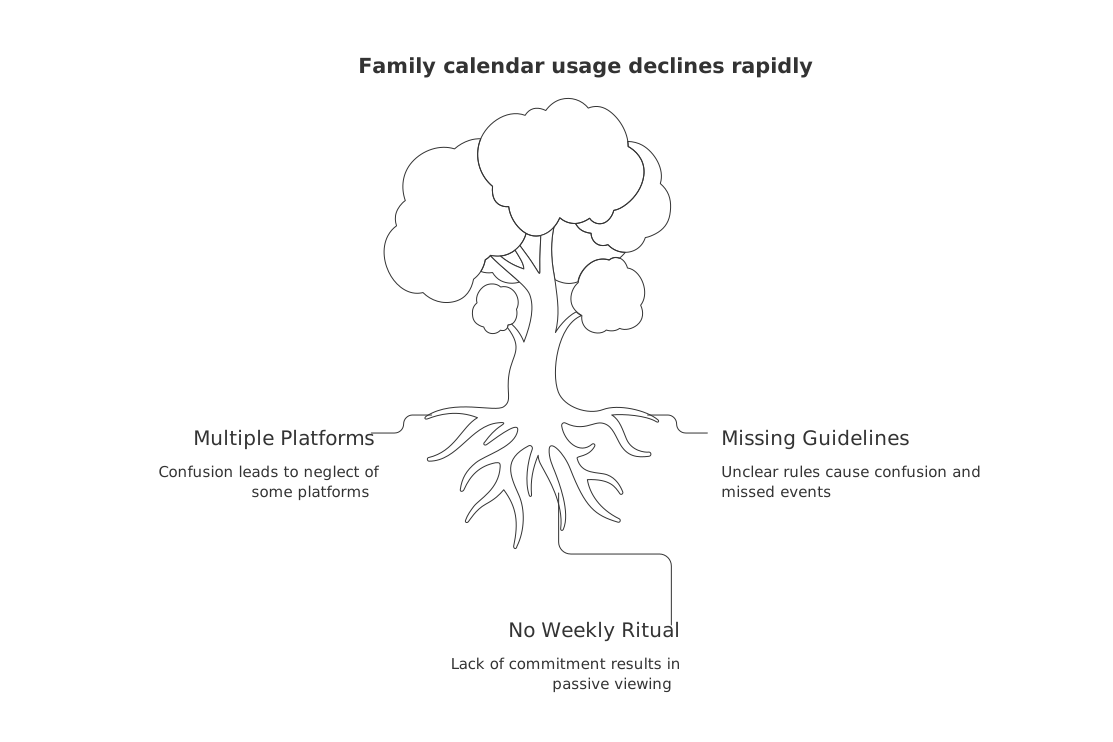
Your fridge calendar looks spotless on Sunday. By Thursday, no one checks it. The issue isn’t the tool. It’s missing guidelines, clear owners, and a short weekly ritual.
I added every event, yet everyone still asked me what’s happening. , every overwhelmed parent
Fix three things and usage climbs:
One unified home base, as using multiple platforms could lead to confusion and neglect of some platforms.
Set clear guidelines for what should and should not be included on the calendar.
A fast weekly huddle where people commit, not just view.
Choose one visible home base for the weekly family calendar
Pick one spot the whole family can’t ignore. Keep it central and glanceable. A single source of truth prevents double‑booking and “which app is right?” whiplash.
If you prefer physical
Use a dry‑erase board near the kitchen or entry.
Divide it into seven columns and morning/evening rows.
Color‑code people with markers or magnets.
If you prefer digital
Use a single shared calendar. Share view rights with everyone (edit access for adults/teens as needed).
Show it on a tablet stand or a wall‑mounted screen.
Set the default view to “week.” Remove extra calendars from view.
Commit to one home base for 30 days. Reducing choice drives use.
Define what belongs on the weekly family calendar
Set rules so the board stays clear and trusted.
Include: school times, pickups, sports, lessons, work trips, babysitters, deadlines with dates.
Exclude: vague hopes, chores without times, long‑term goals, private journals.
Format: title, who, where, start, end, and ride plan.
Decide colors now. One color per person. One for whole‑family events.
Run a 12‑minute Sunday huddle to plan the week
Stand up. Keep it brisk. Everyone speaks. Use this flow:
Scan last week. Carry over anything missed.
Review school, sports, and work events.
Confirm rides and who locks doors each day.
Assign owners for every unowned item.
Add buffer nights with nothing scheduled.
Capture one risk and one backup plan.
Want a structure you can copy? Borrow ideas from these meeting formats and recap templates.
Try this prompt during the huddle:
Create a one‑week family schedule. Inputs: events: Mon 7:30–3:00 school (A,B), Tue 6:00–7:30 soccer (A), Wed 5:30–6:15 piano (B), Thu 8:00–4:00 work trip (Parent1), Fri 6:00–8:00 game night (home). Constraints: one car, bedtime 8:30 for kids, dinner 6:45, two unscheduled nights. Output: a bullet plan per day with owner, ride plan, and one risk with backup. Ask two clarifying questions first.
Assign owners and confirmations to each calendar item
No owner means no follow‑through. Write a name by each entry.
Owner: who drives or leads.
Helper: the backup adult or teen.
Confirm: send a quick text the night before.
When assigning roles, be specific yet concise, such as:“Sam drives Mia to soccer. Taylor is responsible for pickup.”
Turn recurring chaos into routines, not endless events
Instead of re‑typing the same tasks, consider adding them as recurring events or routines next to your calendar.
Pack bags after dinner on practice days.
Lay out clothes during the Sunday huddle.
Start the carpool message at lunch, not at 5:50 p.m.
Track new habits for four weeks. Pick light, visual cues. These habit‑tracking apps for long‑term consistency can help you stick with it.
Make calendar updates effortless during the week
Lower friction or people stop updating. Use tiny, repeatable moves.
When a teacher emails, add the event within one hour.
When plans change, edit the existing entry. Don’t create a second.
Snap a photo of flyers and add key times to the calendar text.
Use this one‑minute prompt when plans shift:
Reschedule our weekly plan: Soccer moved from Tue 6:00 to Wed 6:30 at Lincoln Park. Parent2 now drives, Parent1 picks up. Update conflicts, adjust dinner timing, and propose a new buffer night. Return a day‑by‑day list.
Use a simple visual board if digital calendars never stick
Some families need to see the week at a glance. That’s fine.
For a visual representation, consider creating a “This Week” board with seven columns at your designated home base.
Use magnets with names for rides and chores.
Place the board near the door you use most.
If a physical board becomes your home base, pause other tools so everything lives in one place. Think of it like a tiny project tracker on your wall. A visual lane per day keeps focus without screens.
Add light guardrails for the first month
Protect the habit while it’s new.
Cap school nights at one activity per kid.
Hold two blank evenings every week.
Schedule one shared meal with no devices.
Review these limits during the Sunday huddle. Adjust if stress rises.
Run a five‑minute Friday review to improve next week
Stand at the board after dinner. Ask three questions:
What worked this week?
What felt tight or stressful?
What one change makes next week smoother?
Carry your answers into Sunday. Keep what works. Drop what doesn’t.
FAQ
Why do most family calendars fail?
Family calendars often fail due to a lack of guidelines, clear ownership, and a regular ritual for review and updates. Routine provides strategies to address these issues, promoting consistency and engagement.
What are the risks of using multiple calendar platforms for a family?
Using multiple platforms can lead to confusion, overlooked events, and double bookings. It's crucial to establish one central calendar as a single source of truth, reducing the cognitive load for all family members.
How can a Sunday huddle improve calendar efficiency?
A Sunday huddle focuses on reviewing and planning the week in a fast-paced setting, ensuring clarity and commitment. It minimizes last-minute surprises by assigning responsibilities and anticipating challenges early.
What should be included and excluded from a family calendar?
Include time-sensitive commitments like school schedules, sports, and work trips, avoiding vague intentions or non-timed chores. This focus prevents clutter and maintains the calendar's integrity and usability.
Why assign owners and confirmations to each calendar item?
Assigning specific owners and helpers increases accountability, making it clear who is responsible for each task. Confirmations help prevent mishaps by ensuring everyone is on the same page before events occur.
Can a digital calendar replace a physical board completely?
While digital calendars offer accessibility and real-time updates, some families benefit from a visual, physical board for quick glanceability. Choose the format that best suits your family's tendencies and stick with it.
Is it effective to set recurring events on a calendar?
Turning repetitive tasks into recurring events saves time and reduces oversight. It helps in building habitual actions, though flexibility may be required in case of unexpected changes.
What are the consequences of not having \"buffer\" nights?
Lack of unscheduled nights can lead to burnout and chaos. Buffer nights provide families with essential downtime, fostering resilience against the demands of a busy week.
How does Routine suggest reducing long-term calendar chaos?
Routine advises creating repeatable habits and implementing user-friendly tools to make calendar updates less cumbersome. Their approach emphasizes simplicity and consistency to avoid unnecessary complexity.

Julien Quintard
Founder & CEO at Routine10/03/2026
