Routine vs Notion vs Airtable: Which Platform Actually Handles Structured Data for B2B?
What structured data means for B2B teams
Structured data goes well beyond just “tables.” For B2B teams, it’s about building a data model that truly reflects how your business operates, all while keeping everything stable and coordinated across teams.
Entities and relationships: Define objects like accounts, contacts, deals, projects, and assets, and clearly map how they interconnect.
Validation and types: Enforce required fields, set enums and numeric boundaries, and ensure logical rules around dates.
Permissions: Control who can view or edit a record, a field, or different views of your data.
Automation: Set up triggers to update statuses, send notifications, or create tasks automatically.
Reporting: Support rollups, funnel analysis, and executive dashboards that illuminate trends and performance.
Change history: Maintain clear audit trails for compliance and risk management.
Data modeling: tables, relations, and constraints
Notion
Notion databases allow for easy modification and understanding. Teams can rapidly establish properties, relations, and rollups, and adjust them as needed. Its interface is approachable for most users.
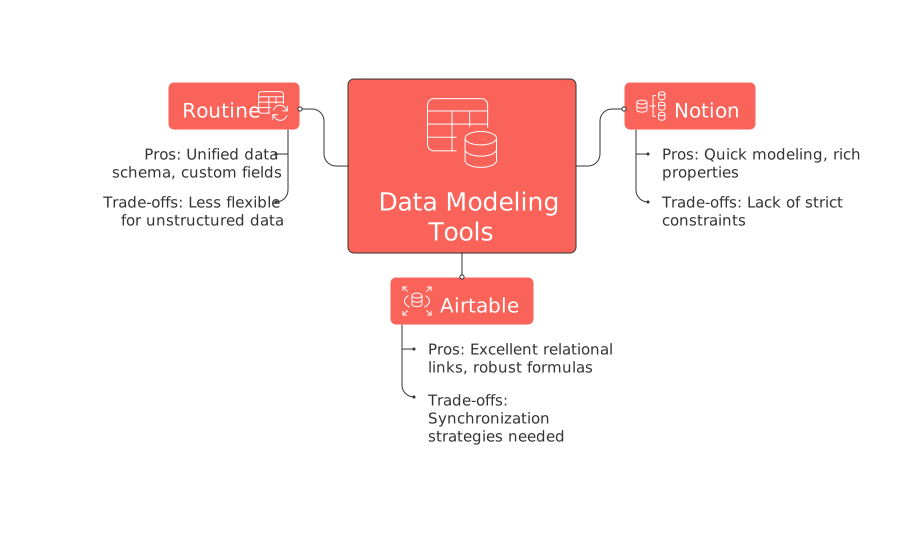
Pros: Quick to model and adapt; supports rich properties, multiple view types, and functional relations and rollups across interconnected databases.
Trade‑offs: Lacks strict data constraints, has limited referential integrity, and row-level permissions typically need workarounds.
Airtable
Airtable treats your data like a user-friendly database. You can define records, link them, and use lookups and rollups that accurately reflect business relationships and logic.
Pros: Excellent relational links, robust formulas, view filtering by stakeholder or role, and interface layers for various audiences.
Trade‑offs: Managing relationships across different bases requires synchronization strategies, and advanced governance options are usually available only in enterprise plans.
Routine
Routine is designed to centralize structured data for project management, knowledge, and CRM in one place. Objects such as deals, tasks, and documents are inherently linked to the same accounts and contacts, reducing duplication.
Pros: Unified data schema spans multiple modules; supports custom fields, standardized statuses, and native cross-record links.
Trade‑offs: Less flexible for unstructured or highly custom scenarios.
Governance and permissions your auditors expect
Clear access controls are critical for smooth B2B rollouts. It’s important to model these controls before any data is imported.
Notion: Simple sharing at the page and database level. Record-level access controls often require splitting data across different pages or databases.
Airtable: Fine-grained roles, control over field visibility, and permission layers built into interfaces, ideal for larger teams and external collaborators.
Routine: Workspace roles and object-level permissions keep data access consistent and reliable across modules like CRM and project management.
Tip for all platforms: Establish a permission matrix for accounts, deals, projects, and documents before welcoming users.
Automation, integrations, and API for real workflows
Automations help keep your data accurate and workflows smooth, eliminating tedious manual checks.
Notion: Integrates through an API and third-party connectors for basic syncs; complex processes typically depend on iPaaS solutions.
Airtable: Native automations support triggers, status updates, notifications, and webhooks with high reliability.
Routine: Built to pass data fluidly between CRM and project modules and offers ready integrations with widely-used SaaS stacks.
Regardless of your platform of choice, define triggers associated with lifecycle milestones such as a new lead, stage change, project kick-off, and contract signing.
Reporting CXO actually read
Executives want clear, current answers, like insights into pipeline health, project risks, and renewal forecasts, without jumping through hoops.
Notion: You can build dashboards from linked databases, but charts and advanced reports often depend on external widgets or integration partners.
Airtable: Interfaces and summary blocks streamline the creation of funnels, burnup charts, and detailed dashboards.
Routine: Provides aligned portfolio, pipeline, and workload views for unified metrics across CRM and delivery activities.
If a VP needs three clicks to see risk by revenue, the model needs work.
Performance at scale and reliability
Any issues in the data model can become evident as the scale increases. Ensure to run tests with actual data volumes and simultaneous edits to assess the stability of the systems.
Notion: Remains fast and flexible for collaborative content, but very large databases can experience slowdowns unless carefully scoped.
Airtable: Designed to handle substantial record counts within plan limits. The structure inherently encourages good data hygiene.
Routine: Unified modules and shared objects reduce data duplication and the need for complex syncing between tools.
Implementation playbook and sample schema
Identify core entities: Account, Contact, Deal, Project, Asset, Document.
Clarify relationships: Account 1‑N Contact, Account 1‑N Deal, Deal 1‑N Project.
Set required fields and permitted values.
Define lifecycle stages for Deals and Projects.
Specify ownership and data visibility by team.
Create targeted views for Sales, Delivery, Finance, and Leadership teams.
Develop automation rules for key transitions, such as stage changes and SLA breaches.
Design dashboards for pipeline visibility, margin tracking, and team capacity.
Import sample data and conduct user acceptance testing.
Train your team on workflows for new accounts, renewals, change requests, and escalations.
Decision framework: when each platform fits best
Choose Airtable for advanced relational modeling, robust formulas, and stakeholder-facing interfaces.
Choose Notion if your team needs flexible databases seamlessly integrated with documentation and collaborative notes.
Choose Routine when connected CRM, project management, and knowledge-sharing in one structured workspace is the goal.
This review complements our in-depth analysis of all-in-one workspaces versus dedicated project tools.
Use cases that reveal the differences quickly
Sales pipeline to project delivery
Simulate moving a deal to “Won” and automatically creating a delivery project with pre-filled fields and assigned owners.
Measure: Creation speed, data integrity, and correct assignment of visibility.
Customer data change governance
Update a billing address and track who made the change, when it happened, and which records were affected downstream.
Measure: Audit trail completeness and accuracy of update propagation.
Quarterly board dashboard
Compile ARR by segment, track deal velocity, project margins, and resource capacity. Access should be simple for all stakeholders, especially those with read-only rights.
Measure: Time required to build the dashboard, reliability of data refresh, and overall stakeholder adoption.
Verdict: which platform actually handles structured data best?
No single platform is the definitive winner. Structured data is shaped by the needs and scale of each team.
Airtable excels in environments with deep relational requirements and strong stakeholder-facing interfaces.
Notion stands out where flexible database functionality must coexist with rich documentation and knowledge management.
Routine is ideal for B2B teams seeking to unify CRM, project, and knowledge flows without piecing together separate tools.
Focus on the trade-offs that fit your workflow. Model a critical scenario, put it to the test with real data, and let those results drive your choice.
FAQ
What is structured data, and why is it crucial for B2B teams?
Structured data represents your business operations through a well-defined data model, ensuring consistency across teams. It's not just about tables; it's about connecting entities, enforcing field validations, and setting up automations. B2B teams rely on structured data for reliable insights and seamless workflows.
How do Notion, Airtable, and Routine differ in handling data constraints?
Notion provides flexibility but lacks strict data constraints. Airtable excels in relational modeling, while Routine offers integrated modules but with limited custom scenarios. Choose the tool that aligns with your data governance needs, considering potential downtime or data integrity issues when constraints are weak.
What role do automations play in data management platforms?
Automations minimize errors and improve efficiency by reducing manual tasks and ensuring data consistency. They can trigger actions like status updates and notifications, but beware: poorly designed automations can lead to data loss or miscommunication. Ensure your automations are robust and clearly aligned with workflow stages.
Are there limitations to using these platforms for large-scale operations?
Yes, each platform has scalability challenges. Notion may slow down with large databases, Airtable has plan limits, and Routine can struggle with unstructured data. Always test with actual data volumes to ensure performance and reliability as you scale.
How important is governance in structured data systems?
Governance is critical to prevent unauthorized access and ensure data integrity. It involves defining permissions and audit trails. Without a strong governance framework, you risk data breaches and compliance issues which can undermine trust and incur regulatory penalties.
Why might a B2B team choose one platform over another?
The decision depends on the specific needs of the team: Airtable offers deep relational capabilities; Notion integrates well with documentation; Routine excels in unifying CRM and project management. Assess your core requirements and potential trade-offs before committing to a platform.
What should be considered when implementing structured data platforms?
Prioritize clarity in defining core entities, relationships, and access controls. Develop comprehensive automation rules and clear reporting dashboards. Overlooking these elements can lead to data silos, inefficiencies, and accessibility issues which may hinder your business operations.

Julien Quintard
Founder & CEO at Routine12/04/2025
