RevOps Blueprint: Creating a Unified Revenue Dataset Across HubSpot, Stripe, and Support Tools
Why unifying revenue data across CRM, billing, and support systems matters
Revenue often slips through the cracks between disconnected systems, getting lost between CRM deals, Stripe invoices, and support tickets. A unified revenue dataset stops this drift, providing executives and teams with a single, trusted source of revenue truth.
The benefits of this alignment compound rapidly. Finance can close books faster. Sales teams identify upsell opportunities earlier. Customer success addresses friction before renewal talks arrive. Product can pinpoint features that truly drive paid growth. One unified dataset brings accountability and clarity to every part of your go‑to‑market effort.
Without a unified dataset, we end up debating reports, not focusing on results.
Define the key RevOps questions your unified dataset must answer
Start your process by determining the questions your data needs to answer, then design your tables accordingly. The foundation of your schema should facilitate decision-making processes, rather than simply reflecting the structure of every data source.
Which companies drive 80% of net new ARR this quarter?
What top churn causes appear in support and billing notes?
Where do invoices stall before payment, and for how long?
Which success touchpoints best predict on‑time renewal?
Which product packages deliver the highest expansion after month three?
Where do lead sources overpromise pipeline but underdeliver revenue?
State each business question in plain language. Pair every question with its required data fields, set update cadences, and assign a clear owner responsible for delivering the answer.
Map core entities and relationships across HubSpot, Stripe, and support platforms
Document critical entities and relationships before building any data connections. Simplicity and durability should guide your entity mapping.
Primary entities and how they link
Company/Account: The authoritative source for firmographics; links to deals, subscriptions, and tickets.
Contact/User: People within an account, connected to meetings, emails, and product usage.
Deal/Opportunity: Sales stages and deal amounts, which tie to products and generated subscriptions.
Product/Catalog Item: Packages and SKUs linked to line items and subscriptions.
Subscription: Tracks term, status, start, and end dates; links to invoices, payments, and renewals.
Invoice/Payment: Transaction details including amounts, taxes, status, and dates; ties to subscriptions and accounts.
Ticket/Conversation: Support interactions, SLA compliance, and sentiment; mapped to accounts and renewals.
Support and ticket data are often siloed. Integrate it early. For practical guidance, see this walkthrough on merging data from Intercom, Front, and email without code to learn about integration strategies and common pitfalls.
Establish a shared revenue schema and plain‑language definitions
Agree on a common terminology before developing your data pipelines. Clear, unified definitions eliminate recurring disputes and the proliferation of shadow spreadsheets.
New ARR: First‑time contracted revenue from a customer, excluding trials and pilots.
Expansion ARR: Incremental revenue from upsell or cross‑sell, logged when the contract is signed.
Contraction ARR: Revenue lost due to a downgrade within an active term.
Churn ARR: Revenue lost at term end, omitting reversals during a renewal grace period.
MRR: Monthly value from all active subscriptions, calculated with a single proration policy.
Activation: The specific milestone where a customer first achieves value; this event must be precisely defined.
Support Risk: Accounts breaching SLAs or generating high ticket volumes relative to licensed seats.
Implement scalable data layers:
Raw: Raw fields from HubSpot, Stripe, and support platforms.
Staging: Cleaned data types, standardized IDs, and normalized field values.
Models: Business-ready tables for accounts, revenue movements, and support tickets.
Marts: Metric tables segmented by cohort, product, and geography for day-to-day use.
Design the integration architecture and data flow for revenue truth
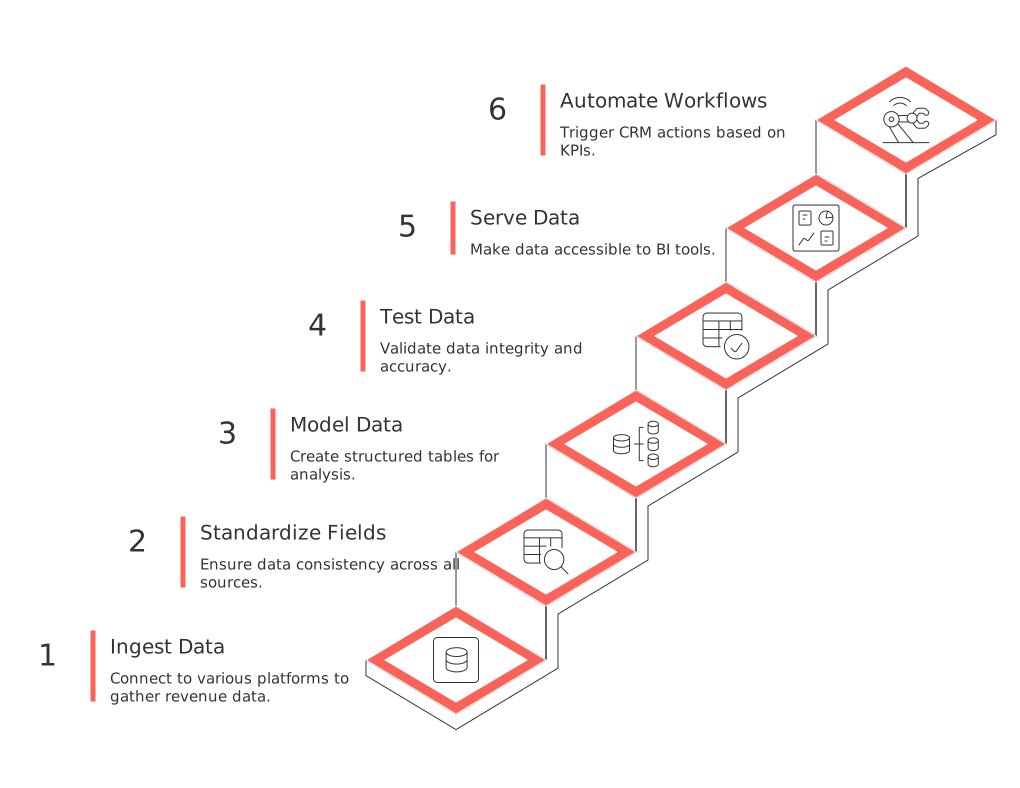
Select an ELT (Extract, Load, Transform) pattern suitable for your team’s operational skills. Prioritize transparency, simplicity, and maintainability.
Ingest: Connect HubSpot, Stripe, and support platforms through secure connectors or APIs.
Stage: Standardize fields like IDs, timestamps, and currencies. Always capture the data source and load time.
Model: Construct fact tables for invoices, subscriptions, and support tickets. Add consistent dimensions across all models.
Test: Validate record counts, referential integrity, and date ranges upon every pipeline run.
Serve: Make metric marts available to BI tools and operational platforms.
Automate: Trigger workflows in the CRM when KPIs cross predefined thresholds.
Advice from RevOps teams in the field
Adopt consistent, stable account IDs across all tools. Never use email addresses as primary keys.
Track every transaction currency and exchange rate, always store both original and converted amounts.
Retain invoice line items for SKU-level revenue analysis.
Preserve change history for mutable fields. Use snapshots to prevent data drift in reporting.
Data quality rules, SLAs, and monitoring for revenue reliability
Establish robust rules to catch and resolve issues before they impact forecasts. Publicize data thresholds and expectations.
Completeness: Every invoice must be linked to an account and subscription ID.
Uniqueness: Invoice IDs should not be duplicated across data loads.
Timeliness: New payment records must arrive within four hours of processing.
Validity: Only accepted currency codes, enforce ISO 4217 standards.
Integrity: Every support ticket must reference a known account or contact.
Send automated alerts when thresholds are breached. Each alert should name the owner, include the rule, and provide a clear resolution path. Continuously track and improve detection and resolution times.
Build the single source of revenue truth in your data warehouse
Choose a data warehouse your engineering team can robustly support. Snowflake, BigQuery, and Redshift are reliable options for most organizations.
Key models to prioritize in your rollout
dim_account: The master company profile, with unified IDs spanning all systems.
fct_subscription: Subscription terms, statuses, and product breakdowns.
fct_invoice: Invoice headers and line items, including tax and discount details.
fct_payment: Payment postings and failures, each with specific reason codes.
fct_ticket: Support ticket metrics like SLA status, sentiment, and topic tags.
fct_revenue_movement: All new, expansion, contraction, and churn events.
Layer in semantic definitions for all core metrics, ARR, MRR, NDR, churn rate, win rate, maintained in a single catalog with tracked history and changes.
Operationalize revenue insights for sales, success, and finance execution
For data to have impact, it must drive clear business actions. Convert your KPIs into actionable, owned signals for each team.
Signals to deploy and their responsible teams
At‑Risk Renewal(Customer Success): Triggered by SLA breaches or negative sentiment in the last 30 days.
Expansion Readiness(Sales): Proactive flag when usage hits plan limits or support tickets request premium features.
Payment Risk(Finance): Raised when charges fail and invoices remain past due for over a week.
Onboarding Lag(Customer Success): Notified if the activation milestone is missed within the first two weeks.
Push these alerts into CRM tasks and sequences, with owners, next steps, and deadlines clearly defined. Explore example plays in our guide on automations every B2B sales team should set up today.
Governance, privacy, and security safeguards across the unified dataset
Handle customer data with care and build trust through explicit controls such as encrypting sensitive information and keeping a detailed audit trail. Responsible data management protects both your customers and your business.
Access: Role-based permissions and audited data views for finance, sales, and success teams.
Minimization: Store only the minimum amount of required PII; mask unneeded fields in test and staging environments.
Retention: Set and enforce clear data retention timelines for each data type, and automate deletion where possible.
Lineage: Maintain field-level traceability for every data point and every modification.
Regulations: Thoroughly document your processes for handling GDPR and CCPA requests and notifications.
Regularly review governance policies, at least quarterly. Always involve security and legal teams in any schema changes affecting personal information.
A pragmatic 90‑day RevOps rollout plan for the unified dataset
Days 0–30: Align decisions and keys
Finalize business questions and clarify responsible owners.
Establish unique account and subscription identifiers.
Define data quality rules and configure alert channels.
Prototype the revenue movement data model.
Days 31–60: Ship the backbone
Automate daily loads of HubSpot, Stripe, and support data.
Publish marts for accounts, subscriptions, and invoices.
Enable two critical business signals in your CRM.
Begin weekly stakeholder reviews using real data.
Days 61–90: Operational adoption
Expand alert signals to support renewal and expansion strategies.
Conduct training for sales, success, and finance on shared data definitions.
Launch an executive dashboard with actionable drill‑downs.
Document SLAs and finalize metric ownership sign-off.
Platforms to evaluate for centralizing RevOps work across teams
Your team needs a central hub connecting projects, shared knowledge, CRM workflows, and meetings. Evaluate platforms that unify strategy and execution, without fragmenting context. Consider options like Routine, or alternatives such as Notion and ClickUp. Assess each for permission management, cross-tool linking, and support for CRM-specific data objects.
Compare these unified workspaces to specialized tools. Our analysis, All‑in‑One Workspaces vs Dedicated Project Tools: Which Serves Your Business Best?, covers the trade-offs leaders often encounter.
To dig deeper into data unification, consult our hands-on guide for merging data from Intercom, Front, and email into a single profile.
Conclusion
Unifying revenue data across CRM, billing, and support systems is essential to eliminating blind spots and ensuring that every team works from the same set of facts. By focusing on the right questions, building integrated data pipelines, prioritizing data quality, and establishing strong governance, organizations can unlock powerful revenue insights and drive impactful business outcomes. With a clear roadmap and the right tools, your RevOps function can deliver a single source of revenue truth, aligning strategy and execution across every stage of growth.
FAQ
Why is unifying revenue data across CRM, billing, and support systems crucial?
Fragmented data leads to misinformed decisions and missed revenue opportunities. By unifying these datasets, you create a single source of truth that enhances transparency and accountability across teams. Routine helps bridge these gaps to drive coherent strategies.
What are the common pitfalls when merging data from different systems?
Inconsistent identifiers and data formats can cause integration issues, complicating the analysis of linked data. Maintaining field consistency and employing robust data cleaning practices are essential to ensure effective unification.
How can a unified dataset improve RevOps performance?
A unified dataset allows for better identification of growth opportunities and more effective risk management. By using Routine, RevOps teams can streamline processes, reduce redundant tasks, and focus on actionable insights.
What is the risk of not having shared data definitions across an organization?
Lack of common definitions can lead to conflicting reports and strategic misalignment, wasting resources and undermining trust. Establishing unified data terminology is crucial in creating coherent metrics and ensuring teams are aligned with business goals.
What should be prioritized when building a data pipeline for revenue data?
Focus on transparency, simplicity, and maintainability to ensure long-term success. Neglecting these aspects can lead to cumbersome, error-prone processes that frustrate users and hinder data-driven strategies.
How does Routine support organizations in executing their RevOps strategies?
Routine offers platforms that consolidate project management, CRM workflows, and team collaborations, ensuring unified strategic alignment. It facilitates cross-tool linking and provides real-time insights, streamlining RevOps execution.
What are effective strategies for ensuring data quality in unified datasets?
Implement rigorous data validation and monitoring rules to catch errors early. Clear SLAs and well-defined ownership are essential to maintain data integrity and support informed decision-making.
Which platforms are recommended for centralizing RevOps work across teams?
Consider using Routine or alternatives like Notion or ClickUp for a cohesive environment that synchronizes project management and CRM functionalities. Evaluate each platform's support for CRM data objects and permission management capabilities.
How can integrating support data impact customer relations?
Integrating support data ensures comprehensive visibility over customer interactions, allowing preemptive issue resolution. It cuts down on reactive measures and prevents issues from escalating, improving overall customer satisfaction and retention.

Julien Quintard
Founder & CEO at Routine02/25/2026
