How to Prioritize Your Backlog When Everything Feels Urgent
Stop the spiral: run a 15‑minute triage
Urgency can fog good judgment. Before you score or sort anything, run a quick triage. Set a 15‑minute timer. Pull every task into a single backlog view. Add one clear line to each item: the desired outcome and the next visible step.
Mark real deadlines with the exact date and who expects it.
Break big ideas into shippable slices you can finish within a week.
Archive stale items that no longer matter to customers, or to you.
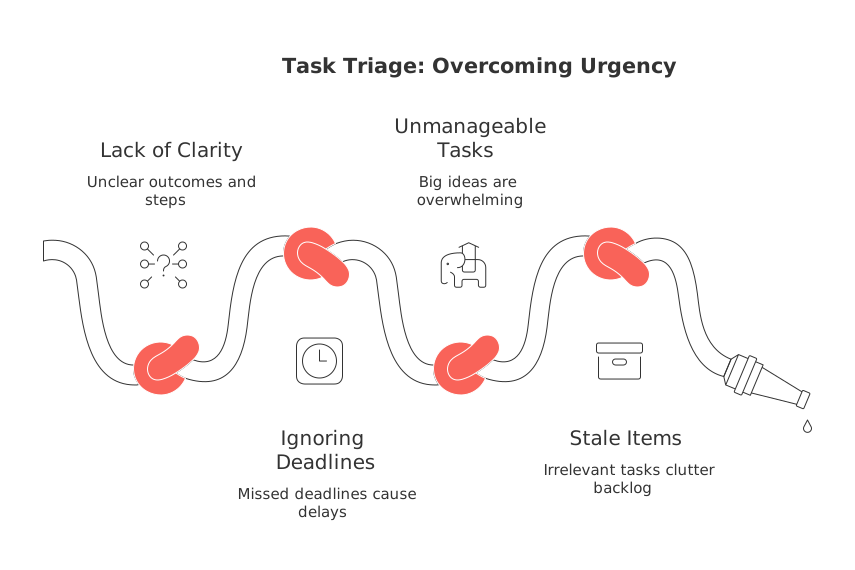
When every task feels urgent, your job is to decide which ones will still matter tomorrow.
Define urgent, important, and impactful for your context
Use plain definitions so your brain, and your team, align quickly. Urgent means time‑sensitive. Important means linked to a goal. Impactful means the result materially shifts customer outcomes or revenue.
Personal example: filing taxes is urgent and important; repainting a room is important but not urgent. Team example: a broken checkout is urgent and impactful; a new color palette isn’t either today.
Pick one scoring model for four weeks
Consistency beats precision. Choose a simple model and stick with it for one month. Define what each score means so others can use it the same way.
The ICE score, simplified
Impact: How much this advances customers or goals (1–5).
Confidence: How sure you are about that impact (1–5).
Effort: How much work it takes (1–5; lower is better).
Calculate ICE as Impact × Confidence ÷ Effort. Sort by the result. If two items tie, choose the one that reduces risk sooner.
Tip: Managing lots of items? Try RICE (adds Reach). Keep the scale small so you can decide fast.
Map value against effort with a quick quadrant
Sketch a simple 2×2: value on the vertical axis, effort on the horizontal. Place each item without overthinking.
Quick wins(high value, low effort): do first.
Strategic bets(high value, high effort): plan next and stage the work.
Trivial many(low value, low effort): bundle and batch later.
Time sinks(low value, high effort): delete, or defend with data.
Limit work in progress so priorities can breathe
Work thins out when too many items start at once. Set a visible cap. For individuals, try two active tasks. For small teams, try one active task per person plus one shared buffer.
When a new urgent item appears, pause the lowest‑impact active task. Explain why and record the change.
Sequence by dependencies, not opinions
List blockers for your top ten items. Tag anything that unlocks multiple items as a keystone. Do keystones first. Then clear single blockers. Finally, run items in parallel only if they don’t compete for the same people.
Never let a dependent task start without its inputs defined: owner, acceptance criteria, and a finish line someone can observe.
Work in 12‑week windows to cut noise
Urgency shrinks when the horizon does. Plan in 12‑week cycles and guard the theme. For a solo view, see why a 12‑week year outperforms vague annual goals. Use the cycle to group strategic bets and to protect a few quick wins each week.
Between cycles, run a short reset. Keep what worked. Drop what dragged. Add only what clearly ties to the next theme.
Visualize the sequence with a lightweight tracker
Pictures reduce debate. Turn your top items into a simple timeline or board. Keep labels obvious: planned, in progress, blocked, done. If you need options, explore practical project trackers and Gantt‑style views to show order and handoffs.
Update the view daily. If something slips, show what moved and why. Visibility builds trust when you say “not yet.”
Rank sales and CRM backlogs by money and momentum
For deals and customer requests, weight by revenue at risk and cycle speed. A fix that saves a renewal this week outranks a future new logo. A request that clears many prospects outranks a bespoke one‑off.
Sort by expiring dates, then by deal size, then by likelihood to close.
Bundle repeated objections into one fix and track the win‑rate change.
Time‑box experiments. If momentum stalls, recycle or drop.
Personal backlog: protect maker time and life admin
Give your sharpest hours to one deep task. Push chores to low‑energy slots. Group errands so you leave once, not three times.
When requests arrive, answer with one of three: “yes today,” “yes later with a date,” or “no with context.” Clarity beats vague promises.
When everything truly is urgent, use three lanes
Create lanes so today’s fire doesn’t burn tomorrow’s foundation.
Firefight: only safety, cash, or production outages. Stop everything else.
Fast‑follow: items that prevent the same fire next week.
Foundational: one small step that still advances the long game.
Staff each lane before you start. Close the incident with a short recap and one prevention action.
Measure outcomes, not ticket counts
Track fewer, better metrics. Pick one leading metric for speed and one for value. Examples: cycle time to “done,” customer adoption within seven days, or revenue saved per fix.
Celebrate deletions. Removing a backlog item for a sound reason is progress. For a deeper process refresher, read “Mastering the Project Lifecycle: The 5 Phases and What Really Happens in Each.”
Choose tools that reduce switching, not expand it
Centralize tasks, docs, CRM items, and meeting follow‑ups in one place when possible. Tools like Routine or ClickUp can connect projects with a knowledge base and customer records. Pick one home for the backlog and keep it current. If a second tool enters, set a clear boundary so items never live in two places.
FAQ
How do I effectively rank my tasks by priority?
A 15-minute triage prioritizes tasks by urgency, importance, and impact. By focusing on these categories, you avoid the clutter of false urgencies and make space for actions that truly matter.
What is the ICE scoring model and why should I use it?
The ICE model (Impact, Confidence, Effort) simplifies task prioritization by quantifying potential benefits against required effort. This approach balances quick wins with strategic goals, making it easier to focus resources where they deliver maximum value.
When should I use a quadrant map for task management?
A quadrant map is essential for quickly distinguishing between high-value tasks and time sinks. Relying solely on gut feelings or opinions often leads to misallocated efforts. This visual tool aligns effort with potential payoff.
Why limit work in progress, and how does it benefit productivity?
Too many simultaneous tasks dilute focus and delay outcomes. By limiting work in progress, you ensure that priorities are clear and manageable, which accelerates completion rates and boosts overall efficiency.
What is the advantage of planning in 12-week cycles?
Shorter planning cycles reduce the noise of distant goals, allowing for higher adaptability and focus. This fosters a more agile approach to changing priorities, ensuring that urgent tasks don't eclipse long-term strategy.
How can visualizing tasks reduce team conflict?
Visual tools like timelines or boards provide transparency, which minimizes disputes over task statuses and priorities. These tools foster mutual understanding by visually tracking progress and bottlenecks, essential for coordinated teamwork.
How should sales and CRM backlogs be prioritized?
Ranking by potential revenue and momentum ensures resources are deployed on deals that protect or enhance revenue. This strategic focus safeguards key opportunities, averting resource wastage on less impactful tasks.
Why is it crucial to have a centralized tool for task management?
Centralizing tasks prevents the chaos of scattered information, which leads to inefficiencies and oversight. Platforms like Routine streamline task management by unifying objectives, documentation, and collaborations within a single interface.
Is there a recommended approach for handling simultaneous urgent tasks?
Establish distinct lanes for immediate, preventive, and foundational tasks. Prioritizing safety and cash-flow tasks avoids compounding issues, while still making progress on long-term goals, thereby maintaining strategic stability under pressure.

Julien Quintard
Founder & CEO at Routine09/23/2026
