10 Power Tips to Work Faster With Routine
1 Create structured project templates in Routine to eliminate setup time
Teams lose valuable time replicating similar processes for different projects. Establish reusable templates in Routine to avoid inefficiency and kick start your projects efficiently each time.
What to include in each template
Standard fields: Include owner, sponsor, project stage, risk level, and ARR impact.
Task skeletons: Build in key steps such as kickoff, requirement reviews, QA, and stakeholder sign-off.
Custom properties: Add attributes like region, product line, and SLA tier.
Stage gates: Clearly define the entry and exit criteria for every phase.
Publish templates to your workspace and restrict edits to preserve consistency. Every new project then benefits from a consistent structure and built-in governance.
2 Connect CRM records to delivery projects in Routine for seamless handoffs
Link accounts, opportunities, and support issues directly to projects to maintain context through every phase of handoff.
Create a relationship field connecting Company to Project.
Attach active deals to delivery plans once marked close-won.
Highlight key CRM data on project cards, such as MRR, renewal dates, and stakeholders.
Reflect blockers automatically in the customer record for account visibility.
All data is easily accessible within Routine, aligning sales, success, and product teams and ensuring everyone is on the same page.
3 Build role-based dashboards in Routine that surface priority work instantly
Different roles have different needs: executives require outcome-focused overviews, managers need to see the workflow, and individual contributors need clear next steps. Build custom dashboards for each function.
Executive view: Showcase goals, risk heatmaps, ARR at risk, and top 5 delays.
Manager view: Track work-in-progress, SLA breaches, blocked tasks, and staffing gaps.
Individual contributor view: List assigned tasks due this week, dependencies, and comments needing replies.
Save and share filters tailored to each team. Lock essential filters to maintain reporting consistency throughout the organization.
4 Automate follow-ups and status transitions in Routine to reduce manual chores
Replace mundane, repetitive clicks with smart triggers and automated actions.
When a task moves to Blocked, notify the owner's squad channel for immediate awareness.
When a deal becomes Closed-Won, automatically launch the associated delivery project from a template.
Escalate to the sponsor if a project remains in one stage for more than seven days.
After a dependency clears, reopen the waiting task and assign it promptly.
For additional automation ideas, explore these sales automation patterns B2B teams implement first. The same logic applies across your CRM and project workflows.
5 Standardize a single taxonomy in Routine across projects, CRM, and knowledge
Inconsistent labels slow everyone down. Publish a unified taxonomy and enforce its use across all objects in Routine.
Adopt clear names for your project stages, owners, impacts, and risks.
Define allowed values and provide detailed descriptions for each field.
Implement naming conventions for projects, such as[Team], [Initiative], [Quarter].
Review new fields monthly, merging duplicates and archiving outdated tags.
This alignment ensures your filters are dependable and your reporting results are always trustworthy.
6 Publish concise SOPs in Routine’s knowledge base to reduce repeated questions
Short, actionable SOPs streamline execution. Keep each SOP under five steps for maximum impact.
Structure for fast comprehension
Purpose: A one-sentence summary.
When to use: List specific triggers or thresholds.
Steps: Numbered actions, each with an expected result.
Owner: The accountable team or person.
Quality check: Clear definition of done.
Tip: Link SOPs directly to tasks for seamless access to guidance during execution.
7 Track dependencies and risks in Routine using simple visual trackers
Make blockers visible early and manage them efficiently with paired dependency boards and risk registers.
Create a Dependencies tracker to outline upstream and downstream relationships.
Add risk fields: probability, impact, owner, and response plan.
Review high-impact items during weekly standups for timely mitigation.
If your team prefers visual methods, explore these visualization tools for simple project tracking and agree on a consistent format.
8 Use meeting pipelines in Routine to turn agendas into actions
Organize recurring sessions, such as planning, review, and postmortem, into a meeting pipeline. Convert agenda items into actionable tasks with designated owners and deadlines.
Structure agendas with three main sections: decisions, risks, and escalations.
Assign every action during the meeting and link it to the right project.
Start the next session with a brief review of previous actions to ensure follow-through.
This approach keeps decisions documented and ensures actions always move forward with full context.
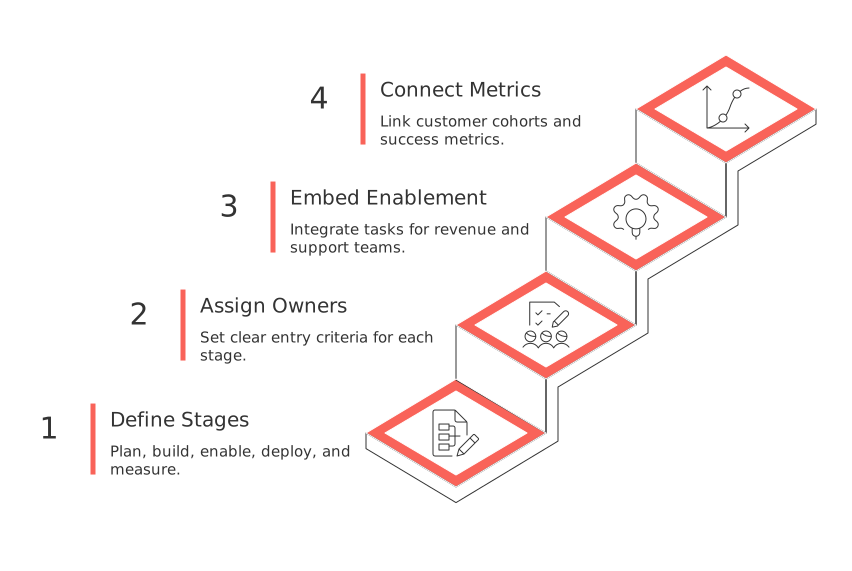
9 Create cross-team launch playbooks in Routine that align sales, success, and product
Complex launches require repeatable, coordinated steps. Build a cross-team playbook in Routine once and reuse it for every launch.
Define each launch stage: plan, build, enable, deploy, and measure.
Assign owners and set clear entry criteria for every stage.
Embed enablement tasks for revenue and support teams.
Connect relevant customer cohorts and success metrics to the launch project.
When discussing these strategies with stakeholders, consider mentioning alternatives such as Notion, ClickUp, or HubSpot. This will allow for better understanding and comparison and prevent any bias towards a particular tool.
10 Share executive-ready reports in Routine with saved views and concise summaries
Executives need meaningful, summarized insights. Organize critical metrics and decisions together in one accessible place.
Create saved views for essential metrics such as ARR impact, burn, cycle time, and adoption rates.
Highlight the top three risks along with responsible owners and due dates.
Include a concise summary that communicates what has changed and why.
When evaluating your CRM stack, review the HubSpot CRM overview to compare data structures and reporting features with Routine.
FAQ
How can Routine templates improve project efficiency?
Using Routine templates standardizes project setups, reducing redundant administrative tasks. This ensures teams maintain focus on strategic objectives rather than getting bogged down in repetitive setup processes.
Why connect CRM records with projects in Routine?
Integrating CRM records with projects in Routine ensures seamless handoffs and context retention. Ignoring this integration can lead to disjointed communication and missed opportunities due to poor visibility of client interactions.
What differentiates Routine's role-based dashboards?
Routine offers dashboards tailored to specific roles to prioritize work most relevant to each function. Generic dashboards can dilute focus and lead to missed critical tasks or decision delays.
What are the risks of not automating follow-ups in Routine?
Failure to automate follow-ups can lead to unnecessary delays, oversight of critical tasks, and ultimately lower project success rates. Routine automations ensure tasks are promptly addressed and escalated efficiently.
How does a unified taxonomy benefit workflow in Routine?
A unified taxonomy in Routine prevents the chaos of inconsistent labeling, which can slow down reporting and create confusion. Consistency in labels ensures efficient communication and reliable data analysis.
Why should SOPs be concise in Routine's knowledge base?
Concise SOPs reduce duplicated efforts and minimize ambiguities, ensuring clear guidance for execution. Lengthy SOPs can overwhelm users and detract from actionable insights.
Why is visual tracking of dependencies critical in Routine?
Visual tracking in Routine allows for immediate identification and resolution of blockers, facilitating proactive problem-solving. Ignoring this visual approach can result in unmanaged risks and project delays.
How do meeting pipelines translate to action in Routine?
Meeting pipelines in Routine transform discussions into structured actions with assigned responsibilities and deadlines. Without this conversion process, decisions remain theoretical and fail to drive tangible progress.
What makes cross-team playbooks effective in Routine?
Cross-team playbooks in Routine enable synchronized efforts across departments, mitigating misalignment risks. Lack of coherent playbooks can lead to fragmented launches and disparate team objectives.
How do executive-ready reports enhance decision-making in Routine?
Executive-ready reports in Routine consolidate crucial metrics, risks, and summaries to facilitate informed decision-making. Disorganized reports can obscure significant trends and delay strategic pivots.

Julien Quintard
Founder & CEO at Routine12/17/2025
