What Is a personal Life OS and How to Build One That Actually Works
What a personal Life OS means for executives and teams
A personal Life OS is much like an operating system for your personal and work tasks. It integrates projects, a lightweight CRM, and a knowledge base into one structured workspace. This reduces the need to jump between tabs and hunt for scattered files, while providing organized workflows that can scale from a single person to an entire team.
With a Life OS, every decision, document, and deal flows through unified objects and processes. You gain the clarity and accountability needed to work efficiently, without piling on additional tools.
The business case: why a Life OS cuts context switching
Switching contexts repeatedly can sap your speed and focus. By centralizing the most important elements of your work, objectives, project pipelines, and deliverables, a Life OS minimizes distractions. Executives get unified dashboards. Teams access a single source of truth. This results in faster cycles and fewer unnecessary status meetings.
Systems create consistency. Consistency compounds into outcomes.
The core data model for a Life OS that actually scales
Simplicity is key, map your work to a handful of shared entities, each with clear fields, statuses, owners, and automations:
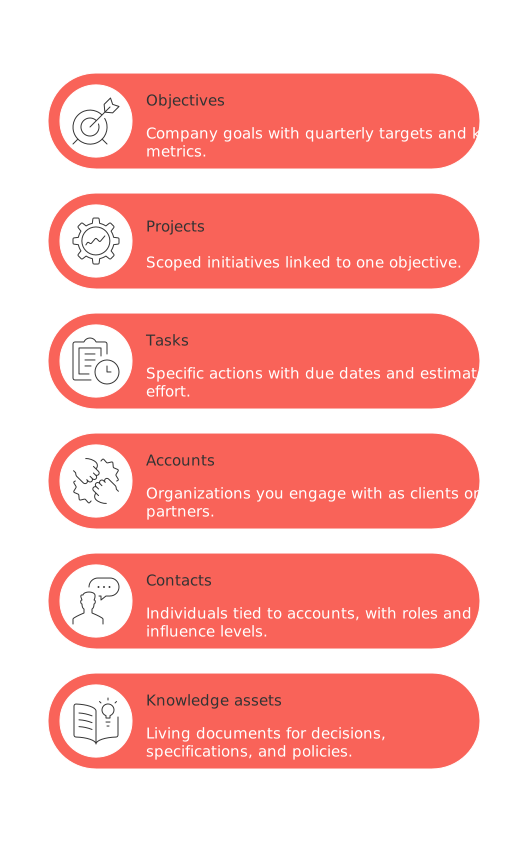
Objectives: Company goals with quarterly targets and key metrics.
Projects: Scoped initiatives linked to one objective.
Tasks: Specific actions with due dates and estimated effort.
Accounts: Organizations you engage with as clients or partners.
Contacts: Individuals tied to accounts, with roles and influence levels.
Knowledge assets: Living documents for decisions, specifications, and policies.
Align your status options across every entity. Use simple, defined stages like Backlog, In progress, Blocked, and Done. The fewer picklist options, the better your data quality and consistency.
How to choose the right platform for your Life OS
You need to make a decision whether to use a comprehensive single platform that can manage all tasks, or utilize a combination of different specialized tools for individual tasks. As you compare options, look at schema flexibility, permissions, automation capabilities, migration paths, and API maturity. For a detailed review, check out this side-by-side analysis of all-in-one workspaces versus specialized tools.
When selecting a platform for your Life OS, there are numerous options to consider. Popular choices among professionals include Routine, Notion, ClickUp, and Coda. Also consider where your CRM data will reside: some teams build CRM objects into their Life OS; others prefer to sync with established CRM platforms like HubSpot or Salesforce to avoid being locked in.
Step-by-step plan to build a Life OS that you will maintain
Set outcomes for the next 90 days. Choose 3–5 objectives with measurable goals.
Sketch your entity schema. Start with the six tables: objectives, projects, tasks, accounts, contacts, and knowledge assets.
Define statuses and entry criteria. Write brief definitions for each status. Make sure handoffs are clearly documented.
Create intake pipelines. Route incoming requests and leads into projects or accounts, not email folders.
Build essential views. Set up an objectives dashboard, a project kanban, and a straightforward CRM board.
Automate routine transitions. Auto-close tasks that go stale. Auto-flag blocked work after 48 hours.
Standardize templates. Utilize templates for projects and accounts to ensure no essential fields are skipped.
Run weekly reviews. Start with objectives, then review projects, then tasks, all within 45 minutes or less.
CRM inside your Life OS: a simple schema executives actually use
Keep your CRM lightweight and focused on actionable, forecast-relevant fields:
Account: name, segment, potential ARR, health score.
Contact: role, influence level, champion score.
Opportunity: stage, value, closing date, confidence, next action step.
Activities: last touch, next touch, owner, communication channel.
Define five succinct opportunity stages: Discovery, Validation, Proposal, Procurement, Won/Lost. Every opportunity must have a next step, if not, the deal is at risk.
Project management inside your Life OS: templates and visualization that drive delivery
Projects need structure to succeed. Leverage project templates that define scope, risks, and milestones from the start. Use this library of project planning templates to jumpstart your workflow. Visualize your projects with timelines or kanban views, and track blockers daily. Dive deeper with advanced visual tools, ai>Gantt charts or custom trackers, to find what matches your team’s pace.
Automation and integrations that keep your Life OS accurate
Automations ensure standards are upheld even on busy days. Start with these simple automated rules:
If a task is marked Blocked, notify the owner and add an Unblock by date.
If an opportunity moves to Proposal, create an automatic checklist for legal and security review.
If a project is delayed by seven days, alert the project sponsor and assign a recovery plan task.
Connect your Life OS with email, CRM, and document tools using native integrations or APIs. Only sync necessary fields, excess data leads to more errors and confusion.
Governance, roles, and data hygiene rules for a personal Life OS
Even individual-run systems benefit from simple governance. Assign clear roles:
Owner: manages the schema and templates.
Contributor: keeps tasks, deals, and deliverables up to date.
Reviewer: audits dashboards and cleans up outdated records.
Set basic data hygiene rules: every record needs an owner, status, and next action. Archive anything inactive each week. Don’t allow undefined stages or custom emoji statuses, precise language is essential.
Metrics that prove your Life OS works
Keep an eye on a few key performance indicators (KPIs), which hint at the future performance of the Life OS:
Project cycle time: time from start to finish, broken down by type.
Deal velocity: days spent in each CRM stage.
Work in progress: how many active projects are assigned per person.
Blocker half-life: average time tasks remain blocked.
Adoption: number of team members actively using the Life OS each week.
If these metrics trend positively over four consecutive weeks, your system is working. If not, simplify your schema and reduce the number of views.
Tools that can host a Life OS without lock-in
Remember, the tool you choose for your Life OS should align with your personal needs and work habits. Ensure any platform supports robust relational databases, detailed permissions settings, and event-based automation. If you plan to synchronize with a CRM, confirm that true two-way sync exists with platforms like Salesforce or HubSpot, avoid one-way exports that fall out of date.
For a closer look at visual management options, check out this overview on Gantt charts and project trackers for executives. Pick a view that communicates clearly with your stakeholders.
Common pitfalls when building a Life OS and how to avoid them
Too many fields. Remove any fields that aren’t absolutely necessary, updating information should take under 30 seconds.
Ambiguous statuses. Provide one-line definitions, and train users with simple examples.
No intake process. Implement a single, clear form or board for new requests to enter your system.
Automation sprawl. Only introduce automations to solve a measurable issue, don’t add complexity for its own sake.
Private silos: Keeping records private may lead to knowledge gaps within team members. Aim for shared records while maintaining appropriate access control and permissions.
Example schemas you can copy into your Life OS today
Project (table)
Fields: Name, Objective, Owner, Status, Start Date, Target Finish Date, Risk, Confidence (0–100%), Tags.
Status flow: Backlog → In progress → Review → Done.
Automation: If Confidence < 60% for 7 days, notify project sponsor.
Opportunity (table)
Fields: Account, Value, Stage, Close Date, Confidence, Next Step, Champion, Competitor.
Stages: Discovery → Validation → Proposal → Procurement → Won/Lost.
Automation: If there is no Next Step listed, flag as At Risk.
Knowledge asset (page)
Fields: Type, Owner, Last Reviewed, Linked Projects, Linked Accounts.
Governance: Review every quarter; archive records if unused for 12 months.
Next steps to pilot your Life OS and roll it out
Begin with one executive and one team. Import five projects and five deals. Test the system for two weeks, remove features you don’t use, and add anything you find yourself missing. Once refined, train the rest of your team using those proven templates.
If you’d like a more in-depth review before moving forward, see the earlier guide contrasting all-in-one platforms and specialized tools. For inspiration and ready-made structure, borrow from these project planning template examples for charters and roadmaps. This way, your Life OS will remain simple, actionable, and scalable for future growth.
FAQ
What is a personal Life OS?
A personal Life OS is an all-in-one system designed to streamline your personal and work tasks. It combines project management, CRM, and a knowledge base into a cohesive workspace, reducing the need for multiple tools. While tempting to think it's a magic bullet for productivity, its success depends on proper setup and consistent maintenance.
How does a Life OS reduce context switching?
A Life OS centralizes key work elements into one unified system, minimizing the disruptive task-switching that kills efficiency. It provides dashboards and a single source of truth, yet beware of over-relying on technology alone to solve focus issues—discipline is equally essential.
What considerations should I take into account when choosing a platform for a Life OS?
Look for platforms that offer flexibility in schema design, robust permission features, and reliable automations, like those found in Routine. Beware of vendor lock-in with inadequate API integrations and always consider future scalability when choosing your tools.
What are common pitfalls in building a Life OS?
Too many data fields and ambiguous statuses can cripple your Life OS. Avoid unnecessary complexity and ensure every feature tackles a real need, rather than adding confusion. Keep it lean for efficiency and ensure your team is adequately trained to prevent private silos.
Is it better to use one platform for a Life OS or multiple specialized tools?
Utilizing a single, comprehensive platform can simplify management and reduce fragmentation, while multiple tools might offer greater specialization. Choose based on your team's specific needs and integration requirements, but avoid sacrificing functionality for simplicity.
What are the key components of a Life OS that scales?
Effective Life OS models focus on objectives, projects, tasks, accounts, contacts, and knowledge assets. While simplifying is crucial, avoid creating too few categories that force incompatible tasks under the same umbrella, leading to confusion and inefficiency.

Julien Quintard
Founder & CEO at Routine02/03/2026
