Intercom, Front, Notion: Why Patchwork CRMs Fail (And How to Make it Work)
1. Intercom: When support drives the deal
Intercom is particularly effective in environments where early buying signals are reflected through product usage and interactions with support. If your typical customer journey includes moving from a trial user to engaging in support chats and, ultimately, to account expansion, this likely explains why Intercom frequently finds itself occupying CRM territory.
Why it’s in this top
Intercom transforms real product activity into significant commercial moments. Few tools enable teams to surface “who did what” within your app with the immediacy that Intercom provides.
Core strengths
Event-based targeting that segments users by tangible product actions (such as “created first project,” or “invited three teammates”).
Context-rich timelines that merge messages, articles, and conversations for each user or company.
Automation capabilities that span inbound chat, bots, and intelligent routing to the appropriate owner or queue.
Quick qualification within the messenger, allowing for fast triage before the sales team engages with a lead.
Where patchwork fails
Contacts, companies, and conversation tags in Intercom often do not align with CRM fields or stages, resulting in inconsistent pipeline metrics.
Expansions initiated by support may be seen as “won” deals by individuals but aren’t reflected accurately in your official forecast.
Make it work in a patchwork
Establish a single source of truth for contacts and companies, such as HubSpot or your preferred CRM, and ensure that all Intercom users are mapped via email and domain.
Create strict field agreements: lifecycle stage, segment, and product-qualified lead (PQL) flags should sync one-way into Intercom, while ownership and deal stages sync one-way back to the CRM.
Convert significant product events into explicit sales tasks or create deal stage updates through integration (e.g., “invited three teammates” triggers the creation of an “Expansion – Seats” deal).
Example: When a user’s account in Intercom reaches “Usage > 80% of plan,” your integration automatically creates a renewal or expansion deal in the CRM, assigns it to the CSM, and posts an internal comment in the Intercom conversation thread with the deal URL, consolidating follow-up in one location.
2. Front: The inbox aspiring to be a CRM
Front excels for teams whose go-to-market motion relies extensively on email, manages inbound RFPs, collaborates through partner channels, or handles customer interactions that originate in shared inboxes. It is often used as a makeshift CRM because, for many, the “conversation” itself becomes the key unit of work.
Why it’s in this top
It brings accountability to team email: clear ownership, deadlines, and transparency, without the chaos of lengthy forwarding chains.
Core strengths
Shared inboxes with owner assignments, service level agreements, and collision detection to prevent multiple reps from replying at the same time.
Flexible rules and routing options that label, escalate, or auto-reply based on context (for example, automatically routing emails tagged “RFP” to the partnerships team).
Metadata linked to conversations and app integrations that display relevant CRM context directly alongside the thread.
Support for internal comments and draft collaborations to coach replies without sending unnecessary emails.
Where patchwork fails
Deals often exist as lengthy email threads, lacking defined stages, values, or expected close dates.
Contact and company information may be incomplete or duplicated across aliases and shared addresses.
Make it work in a patchwork
Implement automatic creation or association so every new external email attaches to a contact and account in the CRM using domain matching.
Eliminate the use of the inbox as the sole record of a deal. Use quick actions to create or update deal records as soon as an opportunity is identified.
Standardize labeling in Front to correspond with CRM fields (e.g., “RFP,” “Security review,” “Legal”) and enable one-way syncing for accurate reporting.
Example: When a “Pricing for 200 seats” inquiry arrives at sales@, Front tags it as “Opportunity,” automatically creates a deal with an amount placeholder, assigns the account executive, and posts the CRM deal link back to the conversation for continuity.
3. Notion: Flexible database, but often lacking core CRM structure
Notion is highly appealing for teams who prefer customizing their organizational structure and databases to fit their specific workflow needs, whether that means structuring ICP matrices, tracking product feedback, organizing partner directories, or managing renewal calendars. For CRM use, this flexibility is both an advantage and a risk.
Why it’s in this top
It enables revenue operations teams to move quickly without relying on engineering. You can add a new field or create a custom view in minutes and place process documentation alongside operational data.
Core strengths
Dynamic, customizable databases with built-in relations and rollups for tailored account briefs and playbooks.
Multiple view types (table, board, timeline) accommodating the needs of sales, customer success, and management workflows.
Readable documentation and checklists located side-by-side with pipelines and lists for easy access and updates.
Granular permission controls to securely share account hubs with cross-functional teams.
Where patchwork fails
There’s no inherent concept of lifecycle objects, such as contacts, companies, or deals, with standardized validation rules and stage logic.
Reporting and forecasting are typically intensive manual efforts or require third-party tools to function effectively.
Make it work in a patchwork
Use Notion as the central hub for enablement and planning, not as your primary system of record. Sync read-only CRM data wherever possible (such as accounts and active deals) for context.
Maintain a consistent “Account Hub” template that pulls in relevant CRM fields, important documents, and active projects through database relationships.
Clearly define which fields should be edited in Notion and which must be managed in your CRM, locking fields in Notion as necessary to avoid conflict.
Example: A customer success manager opens the “Acme Account Hub” in Notion to view the active expansion deal (synced from the CRM), linked implementation projects, and a curated list of product feedback related to upcoming roadmap items.
4. Routine: An all-in-one workspace with CRM at its core
Routine integrates project management, a knowledge base, CRM, and meeting features in one platform, providing a common context for both revenue generation and product delivery processes. For teams that want to stop switching between separate project systems, documentation tools, and CRMs, this level of consolidation allows the entire workflow to be modeled in a single environment.
Why it’s in this top
Patchwork solutions often break down during crucial transitions, when a deal turns into a project, or a customer question leads to a new task. Routine elevates these transitions by treating the connections between records as native features rather than external integrations to maintain.
Core strengths
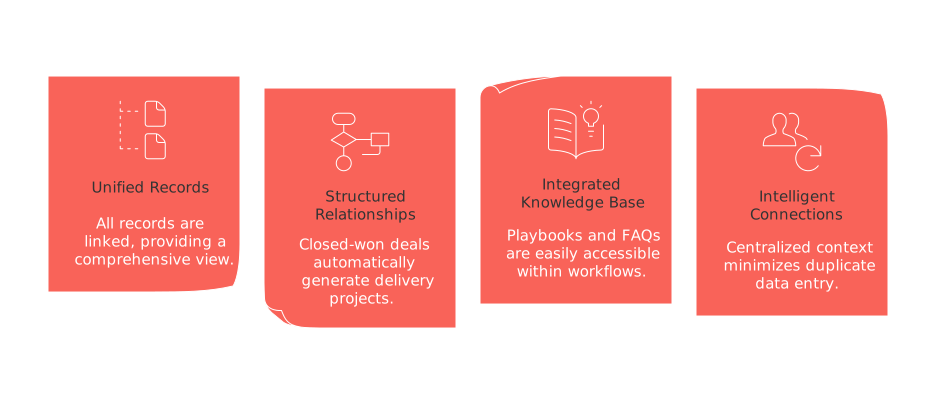
Unified records for accounts, deals, projects, and documentation, with two-way links between all objects.
Structured relationships so closed-won deals can automatically generate delivery projects and tasks, all connected back to the original revenue event.
An integrated knowledge base positioned directly alongside CRM and project workflows, putting playbooks and FAQs one click away from operational work.
Intelligent connections between objects, minimizing duplicate data entry and centralizing context in one workspace.
Where patchwork fails (and Routine helps)
Handoffs suffer when sales teams close a deal but delivery lacks visibility into the project scope. Routine directly associates scope documents and projects to deals by default.
Accountability issues arise when tasks are disconnected from CRM records. Routine resolves this by tying tasks directly to accounts and deals, ensuring responsibility remains clear.
Make it work in your stack
Adopt Routine as your central operating hub and clearly define your CRM strategy, either leverage Routine’s built-in CRM as your system of record, or connect it to an external CRM with strict data ownership rules.
Implement a “Closed-won → Project” workflow blueprint to automatically generate milestones, stakeholders, and deadlines from deal records.
Keep playbooks and process pages in close proximity to sales pipelines and active projects, so any changes immediately flow to frontline workflows.
Example: When “Acme – 200 seats” is marked as Closed-won, Routine automatically generates the onboarding project, attaches the scope document, assigns delivery milestones, and keeps both revenue and project progress in sync for accurate reporting. When evaluating options, consider assessing Routine alongside competitors like ClickUp or Monday.com to determine which system best supports your team’s preferred workflow.
5. HubSpot CRM: The dedicated anchor that patches the gaps
When the integration of multiple tools proves inconsistent or unstable, a dedicated CRM provides a reliable, structured solution. HubSpot is a commonly chosen anchor for B2B organizations, balancing robust data structure with user-friendly configuration.
Why it’s in this top
HubSpot brings together contacts, companies, deals, and activities under a single platform. It provides workflows and reporting that can be managed by operations teams without a dependence on engineering resources.
Core strengths
Structured objects and pipelines with built-in validation, mandatory fields, and stage logic to maintain clean data.
Automated workflows for routing, managing the lifecycle, and enforcing SLAs across marketing, sales, and success functions.
Comprehensive dashboards and attribution to link activity directly to revenue, all without relying on spreadsheets.
Integrations with tools like Intercom, Front, and collaborative workspaces, consolidating events and interactions under unified records.
Where patchwork fails
Identifying unique contacts and companies across disparate apps is challenging, but the CRM enforces a single identifier for each.
Forecasting accuracy declines when information is spread across slide decks and tools; the CRM centralizes all relevant data such as stages, values, and close dates.
Make it work in a patchwork
Designate HubSpot as the definitive source of truth and thoughtfully plan one-way or two-way data syncs (e.g., maintain owner and stage authority within HubSpot).
Mirror only the essential set of fields within connected tools like Intercom, Front, or Notion, as minimal field syncing reduces friction and errors.
Automate pivotal transitions to tie cross-functional workflows together: prompt deal creation from key product events, move RFP emails into an “opportunity” stage, and trigger delivery projects for closed-won deals.
Example: When a user in Intercom is qualified as a PQL, a workflow creates a corresponding HubSpot contact at the correct lifecycle stage, starts an outreach sequence, and posts a link into Front, ensuring subsequent responses are tied to the appropriate CRM record.
How to decide: Consolidate or patch, three quick rules
If answering a simple revenue question requires opening three tools, centralize the workflow in a single platform.
If your processes change frequently, center your operations on a flexible workspace and sync just the essentials to a dedicated CRM.
If audit trails, forecasting accuracy, or renewals are suffering, designate a primary CRM as your system of record and treat other tools as supporting context only.
Conclusion
Patchwork CRMs often break down at connection points, such as identity management, handoffs, and reporting gaps. The solution is to establish a single backbone (either a dedicated CRM or an all-in-one workspace with CRM capabilities), define clear field contracts, and convert key product activities, inbound emails, and deal changes into shared, integrated workflows.
If your team is ready to unify CRM, project management, and institutional knowledge, consider exploring a consolidated workspace like Routine, or run comparisons with platforms such as ClickUp or Monday.com. Assess which option best maintains deals, projects, and context within a streamlined, cohesive workflow.
FAQ
Why should companies integrate CRMs like Intercom or Front?
Integrating CRMs like Intercom or Front allows companies to streamline their processes, create a centralized repository for client interactions, and ensure that sales opportunities are not missed due to fragmented tools. However, the challenge lies in maintaining consistent data mapping and avoiding broken workflows.
What are the risks of using Notion as a CRM?
Notion's flexibility can lead to inconsistent data entry and lack of standardized processes, making it unsuitable as a primary CRM. Without the inherent structure of traditional CRM systems, lifecycle tracking and reporting can require significant manual effort, often negating the perceived advantages.
How does Routine improve workflow transitions?
Routine excels by natively connecting key processes, like deal closures to project initiation, minimizing manual tasks and ensuring smooth transitions between sales and delivery teams. Despite this advantage, reliance on an all-in-one tool can compromise specialized functionality available in dedicated apps.
What makes HubSpot a preferred choice for CRM integration?
HubSpot is valued for its ability to consolidate multiple data points into a unified platform, reducing errors common in patchwork systems. Yet, its perceived simplicity can lead to underutilization of its more advanced customization and performance-tuning capabilities.
When is it better to consolidate tools rather than patching them?
If retrieving simple information requires juggling multiple tools, consolidation is necessary to enhance efficiency. However, blindly integrating everything may result in loss of functionality tailored by specialized tools, so weigh the benefits against potential trade-offs carefully.
How do patchwork CRMs impact forecasting and reporting?
Patchwork CRMs scatter data across different systems, muddying the clarity needed for accurate forecasting and reporting. As gaps widen at the integration points, teams can find themselves reacting to incomplete or outdated insights instead of proactive, strategic planning.
Are automation features enough reason to choose a CRM?
While automation saves time, overly relying on it can surface issues if workflows are misconfigured or not adequately monitored. The value of a CRM lies in how well it supports complex decisions through intelligent processes, not merely in automating routine tasks.

Julien Quintard
Founder & CEO at Routine01/12/2026
