Notion CRM vs Airtable CRM for Agencies: Data Models, Templates, and Limits Compared
What agencies actually need from a CRM and how Notion CRM and Airtable CRM map to it
Agencies often manage a complex web of relationships within every deal, brands, stakeholders, partners, and delivery teams. Both Notion CRM and Airtable CRM can represent these interconnected entities, but each does so in its own way.
Beyond relationship tracking, agencies need features like quoting, renewals, and visibility into profit margins across both retainers and projects. Speedy overviews and minimal admin effort are also central.
Unified timeline covering emails, calls, and assets
Multiple pipelines for different service lines
Renewal and upsell tracking integrated with delivery workflows
Granular permissions for both clients and contractors
Dependable automations and clear, actionable reporting
We sell retainers, deliver sprints, and expand accounts without re-entering data. This expectation pushes agencies to seek platforms that serve as a reliable, all-encompassing source of truth.
Data model comparison for Notion CRM vs Airtable CRM in agency pipelines
Notion handles records as pages within databases, connecting them through relations and rollups. The experience is document-centric, making it ideal for workflows heavy on narrative context.
Airtable, in contrast, treats records as rows in tables, allowing links, lookups, and formulas. This spreadsheet-first approach lends itself to more structured, relational data models.
Modeling many-to-many realities
In Notion, you create a relation for each desired connection and use rollups for summary reporting. This supports complex, nested contexts efficiently.
In Airtable, many-to-many relationships are typically modeled with junction tables. These linked records can remain performant even as the system scales.
View logic and pipeline hygiene
Notion’s filtering is property-based, users can quickly group, board, or timeline views to match team needs and save filters for each group.
Airtable provides grid, kanban, calendar, and form views, further extended with Interfaces for different stakeholders. Consistent saved views enhance operational discipline.
Template availability and setup speed for Notion CRM vs Airtable CRM
Notion’s templates start with basic entities and relations, which you then customize for your agency’s specific services, retainers, or quoting workflows.
Airtable delivers templates with multi-table CRMs, pre-configured Interfaces, and ready-made automations. This makes it easy for agencies to get up and running, expanding functionality as they grow.
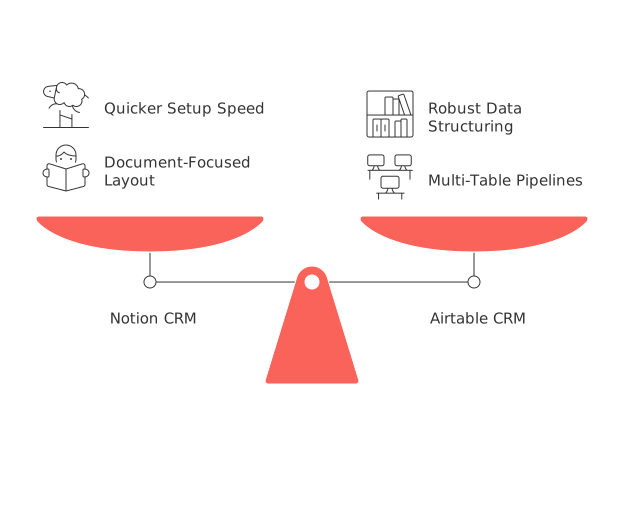
For agencies that work extensively with narrative-rich records and detailed briefs, Notion is typically quicker to set up thanks to its document-focused layout and user-friendly interface.
Conversely, Airtable excels for agencies managing complex, multi-table pipelines and dashboards, owing to its robust data structuring and visualization features.
Regardless of which tool you select, it’s vital to establish clear naming conventions and property standards from day one. This practice prevents confusion and messy databases as you scale.
Workflow automation, interfaces, and reporting in Notion compared with Airtable for agencies
Airtable Automations make it possible to trigger actions based on record changes or scheduled rules, updating fields, calling webhooks, or sending messages.
Notion also supports native actions and integrates strongly with leading integration platforms (iPaaS), enabling reliable updates to tasks, messages, and documents.
Airtable Interfaces allow the creation of customized, role-based dashboards without complex formulas. This ensures every stakeholder sees the metrics most relevant to them.
For actionable sales process improvements, use proven playbooks and adapt them to your preferred platform. Explore these B2B sales automation ideas to jumpstart your own approach.
Scalability, permissions, and data governance in Notion vs Airtable for agencies
Airtable enforces limits based on your subscription plan, including caps on records, attachments, and automation runs. Roles and Interfaces enable segmenting access for different users.
Notion offers flexible scaling on pages and relations, but very large databases may experience slowdowns unless fields and formulas are kept streamlined.
Agencies with contractors often require nuanced access control. While Airtable offers granular sharing with tighter control at table and interface levels, Notion opts for a more straightforward, user-friendly sharing system.
Governance becomes essential as you scale to multiple brands or regions. Assign ownership for properties, schema changes, and automations to keep your system well-organized and compliant.
Integration patterns and API constraints that impact an agency CRM in Notion and Airtable
Airtable’s API is optimized for table-centric data reads and writes, following well-defined schemas. Take note of rate limits and use batch operations where possible.
Notion’s API is page-centric, offering a high degree of customization through the use of flexible blocks and their capability to manage database properties. For robust syncing, normalize your data attributes before integration.
Common workflow patterns often include the use of integration platform as a service (iPaaS) tools for tasks such as email parsing, data enrichment, and syncing tickets between systems. Avoid having duplicate data entries across different apps.
If integrating communications platforms like Intercom or Front, it’s advisable to model conversation threads as related records rather than loading all correspondence into deal records.
Cost of ownership and time-to-value for agencies choosing Notion or Airtable as a CRM
Various factors shape the actual cost of using these platforms, including the number of seats, the extent of automations, storage needs, the use of external tools, and the time spent on setup and ongoing work to manage and update the system’s schema.
Airtable can shorten time-to-value for dashboard and pipeline management, while Notion can reduce the time required for preparing briefs and capturing narrative context. The best fit depends on your agency’s workflow priorities.
Project your costs and potential savings across a 12-month period, stress-testing your setup with sample data and workflows.
When an all-in-one workspace or dedicated CRM replaces Notion or Airtable for agency growth
As agency operations scale and become more complex, with requirements like advanced quoting, service level agreements, and recurring revenue management, out-of-the-box templates in Notion or Airtable may no longer suffice.
In these scenarios, agencies sometimes migrate to platforms that unify CRM, project management, and knowledge-sharing tools, such as Routine or ClickUp. Dedicated CRM platforms like HubSpot or Pipedrive can also be strong alternatives. Whenever testing a switch, run real deal pipelines before making changes system-wide.
For a thoughtful evaluation, compare unified workspaces and standalone CRM solutions with a structured framework. Use this comparison guide for all-in-one vs dedicated tools to guide your decision-making.
Practical recommendations for agencies choosing between Notion CRM and Airtable CRM
Opt for Notion if your agency’s sales process relies heavily on detailed briefs, content, and rich project narratives. Just be prepared to invest time in thoughtful reporting setup and ongoing schema management.
Choose Airtable if your workflows revolve around structured, multi-table data, complex dashboards, and role-specific Interfaces. Document your data modeling decisions early and review them as your agency grows. choice = Airtable if relational_complexity >= medium
Whichever platform you choose, standardize properties, limit data clutter, and revisit your schema on a quarterly basis to keep pace with evolving service lines.
For visualization strategies that support simple project tracking after a deal closes, look beyond basic CRM templates to ensure smooth delivery alignment with your sales pipeline.
FAQ
What are the main differences between Notion CRM and Airtable CRM?
Notion operates on a document-centric model ideal for narrative-rich workflows, while Airtable offers a structured, spreadsheet-based approach better suited for managing complex data relations. Choose based on your agency's primary needs: narrative context or structured data management.
How do Notion and Airtable handle multi-table relationships?
Notion uses relations and rollups to navigate complex, nested contexts efficiently, while Airtable employs junction tables to model many-to-many relationships, maintaining performance at scale. Choose Notion for flexibility and Airtable for structured relational frameworks.
Can either Notion or Airtable support automation effectively?
Airtable provides robust automation capabilities via triggering actions based on record changes, whereas Notion's strength lies in integration with iPaaS platforms for task and document updates. Strategize your automation requirements before selecting a platform.
Which platform is more cost-effective: Notion or Airtable?
The cost-effectiveness depends on factors like the number of users and your automation needs. Airtable may offer quicker returns on dashboard management, while Notion can save time on narrative tasks. Estimate long-term costs based on your specific agency needs.
When would an agency outgrow Notion or Airtable as their CRM solution?
Agencies typically outgrow these platforms when dealing with highly complex operations that demand advanced CRM functionalities like service level management or intricate quoting systems. At that point, transitioning to a dedicated CRM like HubSpot or an all-in-one tool like Routine might be necessary.
What considerations are there for data governance when using Notion or Airtable?
In Airtable, permissions and access control are more granular, aptly suiting larger teams requiring segmented access. Notion offers broad sharing options but requires thoughtful schema management to prevent sluggishness in large databases. Governance should always be a priority to avoid data chaos.
How can I ensure my CRM setup scales efficiently as my agency grows?
Implement clear naming conventions and property standards from the start, and regularly review your database schema. Poor setup leads to cumbersome data management and inefficiency, affecting scalability and operational fluidity.

Julien Quintard
Founder & CEO at Routine02/16/2026
