How to Create a Sales Prospecting Agent with AI
Set the goal and outline non‑negotiables
Before building any workflow, define exactly what success looks like.
Volume target: How many new, ICP-fit accounts do you want to target each Monday?
Quality bar: Ensure that each prospect has a verified email, validated role, and matches your firmographic criteria.
Channels: Email should be the primary channel, with optional social outreach and calling only after a positive reply.
Latency: Ensure each new lead receives their first outreach within four hours of inclusion.
Guardrails: Exclude anyone who has opted out, competitors, or current customers from outreach.
Define your ICP and perform effective segmentation
Clear ICP definition and segmentation prevent your pipeline from filling up with irrelevant leads.
Firmographics: Focus on the right industries, headcounts, funding status, revenue ranges, and regions.
Technographics: Consider what CRM, marketing automation, and key integrations your ideal customers use.
Buying roles: Identify economic buyers, champions, users, and blockers.
Exclusions: Rule out agencies, partners, students, government entities, or your current customer base.
Buying triggers: Look for signals like hiring a new VP of Sales, adding SDRs, launching new products, or recent funding rounds.
Create tight, well-defined segments mapped to specific messages and value propositions. Avoid broad segments to maintain high personalization.
Assemble data sources and enrich your lists
Combine multiple data sources to fill gaps and reduce bias.
Prospect discovery: Use platforms like LinkedIn Sales Navigator, Crunchbase, Apollo, ZoomInfo, Clearbit, and Clay.
Firmographic enrichment: Leverage tools like Clearbit, Crunchbase, and People Data Labs for additional company data.
Email validation: Validate emails using services such as NeverBounce, ZeroBounce, and Bouncer.
Intent signals: Monitor sources like Bombora, G2, website events, and job postings to identify active buyers.
Suppression lists: Maintain lists of current customers, trials, churned logos, and do-not-contact domains to exclude.
Never rely on a single data vendor , always use fallback providers and implement confidence scores. Keep a record of source fields and timestamps. This data is essential for auditing, ensuring transparency and accountability in your process.
Design the trigger, ensure deduplication, and set guardrails
Schedule
Schedule your prospecting workflow to run at 08:00 in your main operating time zone. If you manage multiple regions, run separate jobs for each.
Idempotency
Generate a stable lead key. This involves using a ‘SHA256’ function on the lowercased email and company domain, creating a unique code for each lead.
Use upsert operations instead of inserts, treating duplicates as updates to maintain clean data.
Deduplication rules
First, match based on email. If no match, try matching by domain and full name.
Implement fuzzy matching for company names within a safe similarity threshold.
For contacts with multiple titles, collapse to the most relevant buying role.
Guardrails
Always respect your suppression and opt‑out lists to maintain compliance.
Throttle email sends to safeguard your domain’s sender reputation.
Pause campaign activity immediately if bounce rates exceed your defined limit.
Orchestrate the workflow in your CRM or workspace
You can run this process in an integrated workspace tool like Routine or within a CRM such as HubSpot. For managing and automating the workflow, consider tools like Zapier, Make, or n8n. Alternatively, you could utilize vendor APIs directly from a simple, less resource-intensive service.
Automate tasks that are repetitive and time-consuming, but keep review and approval steps agile and human-driven.
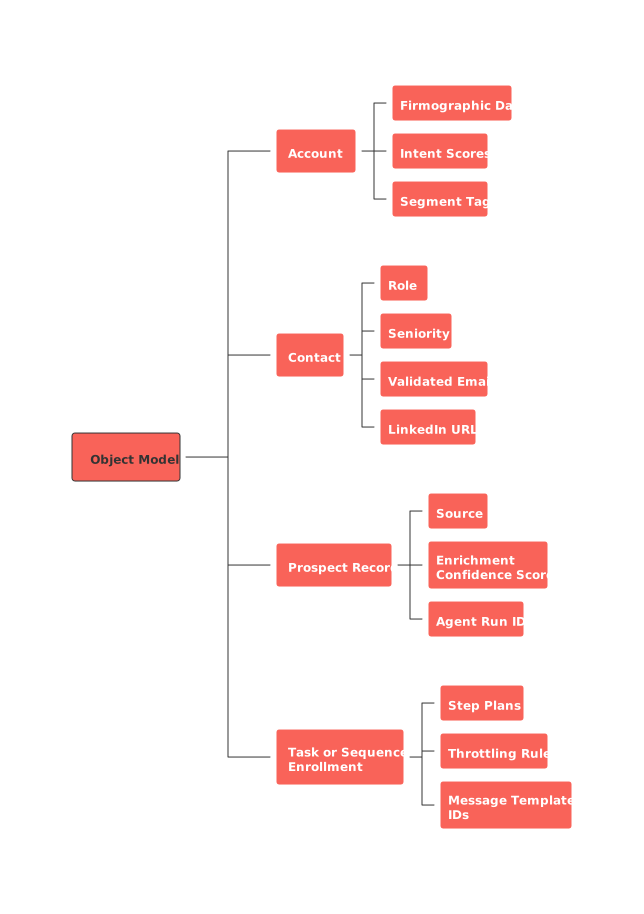
Suggested object model
Account: Store firmographic data, intent scores, and segment tags for each account.
Contact: Track role, seniority, validated email, and LinkedIn URLs.
Prospect record: Include source, enrichment confidence score, and agent run ID.
Task or sequence enrollment: Outline step plans, throttling rules, and message template IDs.
Write outreach sequences that feel personalized, not like spam
Create subject lines under 45 characters that also provide a clear reason for opening the email.
The first line of your email should reference the specific trigger or segment; avoid generic introductions.
Keep email one to three short, direct sentences with a single call to action.
Use a maximum of two personalization tokens, avoid forced or superficial familiarity.
Vary your outreach steps: start with email, add a social touch, follow up with another email, and use a clear break-up message if needed.
Test at least two value message angles for each segment, and keep an up-to-date champion log.
Start with a measured, smaller volume of initial sends on Monday mornings, gradually increasing to the full volume by noon.
Assign ownership, shape the pipeline, and log valuable context
Ensure fair lead distribution and keep territory boundaries clear.
Assignment: Allocate leads round-robin based on each rep’s capacity and territory rules.
Auto‑creation: Automatically create deals only for leads that pass your minimum intent score threshold.
Context fields: Record trigger reason, data source, and the last validation date for every lead.
SLA: Require all new Monday leads to be triaged by sales reps by 14:00.
Compliance, consent, and data retention
Honor opt‑out requests across all systems. Sync your suppression lists regularly across all tools.
Store the consent status for each contact, including timestamp and original source.
Establish clear retention timelines and regular data purge schedules for prospect information.
Provide training for representatives on regional compliance rules including CAN‑SPAM, GDPR, and CASL.
For detailed information on commercial email compliance, review the official CAN‑SPAM compliance guide from the FTC.
Essential metrics to check by Monday noon
Input: How many new ICP accounts were added this morning?
Quality: Review your email validation pass rate and bounce rate.
Throughput: Track leads assigned, sequence enrollments, and speed to first engagement.
Early outcome: Monitor opens, replies, positive responses, and meetings set.
Pipeline: Review opportunities generated and transaction value linked to the run.
Waste: Count duplicates blocked and contacts suppressed.
Troubleshooting and continuous improvement
High bounces: Test a new validator, increase your confidence threshold, and slow down sending.
Low opens: Experiment with different subject lines for each segment and monitor your sending domain’s reputation.
Poor reply rates: Refine your value propositions and eliminate generic claims.
Duplicate issues: Improve matching accuracy and standardize incoming data.
Slow handoffs: Review SLAs and set alerts for any leads that are idle too long.
How this automated agent fits in your sales operating system
This weekly process should complement, not clash with, your other sales workflows. For more inspiration on optimizing sales automation, explore these essential B2B sales automations. Managing your data and workflows within an all-in-one tool like Routine or a robust CRM like HubSpot will help ensure both structure and flexibility, letting your chosen orchestration tool power your process efficiently.
FAQ
Why is defining non-negotiables important before building a workflow?
Non-negotiables set clear parameters that guide your strategy and prevent resource wastage. Without them, operations risk being reactive, chasing any lead regardless of fit or value, which undermines strategic growth.
How does firmographic segmentation enhance pipeline quality?
Firmographic segmentation targets companies with the right industry verticals, sizes, and financial profiles. Ignoring this can flood your pipeline with prospects that don't genuinely benefit from your offering, leading to low conversion rates.
Why is lead deduplication crucial in this process?
Deduplication ensures you aren't chasing the same prospect repeatedly, which can damage your brand's reputation and inflate operational costs. Repetition degrades data quality and can even lead to violations of communication laws.
What risk does relying on a single data source pose?
Depending on a single provider introduces biases and increases the risk of outdated or inaccurate data. Diverse sources diversify insights, creating a more reliable and holistic view of your prospects.
Why is it necessary to monitor email bounce rates closely?
High bounce rates jeopardize your domain's sender reputation, leading to deliverability issues across your entire email strategy. Ignoring them might result in blacklisting, cutting off communication channels with key prospects.
What are the dangers of superficial email personalization?
Superficial personalization can come off as insincere and undermine trust, reducing engagement. Genuine personalization requires insightful triggers and real understanding of the recipient's context, not just filling in a name field.
Why is regular data purging advised in data retention strategies?
Holding outdated or irrelevant data clogs systems and creates compliance liabilities, especially under rigorous regulations like GDPR. Periodic purges ensure data remains actionable and in line with legal obligations.
Is automating lead processes without human oversight risky?
Automation without human checks risks errors propagating unchecked, which can snowball in impact. Human oversight provides critical intervention points, ensuring findings are accurate and strategies are adapted in real-time.

Julien Quintard
Founder & CEO at Routine12/12/2025
