Why Your Company Drowns in Tools? (And How a Unified Object Model Fixes It)
When tools multiply, context dies
Work tasks and processes are often spread across a variety of platforms: project boards, customer relationship management systems (CRMs), and wikis. Each system holds only a fraction of the full picture, forcing people to chase updates instead of focusing on real outcomes.
Sales updates a deal, but delivery teams never see the change.
Product teams adjust scope, yet revenue forecasts remain outdated.
Legal finalizes a contract, but onboarding still waits for someone to notify them.
The solution isn’t just process, it’s structural. Unify how your business represents and manages work.
What a unified object model actually means
An object model establishes shared entities and their relationships, forming the backbone of your operations.
Objects: These include Account (the customer record), Contact (individuals associated with the account), Deal (specific business agreement), Project (a specific work initiative), Task (actionable work item), Document (relevant paperwork), Deliverable (products or services to be provided for the client), Risk (potential issues or threats), and Decision (resolved choices with rationale).
Relationships: For example, an Account owns Deals and Projects. Projects contain Tasks and Deliverables. Decisions are connected to Risks and Documents.
Events: These are significant markers in the workflow, such as status changes, approvals, handoffs, and breaches in service level agreements (SLAs), which outline standardized service expectations.
Views: Role-based perspectives that display the same core information to different teams, tailored to their needs.
With a unified model, every update is reflected in a single, consistent structure. This ensures all relevant details and context remain directly associated with each work item as it moves through your business.
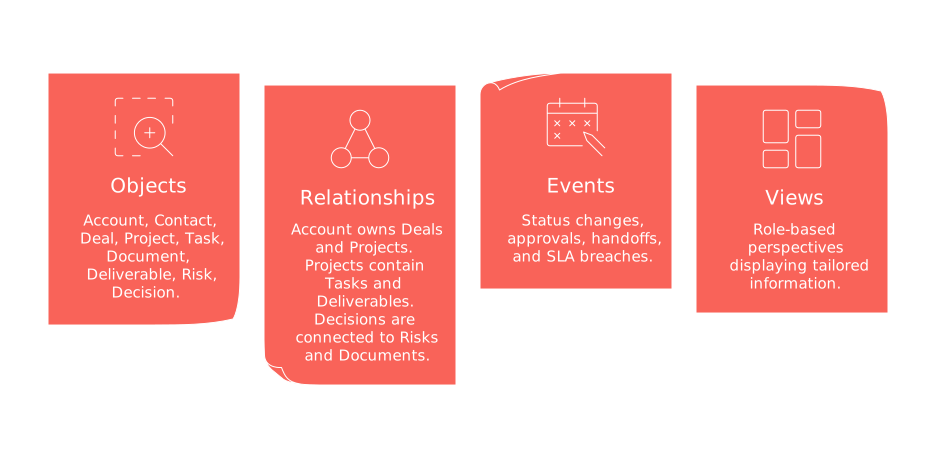
A simple object map for cross-functional work
Core objects
Account: This represents the customer entity and is linked to Contacts, Deals, and Projects.
Deal: A revenue opportunity tied to an Account; it usually leads to a Project once closed.
Project: The delivery container for work, housing Epics, Tasks, Risks, and Deliverables.
Task: An actionable work item with an assigned owner, status, due date, and connections to related objects.
Document: Any relevant specification, statement of work (SOW), or plan; documents reference the objects they inform or support.
Decision: A recorded choice, dated and accompanied by an approver and rationale.
Key relationships
Account → Deal (one-to-many)
Deal → Project (one-to-one or one-to-many)
Project → Task, Deliverable, Risk (one-to-many)
Decision ↔ Risk (many-to-many)
Document ↔ Project/Deal/Decision (many-to-many)
These connections keep revenue, delivery, and knowledge tightly linked, eliminating the endless search for critical context.
How it fixes the daily grind
Handoffs become traceable: A Deal transitions to a Project, carrying its full history.
Reviews run faster: Leaders open an Account and instantly see health, active work, and current risks.
Duplication shrinks: One Account holds a single, shared record accessible by all teams.
Automation stays sane: Triggers rely on robust, centralized objects instead of fragile copies.
Analytics align: Metrics reference a unified data structure, avoiding the need to reconcile multiple exports from different systems.
Implementation patterns that work
All-in-one platform: Model objects in a unified workspace. Tools like Routine or Notion can house CRM, projects, and documents together for a complete view.
Best-of-breed, integrated: Retain specialized systems, Salesforce or HubSpot for CRM, Asana or Jira for projects, while integrating them with a clear schema and using integration platforms as a service (iPaaS).
Data layer first: Store your unified model in a data warehouse, surfacing views in applications via APIs and reverse ETL for flexible access.
Choose the implementation path that fits your team’s capabilities and appetite for risk.
Map your schema in five workshops
Inventory objects: List every entity you track today. Merge overlapping or duplicate terms.
Define fields: Retain only the fields that inform decisions, and manage active statuses carefully.
Draw relationships: Determine how entities relate, including cardinalities (one-to-one, one-to-many) and ownership rules.
Set lifecycles: Establish entry and exit criteria for every status within each object.
Decide events: Identify which events truly matter, and clarify who needs notifications for each.
Consolidate every decision directly into your model, avoid dispersing this critical knowledge across scattered documents or files.
Governance you cannot skip
RACI for objects: Assign both an owner and a steward to each object to ensure accountability.
Change control: Version your schema and communicate any breaking changes promptly.
Access: Grant view and edit privileges by role, object, and specific fields.
Quality checks: Enforce requirements for essential fields and establish rules to prevent duplicate records.
Audit trails: Maintain detailed logs of every change: who made it, what was changed, and when it happened.
Migration without breaking the business
Approach migration by process, not by team. Start where the challenges are most acute.
Begin with a single workflow, such as customer onboarding.
Map the current entities and fields to the new schema.
Develop data syncs and backfill historical information.
Train users in their actual roles with real records to ensure adoption.
Run old and new systems in parallel for two operational cycles before switching fully.
KPIs that show you’re winning
Hand-off latency: Measure time from deal close to project kickoff.
Cycle time by stage: Track time at each stage for Deals, Projects, and Deliverables.
Duplicate rate: Monitor Accounts and Contacts flagged as duplicates each month.
SLA adherence: Count breaches by object and owner to track service consistency.
Forecast accuracy: Analyze the variance between projected and actual outcomes.
Context switch time: Time how quickly someone can answer, “What’s the status?”
Common traps and how to avoid them
Too many statuses: Limit statuses to only those that are clear and testable to avoid confusion.
Field sprawl: Eliminate unused fields on a quarterly basis to declutter your schema.
Hidden ownership: Always include object owners in your documentation and schema.
One-way integrations: Favor bidirectional syncing where it’s vital that data flows both ways.
Custom first: Start with standard objects and structures; only customize when absolutely necessary.
Case walkthrough: from RFP to renewal in one model
Flow
An RFP initiates a Deal under an Account.
Pre-sales teams attach a relevant Document and make a Decision on scope.
When the contract is signed, a Project is automatically created with templated Tasks.
Delivery teams record Risks and tie them to relevant Decisions.
At go-live, acceptance of the Deliverable is logged.
Any decline in health status automatically notifies the Account team.
At renewal, the entire chain of records is referenced as value proof.
This approach means everyone views the same objects and relationships throughout the customer journey. Reviews become decisive actions, not endless debates.
Where to dive deeper
To further examine these strategies, consider our analysis of all-in-one workspaces versus dedicated tools for a deep dive into the pros and cons. If you work in revenue teams, explore these automation strategies for B2B sales teams to connect your unified model directly to business results.
FAQ
How does a unified object model prevent misalignment in business processes?
A unified object model centralizes information, ensuring that every team access the same consistent data. It removes silos by connecting work items with their full context, minimizing the chaos typically caused by disconnected systems.
What are the core components of a unified object model?
Core components include shared entities like Accounts, Deals, Projects, and the relationships between them. These components form a structured backbone, aligning objectives across departments and avoiding fragmented communication.
Why is it important to limit the customization of object models?
Excessive customization complicates maintenance and can create more silos. Sticking to standardized structures where possible keeps the system agile and less prone to data inconsistencies.
How does a unified object model enhance automation capabilities?
Automation relies on stable, consistent data; a unified model provides exactly that. It streamlines processes by reducing errors from duplicate or outdated records, enabling more reliable automation workflows.
What are the risks of not having a clear data governance structure in place?
Without robust governance, data chaos reigns—leading to duplicate records, unclear accountability, and potential security breaches. Effective governance establishes clear ownership, access controls, and quality assurance, avoiding operational dysfunction.
How can integrating multiple specialized systems benefit from a unified model?
A unified model provides a schema that aligns disparate systems, enhancing data accuracy and reducing integration complexity. It allows each specialized system to perform optimally while still communicating effectively with others.
What are some common pitfalls when migrating to a unified object model?
Ignoring team-specific workflows and rushing migrations can lead to resistance or system failure. Careful planning, training, and running parallel systems are essential to ease transitions and secure buy-in.
What key performance indicators (KPIs) should be tracked to ensure success?
KPIs like hand-off latency, cycle time by stage, and duplicate rate help gauge the efficiency and accuracy of the unified system. Monitoring these indicators ensures ongoing alignment and process optimization.
How does a unified object model facilitate quicker decision-making?
By providing a single source of truth, a unified model eliminates the noise of scattered data. Leaders make informed decisions rapidly, reducing the lag caused by chasing down disparate information sources.

Julien Quintard
Founder & CEO at Routine12/01/2025
