Alternatives to ClickUp AI for Smarter Task Prioritization
Why teams seek alternatives to ClickUp AI for smarter task prioritization
Executives want more than generic AI suggestions; they expect task priorities that are deeply connected to strategy. Many AI-driven recommendations lack depth, especially when complex tradeoffs arise. Effective prioritization should incorporate budgets, risks, and revenue cues to guide every decision queue. This has led organizations to look for platforms that treat prioritization as a robust system, rather than just a feature.
Clear goals are critical. Task rankings should consistently reflect customer value, operational risk, and the required delivery effort. It is essential for your platform to make these drivers visible through customizable fields, business rules, and adaptive views.
What enterprise-grade prioritization should support across projects and CRM
Effective prioritization goes beyond product management, it must span product, sales, and operations teams. Your solution should align work with outcomes that are important to both finance leaders and CXOs.
Weighted impact scoring across multiple teams.
Detailed effort estimates paired with confidence assessments.
Management of dependencies across roadmaps and campaigns.
Automated reordering of SLAs and due dates.
Role-based governance and comprehensive audit trails.
Strong backlog hygiene with defined limits and triage processes.
Real-time CRM signals that automatically adjust task priorities.
How to evaluate alternatives to ClickUp AI
Data models and scoring fields
Prioritize tools that allow storage of numeric fields for impact, effort, risk, and revenue factors. These platforms should enable you to calculate a consolidated prioritization score without hassle.
Automation and integrations
Choose solutions that offer automation triggers from support systems, product analytics, and CRM data. Automations should be able to update scores and assign owners automatically, no scripting required.
Views and governance
Insist on having portfolio, board, and timeline views. Make sure role-based edit controls and tracked histories are available, so auditing never impairs delivery pace.
Product development suites: Asana, Jira, Linear, and monday.com
These platforms are built for managing feature delivery and rapid bug triage, offering unique mechanisms for scaling prioritization.
Asana: Custom fields for numeric scoring and sorting; business rules to escalate risks or reassign tasks dynamically.
Jira: Flexible backlog ranking, explicit priority fields, and WIP limits on Kanban boards help minimize overload. Automation swiftly addresses SLA breaches.
Linear: P0–P2 categorization combined with cycles sharpens team focus, while triage views quickly reduce noise.
monday.com: Priority columns, status-driven automations, and visual dashboards keep teams coordinated around common metrics.
Select the platform that best mirrors your preferred workflow and governance structures. Avoid setups that obscure decision-making logic or involve duplicative data management.
CRM-first prioritization: Salesforce, HubSpot, and Pipedrive
Revenue-generating teams require tasks that can adjust swiftly to changes in the sales pipeline, and CRM platforms can prioritize tasks based on real-time deal progression.
Link lead scores directly to task urgency for sales and customer success.
Automatically trigger activities when deals stall at specific stages or for a defined period.
Create shared tasks across teams when churn risks increase.
Highlight executive escalations in account workspaces for immediate attention.
This approach connects team efforts directly to revenue outcomes, closing the loop between sales, onboarding, and product feedback with minimal gaps.
Database platforms: Airtable and Smartsheet for transparent weighted scoring
Spreadsheet-style databases are ideal for teams seeking explicit scoring formulas, providing transparency and easy auditing.
Model explicit fields for Impact, Effort, Confidence, and Reach.
Calculate RICE scores using (Reach * Impact * Confidence) / Effort.
Sort by calculated score and use risk or revenue data to break ties.
Example calculation: 100 * 3 * 0.8 / 5 = 48.
Add filters for customer segments or regions and share read-only views with finance for data-driven funding decisions.
All-in-one workspaces: when centralization supports better prioritization
Centralized suites such as Routine, Notion, and Coda bring together projects, documentation, CRM, and meetings. This reduces context switching and ensures consistent use of scoring fields across teams.
Review this comparison of all-in-one workspaces versus dedicated project tools to better understand structural pros and cons. Confirm that your selection allows for robust permissions, formulas, and seamless integrations.
Select the workspace that best aligns with your team's workflow and audit requirements. Be aware that utilizing multiple databases can lead to inconsistent scoring, as data may not be uniformly updated across all platforms.
Visual methods to keep priorities visible and stable
Discipline in prioritization is reinforced by strong visualization tools. Visualization surfaces bottlenecks early, preventing work pileups and delays.
Kanban boards clarify WIP limits by team or role.
Timelines help you spot dependency risks before deadlines are threatened.
Status trackers clearly show owner, status, and the date of next critical decision.
For further details about effective visual formats, explore this guide to Gantt charts and lightweight project trackers.
Prioritization frameworks that help remove team bias
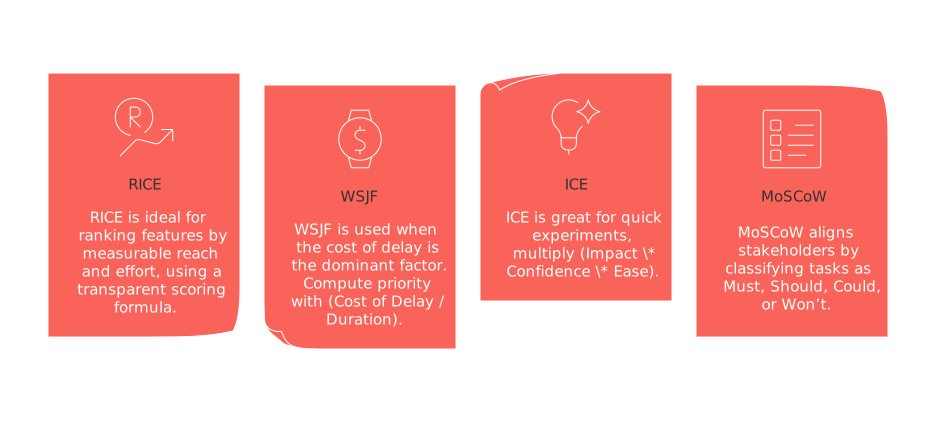
RICE: Ideal for ranking features by measurable reach and effort, using a transparent scoring formula.
WSJF: Use when the cost of delay is the dominant factor. Compute priority with (Cost of Delay / Duration).
ICE: Great for quick experiments, multiply (Impact * Confidence * Ease).
MoSCoW: Aligns stakeholders by classifying tasks as Must, Should, Could, or Won’t.
Pick a single framework per portfolio and ensure rules are well-documented to avoid bias or local modifications skewing results.
Workflow examples you can deploy this quarter
Support-driven triage
Raise task priority for incidents impacting top revenue accounts.
Auto-assign issues to the correct specialized squad based on affected component.
Escalate unresolved tickets if no update is logged within 24 hours.
Sales and product feedback integration
Translate lost-deal reasons directly into feature requests.
Tag requests by segment and expected revenue impact.
Re-score backlog weekly using updated sales pipeline data.
Operations risk management queue
Automatically spot SLA breaches and reprioritize tasks.
Notify both the task owner and a backup role for accountability.
Freeze lower-priority tasks until risks are resolved.
Migrating from ClickUp AI to a more robust prioritization stack
Inventory all use cases, integrations, and compliance requirements.
Export tasks along with their fields, comments, and dependencies.
Map existing fields to the new data structure and assign new owners.
Rebuild custom scoring formulas and base priorities within the new tool.
Recreate automations and test various failure scenarios.
Pilot the setup with one portfolio for at least two sprints.
Train all teams on usage and publish a concise operational runbook.
Monitor metrics such as cycle time, predictability, and measurable revenue impact.
Implementing governance and quality checks for long-term organizational clarity
Clearly define who has the authority to set, edit, and audit prioritization scores.
Limit work in progress per team and enforce these rules automatically.
Schedule regular backlog triage to merge duplicates.
Standardize field names and choice options across tools.
Review automations quarterly to ensure they haven’t deviated from business needs.
Retire outdated queues and archive data safely to preserve organizational knowledge.
Prioritization works best when strategy, reliable data, and disciplined execution are combined.
FAQ
What should executives focus on when implementing a new prioritization tool?
Executives should ensure clear scoring policies, address disputes proactively, and provide performance insights. Effective automation and regular audits are crucial to prevent drift and ensure that prioritization aligns with business outcomes.
Why are teams seeking alternatives to ClickUp AI for task prioritization?
Teams are looking for more strategic prioritization tools that integrate deeply with their business objectives. ClickUp AI often lacks the depth required for complex decision-making, prompting organizations to explore platforms that treat prioritization as a comprehensive system.
What critical features should enterprise-grade prioritization include?
An effective prioritization platform should provide weighted impact scoring across teams, detailed effort estimates, and real-time CRM signals to adjust priorities. Supporting dependencies, role-based governance, and strong backlog hygiene are essential to achieving alignment with organizational goals.
How do database platforms like Airtable and Smartsheet enhance task prioritization?
Airtable and Smartsheet allow for transparent scoring using explicit fields and formulas like RICE. This transparency facilitates rigorous auditing and helps prevent decision biases that could undermine strategic alignment.
How can prioritization frameworks remove team bias?
Frameworks like RICE and MoSCoW provide structured approaches to prioritization, reducing subjective decision-making. By enforcing standardized criteria, teams can ensure that priorities reflect genuine business value rather than individual preferences.
What are the pitfalls of adopting AI agents too early in the prioritization process?
Introducing AI agents without a stable data model risks vendor lock-in and poorly informed decisions. AI should only assist in defined use cases and always require human oversight to maintain strategic alignment and data integrity.
How does Routine help centralize task prioritization?
Routine offers an all-in-one workspace that allows teams to reduce context-switching and apply consistent prioritization across projects and documentation. Its structure supports strategic alignment by minimizing inefficiencies and ensuring unified scoring standards.

Julien Quintard
Founder & CEO at Routine01/27/2026
