Calendar and Notes in One Place to Plan, Journal, and Execute Your Week
Why bringing calendar and notes together clarifies your week
Integrating your calendar and notes brings true clarity to your week by aligning time and context. The calendar shows you when; notes reveal why and how. This combination eliminates confusion, minimizes app-switching, and streamlines decision-making.
When every event contains its agenda, key points, and next actions, there’s no more searching across platforms. Momentum stays high, you easily remember your commitments, and you move on tasks swiftly.
What gets scheduled gets done works best when each block of time connects to its notes and outputs.
How to set up a weekly planning system that connects calendar, notes, and tasks
Establish a single, reliable source for your week. Seamlessly link your calendar blocks, notes, and action items to keep everything in sync.
Quick setup
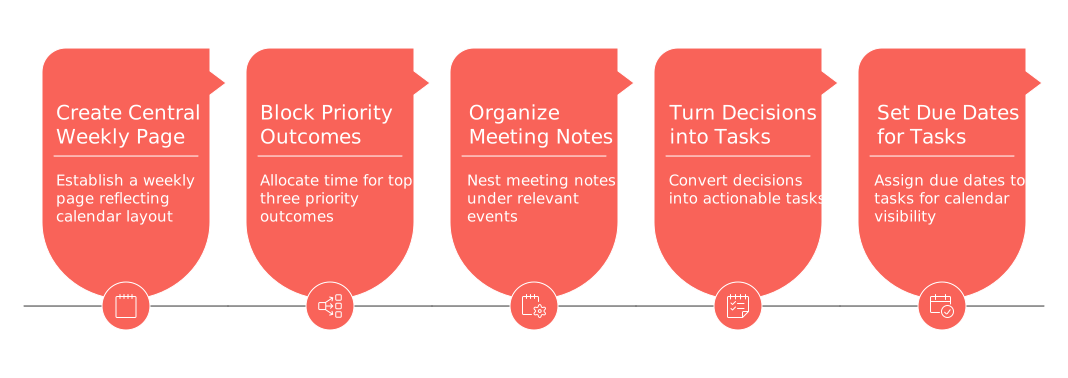
Create a central weekly page that reflects your calendar layout.
Block time for your top three priority outcomes.
Organize meeting notes by nesting them under each event for instant access.
Turn decisions directly into actionable tasks within the same workspace.
Set due dates for tasks so they automatically appear on your calendar view.
Keep your setup lean: a weekly overview, a daily log, and meeting notes are sufficient for most users.
How to journal in the same workspace without losing the thread
Journaling alongside your schedule turns insights into actions. Just write, tag a task, and schedule it, no extra copying required.
Keep entries concise. Try this simple morning and evening routine:
Morning: State your primary intention, a must-do, and the main risk.
Evening: Note one win, one lesson, and what needs carrying over.
Link each reflection to relevant tasks or events, forming a cohesive story of your week instead of scattered thoughts.
How to turn meeting notes and events into tasks you actually complete
For notes to be valuable, they must quickly translate into a dependable task list. Capture decisions in real-time, and always track ownership, deadlines, and progress in a unified space.
Start each meeting with a clear goal and bullet-point agenda.
Document decisions in bold. Assign an owner and a due date for each action.
Convert decisions into linked tasks directly from the notes.
Attach relevant files or links where the follow-up work will occur.
Need an extra layer of structure? Explore effective meeting minutes and recap templates that keep everyone’s actions clear. Make sure to schedule a 10-minute review session to confirm progress on these tasks.
How freelancers and solo workers can tie CRM and calendar in one weekly view
If you manage clients, your week is a balance between delivery and follow-up. Light CRM tracking can live right inside your notes and calendar blocks. Record details like stage, value, and next step alongside where you already plan your work.
Sample workflow:
Discovery call events store the agenda and call notes.
Essential CRM fields, stage, budget, decision date, sit at the top of each note.
Tasks auto-generate, such as proposal drafts, reference calls, or invoices.
Each new task links to the client entry and is scheduled on your calendar.
This approach lets you see which clients need attention without ever leaving your central workspace.
What visual planning methods fit a weekly view with notes
Every week is different, so choose planning visuals that fit your workflow. Pair robust visuals with note-taking for a complete overview.
Kanban for flow: Perfect for handling multiple deliverables. Link each card to a brief note with acceptance criteria.
Timeline for commitments: Ideal when juggling overlapping deadlines. Include risk logs for each timeline lane.
Checklist for sprints: Simple for personal weeks; keep it actionable and straightforward.
No matter which system you use, let the calendar prioritize deadlines and deep work based on your visual board selections.
How to choose an all-in-one workspace versus a stack of dedicated tools
Uniting your calendar, notes, tasks, and CRM into one workspace reduces friction and speeds up your workflow. Separate, dedicated tools can offer depth but may introduce extra complexity. Adapt your choice to your week’s specific needs.
Opt for an all-in-one workspace if you’re managing several smaller projects and switch contexts frequently.
Choose a stack of tools if you need powerful features in a single domain, such as advanced CRM automation.
For in-depth guidance, compare all-in-one solutions versus dedicated tools. Test your chosen system for three months, then refine your approach.
What tools currently combine calendar, notes, tasks, and CRM in one place
Several up-to-date platforms now unify these features seamlessly. Solutions like Routine and Notion centralize documents, tasks, and scheduling, while ClickUp brings together documents and project management. For deeper client relationship management, solo professionals frequently pair these hubs with specialized CRMs like HubSpot or Zoho.
Choose one main hub for daily operations. If you integrate an external CRM, ensure next steps sync back to your central workspace for a cohesive weekly view. If you mention a specific platform, always offer at least one alternative so you’re not locked into a single ecosystem.
Common pitfalls with calendar-and-notes setups and practical fixes
Excessive tags: Limit tags to three types: area, status, and priority.
Notes lacking ownership: Add an “owner” line to every meeting document.
Overly large tasks: Break them down so each task can be completed in a single session.
Overbooked schedules: Always include a 30% buffer for unforeseen changes.
Stranded ideas: Maintain an “Incubator” section on your weekly page to capture them.
How teams and executives can keep alignment without adding meetings
Maintain shared visibility by asking everyone to keep their outcomes, time blocks, and top risks on a communal weekly page. Require linking each event to its agenda and action items. This lets leaders check progress at a glance, while individuals retain control over their daily flow.
FAQ
Why integrate calendar and notes in one workspace?
Combining these helps synchronize your tasks with their context, cutting down on app-switching and reducing missed details. It requires discipline to maintain updated notes but streamlines day-to-day operations.
How can journaling enhance my workflow?
Journaling transforms insights into actionable tasks seamlessly when integrated with your calendar. Be wary of overcomplicating entries; keep them impactful and directly related to tasks.
What is the risk of using multiple dedicated tools?
While dedicated tools often provide specialized features, they introduce complexity and fragmentation. A single workspace like Routine minimizes these issues but may lack depth in certain domains.
How do I transition meeting notes into actionable tasks?
Capture decisions immediately and assign clear ownership and deadlines. Failure to do so results in forgotten tasks and duplicated efforts.
What is a common mistake with calendar-notes integration?
Excessive tagging and unclear ownership plague many systems. Limit tags and ensure every note specifies an accountable person to avoid chaos.
Is visual planning effective in a weekly view?
Yes, when paired with notes, visual methods provide a comprehensive overview. Yet, misuse can lead to an overcomplicated system that distracts from getting things done.
Can freelancers benefit from integrating CRM into their calendar?
Absolutely. Streamlining CRM data with your calendar allows you to prioritize client interactions without hopping between tools, but requires commitment to keeping information current.
What should be included in a weekly reset checklist?
Focus on resolving open loops and setting key outcomes rather than whimsical to-do lists. This solidifies your strategy but requires consistency to be effective.
How can teams ensure alignment without more meetings?
Maintain a communal weekly page that details outcomes and risks. This practice enhances transparency but demands discipline to regularly update by all team members.

Julien Quintard
Founder & CEO at Routine04/23/2026
