Build a Smart Life OS With ChatGPT in 30 Minutes
Why a smart Life OS for business beats scattered apps
Your team already manages a constant stream of projects, documents, and customer interactions. Chaos emerges when these efforts live in disconnected silos. A smart Life OS unifies project management, CRM, and knowledge into one streamlined operating model. ChatGPT assists in preserving structure, context, and clarity in language throughout this unified approach.
Executives gain a singular, comprehensive dashboard to view progress, instead of trying to consolidate information from five separate dashboards. Managers see actionable next steps rather than just reviewing last week’s status. Contributors are guided by clear templates, leading to fewer handoffs and minimal rework.
Consistency is the shortest path from strategy to execution.
If personal tools seem ineffective at a team scale, remember that structured data could be the solution. Structured data involves organizing information in a set pattern, making it easier to handle and interpret, particularly for teams dealing with large quantities of data.
The 30-minute build plan for a ChatGPT-driven Life OS
Six sprints, five minutes each
Scope the outcomes. Choose two main objectives: deliver projects faster and close deals more efficiently. Clearly state each goal in one sentence.
Choose core entities. Identify key items like Projects, Tasks, Deals, Contacts, Documents, and Decisions. Use simple, intuitive names.
Draft templates. Create a template for projects, one for deals, and another for Standard Operating Procedures (SOPs). Make all fields mandatory.
Set statuses. Restrict each workflow to five straightforward stages. Write a clear 'definition of done' for every status.
Design views. Create one board for projects, a pipeline for deals, and a library for SOPs. Make filters user-friendly.
Begin with a pilot team. Carry out a two-week test to identify any gaps in your process. It’s better to adjust the fields in your system rather than forcing users to change their established habits.
Define the core entities your Life OS must structure for teams
Robust systems begin with stable core elements. Start with the six essentials below, adding more only as your needs grow.
Project: Name, owner, objective, stage, risk, deadline, budget, dependencies.
Task: Project link, assignee, priority, estimate, status, blocker, due date.
Deal: Account, value, stage, next step, close date, probability, product.
Contact: Role, account, relationship notes, last touched, source.
Doc (SOP or brief): Purpose, audience, version, owner, review date.
Decision: Context, options, choice, owner, date, expected impact.
Maintain systematic connections. Ensure each task is closely associated with one project. Link every deal with a single account and primary contact, and make sure that each decision directly references a project or a deal.
Set up project workflows that ChatGPT can draft and maintain
Projects can quickly stall when workflow stages are unclear. Limit the number of stages and set specific entry criteria for each. ChatGPT can help by drafting criteria and acceptance checks in straightforward language understood by everyone on your team.
Sample project stages with crisp gates
Intake: Business case approved, budget placeholder logged.
Planning: Scope, risks, and milestones reviewed by the project owner.
Delivery: Work packages assigned, dependencies tracked, risks updated weekly.
Validation: Acceptance tests passed, stakeholders sign off.
Close: Metrics captured, decision log archived, lessons recorded.
For greater alignment, ensure your stages reflect the project lifecycle. Refer to our guide on the five phases of the project lifecycle for terminology that your project managers already use.
Design a CRM pipeline your CXOs can review at a glance
Executives want quick, actionable insights. Keep your pipeline easy to scan. Stages should reflect the buyer’s commitment, not just seller actions.
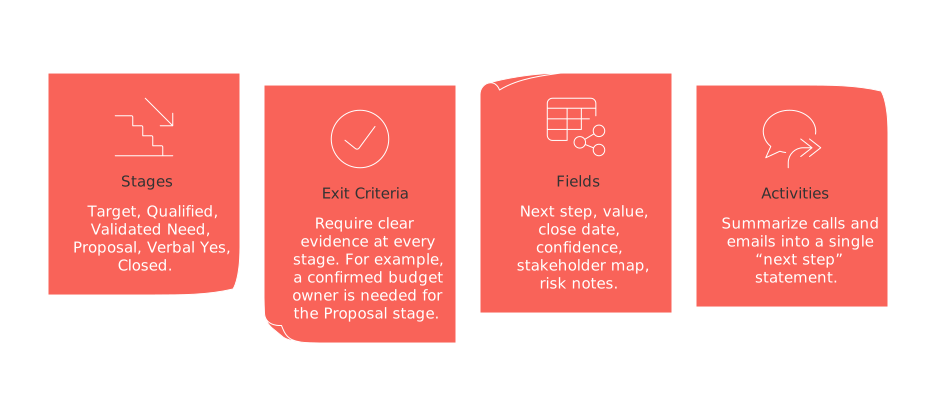
Stages: Target, Qualified, Validated Need, Proposal, Verbal Yes, Closed.
Exit criteria: Require clear evidence at every stage. For example, a confirmed budget owner is needed for the Proposal stage.
Fields: Next step, value, close date, confidence, stakeholder map, risk notes.
Activities: Summarize calls and emails into a single “next step” statement.
Use ChatGPT’s feature of summarizing long conversation threads into a single, clear next step for moving forward. Keep a human involved for substance and tone.
Build a searchable knowledge base without messy notes
Replace scattered notes with concise Standard Operating Procedures (SOPs) and briefs. Each document should have a single purpose and audience. ChatGPT can standardize both voice and structure, ensuring every doc is consistent in quality and tone.
Three document types that cover most needs
SOP: When to use it, owner, step-by-step list, guardrails, review date.
Project brief: Goal, success metric, scope, timeline, roles, risks.
Decision record: Context, considered options, final choice, rationale, impact.
Index documents by team, process, and lifecycle stage. Set schedules for reviewing and expiring content to prevent outdated information from circulating.
Choose your operating core: all-in-one versus dedicated tools for a Life OS
Your Life OS can operate on either an all-in-one workspace or a combination of specialized tools. The best option depends on how much control and integration complexity your organization can handle.
For an in-depth look at trade-offs, see this comparison of all-in-one workspaces versus dedicated project tools. Many teams start centralized, then selectively add specialized apps to meet higher demands.
Examples: all-in-one choices include Routine and Notion. Dedicated setups might use Jira for delivery and HubSpot for CRM. Always document data contracts and integrations, regardless of your direction.
Create dashboards that move projects and revenue forward today
Dashboards should answer two essential questions: Where are we experiencing delays, and what are the next actions? Eliminate vanity charts. Favor boards, trackers, and straightforward rollups.
Projects view: Board organized by stage with limits on work-in-progress.
Risks view: Highlight the top five cross-project risks with designated owners and target dates.
Deals view: Pipeline shown by stage, with overdue close dates flagged.
SOP health: List of documents due for review this week and this month.
Need guidance on dashboard visuals? Refer to this practical guide on using Gantt charts and project trackers for simple project management. Start simple and only expand to include features your team actually uses.
Governance and change management for your Life OS
Excellent systems fail from neglect, not design. Assign system owners, set review routines, and maintain consistent naming conventions.
Lightweight rules that keep quality high
Taxonomy: Agree on a core list of tags and stick to them.
Naming: Start project names with the team and outcome, such as “Sales, Q2 Expansion.”
Permissions: Default all to view-only. Give edit rights exclusively to designated owners.
Rituals: Weekly project review, monthly SOP audit, quarterly pipeline review.
If it is not trusted, it will not be used.
Next steps: launch your Life OS pilot this week
Pick one area to begin with, either projects or deals. Run a two-week pilot, using concise templates. Gather feedback quickly and expand only once you’ve achieved a concrete win.
Open a new conversation in your chosen chat application and document your scope in plain language. Then provide ChatGPT with the fields, statuses, and document types outlined above. You’ll have a working Life OS in under an hour.
Ready to create your first set of templates? Start a new ChatGPT session and build the structure while your team is hands-on with delivery.
For more on why personal tools often fail in team settings, check out “Why Personal Productivity Apps Don’t Work for Teams? And How Structured Data Solves the Problem.” Apply those insights to your pilot for best results.
FAQ
What is a Life OS and why is it advantageous for businesses?
A Life OS consolidates processes like project management, CRM, and documentation into a singular, cohesive system, reducing chaos and inefficiencies. Unlike scattered apps that silo information, a unified OS centralizes data, enhancing clarity and decision-making.
How does structured data improve team productivity?
Structured data provides a consistent format, making information easier to understand and action. When teams work with unstructured data, they often face miscommunications and inefficiencies; structured data streamlines interactions and mitigates these risks.
What role does ChatGPT play in a Life OS?
ChatGPT can draft and maintain workflow criteria, reducing ambiguity in processes. While it adds efficiency, relying solely on AI without human oversight may lead to a disconnect from nuanced team dynamics and needs.
Are all-in-one tools better than dedicated apps for a Life OS?
All-in-one tools, like Routine, offer simplicity and integration, but may lack specialized features. Dedicated apps provide depth in specific areas, yet demand skilled management to integrate effectively into a Life OS.
How do you maintain governance in a Life OS?
Effective governance involves consistent reviews and clear roles, preventing system neglect which leads to data chaos. A neglected system erodes trust, risking user abandonment despite initial design excellence.

Julien Quintard
Founder & CEO at Routine02/27/2026
