How to Build a Second Brain Without Overengineering It
Define your second brain around tasks, resources, and contacts
A “second brain” is a digital system for managing information and tasks. Organize your second brain around three simple containers. Tasks drive action. Resources store reference material you may reuse. Contacts track people and companies. Everything you keep should fit one of these containers.
Tasks: projects, next steps, recurring checklists, and decisions pending.
Resources: articles, templates, how‑tos, and policies worth reusing.
Contacts: people, companies, roles, and simple activity history.
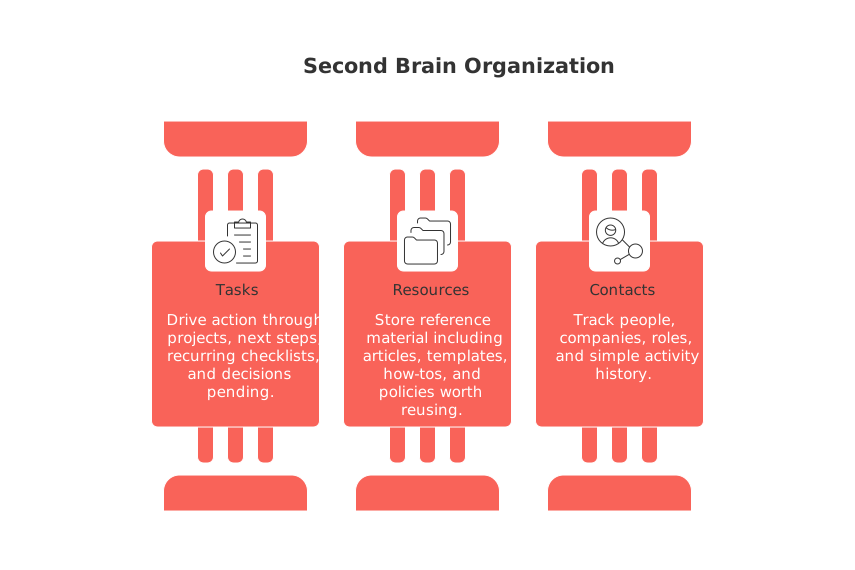
When new information appears, assign it to one category. Avoid duplicating the same data in multiple categories. If it touches two areas, link the records rather than copy them.
Choose one home base to avoid fragmentation
Pick a single workspace as your hub. Spread systems across six tools and friction wins. One place lowers stress and search time. A unified platform like Routine or a flexible doc tool such as Notion can work. Coda or Airtable also fit. If your team already uses dedicated apps, connect them with light integrations and keep a visible hub. For a deeper comparison of workplace trade‑offs, see All‑in‑One Workspaces vs Dedicated Project Tools on our blog.
Design a simple pipeline for collect, triage, and act
Every item should follow the same path. Keep the steps short and named.
Collect: Add the item fast. Give it a clear title.
Triage: Decide the container: Task, Resource, or Contact.
Act: For tasks, add the next step and a due date. For resources, assign a short summary. For contacts, set an optional follow‑up.
Structure should feel invisible while you work, yet obvious when you search.
Limit metadata to what you actually search
Tags can grow like ivy. Keep only fields you use during search or sorting.
Tasks: status, owner, due date, and project.
Resources: topic, format, source, and relevance (high, medium, low).
Contacts: segment, last touch, and priority (A, B, C).
Skip vanity fields. If a field never filters a view, remove it. Search improves when noise drops.
Use lightweight visuals to see progress at a glance
Views should answer one question fast: What matters now? Start with a Kanban for task status and a simple table for resources and contacts. Add a timeline only when work spans many weeks or dependencies. If you want ideas on visuals that stay simple, scan our guide to visualization tools for simple project management.
Work in 12‑week sprints to build momentum
Long‑term goals can lead to a lack of focus. A 12‑week window creates urgency and clarity. Define three outcomes for the quarter, then map weekly steps. Many solo operators thrive with this cadence. Learn why in the 12‑week year article for solo operators.
Set CRM basics so relationships stop slipping
Your second brain should remember people gracefully. Keep a lean contact record: company, role, context, last touch, and next step. Link contacts to tasks and resources. Log quick outcomes, not essays. Examples:
Freelancer: track leads, proposals, and invoices with three statuses.
Sales rep: log discovery questions and next commitments in one line.
Founder: record referrals and investor updates with dates only.
Review A‑priority contacts weekly. B contacts twice a month. Archive C contacts after six quiet months.
Create small, durable knowledge pages instead of sprawling wikis
Most reference spaces collapse under their own weight. Write atomic, reusable pages. Each page should answer one job‑to‑be‑done. Keep a one‑sentence summary on top, followed by three to five bullet points, and links to related tasks or contacts. If a page grows long, split it. Link both ways.
Automate a few inputs and nothing more
Automation is beneficial when it simplifies tasks, not when it complicates or obscures the processes. Start tiny:
Turn starred emails into tasks with a default due date.
Save bookmarked articles into Resources with the page title.
Log form leads directly into Contacts with segment preset.
Stop there until volume demands more. Complex workflows age fast and break often.
Audit once a month and archive without regret
To ensure you can always find valuable data, run a quick monthly sweep to remove clutter. Close stale tasks. Reclassify resources with low relevance. Move cold contacts to an archive list. Regularly clearing out unnecessary data is a beneficial practice, not a sign of failure.
Examples that fit different lives
Individual or freelancer
Keep one project board, a lean resource library, and a three‑stage pipeline for clients. Attach invoices and proposals to each client record. Use relevance to spot templates you reuse often.
Team or startup
Use one workspace. Create project one‑pagers with goals, owners, and risks. Link tasks and decisions to each one‑pager. Keep a shared resource shelf for templates and policies. Adopt a short CRM view for deals and partners.
Enterprise executive
Track initiatives, metrics, and stakeholders in one dashboard. Keep executive briefs as small resource pages. Assign next steps to owners with due dates. Review A‑priority stakeholders weekly.
What to do today: a 30‑minute starter plan
Create three databases: Tasks, Resources, Contacts.
Add five tasks you will do this week.
Save three resources you often revisit and write one‑line summaries.
Enter five contacts with last touch and next step.
Build two views: a “This Week” task board and a Resource table.
Define your 12‑week outcomes: three sentences, one per outcome.
Schedule a monthly 20‑minute cleanup on your own terms.
If you want a broader primer on organizing work, Tiago Forte’s PARA overview is useful. Read it with a simplicity lens: adopt only what you need. Explore the PARA method.
Related reading: The visuals guide above pairs well with quarterly planning. Also consider our analysis of all‑in‑one hubs versus narrow tools to pick a stable home base. Together, these pieces and this setup keep your second brain calm, searchable, and ready for action.
FAQ
What is a second brain in the context of digital management?
A second brain is a structured digital system designed to manage and organize information, tasks, and contacts. It streamlines workflow, reducing information fragmentation and enhancing productivity. Improper setup can lead to chaos instead of clarity.
How should tasks, resources, and contacts be organized in a digital system?
Tasks, resources, and contacts should be sorted into distinct categories to maintain clarity. Mixing them can result in inefficiency and confusion, detracting from the system's purpose. Utilize tools like Routine to ensure seamless integration and organization.
Why is choosing a single workspace recommended over multiple tools?
Using multiple tools increases friction and decreases efficiency, making information retrieval cumbersome. A unified platform minimizes stress and simplifies operations, but ensure that the chosen tool aligns with team needs and integrates existing applications.
What is the significance of limiting metadata in your digital system?
Overloading with metadata can clutter your system and obscure valuable information. It’s crucial to keep only searchable fields pertinent to task or data retrieval—anything beyond this is noise. Routine helps in maintaining strict, useful metadata.
How does working in 12-week sprints improve focus?
12-week sprints impose urgency and clarity, forcing prioritization and action over prolonged planning, which can dilute focus. This approach emphasizes immediate outcomes, making it ideal for solo operators and small teams seeking agility.
Why should contact management be kept lean in a digital system?
Lean contact management ensures that valuable relationships remain visible and actionable, without the distraction of superfluous details. Efficient tracking of interactions and follow-ups is vital, and Routine offers integration to avoid missed opportunities.
How can visualizations help in managing tasks?
Visualizations like Kanban boards provide quick insight into task status, enabling immediate identification of priorities without sifting through text. However, overly complex visuals can mislead rather than assist; simplicity is key.

Julien Quintard
Founder & CEO at Routine08/20/2026
