How to Build a Personal Kanban Board for Life Admin Tasks
Why a personal Kanban board makes life admin lighter
Bills, renewals, and forms pile up faster than dishes. A personal Kanban makes that pile visible and finite. You see work. You finish work. You feel in control.
Kanban rests on two simple rules. Visualize every task. Limit how many you tackle at once. These rules cut mental load and reduce switching.
What counts as “life admin” on your board
Renewals: license, passport, insurance, subscriptions.
Household: repairs, returns, warranties, decluttering.
Money: claims, reimbursements, disputes, savings tasks.
Health: appointments, prescriptions, screenings.
Identity: change of address, voter registration, passwords.
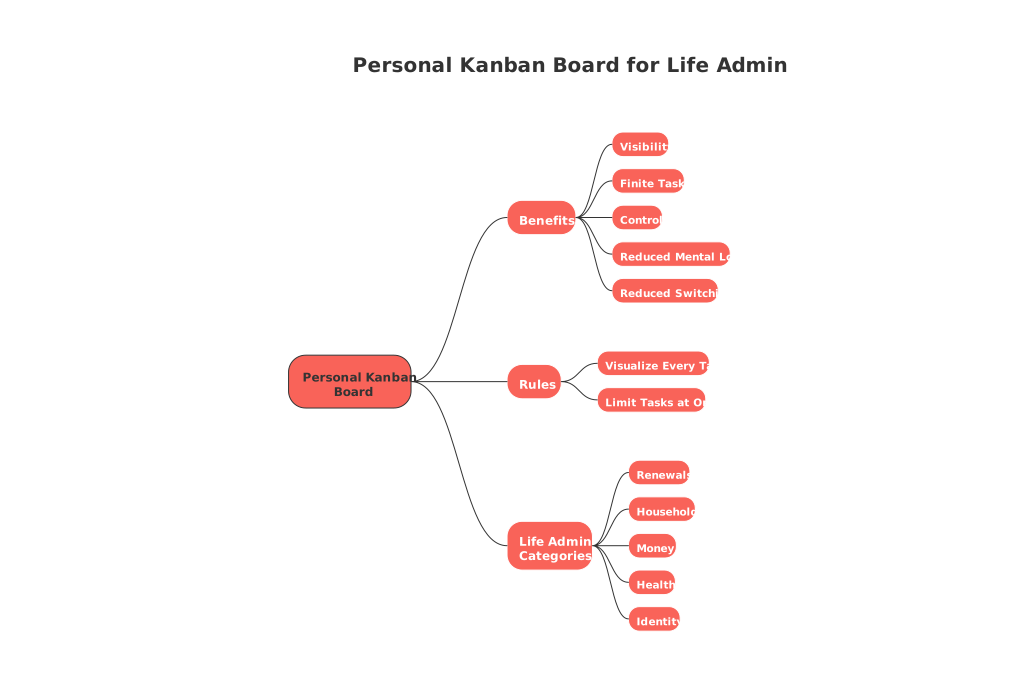
Kanban turns “I should do this” into “This is next.”
Set up a three‑column personal Kanban for life admin in 10 minutes
Keep setup lean. You can grow it later. Start with three columns: Backlog → Doing → Done. Add a small Waiting lane if helpful.
Create cards for every task. Use clear verbs. Example: “Renew driver’s license online.”
Set a Doing limit (your work‑in‑progress, WIP). Start with 2. Fewer tasks means faster finishes.
Pull one card into Doing. Pull the next only when a slot opens.
Move finished cards to Done. Celebrate small wins. They compound.
Write cards that actually move
Make each card completable in under 60 minutes.
If not, split it. Example: “Gather tax forms” and “Submit return.”
Add a tiny cue. Time window, energy, or cost. Keep it human, not technical.
Sample life admin cards: Replace smoke alarm batteries. Cancel unwanted trial. Dispute a fee. Book eye exam. Switch mobile plan.
Keep life admin moving with simple Kanban rituals
Rituals keep the board honest. They also take minutes, not hours.
Daily three‑minute check
Scan Doing. Remove hidden blockers.
Pick the next card only if a slot exists.
End by marking one tiny win. Momentum matters.
Weekly 15‑minute review
Clear stale cards. If it lingers, split or drop it.
Reorder the Backlog by impact, not guilt.
Count completed cards. Note what helped you finish.
Work with a short horizon. Try a quarter. This idea pairs well with the 12‑Week Year approach for solo operators. This approach helps you maintain focus and keep your board lean.
Define clear Kanban policies so your board stays honest
Policies remove guesswork. Write them once. Follow them daily.
Entry rule: A card enters Backlog only if you intend to do it.
Ready rule: A card moves to Doing only if it fits the Work in Progress (WIP) limit.
Blocked rule: If you wait on someone, tag the card “Waiting” and date it.
Aging rule: If a card ages past seven days in Doing, split or drop it.
Done rule: Define “done” clearly. Example: “Policy renewed and confirmation saved.”
These rules protect flow. They also protect your attention.
Choose a tool for your personal Kanban without overthinking it
Any board beats no board. Start physical if you like. Go digital if you prefer portability.
All‑in‑one workspaces keep tasks, contacts, and projects together. Consider Routine or Notion.
Dedicated boards focus on cards and flow. Consider Trello or KanbanFlow.
If you expect your board to grow, read this comparison of all‑in‑one workspaces versus dedicated project tools. It will help you choose once, not twice.
You may also explore other visual methods, such as timelines or checklists. Kanban remains the simplest daily driver for life admin.
Make your cards crystal‑clear with helpful metadata
Metadata should guide action, not create admin overhead.
Energy: Low, medium, high. Pick tasks that fit your current energy.
Time: 10, 25, or 45 minutes. Short slots still move work.
Context: Home, online, phone, in‑person. Pull the right task for the setting.
Cost: Free, $, $$, $$$. Prevent surprise expenses.
Keep metadata light. If it slows you down, remove it.
Use WIP limits that match real life
Most people start with a WIP limit of two. Some thrive with three. Stress test your number.
Run seven days with your current limit.
If nothing finishes, lower the limit by one.
If you finish early, raise it by one.
Guard the limit like a promise. It is your attention budget.
Handle “Waiting on others” without losing momentum
Blocked work is any task you cannot move forward because it depends on another person, a response, or an external event. Keep flow anyway.
Create a slim Waiting lane. Date every card you park there.
Set a reminder rule. Nudge after three business days.
Prepare a fallback. Example: escalate or pick an alternative provider.
Avoid filling your Doing lane with tasks that are blocked or dependent on others. It obscures how accurately your board reflects current, actionable work.
Track only the metrics that help you finish
Two numbers tell the story. Throughput: cards done per week. Lead time: start to finish time.
If throughput drops, lower WIP or split cards smaller.
If lead time spikes, hunt for recurring blockers.
Keep a tiny log if you like. A single line per week is enough.
Troubleshoot common Kanban pitfalls for life admin
Problem: Backlog grows forever. Fix: Add a “Someday” purge every month.
Problem: You start many, finish few. Fix: Cut WIP. Halve it for one week.
Problem: Vague cards stall. Fix: Rewrite with a clear verb and end state.
Problem: Urgent tasks hijack the board. Fix: Create a one‑slot “Expedite” lane.
Problem: Household work mixes with work work. Fix: Use separate swimlanes.
Run a household or partner board smoothly
Shared boards reduce repeat questions and missed tasks. Keep them friendly, not managerial.
Agree on a single Work in Progress (WIP) limit for shared tasks in the Doing column.
Use initials on cards, not job titles.
Hold a five‑minute check‑in once a week.
Archive finished cards monthly. The board stays light.
Stay kind. The goal is progress, not perfection.
Scale your personal Kanban when life gets busier
When the board feels tight, add structure slowly.
Swimlanes: Separate “Home,” “Money,” and “Health.”
Classes of service: Mark urgent work with a bright color.
Checklists: Add a short list inside a big card. Keep it brief.
Templates: Reuse common sequences. Example: “Move homes” or “Car service.”
If your world spans clients or side projects, pick a flexible tool. You might need contact views or light CRM features over time.
Choose a review horizon that matches real motivation
Annual goals often drift. Short windows drive action. Many individuals thrive with a 12‑week lens.
Consider aligning your backlog with a quarter. Read how to pick that focus in this resource. Use it to decide what truly belongs on the board now.
Where to learn more about simple, practical Kanban
Want a concise primer before you start? Skim the Atlassian overview of Kanban basics. Then return and build your board today.
FAQ
How can a personal Kanban board reduce life admin stress?
A personal Kanban board makes tasks visible and manageable, reducing the chaos of life admin. It prevents task overwhelm by limiting how much you're doing at once, resulting in better focus and completion rates.
Why is it recommended to use a Work in Progress (WIP) limit on a Kanban board?
A WIP limit ensures that you are not overwhelmed with tasks, improving focus and efficiency. Without it, the board can become cluttered, leading to multitasking and decreased productivity.
How does Routine support personal Kanban boards?
Routine offers an all-in-one platform where you can keep your Kanban board, tasks, and contacts integrated. It streamlines workflow management by keeping everything in one place, especially as your board scales.
Are separate lanes advisable for shared household Kanban boards?
Yes, separate lanes prevent confusion between differing responsibilities like household tasks versus work-related ones. This organization ensures clearer focus and prevents tasks from being overlooked.
What is a common issue with life admin Kanban boards and how can it be resolved?
Backlogs can grow indefinitely, leading to a cluttered board that's hard to manage. Combat this by purging your \"Someday\" list each month and re-prioritizing tasks based on current relevance and impact.
How can metadata on Kanban cards enhance task management?
Metadata such as energy, time, context, and cost provide essential cues for task prioritization and can prevent costly inefficiencies. However, ensure that these cues are simple to avoid becoming burdensome in themselves.
What should you do if tasks frequently get blocked?
Use a “Waiting” lane to track tasks that rely on external inputs, and nudge follow-ups after a defined period. Keep this list minimal to maintain your board's reflection of active work and to prevent stalling progress.
Can a Kanban board become counterproductive without proper maintenance?
Absolutely. Without regular reviews and WIP limits, your Kanban board can transform into an unmanageable backlog. Continuous prioritization and updates are key to keeping it effective.

Julien Quintard
Founder & CEO at Routine08/14/2026
