7 Apps Like Todoist You Should Try in 2026
What makes a Todoist alternative worth trying in 2026
Your tasks aren’t harder, your life is broader. New roles, side hustles, family duties, and client work add layers of complexity. The right Todoist alternative delivers speed and clarity while supporting structured projects and basic CRM. It should make quick captures effortless, scale for bigger workloads, and let you automate or share without adding unnecessary process. Whether you’re a solo creator or a freelancer, prioritize apps that focus on faster action, richer displays, and simple sharing over feature overload.
“Reduce clicks, don’t increase features.”
TickTick: agile lists with built-in discipline
TickTick adapts as your life shifts. It excels at rapid task entry, handles recurring to-dos, and offers lightweight project boards, all without imposing on your flow. Students, parents, and freelancers love its blend of organizational clarity and focused features to maintain momentum.
Key features
Effortless task entry: just type dates or priorities naturally.
Folders and lists enable quick, structured organizing.
Optional focus modes and habit tracking to sustain progress.
Best for: individuals needing a high-speed personal system that can stretch to basic team or project work.
Microsoft To Do: effortless, cross-platform, and free
For those who want rock-solid, simple lists across devices, Microsoft To Do is a top pick. It’s perfect for shared family chores or small team coordination. You can attach files, break tasks into steps, and segment lists for home, errands, or clients with ease.
Opt for simplicity when it outshines complexity.
Any.do: smart, intuitive organization for busy schedules
Any.do is all about clear lists and easy planning. Voice input, reminders, and quick sharing simplify both personal and collaborative planning. Use folders to separate client projects from personal tasks, its interface remains intuitive, even on hectic days.
Prioritize clearly and navigate simple list layouts.
Instant sharing for couple, family, or roommate logistics.
Things 3: smooth productivity for Apple loyalists
Things 3 prioritizes serene productivity. With beautifully organized projects, headings, and checklists, it helps you focus on what matters. Lightning-fast keyboard shortcuts and elegant design smooth out every step, ideal for personal work and side projects.
Choose this if: you use only Apple devices and favor seamless flow over heavy-duty collaboration features.
Notion: context-rich tasks meet flexible documentation
If your tasks are tethered to requirements, project docs, or files, Notion’s database structure offers full control. Build out custom task tables, link them to project or client records, and customize properties, such as status, effort, or owner, for granular tracking.
Noteworthy advantages
Multiple views: switch between table, board, timeline, or gallery formats.
Templates smooth out repeat project creation for individuals and freelancers.
Great for: small teams or individuals who want project management and documentation seamlessly combined, without being boxed into rigid templates.
ClickUp: scalable workspaces for growing projects
ClickUp bridges the gap between simple lists and full project management. Customize fields, statuses, and workflows to match evolving needs. Solo creators can start light and then integrate dependencies or approval processes as client demands increase.
Tailor fields and statuses to fit your workflow perfectly.
Easily template repeatable tasks and client onboarding routines.
Routine: unify tasks, projects, and CRM
Routine blends tasks, a basic knowledge base, and lightweight CRM so you keep all the essentials in one place. Link any task to a contact, project, or note to boost organization. Ideal for those tired of juggling multiple tools.
Who it’s for
Individuals centralizing side projects and personal tasks efficiently.
Small teams keeping tasks and simple client records linked, without the overhead of a full CRM.
Quick picks: find your ideal Todoist alternative
Want the fastest lists for personal use? TickTick or Microsoft To Do deliver.
Prefer a friendly app with instant sharing? Choose Any.do.
Apple ecosystem a must? Things 3 is tailored for you.
Need robust task context and documentation? Notion covers both.
Expecting your projects to scale? ClickUp grows with you.
Looking to connect tasks and CRM? Give Routine a try.
Migration tips: switch from Todoist and stay productive
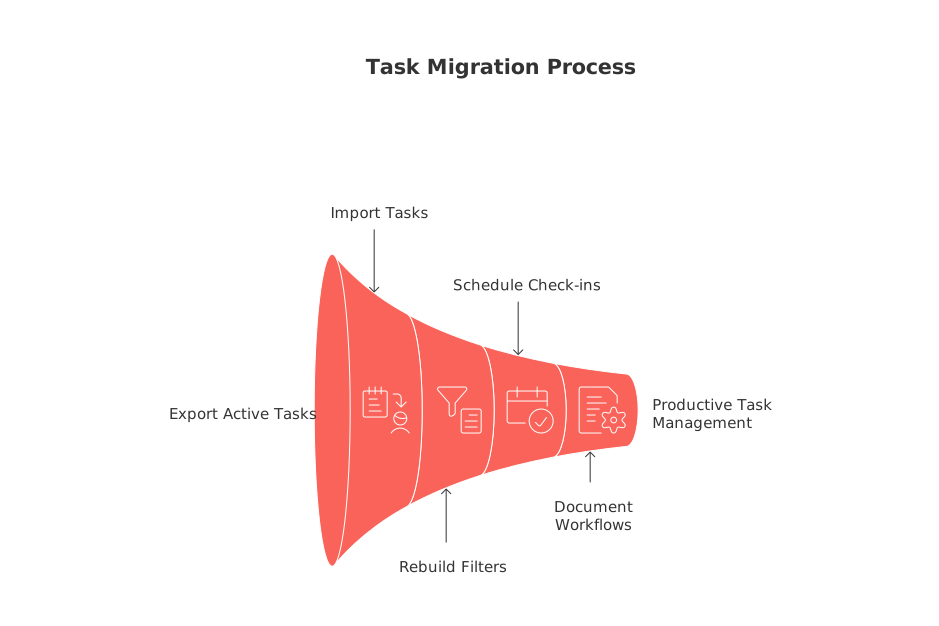
Transition smoothly: export and import only your active tasks, preserving labels and priorities for familiarity. Rebuild just the filters you truly rely on weekly, archive the rest. Schedule quick weekly check-ins to catch duplicates or outdated tasks.
Create a “Staging” list as a temporary sorting zone for imported items.
Map labels to custom fields only if you consistently filter by them.
Document your three key workflows: task capture, daily triage, and weekly review.
For teams: moving beyond the single-user task list
Personal to-do apps can struggle as work grows to include multiple owners, approvals, or complex handoffs. If this friction feels familiar, explore why individual productivity tools often fall short for teams. Debating all-in-one versus specialized tools? Weigh the benefits and pitfalls in this guide to comprehensive workspaces and focused apps.
How to choose the best Todoist alternative for your workflow
Ask yourself: Does this app let me finish tasks faster than Todoist? Can I explain my setup in two minutes or less? Will it adapt as I collaborate more with others at home or work? Select the solution that feels fastest, clearest, and most future-ready for your real-world needs, today and as your responsibilities grow.
FAQ
What should I consider when choosing a Todoist alternative?
Focus on apps that emphasize speed and clarity, especially if your tasks span different life areas. Avoid feature-heavy tools that complicate instead of simplifying your workflow. Ensure the app can scale as your projects grow.
Is Routine a suitable option for managing both tasks and CRM needs?
Routine excels at combining task management with basic CRM functionalities, allowing you to keep essential information linked in one place. However, if more complex process management is needed, consider alternatives like ClickUp or Notion.
Why might I switch from Todoist to something like Microsoft To Do?
Microsoft To Do offers simplicity and cross-platform support, making it ideal for shared use with family or small teams. If Todoist's complexity hampers your daily productivity, an intuitive tool like this might be your answer.
Can Apple users benefit more from Things 3 than other options?
Things 3 is designed for Apple users who value a seamless and elegantly designed productivity tool. However, its ecosystem focus means missing out on broader collaborative features found in cross-platform services.
When is ClickUp a better choice over simple task apps?
If you anticipate your projects scaling in complexity, ClickUp can support this with its robust and customizable workspace. However, its flexibility can overwhelm those who only need basic lists.
How can Notion enhance task management?
Notion combines tasks with documentation and project management, offering granular control over workflows. However, its versatility can lead to setup fatigue if not approached with clear structure in mind.

Julien Quintard
Founder & CEO at Routine04/15/2026
