AI Productivity Tools For Time Tracking in 2026
Why AI time tracking matters for project management, CRM, and finance in 2026
Accurate time data shapes decisions about capacity, project scope, and revenue. AI eliminates tedious manual logging, filling in the gaps with context from actual work performed.
Project management: More precise effort estimates, faster re-planning, and clearer tracking of project progress.
CRM: Monitor and link employee effort to opportunities, accounts, and renewals to calculate true acquisition and retention costs.
Finance: Enhanced accuracy for work-in-progress (WIP), billable hours, and cost allocations that are easily audited across cost centers.
Operations: Reliable insights into resource utilization and throughput for both the Project Management Office (PMO) and Revenue Operations (RevOps).
Time you can trust beats high logging volume. Sound time data fosters confident decisions; an excess of low-quality entries only creates noise.
How AI time capture works across apps, documents, and communications
Modern AI-driven tools infer time spent based on work artifacts rather than relying on memory. These tools classify activities and suggest time entries by tracing back to their sources.
Signals: code commits, pull requests (PRs), task tickets, document edits, emails, and task status changes.
Classification: AI models relate these signals to each project, client, epic, and activity type.
Attribution: Entries are linked to relevant IDs in your project management (PM) and CRM systems, not just vague labels.
Review loop: Users can quickly confirm or adjust suggested entries, improving model accuracy over time.
Choose tools that transparently present their reasoning and the underlying evidence for each recommendation.
Selection criteria for AI productivity tools for time tracking in 2026
Core capabilities to require
Passive capture quality: High suggestion precision with minimal false positives.
Explainability: Display of supporting sources, timestamps, and mapping logic.
Structured data model: Tracks projects, clients, roles, cost centers, and other taxonomies.
Two-way integrations: Native syncing capabilities with Jira, Asana, Monday, Salesforce, and HubSpot.
Approval workflow: Multi-level approval paths and comprehensive audit trails for billing.
APIs and exports: Real-time webhooks and scheduled exports to data warehouses.
Risk, privacy, and compliance controls
Consent and scope: Clearly defined opt-in policies by team, role, and repository.
Redaction: Configurable options for removing personally identifiable information (PII) and using allowlists for specific domains.
Security: SSO, SCIM, RBAC, and compliance evidence for SOC 2 and ISO 27001 certifications.
Data retention: Control retention at the field level with region-aware storage policies.
Test new tools in a sandbox environment. Measure the acceptance rate of AI-generated suggestions before full rollout. Base each criterion on a clear pass/fail test.
Implementation blueprint for enterprises: a 90-day rollout plan
Days 1–30: Baseline. Sample three teams and freeze manual time-tracking rules to establish a comparison point.
Days 31–60: Integrate. Connect project management and CRM systems, align taxonomies, and pilot approvals with the finance team.
Days 61–90: Automate. Enable organization-wide auto-suggestions and train managers to handle exceptions effectively.
Publish a single, accessible policy page that clarifies what is captured, what is not, and why. Maintain simplicity and visibility throughout.
Metrics that matter for AI-driven time tracking programs
Coverage: The percentage of active users who receive automated suggestions from the AI tool.
Acceptance rate: Number of confirmed suggestions divided by total suggestions.
Variance to baseline: Difference compared to historical hours, segmented by team and role.
Leakage recovered: Hours captured now that were previously missed.
Billing accuracy: Proportion of write-offs in relation to total invoiced value.
Cycle time: Time elapsed from work completion to approved entry.
Comparing all-in-one platforms and dedicated time trackers for AI time tracking
Decide where your organization’s time data should reside. Some teams benefit from integrated workspaces, while others prefer purpose-built time trackers with deeper synchronization features.
All-in-one: Centralized data structures and fewer integration points, but broader governance requirements.
Dedicated: Specialized functionalities for time and billing, though more connectors may need upkeep.
For a detailed framework, review this guide on choosing between all-in-one workspaces and dedicated project tools.
Choose a category that aligns with your governance model and your willingness to incorporate complex integrations. Always implement a pilot test before entering into contractual agreements.
Automated time capture and approvals with AI agents that require no coding
These AI agents review suggestions, apply business rules, and escalate unusual cases. They automate routine steps without complex scripting.
Use cases: Automatically assign projects from issue keys, route overtime entries for approval, or tag non-billable activities.
Guardrails: Set daily limits, enforce rules based on roles, and require evidence links for verified entries.
Find practical examples in this analysis of no-code AI agents for productivity in 2026.
Privacy, consent, and change management with automated time capture
Trust is essential for adoption. Users should understand which signals are used to create time entries and how to make corrections if needed.
Adopt an evidence-first user interface that clearly shows sources before submission.
Offer personal ignore lists for repositories, folders, or domains the user wants excluded.
Provide a streamlined redaction flow for sensitive records.
Equip managers to coach based on context and exceptions, not just raw hours logged.
Align company policies with recognized standards such as NIST’s AI Risk Management Framework and SOC 2 services criteria.
Vendor landscape snapshot for 2026: categories and examples
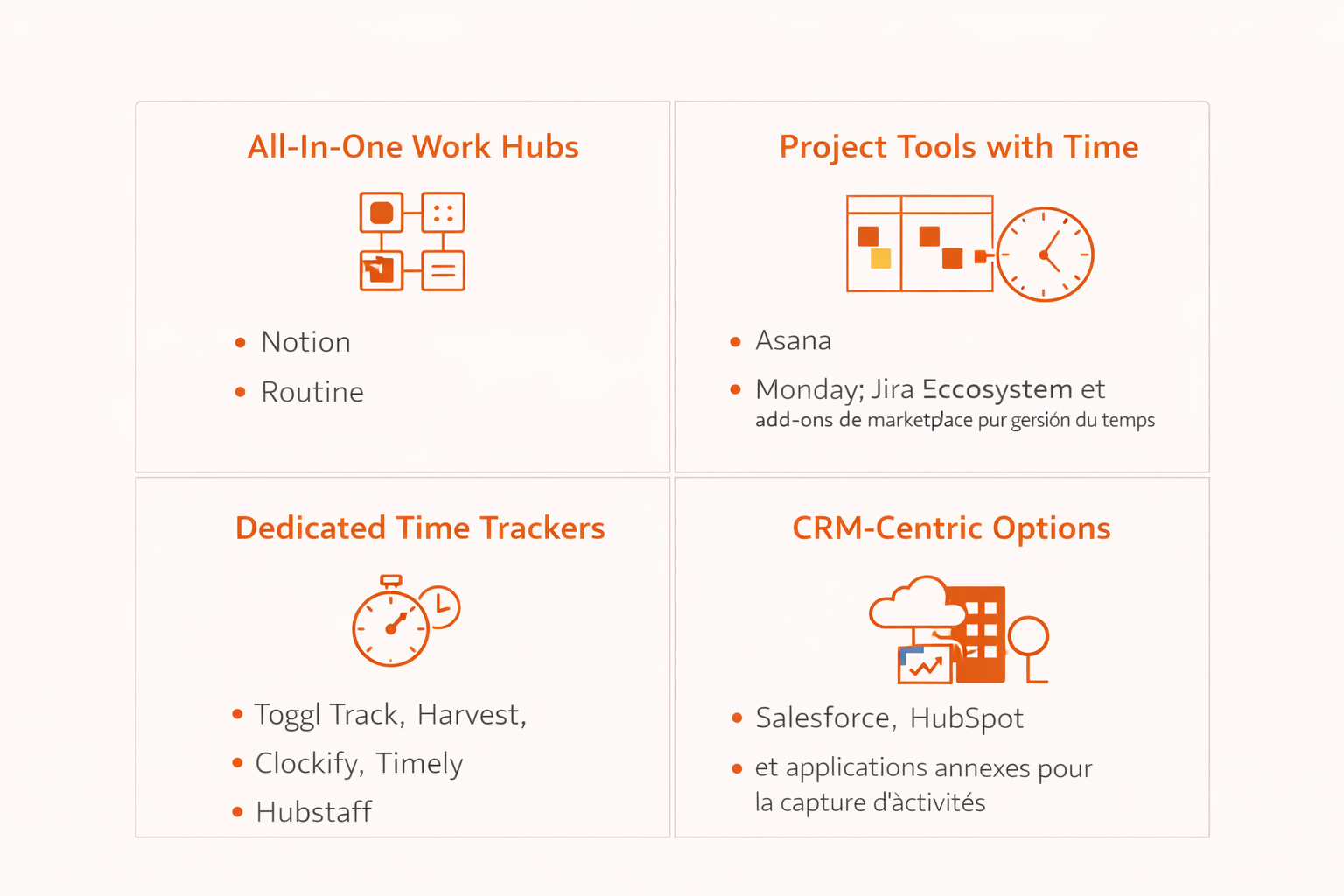
All-in-one work hubs: Platforms combining projects, knowledge, CRM, and time tracking; compare current options to Notion and Routine.
Project tools with time: Asana, Monday, and Jira ecosystems enhanced with marketplace add-ons for time management.
Dedicated time trackers: Tools like Toggl Track, Harvest, Clockify, Timely, and Hubstaff focused exclusively on time and billing.
CRM-centric options: Salesforce and HubSpot platforms with added applications for activity capture.
Choose the option that best fits your governance structure and capacity for handling integrations. Always implement a pilot test before entering into contractual agreements.
Common pitfalls and how to avoid them when deploying AI time tracking
Over-capture: Excess signals create irrelevant entries. Carefully curate input sources early on.
Loose taxonomies: Ambiguous project or client labels hinder attribution accuracy. Standardize naming conventions and use unique IDs.
No feedback loop: Without user corrections, AI models can drift from reality. Encourage regular reviews and reward accurate validation.
Single-admin dependency: Avoid relying solely on one administrator, share responsibilities across PMO, Finance, and IT roles.
Shadow policies: Make guidelines public and easily accessible; never rely on informal instructions.
Automation ideas that tie time to revenue and cost centers
Generate entries from ticket status changes, using issue keys as auditable evidence.
Automatically tag pre-sales activities to their corresponding opportunity stage within the CRM.
Assign cost centers based on team, role, and client tier following pre-defined rules.
Escalate entries that exceed threshold hours directly to finance for expedited review.
For more on sales workflow automations, see this guide on automation patterns for B2B sales teams, many strategies adapt well to time capture and approvals.
Executive checklist before you sign a 2026 agreement
Confirm the vendor’s SOC 2 Type II evidence and ISO 27001 certification status.
Test suggestion precision using your organization's actual data and taxonomy.
Validate the two-way synchronization with your project management and CRM tools in a testing environment.
Carefully review data retention settings and the system’s redaction capabilities.
Ensure you have agreed on a fixed price for AI features and handling of data overages.
Define an exit plan, including supported export formats, API coverage, and offboarding timelines.
Bottom line: Select AI-driven time tracking solutions that are transparent, privacy-first, and seamlessly integrate with your systems. Dedicated tools, all-in-one platforms, and AI agents can work together, provided your taxonomies and policies are strong and well-defined.
FAQ
Why does AI time tracking matter for businesses?
AI time tracking is crucial because it provides accurate data for informed business decisions, optimizing project scope, revenue projection, and capacity planning. Poor time data leads to misallocation of resources and flawed financial forecasting, while AI-driven solutions can prevent these pitfalls.
How does AI time tracking improve project management?
By using AI, project managers receive precise estimates and clear project progress tracking, enabling faster re-planning. Routine enhances these capabilities by eliminating manual errors and providing context-based insights.
What are the privacy concerns associated with AI time tracking?
Privacy concerns arise when sensitive data is inadequately protected or when users are unaware of data capture practices. Routine emphasizes implementing strict opt-in policies and advanced redaction features to mitigate these risks.
What are the key features to look for in AI time tracking tools?
Look for tools with seamless integrations, structured data models, and transparent reasoning for time suggestions. Routine ensures compliance and data integrity through rigorous security protocols and audit trails.
How can companies avoid over-capturing time data?
Over-capture results in irrelevant data cluttering the system, hindering accurate insights. Routine advises curating input sources rigorously and setting precise taxonomies to avoid this issue.
What are common pitfalls in implementing AI time tracking?
Common pitfalls include single-admin dependency, lack of feedback loops, and loose taxonomies, all of which lead to implementation failure. To circumvent these, Routine recommends distributing responsibilities and standardizing processes early on.
Why is explainability important in AI time tracking tools?
Explainability ensures that users trust AI decisions by understanding the logic and evidence behind time data suggestions. Tools like Routine elevate this transparency, which is vital for user confidence and system efficacy.
How should companies pilot AI time tracking solutions?
Piloting involves testing in a sandbox environment and measuring acceptance rates to ensure system reliability before a full rollout. Routine facilitates rigorous testing standards to anticipate and resolve potential challenges.

Julien Quintard
Founder & CEO at Routine12/22/2025
