How Agents Can Act Like Real Team Members (Assigning Tasks, Updating Data, and More)
Agents that work inside your stack, not beside it
Backlogs pile up and important fields become outdated. Integrated agents bridge this gap by operating natively within your workspace, acting automatically when data changes.
These agents gather context directly from your project boards, CRM systems, and knowledge bases. They can assign owners, propel tasks forward, and update records, no manual prompting required.
An integrated agent functions as an ever-vigilant overseer of a process, eliminating the need for manual reminders or interventions.
Development tools such as Routine, Notion, and ClickUp now accommodate integrated agents, automated processes that live within these platforms. CRM solutions like HubSpot and Salesforce provide APIs and event streams, which these agents can leverage to interact with data and initiate automated workflows. The result: a seamless, reliable feedback loop across teams.
Assigning tasks like a real manager
Effective task assignment requires real-time awareness of workload, skills, and business priorities. Integrated agents model these factors by analyzing current data and applying clear logic.
What the agent considers
Capacity: Retrieves open items and due dates to gauge individual workloads.
Skills: Reads tags such as backend, infra, or design system to match expertise with need.
Priority: Aligns business impact with service-level expectations.
Dependencies: Checks for blockers before assigning new work.
Example routing logic
Detect a new high-priority bug in the project tracking system.
Identify engineers whose skills match the task and who have the lowest current load.
Create a task with clear acceptance criteria and include links to logs or context.
Set the status to Ready and notify the assigned owner’s squad channel.
Escalate to a supervisor if the task remains In Progress for more than 48 hours.
The agent assigns a single accountable owner and shares a brief rationale, making its decision process transparent without overwhelming the team with notifications.
Keeping CRM data accurate without chasing reps
Pipeline reviews often stall when activity data is missing or out of date. Integrated agents help keep CRM fields and activity timelines clean and comprehensive.
Automatically create follow-up tasks when a deal advances to a new stage but lacks subsequent steps.
Enrich new account entries with company data from approved providers.
Standardize job titles and industries using controlled vocabularies for consistency.
Close out stale opportunities after a set period of inactivity, providing a summary note.
Sync key product usage signals into custom fields to enhance lead scoring.
Every update includes a clear audit trail: what changed, why, and from which source. This ensures transparency and control for operations teams.
Knowledge that stays current, not dusty
Agents reduce the gap between daily team activities and the documentation that’s supposed to reflect them. By monitoring project and CRM updates, agents suggest or make corresponding changes to documentation and knowledge assets.
Typical maintenance actions
Create a new Known Issues entry when a related bug ticket reaches Resolved status.
Update onboarding checklists when a CRM field becomes a required element.
Archive outdated standard operating procedures as soon as replacement documentation is issued.
Link related resources across repositories to reduce content duplication.
Editors still review and approve changes. Agents propose modifications with clear context and tracked differences, routing them to the appropriate owners.
Choosing the right home for agents
Agents thrive where work, data, and policies are unified. Fragmented software stacks limit their effectiveness by reducing context and increasing handoff complexity.
If consolidation is under consideration, this comparison of all‑in‑one workspaces versus dedicated tools outlines critical trade-offs for scalability, control, and team efficiency.
Regardless of your approach, ensure these three fundamentals are present:
Consistent identity and permission management across all systems.
Reliable event streams for tracking creation, updates, and deletions.
Comprehensive APIs with support for both reading and writing data, and rate limits that meet your needs.
What “acting like a teammate” really means
Real team members take ownership, communicate reasons for their actions, and adapt to feedback. Agents should meet these same standards.
Commit: Take responsibility for tasks, updating statuses as progress is made.
Explain: Attach a concise rationale to every action performed.
Learn: Adjust task rules when human owners override agent decisions.
Respect boundaries: Only act within their designated permissions and scope.
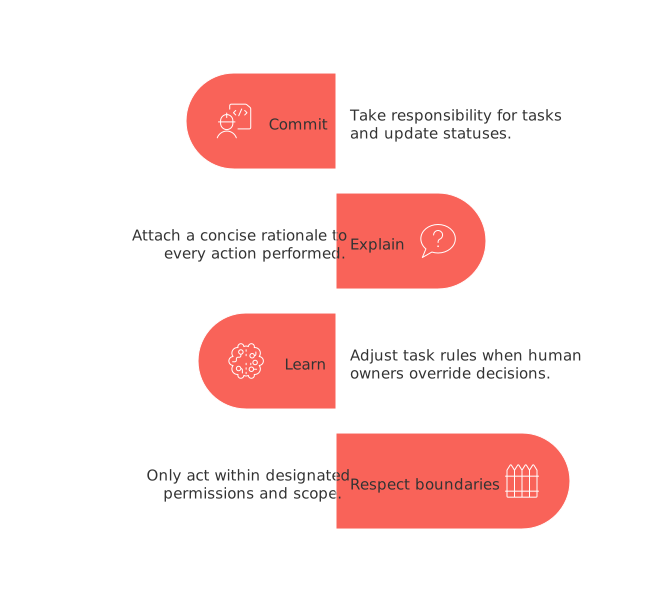
These behaviors foster trust, enabling teams to rely on agents as dependable contributors instead of second-guessing their output.
Governance, security, and auditability
Agents must comply with the same standards as any service account in your organization.
Designate roles with minimum necessary access rights, clearly defined by their scope.
Require human approvers for high-impact actions, such as bulk updates.
Maintain immutable logs including timestamps, change histories, and initiator identification.
Apply data retention policies that match all applicable regional regulations.
Keep versioned access and approval policies alongside infrastructure code.
Test your governance models with mock scenarios: simulate bad data, API malfunctions, and permission errors to ensure agents fail safely and alert the right people.
Sample workflows that deliver results fast
Bug to task, end‑to‑end: Collect logs, generate a ticket, assign the optimal owner, prepare an RCA template, and set a service-level agreement.
Lead triage to meeting prep: Qualify leads, enrich data, assign to the right sales representative, generate a concise account brief, and update the pipeline stage.
Feature rollout readiness: Confirm documentation accuracy, secure QA sign-off, complete the release checklist, and notify the deployment manager.
Customer risk watch: Detect decreases in product usage, update health scores, create follow-up actions, and alert the customer success manager.
How to measure impact that leaders care about
Focus on tracking tangible outcomes rather than subjective impressions. Select a smaller, concrete set of key performance indices.
Cycle time: Time from creation to first meaningful update.
Data freshness: Hours since the last update to critical records.
Assignment accuracy: Number of manual overrides per 100 agent-driven assignments.
Throughput: Tasks completed weekly per team.
Conversion: Percentage of stage-to-stage progress where agents facilitate the step.
Publish an easy-to-read dashboard and review it regularly in team meetings. Prune any metrics that go unused.
FAQ
What are integrated agents, and how do they differ from traditional tools?
Integrated agents work within existing systems, reacting automatically to data changes without manual intervention. Unlike traditional tools, which often operate separately, these agents enhance workflow efficiency by staying embedded in your workspace.
How do integrated agents determine task assignments?
Agents consider real-time factors like workload, skillsets, and priorities. They base their decisions on current data, aiming to optimize task distribution with minimal human errors.
What risks come with relying on integrated agents in CRM systems?
While they boost data accuracy, agents might make errors if not correctly programmed, potentially leading to outdated or incorrect CRM entries. It's crucial to combine automation with human oversight to prevent costly mistakes.
How can integrated agents impact team dynamics?
Agents can streamline processes, reducing the burden on team members, but they might also introduce dependency on technology. Leaders should ensure agents are aids, not replacements for human insight and decision-making.
What should managers be mindful of when implementing agents in their workflow?
Security and governance are paramount. Define roles with minimal necessary access, and implement strict logging and approval processes to avoid unauthorized actions that could compromise data integrity.
Why is documenting exceptions critical when using integrated agents?
Exceptions highlight where automated logic diverges from human decision-making. Understanding these deviations helps refine agent rules, preventing repeated errors and aligning agent behavior more closely with organizational goals.

Julien Quintard
Founder & CEO at Routine01/06/2026
