The Two-Minute Rule: When Quick Wins Become Time-Sinks
What the two-minute rule means in real-world work
Two minutes can close a loop or start a spiral. The classic rule says: if a task takes under two minutes, do it now. That works when the action creates more work the thread. It fails when the action ends. A “quick reply” can invite five more. A tiny fix can reveal three blockers. Two-minute actions can lead to additional follow-ups, effectively multiplying the original time you spend. Treat two minutes as a closure test, not a speed test.
Only do it now if the action ends the loop.
How quick wins become time-sinks through context switching
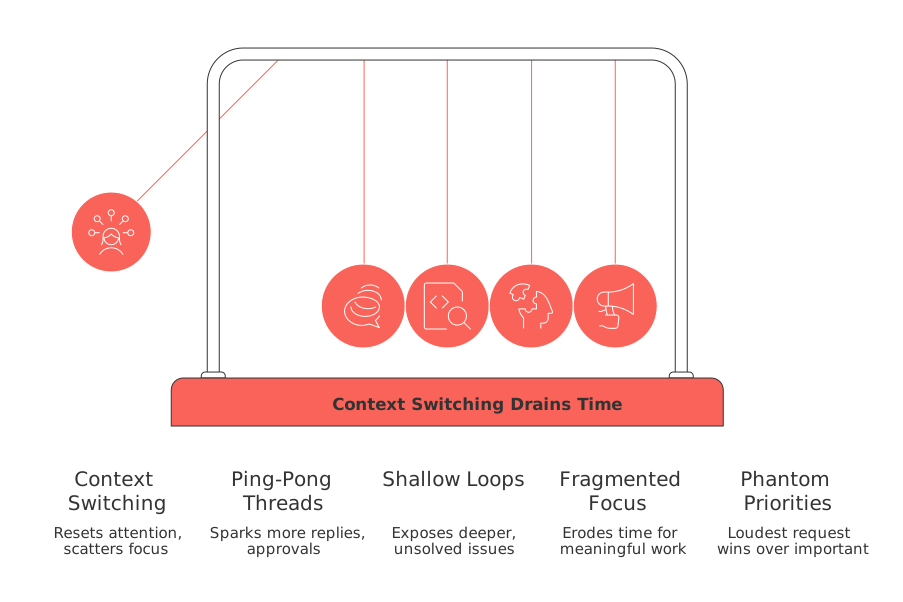
Micro-tasks feel cheap. The hidden fee is switching. Each jump resets context and scatters attention. Two-minute actions that spawn more steps compound the switching cost and drain your day.
Ping-pong threads: Short replies spark more pings, approvals, and clarifications.
Shallow loops: Small fixes expose deeper issues you can’t solve quickly.
Fragmented focus: Many tiny “now” tasks erode time for meaningful work.
Phantom priorities: The loudest request wins over the most important.
A simple decision tree to apply the two-minute rule responsibly
Use this test before you act. Keep it visible on your desk or in your workspace.
Closure check: Will this action finish the matter today? If yes, do it.
Loop risk: If it may trigger back-and-forth, move it to a batch.
Impact filter: If impact is low, schedule or drop it.
Skill fit: If you’re not the best owner, delegate it.
Dependency flag: If you need others, create a clear request, then park it.
Incorporate a daily micro-task budget. Limit immediate micro-tasks to a maximum of 30 minutes. Protect the rest for deep work.
B2C scenarios where the two-minute rule backfires and smarter moves instead
Freelancers handling client pings
A client DM asks for a “quick change.” You can tweak in two minutes. But that tweak reopens scope. Write a one-sentence boundary and propose options. Batch small changes in a weekly window.
Job seekers tracking applications
“Two minutes to send a nudge.” That nudge starts a thread. Draft a reusable follow-up template and queue sends for one slot. Record outcomes in your personal CRM to avoid duplicate outreach.
Solo makers shipping updates
A tiny bug looks fast. The fix needs QA and a note in your knowledge base. Create a mini-ticket, tag the owner, and add it to a release batch. Protect build time.
Team workflows: two-minute tasks across project management, knowledge, and CRM
Small actions live everywhere: issue triage, FAQ edits, and CRM nudges. Centralize them on one board so work stays visible. Tools like Routine, Notion, and ClickUp help connect projects, knowledge, and contacts in one place. Fewer tabs mean fewer “quick” detours.
Create micro‑queues: One column for tasks that can be fully completed immediately. One for tasks likely to trigger more work and better handled in batches.
Define Do Now rules: Close if it removes a blocker or customer friction today.
Route by skill: Assign two-minute items to the lowest capable role.
Automate repeats: Turn recurring “quick wins” into rules or templates.
Running meetings without turning action items into time-sinks
Meetings often spawn a pile of tiny tasks. Don’t chase them live. Capture the action, owner, and deadline. Decide if the item ends a loop. If not, batch it. For practical structures, use these meeting formats and templates. Clear formats prevent “quick” rabbit holes.
Choosing fewer tools to reduce “two-minute” thrash
Tool sprawl turns two minutes into ten. Each switch needs logins, context, and fields. Consolidate work where it makes sense. This comparison of all‑in‑one workspaces vs. dedicated project tools helps you map the trade‑offs. Fewer surfaces, fewer traps.
Metrics and guardrails you can set this week
Micro-task budget: Limit daily immediate actions to 30 minutes.
Batch windows: Two slots per day for loops and approvals.
Context switches: Track switches; aim to reduce by 20% over two weeks.
Queue length: Keep the batch column under 12 items.
Closure rate: Target 70% of “Do Now” items to end the thread.
Copy‑paste prompts to triage your task list right now
Use these prompts to apply the rule with discipline. Paste one, add your tasks, and act.
Consider yourself the task triage coach. Goal: apply the two-minute rule safely. Input: a flat list of 25 tasks with estimates and dependencies. Output: a table with columns: Task, Est. Minutes, Ends Thread? (Y / N), Decision (Do Now, Batch, Delegate, Plan), Reason ( <= 12 words ), Next Step. Constraints: cap Do Now at 30 minutes total; if Ends Thread = N and Est. Minutes <= 2, choose Batch; if blocked by others, choose Delegate with a ready-to-send request. Ask 3 clarifying questions if information is missing.
Analyze my CRM follow-ups. Input: CSV with columns: Contact, Stage, Last Touch ( YYYY-MM-DD ), Urgency ( 1-5 ), Est. Minutes. Task: return a prioritized list under 15 items for Do Now. Apply the two-minute rule: only Do Now if the action ends the thread or reactivates a stalled deal; otherwise assign to Batch or Sequence. Output: table with Contact, Decision, Reason ( <= 10 words ), Next Step, Suggested automation.
FAQ
What is the \"two-minute rule\" and its primary purpose?
The two-minute rule suggests completing tasks immediately if they take under two minutes. However, its effectiveness is in closing tasks, not just speed. If the task leads to more work, it may erode productivity.
Why do quick tasks often lead to inefficiencies?
Quick tasks can trap you in context-switching cycles, increasing mental fatigue and inefficiency. Switching disrupts focus, and tasks that seem small can generate additional steps, extending time commitment exponentially.
How can freelancers manage client requests that seem minor?
Freelancers should cautiously evaluate minor requests, as they often expand scope. Instead of immediate action, set boundaries and group similar requests to handle them collectively.
What strategy should one adopt for handling emails and client communications efficiently?
Use a batch processing method for communications that likely result in more back-and-forth. Draft templates for repetitive tasks and prioritize closing the most impactful conversations.
Why should businesses limit the number of tools they use daily?
Excessive tool use leads to a productivity drain due to constant context switching. Streamline operations using comprehensive tools like Routine to consolidate tasks and reduce unnecessary distractions.
What approach should be taken to prevent short meetings from turning into time vacuums?
Meetings often produce numerous trivial tasks, but not all need immediate attention. Capture action items, assess if they actually resolve issues, and schedule them thoughtfully to avoid endless follow-ups.
How can someone apply the two-minute rule without falling into common pitfalls?
Evaluate if the task indeed ends a thread or opens more. Use decision frameworks to categorize tasks scientifically, positioning them as Do Now, Batch, or Delegate to maintain optimal focus and efficiency.

Julien Quintard
Founder & CEO at Routine06/08/2026
