How to Triage your Inbox in Two Daily Passes Instead of Checking it Constantly
How to triage your inbox in two daily passes instead of checking it constantly
The two-pass inbox triage method explained simply
The premise is straightforward: scan your inbox quickly once for immediate action, then revisit later to process the rest. Each email gets a decisive action during its pass.
Delete or archive: If it’s irrelevant now, or ever, remove it.
Reply in under two minutes: When a brief response will suffice, send it right away.
Delegate or forward: Assign to someone better suited to handle it.
Task or ticket: If it needs dedicated work, track it somewhere actionable.
Reading queue: Tag articles or newsletters to review in batches.
Waiting: Mark emails needing follow-up after your quick reply.
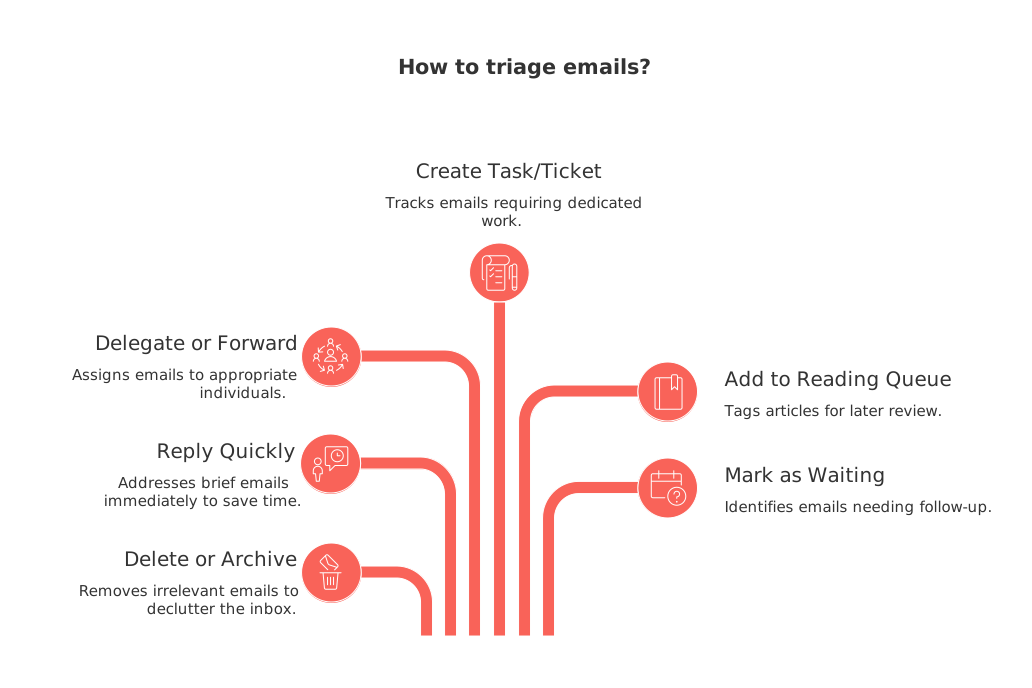
This two-pass approach counters “half-processing”, the habit of skimming messages multiple times before acting. Touch each email only once per pass, not repeatedly.
Establish your rules before opening your inbox
Define what constitutes “urgent” for yourself and your team. Identify VIP senders who always warrant a prompt response. Bundle newsletters. Silence threads that provide little value.
Email is a to-do list others assign to you. Prioritize your own work first.
Disable push notifications and previews. Check email on your schedule, not someone else’s.
Unsubscribe from senders ignored twice in a month.
Use basic filters to group receipts, reports, or alerts for reviewing in bulk.
First pass: a brisk 10-minute morning sweep
This is for safety and speed. Eliminate distractions, address quick wins, and highlight priorities. Avoid deep dives now.
Sort messages by unread. Purge promotions and stale threads first.
Flag important contacts and deadlines for your second pass.
Reply immediately if you can resolve something in under two minutes.
Label items as “waiting” if you need a reply to move forward.
Close your inbox and shift to your core work.
One-line reply examples for pass one
Confirming: “Received. I’ll share the draft by 2 pm Monday.”
Simple approvals: “Approved. Please proceed as planned.”
Redirecting: “Not my area. Looping in Dana, who manages hiring.”
Second pass: a focused 25-minute afternoon session
This is your deeper work window. Tackle emails flagged earlier with the time and attention they deserve.
Group emails by topic. Respond to all hiring, invoicing, or support inquiries together.
Convert complex requests into tasks or tickets, assigning ownership and deadlines.
Write thorough responses and attach any resources your recipients need.
Update the status for “waiting” items after substantive replies.
Archive completed threads to maintain an uncluttered inbox.
Adjust timing as needed, students or freelancers might opt for eight minutes in the morning and twenty later. Keep both sessions brief and deliberate.
Move work from email to trusted systems
Email should act as an entry point, not your workspace. Transfer actionable items to project boards, knowledge bases, or CRM tools. Convert client briefs into dated tasks, sales inquiries into CRM entries, or common answers into help articles.
Centralized platforms like Routine or ClickUp streamline this process, keeping tasks, documents, and client data in sync without endless copying. Choose a single source of truth and stay with it.
Automate inbox triage, but keep the personal touch
Leverage automation to organize incoming mail, not to send automated replies. Human context makes a difference in conversation.
Create a “VIP” label that always bypasses newsletters and lands in your main inbox.
Auto-label receipts, reports, and alerts so you can review them as a group.
Direct product trial or demo requests straight into your CRM queue.
Automatically archive recurring notifications once you know they’re not important.
If you manage sales or partnerships, consider these automation strategies for sales teams to filter leads and reduce noise, without sacrificing trust.
Set clear expectations with your team and clients
Communicate how and when you process email. Tell contacts the times you check your inbox and how to get urgent attention when needed.
Add a footer: “I review email at 10 am and 4 pm Pacific each workday.”
Provide a secondary, urgent communication method like chat or phone.
Let frequent contacts know your average response window for non-emergencies.
Consistency fosters trust with executives and customers alike. Reliability always trumps instant responses.
Keep response templates handy to reply faster
Prepare concise templates for frequent replies. Edit once, then reuse to save time while staying clear and professional.
Confirmation:“Thank you for the details. I’ll deliver the first draft by Thursday, June 4.”Redirecting:“Looping in Alex from billing. Alex, can you advise on the next step?”Request for clarification:“Could you clarify the target audience and final deadline?”Holding pattern:“Received. I’ll review during my afternoon inbox session today.”
Track metrics to measure your inbox progress
Average inbox checks per day drop below five.
First-response times remain under one business day.
More emails are archived or handled on the first pass each week.
Outstanding “waiting” items decrease steadily.
Review these indicators weekly. If your response time creeps up, shorten your messages or move more items to dedicated task lists.
Know when it’s okay to break the two-pass rule
Certain roles, like on-call support or overseeing live launches, require more frequent checking. Tighten your loop only when truly necessary.
Assign a dedicated person to monitor urgent alerts on each shift.
Use a shared inbox or queue for time-sensitive emergencies.
Switch back to the two-pass system once the busy period passes.
Additional resources for better email workflow
If you handle customer messages across platforms, consolidate them into one view. Learn how to sync customer data from Intercom, Front, and email without coding to simplify your context switching. As your systems connect, inbox triage becomes lighter and easier.
Want to ease in? Start with one new rule and one template, run two quick inbox passes for a week. Next, add another filter or canned reply. As you adjust, your inbox will feel calmer and your focus will return to your most important work.
FAQ
Why should I limit my inbox checks to twice daily?
Constantly checking your inbox fragments your attention and hinders productivity. By limiting it, you focus on completing significant tasks, reducing stress and time wasted on interruptions.
What criteria can I use to decide if an email is urgent?
Define urgency by its impact on current objectives or deadlines. Only true emergencies should disrupt your primary work, prioritizing strategic goals over reactionary tasks.
How can automation help in managing my inbox effectively?
Automation can prioritize and categorize incoming emails, allowing you to focus on critical messages. Tools like Routine help streamline processes by organizing essential information away from daily clutter.
How do I ensure effective email communication with my team?
Establish clear expectations for email response times and alternative urgent contact methods. Consistent communication patterns build reliability and trust among team members and clients.
Why should I move tasks from email to dedicated systems?
Email is meant for communication, not as a task management tool. Moving tasks to platforms like Routine or ClickUp reduces chaos, enabling more effective tracking and completion of tasks.
What are the risks of not unsubscribing from unnecessary email lists?
Failing to unsubscribe clogs your inbox with noise, causing missed opportunities to respond to crucial emails promptly. Eliminate the irrelevant to focus on what matters the most.
Can email response templates genuinely save time?
Yes, they streamline frequent replies, ensuring consistency and efficiency in communication. They allow you to allocate more energy to unique and critical messages, lessening mental load.
How do I know if I’m improving in managing my inbox?
Track metrics like reduction in daily inbox checks and faster first-response times. If you're archiving more emails in first passes, your system is likely improving.

Julien Quintard
Founder & CEO at Routine05/29/2026
