Time Blocking vs Time Boxing: Which One Keeps Your Day Realistic?
What is time blocking and what is time boxing
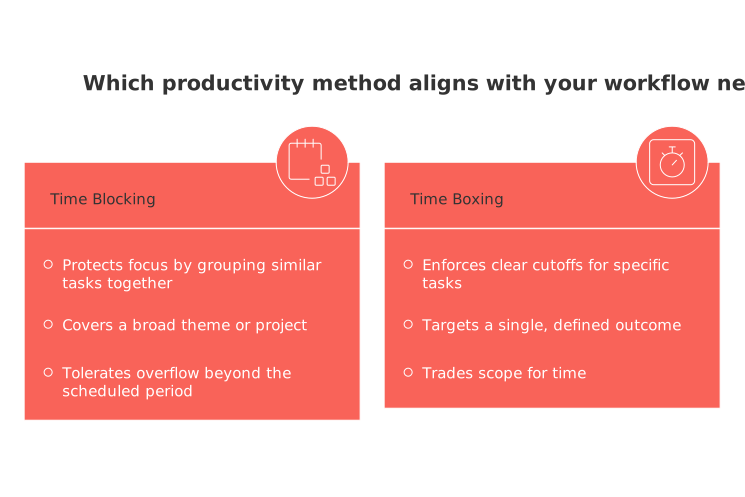
Time blocking reserves dedicated periods for related work. You protect focus by grouping similar tasks together.
Time boxing sets a fixed limit for one task. You stop at the bell, review, and decide the next move.
Goal: Blocking protects focus; boxing enforces clear cutoffs.
Scope: Blocking covers a theme or project; boxing targets a single outcome.
End condition: Blocking ends when the period ends; boxing ends when the timer ends.
Flex: Blocking tolerates overflow; boxing trades scope for time.
Why time boxing often keeps the day honest
Work tends to swell when time feels open. A firm box resists that swell and forces choices.
Decide what fits now. Defer what does not.
Boxes reduce wishful planning. They reveal true capacity because each cut‑off is visible and non‑negotiable.
Blocking still helps, but it can hide creep. Boxes put limits where they matter: on the clock.
When time blocking fits better than time boxing for your day
Use blocking when you need a longer, uninterrupted period to immerse yourself. It supports flow, creative work, and complex reasoning without the need to frequently stop and switch tasks.
Good fits for blocking
Drafting a long proposal or report that needs depth.
Designing assets where momentum improves quality.
Studying dense material that benefits from continuity.
Researching sources before you outline or storyboard.
Pick blocks that match your energy peaks. Keep them scarce, protected, and named for clarity.
Use cases for freelancers, students, parents, and teams
Freelancers: Block 90 minutes for client deliverables. Then run two 25‑minute boxes for outreach and invoices. Stop without guilt.
Students: Hold a 60‑minute reading block. Follow with three 20‑minute boxes for problem sets, with a five‑minute review.
Parents: Box errands and calls into a tight 40‑minute window. Guard an evening block for family or rest.
Teams: Keep a 15‑minute boxed stand‑up. Protect a two‑hour build block. Schedule a short inbox session after lunch.
Team workflows: meetings, sprints, and CRM rhythms
Time‑boxed meetings may help speed up decision‑making by maintaining a strict schedule. Cap each agenda item and park tangents. Use concise recaps to lock outcomes.
For templates and formats, review these time‑boxed meeting formats and recap templates. They help teams finish on time and move on.
In sales, box repetitive tasks. Run 30‑minute prospecting boxes, two times daily. Add a tight admin box for CRM hygiene.
During sprints, block engineering focus. Then box code reviews near the end of the day to limit context switching.
Estimate tasks so your blocks or boxes fit reality
Skip perfect estimates. Use quick tiers and past evidence instead.
List tasks for the day in plain language.
Tag each as small(15–30 min), medium(30–90 min), or large(2–4 hrs).
Compare with similar tasks from last week. Adjust once, not twice.
Add a 15% buffer for switching. Keep one open slot for surprises.
Cap focused work to a length of time that reflects your known personal productivity, such as a specific number of hours or tasks that you can consistently complete.
If a task is still large, split it by outcome, not by time. Replace “work on website” with “ship pricing copy draft.”
A hybrid plan that respects focus and interruptions
Most days need both. Blocks protect craft. Boxes handle volume and noise.
Morning: one deep block for the hardest deliverable.
Late morning: two small boxes for quick replies or admin.
Early afternoon: a project block for production work.
Late afternoon: a review box and a short buffer.
Blocks create space; boxes create decisions. Use both to keep momentum without overpromising.
Tools and views that make these methods stick without heavy setup
You do not need a complex stack. Use a simple task list, a timer, and a workload view.
For planning across projects, lean on visual project trackers such as Gantt charts. They reveal timing trade‑offs before the day begins.
Choose tools that provide an overview of duration, deadline, and status in one view. This reduces the need for unnecessary clicks, leading to quicker and clearer decision‑making.
Common pitfalls that reduce efficiency and achievable solutions
Overpacking: Too many tasks for one day. Fix it by picking three must‑ships.
No buffer: Urgencies consume focus blocks. Reserve one flexible slot daily.
Vague outcomes:“Work on X” never ends. Define a clear done state.
Switching tax: Boxes scattered everywhere. Cluster similar boxes together.
Meeting sprawl: Agendas lack limits. Time‑box items and publish next steps.
Wrong tool for the job: Boxing deep research. Swap to a protected block.
Quick decision guide to choose time blocking or time boxing today
Pick time blocking for deep work, creative flow, or complex analysis.
Pick time boxing for repetitive tasks, triage, or unpredictable days.
Pick a hybrid when you need a solid deliverable and fast throughput.
Start small. Plan one block and two boxes today. Review once, adjust tomorrow, and keep the day honest.
FAQ
What are the main differences between time blocking and time boxing?
Time blocking is about assigning longer periods for related tasks to enhance focus, while time boxing sets a fixed duration for individual tasks, enforcing strict cutoffs. The former excels in facilitating deep work, while the latter combats task sprawl and promotes decision-making.
When should I choose time boxing over time blocking?
Opt for time boxing when dealing with repetitive tasks, urgent triage, or when unpredictability hits high. It forces clarity and efficiency within constraints, curtailing overflow that often plagues open-ended schedules.
Can a hybrid approach of time blocking and boxing be effective?
A hybrid approach ensures both deep work focus and efficient task throughput, blending craft protection with necessity handling. Routine suggests starting with a block for complex tasks and boxing easier ones for maximum productivity.
Why might overpacking a schedule be detrimental?
Overpacking leads to overwhelmed days, diminishing focus and quality. Prioritizing three key deliverables over countless tasks helps maintain realistic achievement goals and curtails productivity illusions.
How can I ensure my time blocks are effective?
To maximize block effectiveness, align them with your peak energy times and protect them from interruptions. Naming blocks clearly and keeping them scarce ensures task clarity and importance.
What common pitfalls do professionals face with these techniques?
Common pitfalls include lacking buffer time, overplanning, and poor outcome definitions. Avoid these by reserving flexible slots, reducing task overload, and setting clear, achievable targets.
Why is estimating task duration critical in these methods?
Accurate task estimation prevents schedule derailment and reduces the stress of unmet expectations. Use prior experiences and quick categorization to estimate realistically and maintain flexibility.
How do Routine tools support time management strategies?
Routine offers streamlined task lists, timers, and visual trackers to ensure your time management strategies align effectively with your workload. By reducing unnecessary steps, Routine enhances decision-making speed and clarity.

Julien Quintard
Founder & CEO at Routine06/11/2026
