Run a Time Audit for One Week: What You'll Actually Learn
What a one-week time audit reveals that your memory hides
Your memory edits your week. A log does not. Run a seven‑day audit and you’ll see where attention actually went. You’ll find invisible drains, poorly timed work, and moments that created real progress. That clarity changes decisions fast.
“What you measure shapes what you protect.”
Expect a few surprises. You will likely overestimate focused hours and underestimate small handoffs. You will also spot which tasks deserved your best energy but got leftovers.
How to set up a simple, bias‑free time audit for seven days
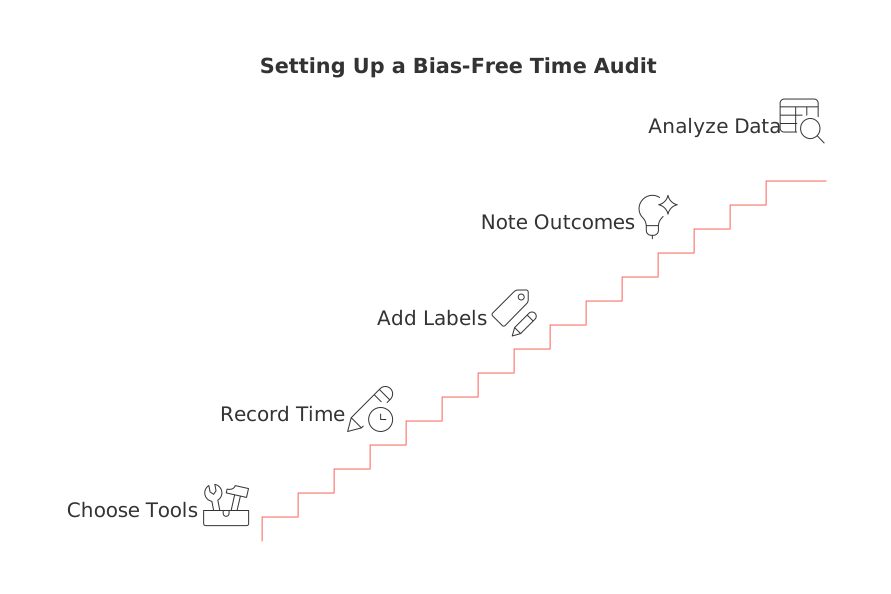
Keep the setup straightforward and uncomplicated. The goal is truthful capture, not perfect tracking. Use your existing task tool, a spreadsheet, or a timer app. In 15‑minute intervals, record what you are doing and mark the start time. When you switch to a new activity, stop the current entry and start a new one. Repeat this process throughout the day.
For each entry, add two quick labels: work type and energy level(high, medium, or low). Optional: jot a one‑line outcome when the block ends.
Choose categories that explain outcomes
Deep work: strategy, creation, design, analysis.
Operational work: admin, handoffs, approvals.
Collaboration: meetings, workshops, live reviews.
Customer relationship management (CRM) and sales: prospecting activities, outreach, and follow‑ups.
Comms: email, chat, DMs, comments.
Personal: breaks, errands, life logistics.
Keep the friction low
Log in the moment when possible. If not, write short summaries every two hours.
Use the same few tags all week. Don’t overfit categories.
Mark context switches. One mark per switch tells a strong story.
Respect privacy and consent
If you are conducting this time audit as a team, explain its purpose and how long it will run. Share only aggregated patterns, not individual diaries, and get clear opt‑in.
The five patterns you will almost always uncover in a time audit
Context switching tax. Frequent toggling steals attention. You’ll see clusters of 5–10 minute fragments. Those fragments rarely move work forward.
Hidden operational load. Admin creeps. Approvals, chasing files, and rework appear small but claim hours.
Meeting sprawl. Short sessions multiply. Many lack clear outcomes. The log will show them stacked at peak focus times.
Energy misalignment. Hard tasks land in low‑energy windows. Easy tasks steal your sharpest hours.
Unpriced communication. Email and chat feel free. They cost real time. Your audit will put a number on it.
Each pattern suggests an experiment: batch, delete, reschedule, or redesign the work. Small changes compound quickly.
What your time audit says about meetings and collaboration work
Meetings aren’t evil. Fuzzy meetings are. Your log will show which sessions produced decisions or assets, and which just moved talk around. Protect your prime focus window from live sessions whenever possible.
Set a “decision or deliverable” rule for every session.
Combine short status check‑ins into one weekly review.
Replace single‑topic chats with asynchronous updates when stakes are low.
To improve efficiency quickly, adopt structured meeting formats and use recap templates. Ensure each item discussed has a clear owner and due date. For examples, use structured meeting and recap templates that end with owners and deadlines. Your next audit will reflect the difference.
Translate one week of time data into actions you will keep
Translate one week of time data into actionable steps. Review the patterns and trends in your log and identify where you can make improvements. Then convert findings into a simple playbook using the 4T approach.
Trim: Remove any block with zero outcome. Say no or end earlier.
Trade: Move low‑skill tasks out; reserve sharp hours for complex work.
Transfer: Automate repeats; standardize checklists and handoffs.
Test: Choose one change for next week, add it to the calendar, and review results on Friday. Keep what works. Drop the rest.
Use one rule for tough calls: if a task doesn’t serve a goal this month, schedule it later or delete it. Protect momentum over perfection.
A solo professional’s playbook for running a time audit
Freelancers and creators live by output. Your audit will show where output stalls. Act on it.
Define two daily deep‑work sprints. Guard them with do‑not‑disturb.
Batch admin into a single window. Stop scattering small chores.
Set CRM hours for outreach. Treat it like a client task.
Price your week. Know your revenue per focused hour.
I’m busy often hides I’m scattered. The log will prove it either way.
What teams and small businesses learn from a shared time audit
Teams discover process friction. Handoffs take longer than expected. Status work multiplies. Leaders also see where knowledge lives in one head and blocks progress elsewhere.
Standardize recurring workflows. Shorten reviews with clear acceptance criteria.
Tie CRM tasks to outcomes, not rituals. Reduce duplicate logging.
Create a single source for assets and decisions. Stop hunting files.
If tool sprawl fuels context switches, first compare all‑in‑one workspaces with dedicated project tools for your setup. Consolidation often frees more time than optimization.
Metrics that matter after your audit: effort, value, and return‑on‑minute
Skip complex math. Use three simple scores per recurring task:
Minutes spent: average time per occurrence.
Outcome value: 1 (low), 2 (medium), 3 (high).
Return‑on‑minute: value divided by minutes per occurrence (higher is better).
Keep tasks with high value and reasonable minutes. Redesign or remove the rest. Re‑score monthly to track drift.
A seven‑day time audit routine you can start any week
Day 1: Set categories and energy tags. Capture without judgment.
Day 2: Add context switches. Note triggers briefly.
Day 3: Mark outcomes for deep‑work blocks.
Day 4: Tag meetings as decide, design, or discuss.
Day 5: Flag admin tasks that repeat weekly.
Day 6: Tally minutes by category. Circle top three drains.
Day 7: Write two rules to try next week. Put them on your calendar.
Common traps during a time audit and how to avoid each one
Trap: Logging only “real work.”Fix: Log everything, including scrolling and errands.
Trap: Too many categories. Fix: Cap at six. Merge similar ones.
Trap: Changing three things at once. Fix: One experiment per week.
Trap: Treating the log as a diary. Fix: Report patterns, not stories.
Trap: Ignoring energy data. Fix: Move hard tasks into strong hours.
When a dedicated tool helps, and when an all‑in‑one workspace wins
Use a single‑purpose tracker if billing by the minute matters. Tools like Toggl Track or Harvest make that simple. Use an all‑in‑one workspace when time connects tightly to tasks, assets, CRM, and reviews. Apps such as Routine or Notion tie time to the actual work, which cuts handoffs. Choose the path that makes logging easy and decisions obvious.
Want a quick primer on planning creative time? Read this clear explanation of maker versus manager schedules and adjust your audit windows accordingly.
FAQ
What is a time audit, and why should I conduct one?
A time audit involves tracking tasks and activities over a week to uncover misalignments and inefficiencies. It reveals how much time is truly spent on meaningful work versus distractions, challenging assumptions and guiding strategic changes.
How do time audits expose hidden productivity drains?
Time audits reveal frequent task-switching, hidden operational tasks, and unproductive meetings by recording activities in detail. This detailed log makes clear the areas where time is wasted, urging for immediate optimizations.
Why is recording energy levels during a time audit important?
Logging energy levels helps identify when you perform most efficiently, aligning challenging tasks with high-energy periods. Ignoring energy leads to mismatched task execution, undermining productivity.
What are the pitfalls of using too many categories in a time audit?
Using too many categories complicates tracking and dilutes focus, making it difficult to discern meaningful patterns. Simplifying categories ensures more accurate analysis and actionable insights.
How can Routine facilitate a more effective time audit?
Routine ties time tracking directly to tasks and assets, reducing handoffs and improving focus. Its integration with CRM and other functions streamlines the process, making it ideal for rooted efficiency.
What common mistakes might skew the results of a time audit?
Neglecting context switches, ignoring energy data, or treating the audit like a diary can obscure critical insights. Instead, focus on logging throughout the day and analyzing patterns, not isolated incidents.
How should teams address findings from a collective time audit?
Teams should standardize workflows and reduce status updates that don't drive progress. Sharing key insights collectively ensures streamlined operations and prevents knowledge silos that impede efficiency.
What is the \"context switching tax\" and its impact on productivity?
The \"context switching tax\" refers to the inefficiency caused by frequently shifting between tasks. This divided attention results in fragmented progress and diminishes overall productivity.
Why is a simple logging setup recommended for a time audit?
A simple setup ensures consistent, unbiased tracking and reduces the burden of overcomplication. This straightforward approach enhances clarity and focus in analyzing results, prompting actionable change.
What steps should freelancers take after conducting a time audit?
Freelancers should prioritize deep work, batch administrative tasks, and optimize client interactions. Such adjustments ensure that efforts align with revenue goals and sustain competitiveness in their field.

Julien Quintard
Founder & CEO at Routine06/16/2026
