Top Superlist Alternatives to Try in 2026
Why people look for Superlist alternatives in 2026
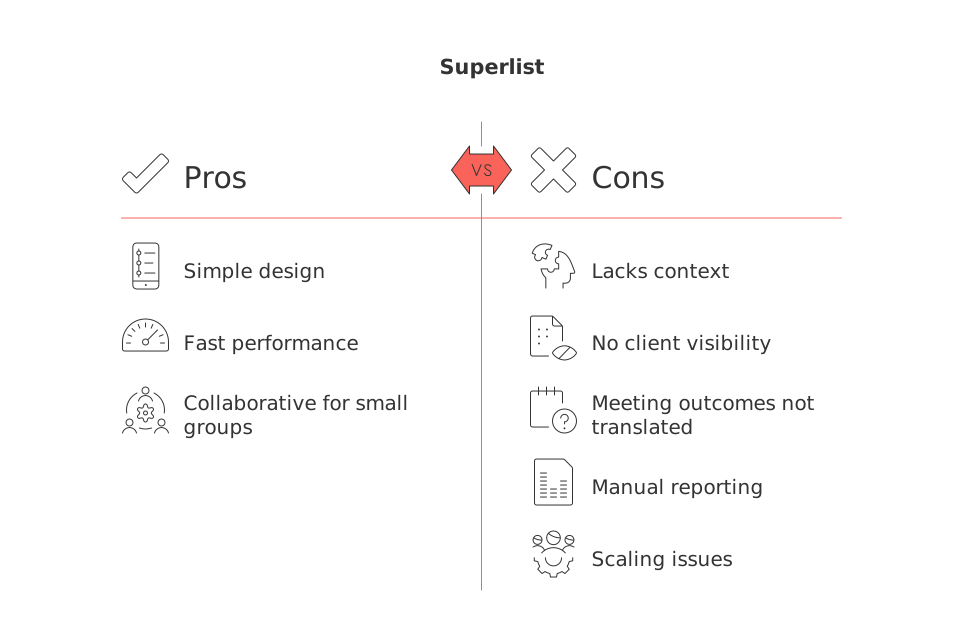
Superlist perfectly captures the simplicity and modern design of a to‑do app. It’s fast, and sufficiently collaborative for a small group, making it delightful for managing personal lists. However, as your work grows to include client context, project briefs, recurring meeting actions, and interconnected tasks, a simple list ceases to be adequate. The main limitation isn’t the checkbox; it’s the absence of meaningful context around it.
Common reasons for making a switch emerge in familiar ways:
Tasks become disconnected from their project context, forcing important decisions into scattered documents and chats.
Client follow-ups and pipeline statuses are not visible alongside the tasks where the real work happens.
Meeting outcomes do not reliably translate into accountable tasks for the appropriate team members.
Reporting across projects, comprehensive tagging, and high-level summaries end up as manual spreadsheets.
The team struggles to scale from a handful of shared lists to more structured workflows with roles and approvals.
This guide ranks the top Superlist alternatives by their ability to bring back meaningful context, enhance collaboration, and scale up without turning daily planning into an added burden. If you are still undecided between consolidating all functions into one workspace or using specialized tools, this comparison of all-in-one workspaces versus dedicated project tools will help clarify your options. For more complex workflows, “Mastering the Project Lifecycle: The 5 Phases and What Really Happens in Each” is a valuable resource for scoping your requirements.
Side-by-side comparison of top Superlist alternatives
Tool (rank) | Best for | Why choose over Superlist | Stand-out trade-off | Team size fit |
|---|---|---|---|---|
Routine | Teams and freelancers who need projects, knowledge, CRM, and meetings tied together | Deep context across workstreams; fewer apps; smarter connections between tasks, briefs, and client records | All-in-one means change management; agree on one system | Solo → 150+ |
Notion | Builders who want docs + databases with flexible schemas | Create any task model; link tasks to docs and specs in one place | Requires a system owner; templates drift without governance | Solo → mid-size |
Asana | Cross-functional projects with dependencies and approvals | Stronger process oversight, accountability, and standardized workflows | Heavier adoption; admin overhead | 10+ |
Motion | Individuals and small teams who want automatic time planning | Auto-plans your day so tasks actually happen | Not a docs or CRM hub; narrow by design | Solo → small |
ClickUp | Operations that want one configurable platform | Many views, docs, and automation under one roof | Setup depth; risk of over-configuration | 5 → 500 |
Todoist | Personal productivity with lightweight collaboration | Frictionless capture; fast personal system | Limited project context and reporting | Solo/duos |
Trello | Visual pipelines and quick onboarding | Instantly understandable boards for simple flows | Shallow hierarchy; relies on add-ons | 3 → 30 |
Sunsama | Daily focus and mindful execution | Plan your day with intention; pull tasks from other tools | Not built for complex, multi-team projects | Solo/small |
Routine : best Superlist alternative for unifying projects, knowledge, CRM, and meetings
Teams often make the switch when tasks become dependent on more than just a list and begin to require client context, detailed briefs, and meeting outcomes. Routine brings together project management, a knowledge base, CRM, and meetings so that all relevant information is located in a single place. You don’t need to search for relevant context; it is automatically linked and travels with the work.
Why it made the list: Superlist is efficient for basic lists; Routine is superior when the connectivity and relationships between tasks and other work components matter. Tasks can be grouped with related briefs and client details, making sure follow-ups, decisions, and handoffs are always accessible. This reduces the need for multiple tools and minimizes the risk of losing important context.
Where it stands out: Smart cross-project connections, reusable structures for recurring work, and CRM details that are easily accessible near the work itself. For sales teams or agencies, this blend of work management and client relationship tracking limits the need for constant app switching and reduces miscommunication.
Trade-offs: Opting for an all-in-one system requires your team to align on shared processes and migrate important work content. Simpler tools such as Todoist or Sunsama are more suitable if your needs are limited to personal task lists.
Who should choose it: Founders, client-facing teams, and freelancers seeking a workspace that grows from solo mode to larger team operations. If recurring meetings are a core part of your workflow, use these effective meeting formats and recap templates to ensure meeting outcomes and action items are persistent and accessible within your workspace.
Decision moment: Consider adopting Routine when your tasks become reliant on meeting context, project knowledge, and client follow-ups, and you are ready to stop manually piecing that information together.
Notion : best Superlist alternative for flexible databases with docs-first planning
Not every team is looking for a prebuilt system; many prefer adaptable building blocks. Notion enables you to design custom databases for tasks, link them seamlessly to documentation and research, and create the specific views you need.
Why it made the list: If your daily work revolves around documentation and fine-tuning your own organization system, Notion can serve as both a to-do app and a comprehensive wiki.
Where it stands out: Exceptional flexibility, advanced relational databases, and easy documentation capabilities around your tasks.
Trade-offs: An internal owner is necessary to maintain template consistency, set clear guidelines, and keep views useful. Without such oversight, the system can lose coherence and team engagement may drop.
Who should choose it: Product, content, and research teams who want to build and refine their own operating system. For teams desiring more opinionated structure and built-in CRM abilities, Routine or ClickUp will be a faster starting point.
Asana : best Superlist alternative for process, dependencies, and multi-team accountability
When the challenge grows from needing context to requiring process discipline, Asana is a logical choice. It prioritizes structured workflows, dependencies, assignments, and approval mechanisms.
Why it made the list: Asana offers a mature, reliable structure for cross-functional projects. Managers benefit from clear accountability, while contributors know exactly what is expected of them.
Where it stands out: Strong templates, effective dependency management, and straightforward project tracking that keeps complex workstreams synchronized.
Trade-offs: Onboarding and governance requirements are higher. Smaller teams may find it overly complex compared to the simplicity of Superlist.
Who should choose it: Growing teams that must navigate compliance, approval workflows, or vendor coordination where auditability is important. For teams needing closer CRM context, Routine is generally a more comprehensive option.
Motion : best Superlist alternative for automatic time planning
If your primary limitation is time management rather than tool features, Motion is a practical solution. It automatically schedules your day and adjusts in real-time as priorities change, ensuring essential work gets done.
Why it made the list: Many Superlist users spend more time maintaining their lists than completing their tasks. Motion reverses this trend, turning your good intentions into actionable plans without the need for micromanagement.
Where it stands out: Automated, hands-off daily planning for individuals and small teams who value time blocking with minimal management overhead.
Trade-offs: It is intentionally focused, project context and client information will still need to be managed elsewhere.
Who should choose it: Consultants, solo entrepreneurs, and small teams whose top priority is making every hour as productive as possible.
Decision moment: Motion becomes necessary when planning your day consumes more effort than actually accomplishing it.
ClickUp : best Superlist alternative for configurable, operations-wide workflows
ClickUp suits teams that want a highly configurable solution and are willing to invest in its setup. If you’re comfortable shaping workspaces, building views, and setting up automations, much of your operation can be managed centrally in ClickUp.
Why it made the list: It covers tasks, docs, and dashboards, which allows operations teams to reduce the number of tools they use.
Where it stands out: The ability to create a wide range of views and workflows makes it a favorite for teams that enjoy customizing their tools.
Trade-offs: With flexibility comes complexity. If you lack clear managers or system owners, the system can quickly become unwieldy.
Who should choose it: Operations, marketing, and service teams ready to dedicate time and resources to configuration. If you want more opinionated structures out of the box and an integrated CRM, consider Routine instead.
Todoist : best Superlist alternative for frictionless personal productivity
For fast task capture and simple lists, Todoist remains a standout. It’s ideal for individuals who want minimal overhead, along with lightweight collaboration for side projects or shared errands.
Why it made the list: Quick input, intuitive recurring tasks, and a familiar user experience help keep you productive every day.
Where it stands out: Speed and clarity for basic personal tasks that don’t require deeper organization.
Trade-offs: Limited in providing broader project context and reporting. You’ll likely need separate tools for client briefs or team-wide transparency.
Who should choose it: Freelancers and individuals seeking a streamlined task management experience. As your work becomes more collaborative, consider transitioning to Routine or Asana.
Trello : best Superlist alternative for visual pipelines and quick adoption
For teams that prefer visually guided tools and need something immediately accessible, Trello’s board-based system is easy to adopt. It excels for straightforward process workflows: such as editorial calendars, simple requests, or managing vendor queues.
Why it made the list: The quick onboarding and visual clarity make Trello perfect for teams and collaborators who want a clear, shared view of their process.
Where it stands out: Its simplicity means teams can get started in minutes, with minimal learning curve.
Trade-offs: Lacks hierarchical structure and deeper reporting unless supplemented by add-ons. As soon as your work demands more comprehensive context, its limitations become apparent.
Who should choose it: Small teams or inter-company collaborations that favor ease of adoption over advanced features and depth.
Sunsama : best Superlist alternative for daily focus and mindful execution
If you’re looking for a tool that enhances focus rather than adding more features, Sunsama offers a daily routine to intentionally choose what gets done. Its core philosophy is about maintaining a sustainable pace and limiting overcommitment.
Why it made the list: Sunsama helps individuals protect their focus while still keeping up with team responsibilities integrated from other tools.
Where it stands out: Intentional, mindful planning for solo workers who want to avoid overwhelm.
Trade-offs: It’s not designed for coordinating complex, multi-team projects or as a central knowledge repository.
Who should choose it: Consultants, creators, and anyone pursuing a more humane, manageable approach to daily planning. As your workload scales, pair Sunsama with a broader project or knowledge hub.
Final decision framework: choose a Superlist alternative by workflow maturity, team size, and context needs
Use this decision map to select your best fit:
Workflow maturity: In the early, ad-hoc stages , Todoist or Trello.
For growing projects that require management of context and client history , Routine.
For process-heavy delivery with complex handoffs and formal approvals , Asana.
Further reading: Beyond meeting templates, review our analysis of all-in-one vs dedicated tools. If you’re moving from personal apps to a team workspace, “Why Personal Productivity Apps Don’t Work for Teams? And How Structured Data Solves the Problem” provides useful guidance as you make the transition.
Conclusion
Superlist is excellent while straightforward task management is your only need. Once context, cross-team ownership, client histories, and durable decisions become your challenges, it’s time for something broader. Opt for Routine if you want to unify projects, knowledge, CRM, and meetings in one place. Choose Notion if building databases and documentation frameworks excites you. Go with Asana if process discipline is your main concern. Select Motion or Sunsama when efficient planning of your time is essential. Pick ClickUp when you’re ready to configure complex operations on a large scale. And if you’re staying solo for now, Todoist or Trello remain solid, with options to upgrade later.
Start with the smallest solution that solves your current challenge, but keep future growth in mind. The right alternative will not only make today’s work easier but will also leave you well-prepared as your needs evolve.
FAQ
Why is Routine ranked higher than other Superlist alternatives?
Routine offers deep integration of projects, CRM, and meetings, reducing the need for disparate tools. It excels in syncing tasks with context, a crucial factor as project complexity increases.
Why would someone consider switching from Superlist to another tool?
As projects grow in complexity, Superlist's simplicity becomes a limitation, lacking context and integrations that tools like Routine provide. Scattered information can lead to inefficiencies and communication breakdowns.
What are the trade-offs of using an all-in-one system like Routine?
All-in-one systems require substantial team alignment and process adoption. The trade-off is sacrificing tool specialization for interconnectedness, which can lead to challenges in change management.
Which teams benefit most from using Notion over Superlist?
Teams valuing customizable databases and documentation will find Notion superior. It allows building personalized workflows, yet risks losing coherence without dedicated oversight.
What's a major downside of choosing Asana for task management?
Asana's structured environment can become cumbersome for smaller teams due to its complexity and overhead. While powerful for cross-team projects, it demands significant setup and training efforts.
How does Motion differ from other task management tools?
Motion focuses on automatic scheduling to maximize daily productivity, unlike tools aimed at broader task contexts. It's ideal for individuals prioritizing time management but lacking integration depth.
Why might a team opt for Trello despite its limitations?
Trello is unmatched in user-friendliness and quick adoption, making it a favorite for straightforward workflows. Its simplicity, however, doesn't scale well for complex projects needing detailed reporting.
In what scenario is Routine especially recommended?
Routine is highly recommended for teams handling dynamic projects with frequent meetings and CRM needs. It unifies disparate workstreams, reducing reliance on multiple disconnected apps.

Julien Quintard
Founder & CEO at Routine06/01/2026
