Slack vs Microsoft Teams: The Real Difference for Small Companies
Slack vs Microsoft Teams: the real difference small companies actually feel day to day
For small companies, the question isn’t “which chat app has more features?” It’s “where does our work actually live?” As of the current date, Slack and Microsoft Teams both solve messaging, but they anchor your workflow in very different places: Slack centers open, app‑agnostic channels; Teams centers Microsoft 365 files, meetings, and policy. There’s also a third path many small teams now take, reducing tool count and moving work into a context‑first workspace like Routine, a unified workspace solution, when constant chat is more noise than value.
Slack vs Microsoft Teams vs Routine: quick comparison for small companies
Buying criteria | Routine | Slack | Microsoft Teams |
|---|---|---|---|
Best for | Small teams wanting one home for projects, docs, CRM, and meetings | Teams living in open channels with a mixed tool stack | Companies standardized on Microsoft 365 needing tight governance |
Core idea | Context‑first work (projects + knowledge + CRM + meetings) | Channel‑first conversation with a huge app directory | Microsoft‑centric hub for chat, meetings, and files |
Setup speed | Fast: fewer tools to wire together | Fast: create channels and plug in apps | Fast if you already use Microsoft 365; otherwise heavier |
Collaboration style | Structured around deliverables, clients, and knowledge | Open, real‑time chatter across channels | Meeting‑led with threaded chat tied to Microsoft files |
Meetings/calls | Integrated meetings with project and CRM context | Lightweight calls; many teams pair with Zoom/Meet | Robust calls/meetings inside Microsoft 365 |
Files & docs context | Native knowledge and project docs stay connected | Shared via integrations; lives mostly outside Slack | Stored in SharePoint/OneDrive and surfaced in Teams |
Projects & CRM | Built‑in project tracking and lightweight CRM | Relies on integrations (Jira, Asana, Salesforce, etc.) | Relies on integrations (Planner, Dynamics 365, etc.) |
App ecosystem | Focus on smart connections inside one workspace | Very broad third‑party marketplace | Deep Microsoft ecosystem plus connectors |
Admin overhead | Low: one system to maintain | Moderate: channel hygiene and app sprawl | Higher: Microsoft policies, permissions, and governance |
Security/compliance | Centralized control across one workspace | Solid controls; varies by plan and add‑ons | Strong enterprise controls within Microsoft 365 |
Pricing logic | Replace several tools with one subscription | Per‑user chat plus paid add‑ons/apps as needed | Often bundled with Microsoft 365 licenses |
Shines when | Context matters more than chat speed | Cross‑tool teams need fast, open conversation | Meetings, files, and policy live inside Microsoft 365 |
Stalls when | You need company‑wide open chat “hallway” energy | Context gets lost across many external tools | Your team isn’t on Microsoft or needs lighter admin |
Who should avoid | Chat‑heavy orgs that need public channels as a core ritual | Regulated orgs wanting Microsoft‑native records | Startups that value vendor‑neutral stacks |
If you’re contemplating whether to use fewer, more versatile tools or many specialized tools, see our comparison of all‑in‑one workspaces versus dedicated tools, where we outline when consolidating your stack helps or hinders small teams.
Routine for small companies that want fewer tools and richer context
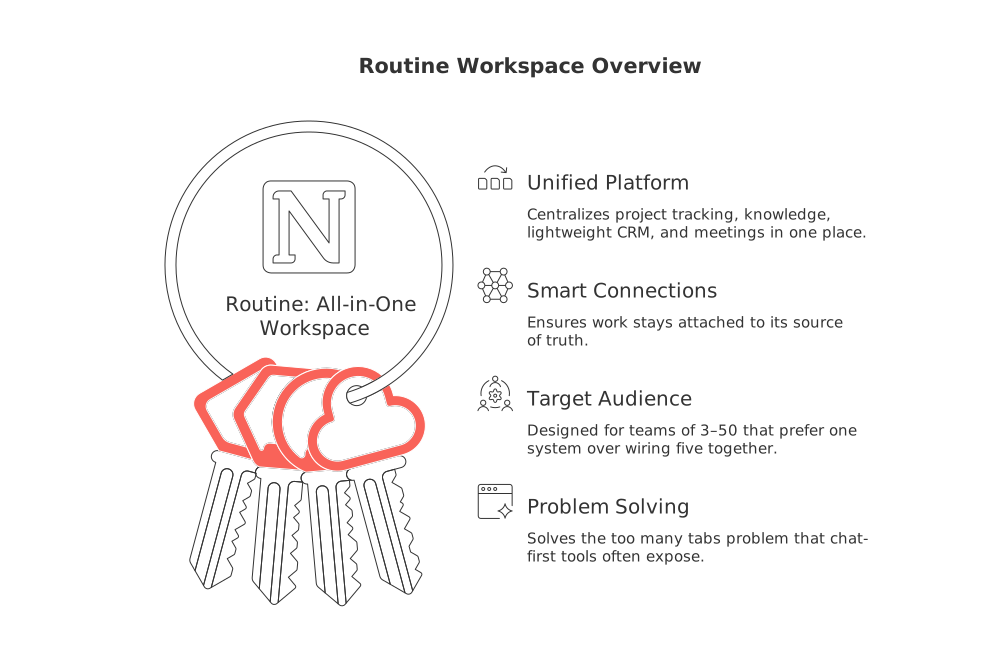
Most Slack‑vs‑Teams debates start with chat volume. For many small companies, the real friction is scattered context, client details in a CRM, tasks in a project app, docs elsewhere, and conversations that never resurface when it’s time to deliver. Routine takes a different path: it centralizes project tracking, knowledge, lightweight CRM, and meetings in one place, with smart connections so work stays attached to its source of truth.
What it is: an all‑in‑one workspace that unifies projects, knowledge, CRM, and meetings.
Best for: teams of 3–50 that would rather finish work inside one system than wire five together.
Why it made the list: it solves the “too many tabs” problem that chat‑first tools often expose.
Where it stands out
Deliverable‑centric collaboration: discussions, client context, and tasks live together so handoffs are cleaner.
Lightweight CRM built into the same workspace as projects, ideal for founder‑led sales or agency retainers.
Meetings connect back to active work, so follow‑ups don’t get lost in a separate chat stream.
Trade‑offs to weigh
Not a public‑channel chat network. If company‑wide chatter is your culture, a chat‑first app may fit better.
Shines when teams commit to working inside one system; half‑in, half‑out usage dulls the benefits.
Who should choose it
Service firms, studios, and product teams whose days revolve around deliverables, clients, and recurring workflows.
Founders and small CXOs who want CRM visibility without running a separate tool.
When another option is better
If your organization depends on open, high‑traffic channels with dozens of external guests, Slack is a more natural fit.
If you’re standardized on Microsoft 365 and need strict policy controls tied to meetings and files, Teams will feel native.
Decision moment: You’ll find Routine beneficial when your tasks go beyond simple reminders and begin requiring client history, project knowledge, and meeting outcomes to be compiled within one platform.
For a deeper look at running meetings that actually move work forward, see our guide to running effective meetings with practical templates.
Slack for small companies that live in channels and integrate many apps
Teams usually switch to Slack after the first reply‑all crisis. The promise is public channels where topics, teams, and vendors can work in the open, and a huge marketplace of integrations so work stays discoverable as it happens.
What it is: a channel‑first communication layer that sits on top of whatever tools you already use.
Best for: startups, agencies, and mixed‑stack teams that thrive on fast, open conversation.
Why it made the list: unmatched channel culture and a broad app directory for quick wins.
Where it stands out
Open collaboration: channels make work visible across functions without meetings.
Vendor‑neutral: connect issue trackers, design tools, docs, and CRMs from any ecosystem.
Quick touchpoints: lightweight calls and impromptu audio keep momentum between formal meetings.
Trade‑offs to weigh
Context fragmentation: tasks, docs, and customer records still live elsewhere; Slack is the notification layer.
Channel sprawl: without clear naming and archiving habits, discoverability fades as you scale.
Who should choose it
Remote‑first teams with lots of external collaborators and vendors.
Product squads that want discussions to default to public, searchable channels.
When another option is better
If meetings, files, and policy live inside Microsoft 365, Teams centralizes more of your week.
If your pain is scattered context rather than slow chat, Routine or even an all‑in‑one like Notion may be the cleaner move.
Decision moment: You need Slack when work moves faster in public channels than in private threads or recurring meetings.
Microsoft Teams for small companies standardized on Microsoft 365
When Outlook, Excel, and SharePoint already run your week, Teams is the path of least resistance. It ties meetings, chat, and files together under Microsoft 365 governance, handy when client calls, recordings, and document control are daily reality.
What it is: Microsoft’s hub for chat, channels, calls/meetings, and file access.
Best for: companies that already provision Microsoft 365 accounts for everyone and want consistent policies.
Why it made the list: meetings and files are first‑class citizens, not bolt‑ons.
Where it stands out
Meeting‑heavy workflows: screen‑sharing, scheduling, and document access live under one umbrella.
Governance: permissions, retention, and compliance align with Microsoft 365 controls.
Internal knowledge continuity: files don’t “float” in different tools; they sit in SharePoint/OneDrive by default.
Trade‑offs to weigh
Heavier administration: channel structure, team permissions, and policies take owner attention.
Less vendor‑neutral: works best when your core tools are already in Microsoft’s ecosystem.
Who should choose it
Firms in finance, legal, healthcare, or public sector that need predictable records and controls.
Sales and customer teams that live on scheduled calls tied to shared documents.
When another option is better
If your stack is Google‑centric or tool‑diverse, Slack keeps you more vendor‑agnostic.
If you want fewer systems and stronger project/CRM context, consider Routine.
Decision moment: You need Teams when client calls, shared files, and policy compliance are the spine of your week, and running them outside Microsoft creates friction.
Final decision framework for choosing Slack, Teams, or Routine
Workflow maturityAd‑hoc, fast‑twitch work with lots of external guests: choose Slack.
Process‑driven work where deliverables, client records, and knowledge must stay connected: choose Routine.
Meeting‑led operations with strict governance tied to files: choose Teams.
If you’re deciding how much to consolidate before you scale headcount, our all‑in‑one vs dedicated tools analysis can help frame the trade‑offs. And if your week is dominated by standups and client reviews, this practical playbook for effective meetings shows formats that keep momentum without extra tools.
Conclusion: choosing between Slack, Microsoft Teams, or Routine for a small company
Slack is channel‑first, Teams is Microsoft‑first, and Routine is context‑first. If your culture thrives on open channels and a diverse stack, Slack will feel natural. If scheduled calls, files, and policy live inside Microsoft 365, Teams keeps everything under one roof. If your real bottleneck is scattered context across projects, clients, and documentation, Routine reduces tools and keeps work connected. Pick the anchor that matches where your work truly happens, and your team will feel the difference in a week, not a quarter.
FAQ
How do Slack, Microsoft Teams, and Routine differ fundamentally?
Slack emphasizes open, app-agnostic channels perfect for fast-paced, diverse teams. Microsoft Teams is built around tight integration with Microsoft 365 for those already embedded in its ecosystem. Routine distinguishes itself by centralizing projects, knowledge, and CRM into one cohesive workflow, minimizing the chaos of scattered tools.
Is Routine a good fit for startups?
Yes, if your startup focuses on cohesive deliverables and integrated client management, Routine shines by preventing fragmentation across multiple specialized tools. However, if your culture thrives on high-frequency, open communication, a chat-centric application might serve you better.
What kind of teams should avoid using Routine?
Teams that rely heavily on open, public channels for broad communication may find Routine's context-centric approach restrictive. Organizations with deeply embedded external collaboration habits might find a chat-primary solution like Slack more aligned with their dynamic communication needs.
Is Microsoft Teams only suitable for companies using Microsoft 365?
Primarily, yes. The deep integration with Microsoft 365 means Teams leverages existing tools like SharePoint and OneDrive for robust file and meeting management. If your organization operates outside Microsoft's suite, this integration becomes more cumbersome than beneficial.
Can Routine really reduce tool sprawl?
Routine can consolidate numerous workflows by uniting project management, CRM, and knowledge sharing in a single platform, minimizing the need for disparate tools. However, the effectiveness depends on a total commitment to its ecosystem; partial adoption dilutes its intended benefits.
How does Routine handle CRM needs?
Routine offers a built-in, lightweight CRM solution that integrates seamlessly with project tracking and meetings, making it ideal for teams with straightforward CRM requirements. For those needing extensive CRM functionalities, standalone tools specifically designed for CRM may provide more depth.
When is Slack not the best choice for team communication?
If your team's bottleneck is integrating context smoothly across projects rather than maintaining constant chat, Slack may exacerbate tool fragmentation. Routine or an all-in-one solution could streamline workflows and provide a more cohesive environment for project-centric work.

Julien Quintard
Founder & CEO at Routine08/24/2026
