5 Simple Alternatives to Any.do
Quick comparison table: five simple alternatives to Any.do
Tool | Best for | Key win vs Any.do | Team fit | Setup | Not ideal when | Pricing context |
|---|---|---|---|---|---|---|
Routine | Tasks with project, knowledge, CRM, and meeting context | One place for work, fewer links and copy‑paste | Solo → small teams | Fast; templates help | If you only need simple lists | Free plan; paid tiers for teams |
Todoist | Structured personal planning with light teamwork | Projects, sections, and saved filters for control | Solo → small teams | Very quick | If you need CRM or deeper context | Free plan; affordable paid plans |
TickTick | Daily flow: checklists, durations, habit tracking | Smoother day planning and focus routines | Primarily solo | Very quick | If you need robust collaboration | Free plan; low‑cost premium |
Microsoft To Do | People already in Microsoft 365 | Included, simple lists, “Assigned to me” clarity | Solo → internal teams | Instant if you use M365 | If you want advanced workflow design | Included with Microsoft account |
Google Tasks | Gmail‑first personal capture | Zero overhead; tasks live where you work | Solo | Instant | If you need projects, roles, or reporting | Included with Google account |
Routine is the all-in-one workspace alternative to Any.do
Many users move away from Any.do when simple checklists no longer answer the question, “Where does this belong?” Routine brings project management, a knowledge base, lightweight CRM, and meeting tracking into a single platform. With Routine, a task lives directly alongside its related work, client details, project documentation, and related decisions, rather than scattered across several apps.
Why it made the list
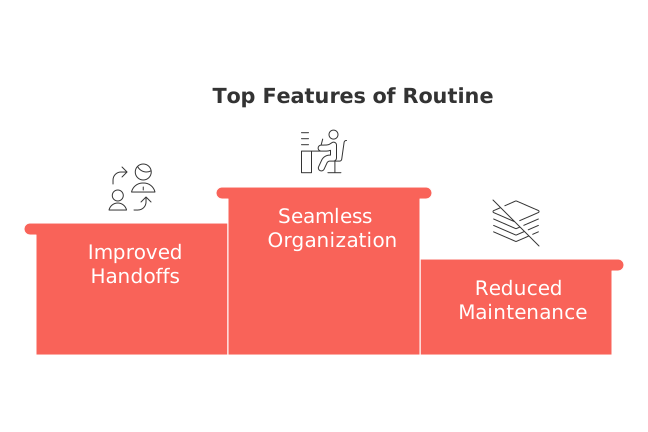
Seamless organization: tasks, CRM records, and project pages coexist, ensuring that important context naturally follows your work.
Improved handoffs: task owners, statuses, and client information remain visible as work progresses from concept to completion.
Reduced maintenance: fewer links, fewer redundant checklists, and fewer “where did that decision go?” moments.
Best for
Freelancers, consultants, and small teams that need a central platform for managing commitments across clients and projects.
Individuals seeking a personal planning system that adapts smoothly when collaborators join.
Where it stands out vs Any.do
Greater structure: track projects, pipelines, and CRM items, all of which can be assigned and reported on.
Integrated meeting workflows: capture decisions and assign owners during meetings without leaving your workspace. If meetings drive your tasks, see how to run meetings with clear formats, minutes, and recaps.
Trade-offs
If your needs are only for quick personal lists, Routine might seem like it has more features than necessary. However, you can begin by just utilizing its task management and project setup features, building up usage as needed.
Who should choose it
Teams that require tasks to remain connected to clients and projects without the need for integrating multiple apps.
Consider using Routine when your tasks extend beyond personal reminders and become dependent on meeting outcomes, project knowledge, and client follow-ups.
When another option is better: If you’re just organizing household chores or school assignments, Todoist or Google Tasks will feel lighter from the start.
Why it’s ranked #1: Starting with Routine is straightforward, and it addresses the main challenge when expanding beyond Any.do: providing context across projects, customer relationship management (CRM), and meetings.
Todoist is the list-first project alternative to Any.do
Todoist is the go-to for those wanting structure without unnecessary process. Projects and sections keep tasks organized, while labels and saved filters help you tame growing lists without enforcing a rigid methodology.
Why it made the list
Super-fast to capture and organize tasks; powerful filtering for when your to-do list grows rapidly.
Built-in light collaboration with shared projects and task assignment.
Where it stands out vs Any.do
Flexible organization with projects, sections, and labels, plus customizable views with filters for “today,” “next,” or any defined context.
Trade-offs
Task context, such as documents or client information, is stored in links and comments. If you need CRM or structured project knowledge alongside your tasks, you may outgrow Todoist.
Who should choose it
Individuals and small groups seeking a reliable personal system that supports simple collaboration as needed.
Consider switching to Todoist when your task list becomes so large that you want advanced filters and custom views, but don’t need a full-scale project management suite.
When another option is better: If your tasks are closely tied to client records or structured documentation, Routine is a better fit. For quick, basic lists for things like errands, Google Tasks is hard to beat.
Why it’s ranked #2: It’s quick, easy to start, scales well for individual use, but doesn’t bring unified context for more complex workflows.
TickTick is the daily-flow alternative to Any.do
For those who plan their days around quick actions and focus, TickTick is a solid match. Its checklists, duration settings, and habit tracking features streamline day planning and help maintain momentum without fuss.
Why it made the list
Great for managing personal tasks: break down items into smaller steps, capture new tasks quickly, and use built-in habit tracking for consistency.
Where it stands out vs Any.do
More fluid day-to-day planning for solo users who like to break large tasks into micro-actions and keep a steady execution pace.
Trade-offs
Limited collaborative capabilities; not suitable for managing shared project knowledge or CRM data.
Who should choose it
Students, independent creators, and solo professionals who value workflow and focus over structural depth.
When another tool is better: If your workflow involves multiple people needing shared context or client/project records, Routine or Todoist are stronger choices.
Why it’s ranked #3: TickTick is exceptionally easy and motivating for individual users, but has limitations for team-based work.
Microsoft To Do is the Microsoft 365 alternative to Any.do
If your organization already uses Microsoft 365, Microsoft To Do is an easy addition. It offers straightforward lists, daily focus view via “My Day,” and automatically collects tasks assigned to you across Microsoft’s suite of productivity tools.
Why it made the list
Included with Microsoft accounts, making it simple for organizations already in the M365 ecosystem to adopt without extra steps.
Where it stands out vs Any.do
Brings together personal to-dos and items assigned from across Microsoft’s tools to provide a single source of truth, so you don’t have to track them manually.
Trade-offs
Lacks advanced project workflows, CRM functions, and deep reporting.
Who should choose it
Employees wanting simple lists that integrate naturally with Microsoft work without extra apps or logins.
When another tool is better: For more advanced project management or shared documentation, Routine is advisable. If you prefer a customizable personal solution, Todoist is a great option.
Why it’s ranked #4: Its convenience is unbeatable for Microsoft 365 users, while its simplicity means it intentionally avoids complex workflows.
Google Tasks is the zero-overhead alternative to Any.do
For users embedded in the Gmail ecosystem, Google Tasks is the lightest and simplest upgrade. It’s a minimal to-do list that lives within your email and calendar, perfect for errands, reminders, and lightweight personal projects.
Why it made the list
No need to learn a new app; tasks can be captured instantly and remain unobtrusive in your daily workflow.
Where it stands out vs Any.do
Lower friction: fewer features means quick setup and fast usage, with no distractions or extra settings to manage.
Trade-offs
Very limited in organization, almost no collaboration features, and no support for complex projects or CRM needs.
Who should choose it
Anyone seeking a super-basic task list with virtually no setup or commitment required.
When another tool is better: If you manage tasks that involve several stakeholders or customers, move to Todoist for more structure, or Routine for deeper context and shared work.
Why it’s ranked #5: Google Tasks is intentionally as simple as possible, but you’ll quickly hit its limits for anything beyond basic reminders.
Final decision framework: choose an Any.do alternative by workflow maturity and context needs
Workflow maturityJust getting organized: Google Tasks or Microsoft To Do keep you moving with no friction.
Established personal system: Todoist adds durable structure without complexity.
Maturing team workflows: Routine centralizes tasks with project pages, CRM items, and meeting context.
If you’re moving from a personal app to team workflows and care deeply about data integrity, our perspective in “Why Personal Productivity Apps Don’t Work for Teams? And How Structured Data Solves the Problem” will help you frame the shift in approach.
Conclusion: keep it simple, until simple starts hiding the work
If your needs are small and straightforward, Google Tasks or Microsoft To Do are ideal for their speed and ease. If you want a robust personal system with room to grow, Todoist is a safe, scalable step. When your work begins living inside projects, meeting outcomes, and client details, bypass the half-measures and centralize everything with Routine. For deeper guidance on tool selection, explore our analysis on all-in-one workspaces vs dedicated tools, it’ll help you weigh your options before you commit.
FAQ
What makes Routine a compelling alternative to Any.do?
Routine consolidates tasks, project management, and CRM into one platform, reducing fragmentations and eliminating redundant workflows. If you're seeking structure and context beyond a basic checklist, Routine delivers a comprehensive solution.
How does Todoist differentiate from Any.do?
Todoist offers advanced filtering and organization through projects, sections, and labels, allowing for rapid task expansion without enforced rigidity. It suits individuals desiring a structured list system without the complexity of full-scale project management.
Who should opt for Google Tasks instead?
Google Tasks suits those embedded in Gmail and seeking minimalistic task management for everyday reminders and errands. It's perfect if you aim for zero tool overhead, but its simplicity limits any advanced project or CRM capabilities.
Does Routine support team collaboration effectively?
Yes, Routine is designed to keep tasks linked with project context and client info, facilitating smooth collaboration through centralized management. It excels when there's a need to track assigned tasks and progress within a team setup.
Is TickTick suitable for team projects?
TickTick primarily targets individual users emphasizing personal task flow and habit tracking, making it less ideal for team projects that require structured collaboration and shared context. Consider it for solo work but explore other tools for team engagements.
Why might Microsoft To Do be a better choice for M365 users?
Microsoft To Do integrates directly with M365, capturing tasks from various Microsoft applications, which streamlines workflow for users already in that ecosystem. However, its simplicity lacks the depth needed for more complex project management needs.
When would Routine not be the best fit?
If you're looking at managing only basic personal lists or chores, Routine's comprehensive features might be overkill. In such cases, simpler apps like Google Tasks or Microsoft To Do offer quicker and more efficient solutions.
How does Routine handle CRM capabilities?
Routine integrates CRM functions by allowing tasks to stay connected with client details and project documents in a unified workspace, dismantling the typical silo effect seen with basic task apps. This integration minimizes the need for multiple disparate tools.

Julien Quintard
Founder & CEO at Routine05/08/2026
