Routine vs Slite Compared: Notes, Tasks, and Everything In Between
What Routine and Slite each try to solve in 2026
Routine aims to centralize work for teams and individuals by combining project management, knowledge management, CRM, and meetings in one place. It targets busy teams, solo operators, and consultants who want fewer tools. Slite focuses on team knowledge with structured docs, wikis, and lightweight collaboration for policies, handbooks, and research, often alongside separate task and CRM apps.
The main decision point between these platforms: would you prefer an all‑in‑one hub like Routine, which keeps projects and clients in the same view, or a wiki‑first approach like Slite, which prioritizes the organization and accessibility of team knowledge?
Feature comparison focused on project management needs
Where Routine fits project execution
Routine organizes projects, tasks, owners, and statuses in one workspace. You can model deliverables, add fields, and review progress without switching apps, keeping execution tightly connected to planning and documentation.
Where Slite supports execution indirectly
Slite documents the why and the how. Policies, specs, and team rituals live there. For task boards or timelines, teams often pair Slite with ClickUp, Asana, or Trello.
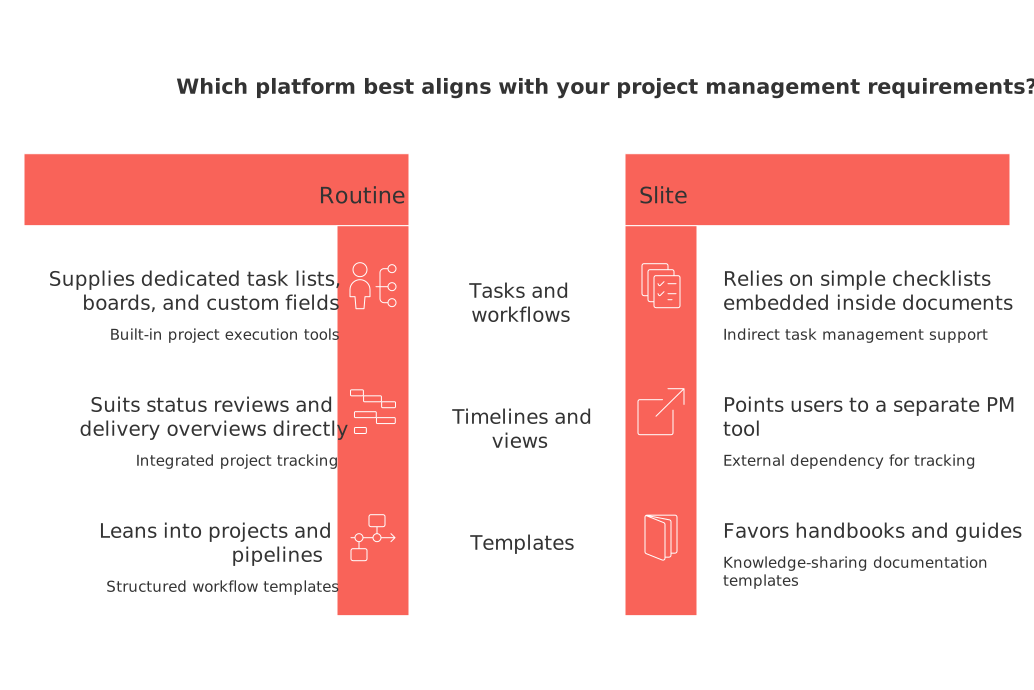
Tasks and workflows: Routine supplies task lists, boards, and custom fields. Slite relies on checklists inside docs.
Timelines and views: Routine suits status reviews and delivery overviews. Slite points you to a separate PM view.
Templates: Both offer templates. Routine leans into projects and pipelines; Slite favors handbooks and guides.
If you’re unsure whether to adopt an all‑in‑one tool or maintain your dedicated project management solution, this comprehensive guide might help: All‑in‑one workspaces vs dedicated project tools.
Knowledge management strengths and trade‑offs for individuals and small teams
Slite shines for policy pages, onboarding guides, and product briefs. Its navigation and doc structure keep content tidy. Search is fast, and permissions feel simple.
Routine ties docs to work. You can keep requirements, decision logs, and SOPs beside tasks and accounts. That context reduces hopping between tools, especially for solo operators and small agencies.
Considerations: Slite’s rich wiki features excel when you’re building a large, durable knowledge base. Routine’s document capabilities are strongest when you want reference material living right next to project plans and CRM records, so execution and knowledge stay connected.
We write once in the handbook, then link tasks to it. Everyone knows the latest process.
CRM and client work: where each tool fits
If you manage sales, retainers, or customer success, Routine integrates a simple CRM into the same workspace. You can track contacts, deals, and follow‑ups in parallel with delivery tasks. This centralization can be particularly helpful for freelancers, boutique agencies, and creators because it reduces app‑switching, keeps client context in one place, and can streamline handoffs between sales and delivery. For practical sales ideas, see five automations every B2B sales team should set up and adapt them to your stack.
Slite does not aim to be a CRM. It can store playbooks and discovery notes, but you will still need HubSpot, Pipedrive, or another pipeline tool.
Meetings and collaboration: agendas, action items, and follow‑ups
Teams need clear agendas and assigned action items. Routine links meeting discussions to tasks and owners, so next steps stay visible in projects and accounts. Slite captures meeting docs well, with threads and comments for decisions. Execution usually happens elsewhere.
For individuals: tie agenda points to concrete tasks in Routine.
For documentation‑heavy teams: record decisions in Slite and push tasks to your PM tool.
Pricing and team size guidance without numbers
Pricing changes often, so it’s advisable to compare plans directly. As you do so, consider these key points:
Individuals and freelancers: One tool that covers projects, docs, and basic CRM is usually simpler.
Small teams scaling process: If handbooks and SOPs rule your day, a wiki‑first setup makes sense.
For CXOs at growing startups: Fewer vendors can mean fewer integrations to maintain; however, ensure that permissions and audit mechanisms fulfill your requirements.
Security, data control, and admin oversight considerations
Ask both vendors about SSO, audit logs, permissions granularity, exports, and incident response. Confirm data residency if you operate in regulated regions. Check how workspace deletion, offboarding, and external guest access work. If you manage devices, align workspace access with your MDM policies.
Scenario‑based recommendations you can apply today
For freelancers and solo operators
You juggle clients, delivery, and sales alone. Choose Routine for combined projects, docs, and lightweight CRM.
You mainly write guides and publish knowledge. Choose Slite, plus a simple task app.
For product and operations teams
Your handbook and process depth matter most. Choose Slite; pair it with a strong PM tool.
You want execution, docs, and accounts together. Choose Routine to keep context unified.
For agencies and consultancies
Use Routine to track retainers, deliverables, and notes beside client records.
Or use Slite for playbooks and a dedicated CRM for deals and renewals.
Migration and onboarding: start small, then expand
Pick one pilot team or one client project.
Move only living content: active SOPs, briefs, and current tasks.
Define two weekly rituals: a review and a docs tidy‑up.
Measure friction: handoffs, duplicate work, and missed follow‑ups.
Decide to scale, switch, or keep a hybrid approach.
If you plan timelines or roadmaps during rollout, this primer on visualizing work with Gantt and trackers offers light options without complexity. It complements whichever tool you pick and helps stakeholders read plans faster.
Alternatives worth a look
Consider Notion or Confluence for deep wikis, and ClickUp, Asana, or Monday.com for robust project layers. Coda blends docs and data with flexible packs. These may pair with Slite, or replace one tool if your needs skew strongly toward one dimension.
The verdict in one minute
Choose Routine if you want projects, docs, CRM, and meetings in one place.
Choose Slite if structured knowledge is your anchor and tasks live elsewhere.
Hybrid works: keep Slite for wikis, connect it to your PM and CRM of choice.
Still undecided? Read a broader take on consolidation in this comparison of all‑in‑one workspaces and dedicated tools, then run a two‑week pilot.
Try before you decide
Set up a small workspace in each tool. Rebuild one real project and one client workflow. Invite two colleagues or a trusted client. After two weeks, compare friction and confidence. Then commit.
Vendor sites for quick access: Visit Routine and Visit Slite. Revisit your PM approach with this lens after testing: sales automations you can adapt to any CRM stack.
FAQ
What are the main differences between Routine and Slite?
Routine is designed as an all-in-one workspace integrating project management, documentation, CRM, and meetings, allowing seamless work execution. Slite focuses on structured team knowledge with documents and wikis, often requiring additional tools for projects and tasks.
Why might a company choose Routine over Slite?
Companies favoring streamlined workflows with minimal tools might prefer Routine, as it merges project management, CRM, and documentation in one platform, enhancing productivity and reducing tool-switching headaches.
Can Slite replace a CRM system?
No, Slite is not designed to function as a CRM. While it can document playbooks and discovery notes, comprehensive CRM features are absent, necessitating additional tools for managing client interactions and sales pipelines.
Is Routine suitable for freelancers and solo operators?
Routine is well-suited for freelancers and solo operators who need to juggle multiple project types and client interactions without hopping between disparate tools, offering an all-in-one solution.
How do Routine and Slite differ in handling meetings and collaborations?
Routine integrates meetings with task management, keeping discussions linked to actionable items. Conversely, Slite excels in documenting meeting notes but execution typically occurs in other apps.
Are there alternatives to Routine and Slite for knowledge management and project execution?
Yes, tools like Notion and Confluence are alternatives for rich wikis, while ClickUp, Asana, and Monday.com provide robust project management features. Coda offers document and data integration with added flexibility.

Julien Quintard
Founder & CEO at Routine08/17/2026
