Top Morgen Alternatives for Better Calendar and Task Management
Comparison table: top Morgen alternatives for better calendar and task management
Rank | Tool | Best for replacing Morgen when… | Scheduling approach | Project / CRM context | Team collaboration | Implementation | Key trade‑off |
|---|---|---|---|---|---|---|---|
1 | Routine | Tasks must live with project docs, Customer Relationship Management (CRM), and meeting outcomes | Time‑blocking plus follow‑up capture | Deep: projects, knowledge base, CRM in one place | Shared context across clients and projects | Moderate: replace several tools at once | More than you need if you only want faster scheduling |
2 | Motion | Work needs automatic task scheduling and constant re‑prioritization | Auto‑schedules and reshuffles tasks | Light: task context, limited knowledge/CRM | Strong for capacity planning | Low–moderate | Rigid feel if you need rich project context |
3 | Sunsama | You want calm, daily planning discipline across tools | Manual time‑boxing with gentle nudges | Light: pulls tasks from PM tools | Light: shared channels, simple alignment | Low | Less automation, weaker long‑range structure |
4 | Akiflow | Speed‑first capture and triage from many sources | Quick scheduling into your calendar | Minimal: aggregator, not a PM/CRM | Individual‑centric | Low | Great for power users, shallow for teams |
5 | Reclaim.ai | You need protected focus time and smart recurring habits | Smart time‑blocking/autoscheduling | Depends on connected apps | Good for shared focus norms | Low | Lives inside Google Calendar; limited task UI |
6 | Notion Calendar | Your tasks, docs, and databases already live in Notion | Clean time‑boxing; scheduling links | Strong if your Notion is structured | Solid via shared Notion context | Low if you’re in Notion; else moderate | Less automation than Motion/Reclaim |
7 | Todoist + Google Calendar | You want a simple, affordable 2‑way task–calendar setup | Rules‑based sync and manual blocks | Light unless paired with other tools | Basic sharing | Low | Context and reporting are piecemeal |
8 | Amie | Design‑driven personal planning with quick tasking | Fast drag‑and‑drop blocks | Minimal | Personal or small team | Low | Style over workflow depth for larger teams |
9 | Fantastical | Apple‑first users who want NL input + light tasks | Natural language + proposals | Minimal (Reminders/Todoist) | Calendar sharing, not work management | Low (Apple‑centric) | Limited cross‑platform and project depth |
10 | ClickUp | You need structured projects with a calendar view | Calendar views on top of tasks | Strong PM; CRM via add‑ons/fields | Robust collaboration | Moderate–high | Heavier admin; calendar is secondary |
Routine: best Morgen alternative when tasks depend on project and CRM context
The primary reason teams outgrow Morgen is the lack of task context: while tasks are visible on your calendar, the underlying “why”, such as client history, project documentation, or outcomes from previous meetings, remains siloed elsewhere. Routine addresses this by bringing projects, a knowledge base, Customer Relationship Management (CRM) systems, and meetings into a single platform, ensuring your calendar blocks are tied to real information, not just time slots.
What it is: a comprehensive workspace connecting projects, documentation, CRM records, tasks, and meetings.
Where it stands out: smart connections linking meeting outcomes directly to the relevant project or contact, so tasks automatically carry context.
Best for: agencies, consultancies, product teams, and freelancers handling client work and needing a single source of truth.
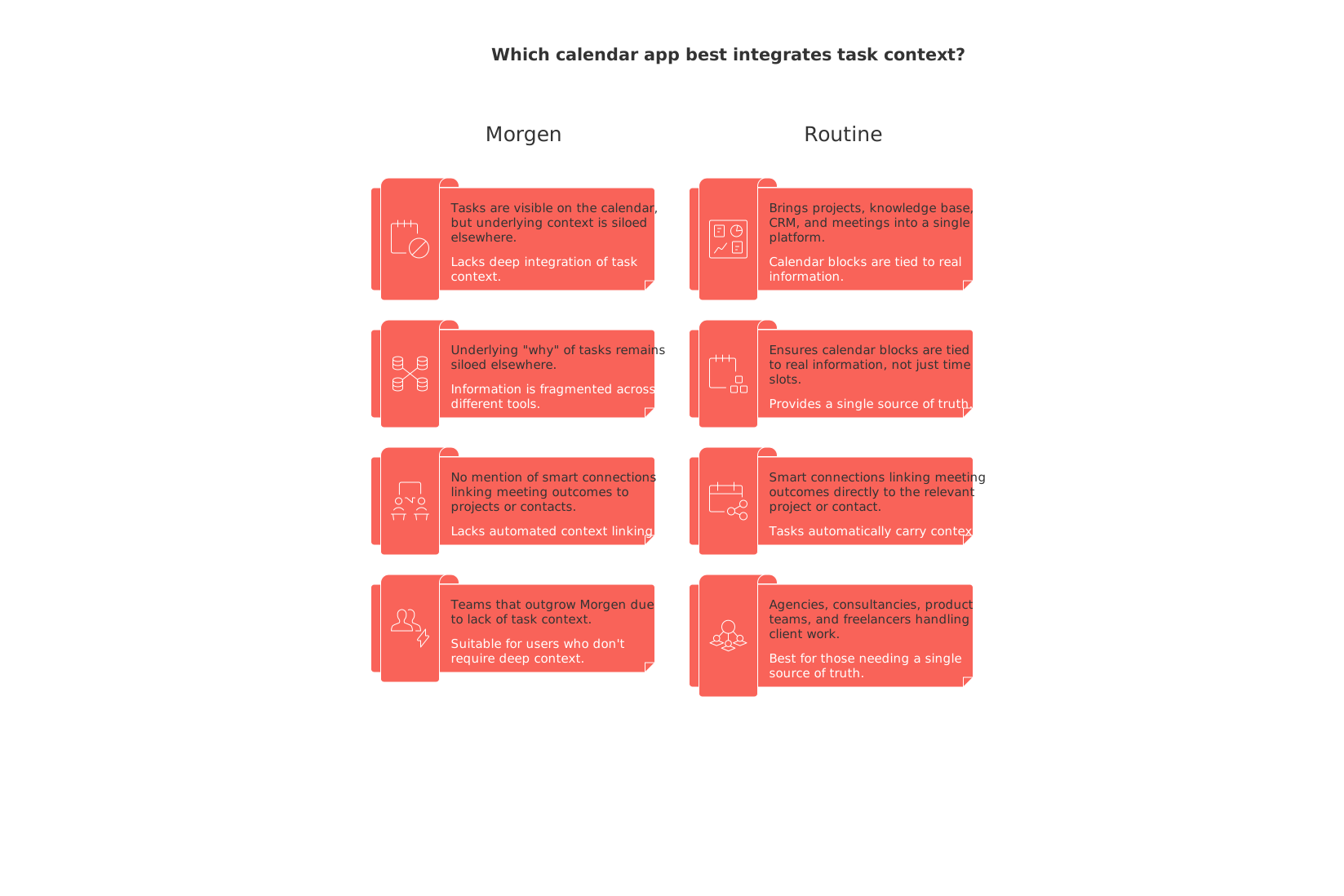
When to switch: You will find Routine beneficial when your tasks progress from personal reminders to responsibilities that depend on meeting context, project knowledge, and client follow-ups.
Trade-offs and who should skip: If your only requirement is to have tasks automatically scheduled, a scheduling-driven tool like Motion or Reclaim may be a quicker win. Routine’s value is greatest when you also need shared context, not just a more orderly day plan.
Related reading: If you frequently lose track of meeting-to-task follow-ups, check out this guide on running effective meetings with templates and structured recaps to ensure nothing falls through the cracks.
Motion: best Morgen alternative for automatic scheduling and capacity planning
If your workdays are frequently disrupted by new tasks and shifting priorities, Motion’s auto-scheduling saves time by continuously reorganizing your calendar. Rather than manually replanning, Motion dynamically adjusts your calendar to create necessary space for your most important tasks.
Where it wins: automatic task scheduling, reprioritization based on deadlines, and clear capacity indicators for both individual contributors and managers.
Why it made the list: it transforms time spent on planning into execution for people with meeting-heavy schedules.
Trade-offs: limited project and CRM context; the frequent auto-reshuffling can feel abrupt if team guidelines aren’t set.
When to switch: Motion is a strong fit if you find yourself spending as much time planning your day as you do executing it.
Choose Motion if scheduling efficiency matters more to you than documentation or project detail depth. Teams with recurring questions about task context may find Routine more suitable, while those needing only protected focus without complete re-planning might consider Reclaim instead.
Sunsama: best Morgen alternative for focused daily planning and managing workload
If you appreciated Morgen’s time-boxing but want to cultivate a calmer, more deliberate routine, Sunsama’s disciplined approach guides you to plan intentionally each day. Sunsama fosters focus: plan what you’ll achieve, commit to a limited set of tasks, then finish with daily reflections. It aggregates tasks from tools like Jira, Asana, and email, but avoids overwhelming automation.
Why switch: you want a gentle workflow that discourages overcommitting, not added automation.
Strength: clear channel-based views for task visibility across your tools while promoting mindful planning.
Trade-offs: less comprehensive long-term planning and lighter on shared team context or reporting.
Choose Sunsama if habit-driven planning works best for you and you prefer a hands-on approach to organizing your day. For automated rescheduling, opt for Motion; for comprehensive client or project context, Routine is a better match.
Akiflow: best Morgen alternative for fast capture and triage
Akiflow is tailored for professionals inundated with messages from Slack, issue trackers, and email. It efficiently collects all to-dos, enables quick triage, and allows you to schedule tasks directly onto your calendar with speed and minimal friction.
Where it excels: lightning-fast command bar, rapid defer/snooze actions, and a smooth scheduling experience.
Why it’s listed: if Morgen’s task intake process is too slow, Akiflow streamlines inbox management above all.
Trade-offs: lacks deep team organization features and robust documentation or CRM integration; excels as a personal productivity tool more than a complete team solution.
Choose Akiflow when speed is your top priority. For teams seeking workflow consistency and shared project records, solutions like Routine or ClickUp are more appropriate.
Reclaim.ai: best Morgen alternative for protecting focus and automating routines
Reclaim operates directly within Google Calendar, functioning like a smart gatekeeper for your time. It automatically blocks out focus periods, breaks, and recurring habits, adjusting these intervals flexibly as your schedule changes.
Great for: creators, technical professionals, and entrepreneurs whose focus time is frequently lost to meetings.
Integrations: connects with task management tools (Asana, Todoist, Jira) to schedule productive work sessions.
Trade-offs: has a basic task interface and depends on the quality of your data within connected apps.
When to switch: Reclaim becomes valuable when you notice your recurring tasks and productive habits are regularly sacrificed in favor of urgent meetings.
Use Reclaim if you’re looking for schedule protection using tools already in your stack. If you need to unify project context or integrate client histories with your scheduling, Routine is the better choice.
Notion Calendar: best Morgen alternative if your team already works in Notion
For teams already invested in the Notion ecosystem, Notion Calendar provides a visually clean scheduling interface that synchronizes seamlessly with your existing documents and databases. It’s perfect if your projects and tasks are modeled in Notion and you want a calendar that mirrors that structure, though with lighter automation.
Where it fits: product, content, or operations teams that have already centralized work in Notion.
Upside: eliminates silos; calendar events are linked directly to the Notion pages where collaboration happens.
Trade-offs: limited automation for scheduling; users must manually set priorities and make judgment calls.
If Notion serves as your operational backbone, Notion Calendar keeps your schedule context-rich. For more advanced auto-planning, explore Motion or Reclaim; for consolidating beyond Notion, compare with Routine.
Todoist + Google Calendar: best Morgen alternative for a simple, affordable workflow
Sometimes, simplicity wins. Pairing Todoist with Google Calendar offers reliable two-way synchronization between your tasks and calendar without the overhead of a larger platform. This is ideal for those seeking a straightforward and budget-friendly setup.
Why it’s recommended: minimal friction, familiar interfaces, and cost-effective for individual users and small teams.
Trade-offs: task context remains fragmented unless supplemented with other tools; reporting is basic.
Use this combination if your workflow is straightforward and your main objective is to deliver results quickly, rather than constructing a sophisticated system. As your collaboration needs evolve, consider Routine or ClickUp for more robust structure and reporting capabilities.
Amie: best Morgen alternative for design-forward personal planning
Amie is crafted for individuals or close-knit teams who value sleek design and effortless momentum in their daily planning. It empowers fast task capture, interactive scheduling, and offers a delightful user interface.
Strengths: drag-and-drop scheduling, modern UI, and an intuitive experience for personal tasking.
Trade-offs: minimal project and CRM context and less depth for complex teams or workflows.
Choose Amie for a personal planning upgrade that feels enjoyable to use. As collaboration and traceability become more significant, consider a more robust platform like Routine or a comprehensive project manager such as ClickUp.
Fantastical: best Morgen alternative for Apple users who want natural language input
If you are deeply embedded in the Apple ecosystem, Fantastical’s polished interface and natural language scheduling make it highly efficient for simple task and event management. It bridges basic needs by supporting Reminders/Todoist integration, all without requiring you to overhaul your workflow.
Upside: enables rapid event/task entry, supports multiple calendar management effortlessly, and provides useful scheduling proposals.
Trade-offs: offers limited task and project context, and isn't ideal for non-Apple users or those needing advanced work management.
Fantastical shines as a refined calendar app. For enhanced project management or collaboration, explore other alternatives.
ClickUp: best Morgen alternative when you need structured projects with a calendar view
If Morgen’s focus on tasks and calendars falls short in expressing dependencies, ownership, or inter-team strategies, ClickUp delivers robust work management. Calendar views overlay a deeply structured system of tasks, hierarchies, custom fields, and automations.
Best for: organizations ready to standardize processes and reporting.
Strengths: comprehensive project management features, advanced dashboards, and scalable team collaboration.
Trade-offs: setup and administration can be complex; calendar views are a supplemental feature, not the core focus.
If your main need is visibility across all work, ClickUp is an excellent option. If your priority is managing the flow of your day, Motion or Sunsama may offer a gentler transition. For unified context and scheduling, consider Routine.
Decision framework: use this guide to match your workflow to the most suitable alternative to Morgen
Use this streamlined rubric to quickly identify which alternatives best align with your workflow maturity and organizational needs:
Workflow maturityLow (solo/freelance, ad hoc tasks): Todoist + Google Calendar, Amie, Fantastical
Growing (teams, repeatable projects): Routine, Notion Calendar, ClickUp
High schedule volatility (meeting-heavy roles): Motion, Reclaim.ai
Burnout risk (overcommitting): Sunsama
If you are uncertain whether your team should simply add a calendar-task layer or start by standardizing project management, this discussion on why personal productivity apps don’t work for teams (highlighting the importance of structured data beyond attractive to-do lists) can offer helpful perspective. And for visual planning following tool adoption, review our advice on project timelines and simple trackers that help teams communicate schedule, scope, and risk clearly.
Conclusion: when to move beyond Morgen, and how to select the right tool
Morgen is a great entry point for personal time management through time-boxing. However, you may surpass its capabilities once your tasks begin to require broader context (projects, clients, meeting decisions) or you need your schedule to adjust automatically as your day changes. If your greatest need is shared context, Routine offers the most comprehensive solution. For advanced scheduling intelligence, Motion or Reclaim are compelling options. When planning discipline is missing, choose Sunsama. If you need speed, lean toward Akiflow. Teams already built around Notion or Apple will find natural fits in Notion Calendar or Fantastical. For organizations in need of structured, project-based work, ClickUp adds order through its robust management features.
Select the solution that addresses your most pressing workflow gap, whether it’s context or scheduling flexibility, then expand as needs evolve. The best alternative will make future weeks easier to plan than the current one, while also providing an intuitive and user-friendly interface.
FAQ
What is the standout feature of Routine compared to other tools?
Routine excels in providing an integrated workspace that ties together calendars, projects, CRM, and documentation. This reduces the need for multiple apps and ensures all work aspects are interconnected, creating a seamless workflow.
How does Routine differ from simple task schedulers?
Routine integrates CRM, project and knowledge management directly into your calendar, offering far more than just task scheduling. It's designed to transform how you manage context-rich tasks and decisions by connecting them to relevant client or project information.
What are the main advantages of using Routine over Morgen?
Routine centralizes your tasks with project docs and CRM, giving context to calendar events, which Morgen lacks. This integration ensures tasks are tied to real information, enhancing efficiency for teams managing client work.
How does Motion differ from Routine in task scheduling?
Motion emphasizes automatic task scheduling and constant reprioritization, reshuffling your calendar for optimal time use. In contrast, Routine focuses on providing crucial project context alongside scheduling, which is essential for client-dependent work.
Who benefits the most from using Routine?
Solo consultants, agencies, and startups that need to manage tasks within a comprehensive workflow benefit the most. It's particularly beneficial if you require tasks to carry project details and client context seamlessly.

Julien Quintard
Founder & CEO at Routine04/09/2026
