Flowtime: The Focus Method for People Who Hate Pomodoro Timers
Why flowtime resonates with people who dislike strict timers
A beeping timer can jolt you out of deep work. Flowtime avoids that jolt. You work until attention fades, then rest. The rhythm follows your brain, not a clock.
Pomodoro cuts sessions on schedule. Flowtime ends sessions on feel. If timers spike your stress, this method offers a less stressful alternative.
Stop when focus dips. Start when clarity returns. That is Flowtime in one line.
What the flowtime method is and how it differs from Pomodoro
Pomodoro uses fixed sprints and fixed breaks. Flowtime uses variable sprints and variable breaks. You still track time, but you never force a stop mid‑flow.
Key contrasts that matter during real work
Stop rules: Pomodoro stops at a timer; Flowtime stops at fatigue.
Break length: Pomodoro sets breaks; Flowtime sizes breaks to recovery.
Task fit: Pomodoro suits quick tasks; Flowtime suits creative or complex tasks.
Stress: Pomodoro adds deadline pressure; Flowtime reduces interruption risk.
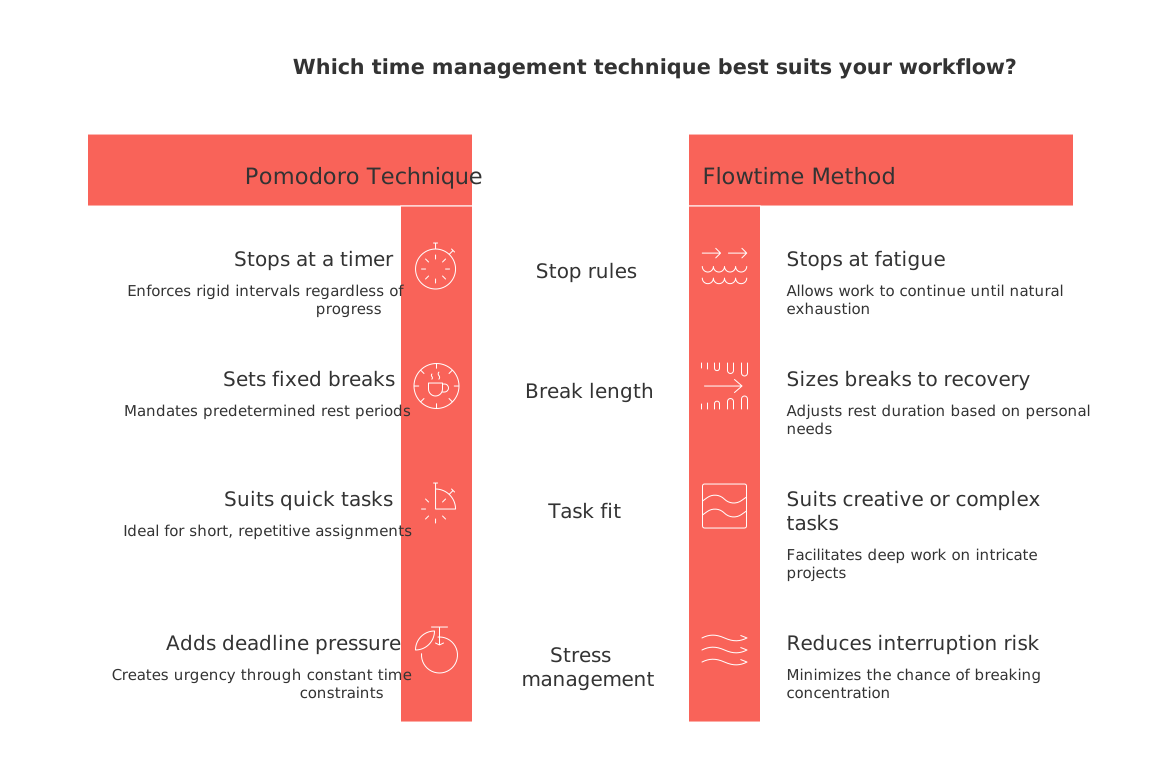
Both methods aid in planning effort. However, unlike Pomodoro, Flowtime accommodates individual work momentum, recognizing that productivity ebbs and flows rather than remaining steady.
How to run a flowtime session step by step
Use this simple loop. It works for solo work and small teams.
Pick one clear task. Define “done” in one line.
Start work. Note the start time on paper or a tracker.
Work until focus slips. Do not stop early if you feel sharp.
Note the end time. Log the actual minutes.
Take a short break. Stand, drink water, breathe.
Record a quick tag. Example: writing, design, or debugging.
Start another session or switch tasks with intent.
Want a nudge while you learn the loop? Try this prompt.
Act as my Flowtime coach. I will share a task, my start time, and a desired outcome. Track my session length, suggest a break length when I report fatigue, and ask one reflection question after each cycle. Keep messages short.
Flowtime for everyday work in project management, knowledge, and light CRM
Individuals can use Flowtime beyond “productivity.” It helps deliver projects, capture learning, and maintain relationships without chaos.
Examples you can try today
Freelance writer: Run a session for an outline. Tag it research. Next, run a drafting session. Tag it draft. Track lengths to spot your best window.
Solo developer: Use one session for a small feature. Next session for tests. A third for refactoring. Keep sessions aligned to deliverables.
Sales consultant: One session for prospect research. One for outreach. One for CRM updates. Pace follow‑ups in your natural focus window.
Reduce app switching during sessions. A single workspace helps. Compare options in this guide on all‑in‑one workspaces versus dedicated project tools to pick a setup that supports flow.
Metrics that matter for flowtime without a timer addiction
Skip vanity stats. Track signals that guide better sessions.
Focus length distribution: What is your usual range before fatigue?
Context switches: How often do you shift mid‑session?
Recovery time: How long until you feel sharp again?
Output per session: A draft, a page, a commit, or a call set.
Energy note: Low, medium, or high at start and end.
Visuals help you notice patterns fast. See ideas in our overview of visualization tools for simple project management.
Flowtime for small teams without breaking shared schedules
Teams can respect flow without losing alignment. Use clear task scopes, quiet blocks, and tight updates.
Simple agreements that protect focus
Define tasks as tangible, small deliverables rather than undefined or broad efforts.
Share “quiet hours” for deep work across the team.
Schedule status updates or check‑ins during natural breaks.
Tag work types so handoffs stay clean.
A unified workspace keeps tasks, knowledge, and contacts connected. Tools like Routine and Notion both support this approach. Pick the one your team adopts with ease.
If executives worry about visibility, show session logs tied to output. Managers see progress without mid‑flow pings.
You are a project facilitator. Create a one-page team agreement for Flowtime: quiet hours, check-in windows, task sizing rules, and escalation paths. Keep it clear and respectful.
Troubleshooting common flowtime problems and practical fixes
Problem: Sessions sprawl with no finish. Fix: Define “done” in one clear sentence before you start.
Problem: Breaks stretch too long. Fix: Set a light reminder for ten minutes, then reassess energy.
Problem: Distractions kill focus. Fix: Close chat, set phone aside, and use one browser window.
Problem: Work feels scattered. Fix: Group sessions by theme, then link them to one deliverable.
Problem: Team needs updates mid‑flow. Fix: Offer a short async summary after each second session.
Further reading on focus within structured execution
Explore related pieces to help refine and simplify your productivity system:
Decide your tool stack with a comparison of all‑in‑one workspaces and dedicated tools.
Get visualization ideas from Gantt charts and simple project trackers.
Read “Why Personal Productivity Apps Don’t Work for Teams?” to understand team productivity pitfalls and explore how structured data changes can help.
FAQ
Is Flowtime suitable for all types of work?
No, Flowtime excels with tasks requiring deep focus and creativity, but may fall short for routine or urgent tasks demanding strict time constraints.
Can Flowtime replace the Pomodoro Technique?
Not necessarily. Flowtime is an alternative, not a replacement. It benefits tasks that suffer from interruptions but lacks the external pressure that Pomodoro provides, which some may need.
How can Flowtime reduce stress compared to a timer-based method?
By aligning with your natural focus ebb and flow, Flowtime reduces forceful stops, letting you take breaks when you genuinely need them, not on a dictated schedule that disrupts momentum.
What metrics should be tracked during Flowtime sessions?
Use metrics like focus duration before fatigue, context switch frequency, and recovery time to improve session strategies, not vanity metrics that offer no actionable insights.
How can teams implement Flowtime without disrupting shared schedules?
By defining quiet hours for deep work, setting small, tangible task aims, and scheduling updates during natural breaks, teams can maintain alignment without undercutting individual focus.
Are there risks to using the Flowtime method?
Yes, without clear task completion definitions, sessions can become aimless, and breaks may extend unnecessarily, hindering productivity rather than enhancing it.
How does Routine support the Flowtime method?
Routine allows for a streamlined focus by integrating task management within a single workspace, minimizing app-switching distractions and aiding in seamless session tracking.

Julien Quintard
Founder & CEO at Routine06/09/2026
