FlowSavvy Alternatives for Smarter AI Planning in 2026
Why many people outgrow FlowSavvy’s auto‑scheduling in 2026
If your schedule keeps changing but your projects, clients, and teammates aren’t moving alongside it, you’re likely experiencing the limits of basic solo time‑blocking. FlowSavvy excels at managing open hours, but it falls short when intricate project planning is required, like tracking deliverables, pipeline stages, or coordinating team capacity. In 2026, more users are seeking alternatives because they need planning tools that understand the broader context of their work. Common frustrations include duplicating detailed project information into tasks, missing follow-ups because CRM data isn’t integrated, and finding that “AI planning” solutions struggle once you introduce dependencies, service-level agreements, or shared responsibilities.
Quick comparison: FlowSavvy alternatives in 2026
Here’s a concise comparison of top alternatives, each suited for different planning needs. Your ideal tool depends on whether your primary focus is structuring time or organizing actual work.
Tool | Best for | AI planning style | Project / CRM context | Collaboration | Setup effort | Notable trade-off |
|---|---|---|---|---|---|---|
Routine | Individuals and teams that require project-related collaboration and task scheduling | Context-aware scheduling tied to projects and CRM | Built-in projects, knowledge, and CRM in one place | Shared context and workflows | Low to moderate | Broader scope than a pure scheduler |
Motion | Executives and PMs with constantly shifting priorities | Aggressive auto‑rescheduling | Light project context | Team scheduling and visibility | Low | Can over-optimize for speed over context |
Reclaim.ai | Focus‑time defenders and habit scheduling | Rules + capacity-aware automation | Minimal; integrates rather than stores | Works well across teams’ calendars | Low | Requires other tools for project/CRM depth |
Sunsama | Consultants and creators who want intentional daily planning | Assisted, human-first planning | Light, link‑out approach | Lightweight team alignment | Low | Less automation; slower at scale |
Akiflow | Power triagers merging tasks from everywhere | Quick scheduling via command and shortcuts | Minimal project depth | Primarily individual | Low | Limited collaboration features |
ClickUp | Teams with complex project structures | Automation + basic scheduling assists | Strong project context; CRM via add-ons | Robust team workflows | Moderate to high | Heavier admin and process design |
Notion Calendar | Cross‑timezone coordination with polished controls | Manual + smart assists | Context via connected docs/databases | Light collaboration | Low | Limited native auto‑planning |
SkedPal | Detail‑oriented solo planners | Rule-based, parametric time-blocking | Minimal | Individual | Moderate (learning curve) | Complex rules to maintain |
Routine: when planning must sit on top of projects, CRM, and real context
Users typically move to Routine when they realize their tasks only skim the surface, real work sits underneath in the form of clients, deliverables, specifications, and ongoing decisions scattered across project trackers, docs, and CRM. Routine gathers these layers together, allowing AI-powered planning that takes into account dependencies and business context, not just isolated tasks.
What it is: An all-in-one workspace that combines project management, a knowledge base, CRM, and meetings, ensuring your plan updates alongside the actual progress of work. Unlike speed-focused schedulers such as Motion, Routine prioritizes deeper insight into the meaning and impact of each task for a client or project.
Best for: Freelancers handling multiple client deliverables, small agencies coordinating campaigns, and product teams needing scheduling that aligns with milestones and pipeline stages. If you’re considering whether to consolidate your planning apps, check this thorough comparison of all‑in‑one workspaces and specialized project tools.
Where it stands out: AI scheduling that considers dependencies and business context, seamless integration across projects, CRM details, and meetings, all in a centralized platform for managing both personal tasks and team projects.
Trade-offs: A broader feature set than standalone schedulers, which may require more structure upfront, but this effort pays off if you’re tired of copying project details into task notes.
Decision moment: You’ll benefit from Routine as soon as your to-dos require detailed client histories, up-to-date project status, and coordination at hand-off points.
Choose Routine if: your planning is unsuccessful without detailed project insight or your team wastes time reconciling tasks with CRM and project updates. For those who only need quick calendar reshuffling, consider Motion or Reclaim.
Motion: aggressive auto‑rescheduling for overloaded calendars
Motion excels at a straightforward mission: fitting all your required commitments into the day, regardless of shifting meetings and priorities. It’s highly responsive to change, rescheduling, adjusting, and slotting tasks instantly as surprises come up, without the need for manual rearrangement.
Best for: Executives, PMs, and busy professionals whose schedules are packed with meetings and who want tasks fit into the remaining gaps automatically.
Where it stands out: Quick, automated schedule restructuring and clearly laid out daily plans with minimal effort to set up.
Trade-offs: Light on project and CRM context. If a task hinges on a project milestone or client information, you’ll likely need to rely on separate systems for those details.
Decision moment: Switch to Motion when your calendar double-books for the third time in a week and speed of rescheduling matters more than integrating with your wider business context.
Who should choose it: Individuals or small teams who value “fewer manual moves” as the definition of smarter planning. For richer project or CRM integration later, consider upgrading to Routine or ClickUp.
Reclaim.ai: habits and capacity management across the week
Reclaim is designed for those who regularly lose productive time to reactive work. Its strength is automating the protection of time for key priorities and routines, like writing, outreach, or learning, while remaining adaptable to meetings and shifting schedules.
Best for: Individual contributors and managers who need automation to protect high-priority work but don’t want their calendar to become an inflexible block puzzle.
Where it stands out: Rule-based scheduling for habits, intelligent rescheduling within preset windows, and flexible capacity blocks that adjust as meetings arise.
Trade-offs: Minimal built-in project or CRM framework. It works best as a complement to your existing planning stack, not as the operational hub.
Who should choose it: Anyone who often says, “I never get to the important work.” If your needs later expand to include shared context for clients or projects, consider moving to a centralized platform like Routine or an extensive project platform like ClickUp.
Sunsama: intentional daily planning that helps you say no
For teams and individuals who want a deliberate, human-centered planning approach, Sunsama gives you the control to decide what fits into today, helping you manage time sensibly rather than packing your schedule too full.
Best for: Consultants, creators, and freelancers seeking an intentional workflow and realistic time commitments.
Where it stands out: Calm, ritualized daily planning workflows and gentle reminders to focus on the most meaningful work, not just more work.
Trade-offs: Lighter automation available; if your schedule changes hour by hour, manual scheduling may feel cumbersome over time.
Who should choose it: Solo professionals valuing judgment and intentional planning over automation. For higher volume or growing collaboration, Motion or Routine may be more effective.
Akiflow: rapid triage for those who live in their task inbox
If you’re overwhelmed by constant intake of emails, messages, or tickets, Akiflow offers lightning-fast command-driven scheduling and quick capture from multiple sources. It’s ideal for those whose work starts in the task inbox each day.
Best for: Operations and support leads or anyone responsible for rapidly organizing and assigning a high volume of incoming tasks.
Where it stands out: Powerful unified task inbox, immediate routing, and fast, efficient scheduling via shortcuts.
Trade-offs: Limited collaboration and project management depth; users often need supplementary tools for milestones and deeper client or project information.
Who should choose it: Individuals who value speed without the need for a robust project management system.
ClickUp: project operating system when work hierarchy comes first
If your main challenge is organizing complex workflows, dependencies, and approvals, ClickUp’s comprehensive project management scaffolding is likely the solution. While its scheduling is helpful, the value is in managing hierarchy and structure at scale.
Best for: Cross-functional teams that must coordinate complex deliverables and require robust stakeholder management and visibility.
Where it stands out: Advanced project hierarchies, automation, detailed templates, and management tools that keep multi-team efforts progressing smoothly.
Trade-offs: Increased administrative overhead and setup complexity. For mostly personal workloads, a lighter tool may be a better fit.
Who should choose it: Teams managing extensive programs or deliverables. Combine with Motion or Reclaim for stronger auto-scheduling, or with Routine for integrated CRM within your main workspace.
Notion Calendar (Cron): polished coordination across time zones
For groups scheduling events, meetings, or project sprints across multiple regions, Notion Calendar offers refined, multi-timezone control with exceptional visibility over constraints and options.
Best for: Individuals and small teams requiring clear cross-timezone views and manual precision in scheduling.
Where it stands out: Elegant scheduling workflows, visually appealing layouts, and tight integration with Notion databases for referencing supporting context.
Trade-offs: Limited native automation, expect to make most scheduling decisions yourself.
Who should choose it: Coordinators who need clarity and manual control over automated rescheduling. Supplement with Reclaim if protected focus time is needed.
SkedPal: parametric rules for detail-oriented solo planners
SkedPal appeals to users eager to fine-tune every aspect of their weekly schedule. By specifying exact priorities, time windows, and constraints, it lets you create a highly customized model of your week.
Best for: Individuals with predictable routines who appreciate granular control over time-blocking logic.
Where it stands out: Rule-driven scheduling with detailed parameters and automatic reshuffling within your defined constraints.
Trade-offs: Steeper learning curve and the need for ongoing rule adjustments. Its individual focus may not support teams as needs increase.
Who should choose it: Solo professionals who regard planning as a precise craft. For larger, collaborative projects, consider shifting to Routine or ClickUp.
Final decision: pick by workflow maturity
Use these quick pathways to guide your decision for April 2026:
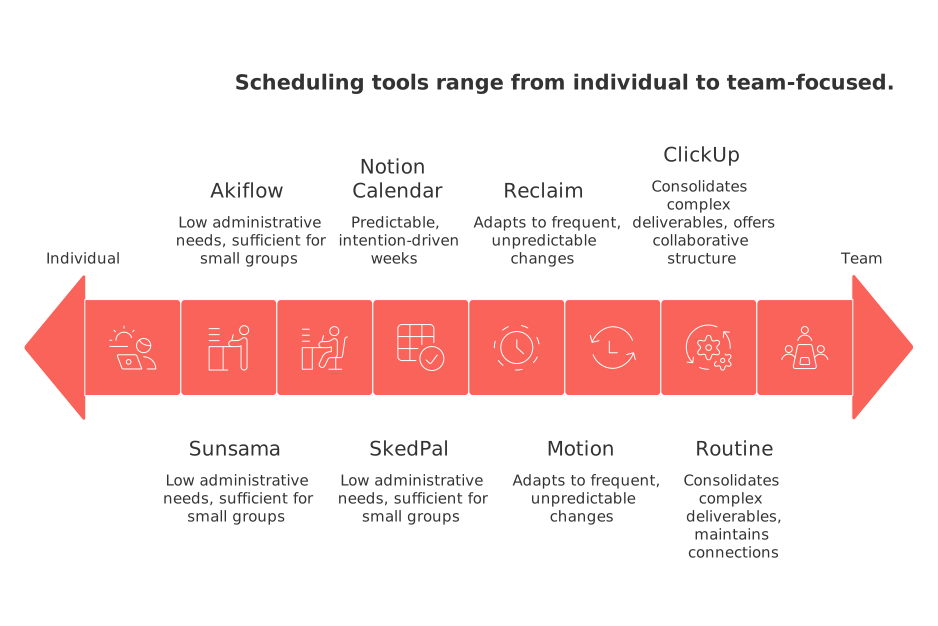
Workflow maturity: If you manage complex deliverables with dependencies and approvals, choose a comprehensive platform (like Routine or ClickUp) that consolidates these elements into a single view. For primarily schedule reshuffling, motion-focused tools like Motion or Reclaim are ideal.
Team size: If you’re working solo or in a small group with low administrative needs, Sunsama, Akiflow, or SkedPal are sufficient. As your team grows and requires shared planning, platforms like Routine or ClickUp offer essential collaborative structure.
Context needs: Work that revolves around clients or a sales pipeline benefits from integrating CRM and project management. Routine excels at maintaining these connections and keeping your schedule genuinely reflective of real progress.
Scheduling complexity: If your planning must adapt to frequent, unpredictable changes, Motion or Reclaim can handle high volatility. For more predictable, intention-driven weeks, Sunsama or Notion Calendar are fitting choices.
Collaboration depth: If several team members regularly contribute to the same projects, shared context, history, and structure matter, favor Routine or ClickUp for these scenarios. For personal accountability, individual-centric tools are enough.
CRM / meetings / documentation: If your work directly impacts revenue or requires extensive documentation, centralize planning. Start with Routine to combine sales and project efforts, or consult this guide to key B2B sales automations to help choose the best planning hub for your needs.
If timeline visualization is important for your process, consult this overview of project visualization and Gantt-style tools to understand how your planning tool should display and track progress once an AI-generated schedule is in place.
Conclusion: choose the planner that plans the work, not just the time
FlowSavvy demonstrates that automatic time-blocking can feel like magic, but ultimately, true productivity demands deeper integration with the context of your real work. In 2026, intelligent planning means your schedule develops as a reflection of ongoing projects, client obligations, and team commitments, not as a separate layer you need to maintain. If scheduling speed is your top priority, Motion or Reclaim would be ideal for you. If you want greater control and manual customization over your planning, Sunsama and Notion Calendar can provide that flexibility. For an integrated workspace where AI planning is genuinely connected to your projects and CRM, try Routine; for process-rich organizations, ClickUp is highly effective. Select the tool that removes the specific friction you encounter in your workflow, and your planning will finally align with your intended results.
FAQ
Why might users outgrow FlowSavvy?
FlowSavvy handles basic time-blocking but struggles with complex project dynamics that require contextual awareness. Users often find it limiting when faced with dependencies, team collaborations, or integrated CRM data.
What does Routine offer that sets it apart from other scheduling tools?
Routine integrates project management, CRM, and task scheduling, delivering context-aware AI planning. It breaks the boundary between isolated tasks and real project progress, ideal for teams needing comprehensive synchronization.
Is Motion suitable for managing project context?
Motion is excellent for rapid auto-rescheduling, but lacks depth in project and CRM integration. It serves high-volume rescheduling needs, not nuanced project insight.
When would Reclaim.ai be the best choice?
Reclaim.ai excels in protecting key priorities with rule-based scheduling, perfect for individuals managing high-priority work amidst shifting schedules. It's not a stand-alone project tool and requires integration with a broader planning stack.
Can ClickUp handle simple, individual task management effectively?
ClickUp is designed for robust project hierarchies and complex team workflows, which can overwhelm individual task management. Solo users might find its feature set overbearing without collaborative needs.
What are the trade-offs of using Sunsama for daily planning?
Sunsama prioritizes intentional, manual planning and encourages daily mindfulness in scheduling. Its light automation means slower adjustments to dynamic changes, which can be cumbersome in fast-paced environments.
How does Akiflow assist with task inundation?
Akiflow targets swift triage and scheduling from multiple task sources. While it's efficient in task conversion, it lacks depth for project milestones and CRM integration, requiring supplementary tools for comprehensive project management.
When does SkedPal become cumbersome to use?
SkedPal offers granular control over scheduling but requires frequent rule adjustments, creating a steep learning curve. Its individual focus might struggle to keep pace with increased team collaboration needs.
What makes Notion Calendar suitable for time-zone coordination?
Notion Calendar provides polished controls for scheduling across time zones with seamless integration into Notion databases for context reference. Its manual scheduling necessitates user-driven decisions, limiting automation.

Julien Quintard
Founder & CEO at Routine05/05/2026
