Ellie Planner Alternatives for Simple Daily Scheduling
Quick comparison of Ellie Planner alternatives for simple daily scheduling
Tool | Best for | Scheduling approach | Collaboration | Context depth | Learning curve | Cost context | Why choose over Ellie |
|---|---|---|---|---|---|---|---|
Routine | Individuals and teams that need tasks connected to projects, docs, CRM, and meetings | Time‑blocking with linked project and client context | Team workspaces, shared context | High: projects, knowledge, CRM, meetings in one | Moderate | Free + paid tiers | Keeps daily plans streamlined while offering the project context often missing |
Sunsama | Calm daily planning and focus rituals | Mindful daily plan, drag‑to‑calendar | Light team visibility | Medium: goals and task sources | Low | Subscription | Guided daily routine with minimal setup and distractions |
Motion | Busy calendars that need auto‑scheduling | AI auto‑plans and reshuffles your day | Team scheduling options | Medium: tasks + meetings | Moderate | Subscription | Automates planning when your schedule is always shifting |
Akiflow | Power users triaging tasks from email, Slack, and tools | Inbox‑to‑calendar with fast commands | Solo or small teams | Medium: cross‑app capture | Moderate | Subscription | Cuts down on clutter by speeding up task capture and scheduling |
TickTick | Personal scheduling with habits and Pomodoro | Task list with calendar view | Light sharing | Low–Medium | Low | Budget‑friendly | Simple planning plus routines, no heavy setup required |
Todoist (+ calendar) | Task‑first users who want simple time‑blocking | List -> scheduled blocks via calendar | Comments, assignments | Low–Medium | Low | Free + paid tiers | Extend your current lists with calendar-based scheduling |
Ellie Planner | Solo users who want a minimalist, distraction‑free daily plan | Manual drag‑and‑drop time‑blocking | Solo | Low | Low | Free + paid tiers | Baseline: clean, minimalist daily planning |
Routine: the Ellie Planner alternative when daily scheduling needs project and CRM context
The core limitation of minimalist planners is not the calendar, its the lack of context. You’re blocking off “Write proposal,” but the brief, meeting notes, and client details are scattered elsewhere. Routine solves this by letting you organize your day alongside projects, CRM details, documents, and meetings, so every task in your schedule is rooted in both purpose and timing.
Best for: Freelancers and teams who need a simple day plan connected to projects, docs, and client follow-ups, all without juggling multiple apps.
Why it made the list: It keeps the daily schedule clean yet adds the context and connectivity that often trigger people to move on from Ellie.
Standout features:
Schedule tasks with full context; opening a time block lets you access the linked project page, meeting notes, or CRM details in one tap.
Collaborative workspace for teams, making it easy to see not only when but also why a block exists and what it connects to.
Designed to grow from solo planning to handling multiple team member needs in the same space, eliminating the need for add-on CRMs or knowledge bases.
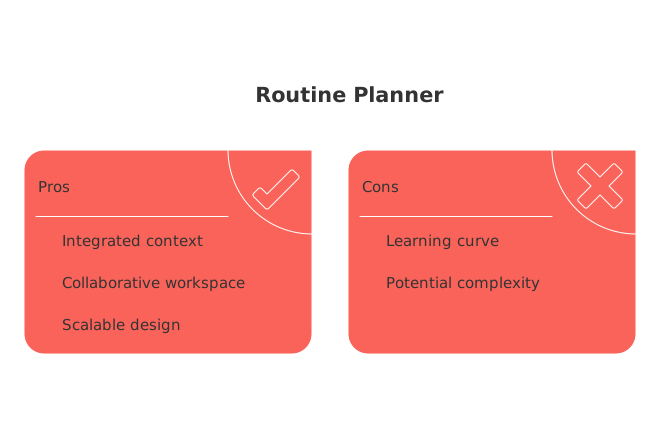
Considerations: Youll need a light project setup and a client list for best results. For those looking for less structure, Sunsama is a simpler alternative that still supports focused planning but doesn’t require building out project or CRM context.
When to switch: Choose Routine when managing your schedule means tracking meetings, client discussions, and shared project tasks, not just personal to-dos.
If your week is heavy on meetings, check out this practical guide to effective meeting formats and recaps to enhance both scheduling and outcomes.
Sunsama: an alternative to Ellie Planner for calm, intentional daily planning
If Ellie’s minimalist style was relaxing but left you needing more structure, Sunsama delivers a tranquil planning experience with helpful guardrails. You start each morning by drafting a reasonable agenda, pulling in tasks from your other tools into a clear and focused workflow, perfect for preventing overwhelm and ending the day with intention.
Best for: Creators, consultants, and managers seeking a mindful, reflective planning ritual without unexpected automation changes.
Why it made the list: Sunsama combines Ellie’s streamlined approach with a thoughtful workflow that stops short of unnecessary complexity.
Standout features: Daily planning rituals, weekly review prompts, and time estimates that steer you toward realistic, enjoyable days.
Considerations: Doesn’t automate rescheduling like Motion, and offers less in-depth context than Routine. When your days are particularly changeable, the manual nature of Sunsama may slow you down.
When to pick something else: Select Motion for a calendar that frequently changes, or Routine when you require direct project or CRM integration with your plan.
Motion: the Ellie Planner alternative for hands-off, automated day planning
As meetings pile up and deadlines converge, just deciding which task fits where slows you down. Motion takes over that decision-making: prioritize your tasks, input deadlines, and let its AI automatically slot work around meetings, then reconfigure the day as things shift.
Best for: Operators and professionals with unpredictable, meeting-heavy schedules.
Why it made the list: Auto-planning in Motion can save you from making frequent small decisions about what to do next and when.
Standout features: Real-time auto-rescheduling that minimizes lost time after interruptions and unexpected changes.
Considerations: Automation here may feel overwhelming for those who prefer more manual control. Customizing priorities and defaults requires a bit more setup out of the gate. For those who want a calmer manual process, Sunsama is the better choice.
When to switch: Opt for Motion when reworking your schedule starts eating up more time than your actual tasks do.
Akiflow: the Ellie Planner alternative for rapid task triage from any inbox
If your main problem with Ellie is gathering, and not just scheduling, tasks, Akiflow could be the right move. It specializes in capturing items from emails, Slack, tickets, and documents, allowing you to process them quickly into a well-organized daily plan with keyboard-driven efficiency.
Best for: Power users who route tasks from multiple sources and want to quickly schedule everything in one go.
Why it made the list: Akiflow excels at stepping in when task intake is the real bottleneck, rapidly converting scattered reminders into a manageable schedule.
Standout features: Instantaneous capture, fast keyboard navigation, and a clean Today view integrated with your calendar blocks.
Considerations: Collaboration and automation are more limited compared to Routine and Motion. If most of your tasks already live in a single app, the biggest advantage is lost.
When to switch: Akiflow is a smart choice when your unscheduled task pile is really just yesterday’s inbox waiting for a plan.
TickTick: the Ellie Planner alternative for light daily scheduling plus habits
When you want Ellie’s simplicity but with a few practical extras, like habit trackers, Pomodoro timers, and a built-in calendar view, TickTick delivers, all without requiring complex project structures or automations.
Best for: Individuals who need an all-in-one for basic tasks, routines, and lightweight scheduling.
Why it made the list: It extends basic planning with habit tracking and personal routines, outpacing bare-bones planners.
Considerations: Has limited options for working with others or storing project context. For collaborative work or more context, Routine or Motion may be a better fit.
Todoist (with calendar): the Ellie Planner alternative for task list loyalists
If you already organize your work in Todoist, switching tools may be unnecessary. Simply add a calendar view, and schedule only the tasks that need time blocks, preserving your familiar lists, labels, filters, and comments in the process.
Best for: Users who prefer list-based systems, but want to reduce overcommitting by visually blocking time.
Why it made the list: It’s minimally disruptive and lets Todoist fans extend their workflow with basic time-blocking.
Considerations: You’ll be combining two tools, and most project context will be in comments or other external docs. For those who need wide team visibility or central documentation, Routine is the better choice.
Decision framework for choosing an Ellie Planner alternative based on your workflow and team size
Follow these guidelines to avoid unnecessary complexity, or under-plan for growing needs:
Workflow maturity: Early stage (solo, managing only a few projects): Choose TickTick for low-friction scheduling.
Increasing complexity (multiple clients or frequent handoffs): Routine ties project, CRM, and meeting context to every time block.
Rapidly changing schedules: Motion’s auto-planning minimizes time spent reconfiguring your agenda.
If your daily agenda is starting to overlap with bigger timelines and dependencies, check out our guide on all-in-one workspaces versus dedicated tools for help on prioritizing your workflow and choosing whether to scale up your simplicity or build toward more features. If meetings make or break your day, consider our actionable resource on using template-driven meetings for better follow-through.
Conclusion: Match your daily scheduling tool to your workflow, not just your calendar
The functionality of Ellie Planner demonstrates the efficiencies possible with a simplified day plan. But as soon as your schedule needs to reference projects, clients, meeting results, and wider context, other options offer significant advantages. Choose Routine when your daily blocks need direct links back to project details. Go with Sunsama for a calming, hands-on approach to daily planning. Select Motion when your schedule needs to adapt instantly to change. Pick Akiflow if the main hurdle is turning a constant influx of tasks into an actionable plan, and stick with TickTick or Todoist when low-friction scheduling within a familiar interface is most important.
As you consider whether to consolidate your toolset or focus your workflow, reviewing the comparison of all-in-one platforms versus dedicated solutions may clarify your priorities for the upcoming quarter. And to make meetings a growth area, not a time sink, explore the effective meetings with actionable templates guide as your next resource.
FAQ
What makes Routine different from other daily planners?
Routine integrates your schedule with project and CRM contexts, offering a comprehensive view that goes beyond basic time blocking. This level of connectivity turns fragmented plans into cohesive workflows.
Can Motion adapt well to sudden schedule changes?
Yes, Motion’s AI-driven rescheduling feature excels in realigning your day when plans shift unexpectedly. However, its dependence on automation might overwhelm those who prefer manual scheduling control.
Is Sunsama suitable for handling frequent task changes?
No, Sunsama thrives in environments that prioritize mindful planning rather than adapting rapidly to change. Its focus on intentionality can become a bottleneck when quick adjustments are needed.
How does Akiflow handle task intake from multiple sources?
Akiflow shines by streamlining task capture from varied inputs, like email and Slack, into an organized schedule. It’s ideal for users overwhelmed by task influx but less effective if your tasks are centralized already.
Is TickTick limited in professional settings?
TickTick offers simplicity with added features such as habit tracking, but it lacks robust tools for professional collaboration. In-depth project management needs would be better served by Routine.
Does Todoist require additional tools for scheduling?
While Todoist can effectively manage task lists, integrating a calendar is necessary for those who need visual time-blocking. This dual-tool setup might limit those seeking a single seamless system like Routine.
Why should I consider switching from Ellie Planner?
Switch if your tasks require context—like project details or CRM data—that Ellie Planner doesn't provide. Routine addresses this gap, transforming simple schedules into efficient, informed plans.

Julien Quintard
Founder & CEO at Routine05/21/2026
