Digital Planner VS Paper Planner: Which One Should You Choose?
Start with your planning pain points before choosing a digital planner or a paper planner
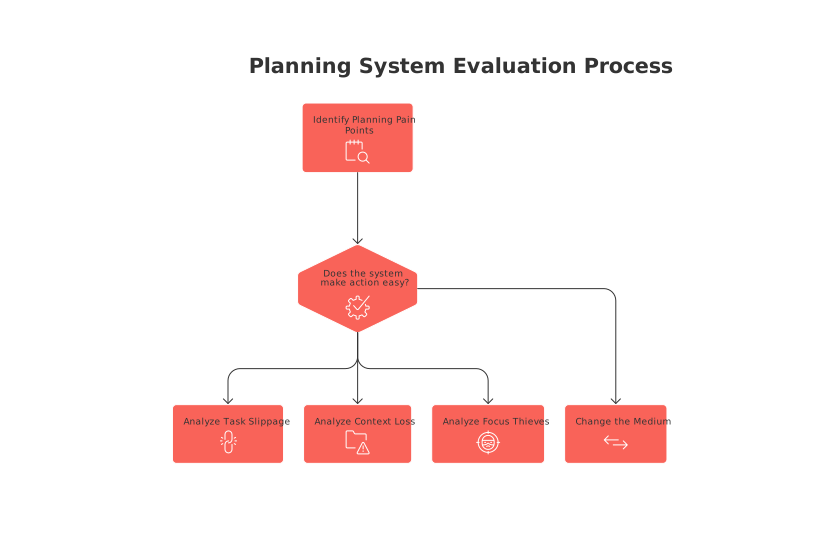
Your system should make action easy. If it slows you down, change the medium.
Ask yourself three quick questions:
Where do tasks slip through the cracks most often?
When do you lose track of project context or files?
What steals your focus when you sit to plan?
The right planner is steadfastly reliable. It shows the next move without friction. That is the benchmark.
Compare how digital planners and paper planners handle projects day to day
Both can work; they shine in different moments.
When a digital planner fits best
You juggle many parallel projects and recurring checklists.
You search past work often and need quick retrieval.
You link tasks to files, emails, or client records.
You rely on notifications for timely follow‑ups.
When a paper planner feels right
You want less screen time and fewer pings.
You think better while writing by hand.
You prefer simple, visual overviews with zero setup.
You need a tool that works without batteries or apps.
Pick the medium that reduces daily friction. Keep the rest optional.
Evaluate knowledge management needs when choosing between digital and paper planners
Projects depend on reference material. That may include procedures, how‑tos, or checklists.
Digital: Link a task to its procedure. Search it later in seconds.
Paper: Use a consistent index and page numbers. Create simple cross‑references.
If you frequently reuse guides, digital linking wins. If you need quiet clarity, paper indexing can suffice.
Consider personal CRM and relationship tracking in digital versus paper planners
Freelancers, job seekers, and sellers all need to keep track of their professional contacts. You likely do too.
Digital: Tag contacts, log interactions, and set follow‑ups with reminders.
Paper: Keep a lightweight contact roster with a manual index and symbols.
Digital shines when volume grows or you need team visibility. Paper works for a small, trusted circle.
Test for friction: capture speed, retrieval, and context switching
Time a capture: add a task from your phone or desk. Then do it on paper.
Time a search: find a three‑month‑old action in both systems.
Note distractions: count pings or detours during planning.
Repeat for three days. Choose the medium that proves faster and calmer.
Privacy, durability, and accessibility differences between digital planners and paper planners
Privacy: Digital needs trust in vendors, encryption, and exports. Paper lives offline.
Durability: Digital survives spills but risks lock‑in. Paper risks loss, fire, or wear.
Accessibility: Digital scales with search and sharing. Paper wins when power or signal fails.
Your context decides the tradeoffs. Weigh risk tolerance and recovery plans.
Choose a hybrid workflow that effectively merges a paper planner with a digital planner
You do not need to pick a side forever. Many people blend both.
Use paper for daily focus and quick sketching.
Capture commitments to a digital inbox by photo or voice.
Process once daily: convert each capture into a dated task or project step.
Archive completed pages with a phone scan when needed.
All‑in‑one workspaces such as Routine or Notion centralize tasks, documentation, CRM, and meetings for this bridge. If you are evaluating ecosystems, compare all‑in‑one workspaces versus dedicated project tools before committing.
Use this fast decision framework to pick your planner today
State the goal: fewer dropped tasks, calmer days, or cleaner projects.
Pick a review rhythm you will keep. Many solo operators prefer 12‑week planning cycles over annual goals.
Run the capture speed, retrieval, and context switching test mentioned earlier.
Commit for eight weeks. Do not switch mid‑cycle.
Measure outcomes: tasks delivered, client replies, and the progression of your projects.
You want a planner that disappears into habit, not one that demands constant attention.
If you outgrow your choice later, change it after your current cycle. Protect momentum first.
FAQ
How do I decide between a digital and a paper planner?
Identify your productivity pain points and match them with the strengths of each planner type. Digital planners excel with complex project management and quick retrieval, while paper planners offer simplicity and less distraction. A hybrid approach may be optimal for balancing diverse needs.
Are digital planners more secure than paper planners?
Digital planners rely on software vendors, encryption, and cloud storage, posing risks of data breaches, but offer quick backup options. Paper planners are private and offline but vulnerable to physical damage or loss with no easy backup.
What is the biggest disadvantage of using a paper planner?
The main drawback is the lack of easy search and retrieval capabilities, which becomes evident when managing extensive or recurring projects. Paper planners also can't automatically link to digital resources or send timely reminders.
How can I implement a hybrid planning system?
In a hybrid system, use a paper planner for brainstorming and daily focus, while capturing tasks digitally with Routine for dynamic reminder integration. Process entries once daily and digitize critical notes with a phone scan to centralize documentation.
Do digital planners require internet access?
While many digital planners offer offline capabilities, access to full features often requires an internet connection, especially for data synchronization and backups. Consider your typical connectivity when choosing a planner.
What should I avoid when choosing a planner?
Avoid planners that complicate your process or require constant manual updates, which can lead to frustration and inefficiency. Choose a planner that becomes intuitive and habit-forming, disappearing into your daily workflow.
How frequently should I review my planning system?
Implement a consistent review rhythm, such as the 12-week cycle, to optimize your system without prematurely switching tools. Regular evaluations help refine your approach and maintain focus on goals, minimizing dropped tasks.
Is reducing screen time a valid reason to choose a paper planner?
Yes, if digital distractions overwhelm you, opting for a paper planner can enhance focus and productivity. However, assess whether analog tools sufficiently meet your project complexity and information retrieval needs.

Julien Quintard
Founder & CEO at Routine08/27/2026
