How to Design a Weekly Team Sync That Doesn't Waste Anyone's Time
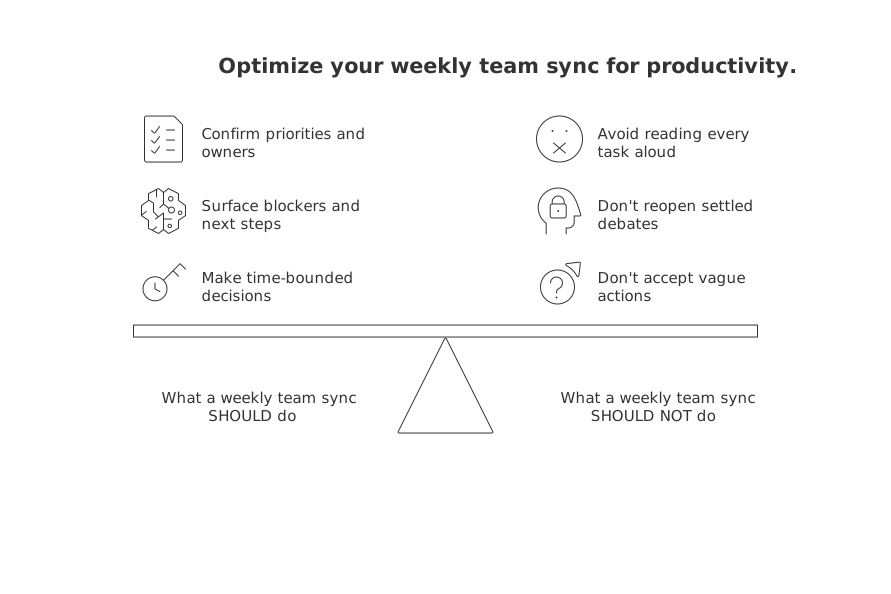
What a weekly team sync should and should not try to do
Treat the sync as a forum for decisions and unblocking, not a broadcast. Keep contributions crisp. Make outcomes explicit.
Do confirm the week’s priorities and owners.
Do surface blockers and agree on next steps.
Do make time-bounded decisions.
Don’t read every task aloud.
Don’t reopen settled debates without new data.
Don’t accept vague actions or unclear ownership.
Principle: If it’s just an update, write it. If it needs a decision, meet.
Set a weekly team sync schedule, duration, and attendee rules that fit the work
Pick one weekday and protect it. Choose 25 or 45 minutes. Fewer attendees means faster outcomes.
Attendee rules that keep focus
Deciders only. Invite people who can commit to action.
One role each. Name a facilitator, a timekeeper, and a clear owner for each topic.
Observers async. Share a recap, not a chair.
Timeboxes that prevent drift
3 minutes: Wins since last week.
7–10 minutes: Priority check and trade‑offs.
10–20 minutes: Decisions and unblockers.
2 minutes: Commitments and who owns what.
Design a crisp agenda for a weekly team sync with clear outcomes
Use a simple flow. Everyone should know what “done” means for each segment.
Wins. One sentence each. Build trust fast.
Priorities. Confirm the short list. Cut the rest.
Blockers. Name the constraint. Assign the owner.
Decisions. State options, decide, record the rationale.
Commitments. Who does what by when. No hedging.
For structure inspiration, review proven meeting formats and ready‑made recap templates. They pair well with the agenda above.
Collect updates asynchronously before the meeting to keep the sync fast
Ask everyone for three bullets the day before. Keep it short and factual.
What changed since last week?
What will you finish before the next sync?
Where are you stuck, and what do you need?
Skim these ahead of time. Promote only items that need a decision or a trade‑off.
Make risks and dependencies visible with a lightweight project tracker
Use a single view that shows priorities, owners, status, and blockers. Avoid clutter. Everyone should grasp it in 30 seconds.
Create a clear “Stuck” lane with entry criteria.
Tag dependencies by team or person.
Limit work in progress to prevent hidden delays.
If you need ideas, explore visualization tools for simple project tracking. Choose the lightest view that still drives action.
If we can’t see it, we can’t fix it.
For small teams and freelancers: adapt the weekly sync to your reality
This approach to regular team syncs benefits more than just companies, it works for small teams, independent contributors, and community groups too. Keep it streamlined and human‑centered.
Two‑person startup. 20 minutes on Monday. One metric, one risk, one commitment each.
Freelancer with two clients. Separate 15‑minute syncs. Focus on scope, deadlines, and payment status.
Community group. 25 minutes. Upcoming event, volunteer gaps, and tasks that need owners.
If your toolset feels heavy, weigh your options. For a deeper comparison of trade‑offs, look for resources such as “All‑in‑One Workspaces vs Dedicated Project Tools: Which Serves Your Business Best?” in your knowledge base or trusted sources to help you choose the right level of structure.
Keep the weekly team sync honest with simple metrics and signals
Measure outcomes, not theatrics. Use clear, actionable metrics, your meeting “signals”, that shape decisions and encourage the right behaviors.
Commitment reliability. Percent of actions done on time.
Carryover count. Items that roll week to week.
Blocked items. Count and average days blocked.
Throughput. Items finished per week.
Meeting health. Quick pulse: useful or not useful.
Review these in two minutes. Adjust priorities on the spot.
Stop holding the weekly team sync when it stops serving a purpose
Kill or reshape the meeting if you see these signs:
Updates dominate and decisions vanish.
Blockers repeat without owners.
Attendees multitask or skip.
Major work now runs on a different cadence.
Consider alternatives: biweekly syncs, functional deep‑dives, or short decision reviews. Protect people’s focus. Meetings are a tool, not a ritual.
Quick agendas you can borrow for your next weekly sync
Product team, 30 minutes
3 min: Wins.
7 min: Priority check and trade‑offs.
15 min: Decisions and unblockers.
5 min: Commitments and owners.
Sales pod, 20 minutes
4 min: Pipeline changes.
10 min: Deal risks and asks.
6 min: Commitments before Friday.
Volunteer crew, 15 minutes
3 min: Upcoming event highlight.
7 min: Gaps and who fills them.
5 min: Clear next steps.
Need more structure ideas you can apply this week? Reuse the agenda frameworks in this article, and if you want templates and visuals, explore the proven meeting formats and project‑tracking visualizations linked above.
FAQ
How long should a weekly team sync last?
A weekly team sync should ideally last no longer than 25 minutes. Focus on decision-making, as prolonged meetings often degrade into unproductive status updates.
Is it beneficial to rotate facilitators for team syncs?
Rotating facilitators monthly injects fresh energy and different perspectives, reducing complacency. It challenges the status quo and perpetuates a culture of accountability.
What's the risk of not using visible metrics in syncs?
Without visible metrics, conversations lack grounding and drift into subjective territory. Metrics provide a factual basis for assessing progress and prioritizing decisions.
How should unexpected side debates be managed during a sync?
Unexpected side debates must be parked and assigned to a specific owner for offline resolution. Letting them hijack the sync disrupts focus and delays decision-making.
Who should attend a weekly team sync?
Only include decision-makers who can commit to actions. Observers should be briefed asynchronously to maintain speed and focus.
Why is it important to collect updates asynchronously before the meeting?
Collecting updates asynchronously ensures the sync is concise, dedicating time to decision-making instead of status updates. It prevents information overload and keeps the team focused on actionable items.
How can small teams adapt the weekly sync to fit their context?
Adjust the duration and content to match your team's size and dynamics, focusing only on what's critical. For instance, a two-person startup might prioritize rapid decision-making over model structures.
What role does Routine play in organizing an effective team sync?
Routine offers proven meeting formats and visualization tools that streamline the sync process, ensuring meetings remain focused on decisions rather than becoming routine rituals. Choose what amplifies action, not merely what's popular.
What is the potential downside of ignoring clear signals or metrics in team meetings?
Failing to monitor signals or metrics like commitment reliability or blocked items risks stagnation and inefficiency. Without these insights, teams may inadvertently repeat mistakes and lose sight of objectives.

Julien Quintard
Founder & CEO at Routine09/30/2026
