The Daily Planner Workflow Product Managers Swear By
Why a daily planner workflow matters to product managers and solo builders
Your calendar fills itself. Your priorities should not. Having a consistent daily workflow helps keep your strategy and delivery closely aligned. It minimizes context switching, guides your decision-making, and reduces last-minute scrambling.
This workflow is flexible: it serves both fast-moving teams and independent makers. Whether you’re building several products or balancing client work with a side app, it scales with your needs.
If everything is top priority, nothing moves.
Set one clear outcome for today that ties to the roadmap
Before you check messages, choose a single non-negotiable outcome for the day. Ensure it connects directly to a quarterly goal. Make this outcome something shippable or decisional.
Approve the final scope for the payments beta.
Publish onboarding copy for step two of signup.
Confirm acceptance criteria for the invoices API.
Base your choice on your current project phase. For practical tips, read this guide about what really happens in each project lifecycle phase to select the most impactful action today.
For further insight, consider reading our guide on All Project Planning Templates You Should Know: Essential Charters, Roadmaps, and More.
Triage the backlog with a simple priority gate product managers can run daily
Spend 12 minutes scanning your top 20 items. Use this priority gate and if an item checks two of the following, it moves up:
Moves a key metric? Activation, retention, or revenue.
Unblocks the team? Removes a dependency today.
De-risks near release? Cuts failure or delay risk.
Categorize the results as Now, Next, Later, or No. Limit your “Now” category to a maximum of three items. If an item falls into the “No” category, remove it from consideration immediately.
Protect deep work using themed work blocks, not rigid time slots
Choose one or two themes for your workday. Themes help focus your attention without locking you to specific minutes.
Set the rules: One theme before lunch, one after.
Group work by energy: Do hard thinking tasks first, reviews later.
Guard the theme: Politely defer any tasks that don’t fit your theme.
Example themes a product manager can run this week
Experiments: Outline hypotheses, define success, line up data pulls.
Build: Clarify edge cases, review PRs, clear blockers.
Customers: Read five support tickets, call two users, tag actionable insights.
Quality: Triage bugs, audit severity, ship at least one fix.
Plan stakeholder touchpoints that support decisions, not status
Swap long-winded updates for short, decision-focused checkpoints. Keep them predictable and light.
Daily async thread: Share yesterday’s win, today’s focus, and one blocker.
12-minute live check: Resolve one decision only; skip status updates.
Weekly demo: Show progress, share one key learning, and set a next step.
Tip: If a discussion takes more than 10 minutes, reframe it as a discrete decision with clear options and a deadline.
Keep CRM hygiene tight in 15 minutes for product‑market clarity
Your CRM is where product and sales meet. A quick daily sweep can keep your signals clean and useful.
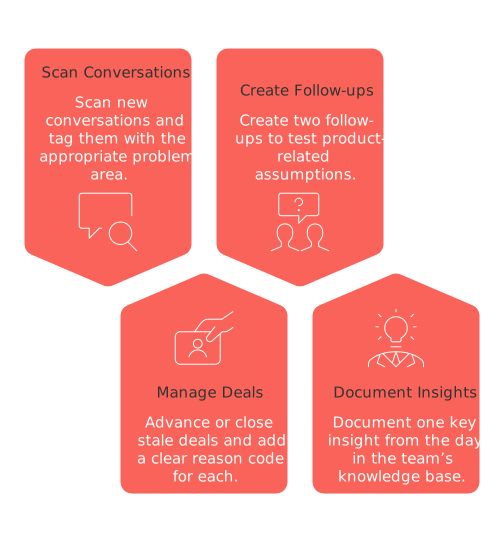
Scan new conversations. Tag each with the appropriate problem area.
Advance or close stale deals. Add a clear reason code for each.
Create two follow-ups to test product-related assumptions.
Document one key insight from the day in the team’s knowledge base.
This process also benefits freelancers and solo founders, keeping customer feedback close to daily decision-making.
Turn metrics into micro‑decisions before lunch
Check three critical numbers, then choose one small, concrete action per number.
Activation rate down? Try a one-screen A/B test on copy today.
Is your Daily Active Users (DAU) count stagnating? Consider adding a prompt or notification in the view users see when there is no new content.
Support tag spiking? Draft a new help article and link it where needed.
Record each action, assign an owner, and set a deadline in your workspace, then move on.
Visualize progress so the team sees movement every day
Pick a simple visual your team can easily grasp. Refresh it each afternoon.
One board with columns for Now / Blocked / Done.
A concise burndown chart for the week.
A compact tracker highlighting key risks and decisions.
To keep your formats straightforward, check out these visualization tools, from Gantt charts to lightweight project trackers. Choose the simplest approach that still answers “what got done today?”
Close the day with a decision log and tomorrow’s first move
Wrap up strong and on time. Take five minutes to record what’s crucial for tomorrow.
Log decisions: Note what changed, why, and who is responsible.
Set two follow-ups: Assign dates and channels for each.
Pick tomorrow’s first task: Choose a 10-minute starter that you will complete first thing.
Platforms like Routine or Notion can be useful to help you manage your workflow more effectively by keeping projects, docs, and CRM organized in one place.
FAQ
What is the role of stakeholder touchpoints in decision-making?
Stakeholder touchpoints should prioritize decision-making over mere status updates, fostering actionable discussions rather than endless progress checks. Mismanaged touchpoints lead to information overload with little strategic advancement.
How can CRM maintenance support product-market clarity?
Regular CRM updates ensure the integrity of customer insights, keeping them relevant and actionable. Neglecting CRM hygiene contributes to outdated data and misguided decisions.
Why is it crucial to turn metrics into daily micro-decisions?
Small, data-driven decisions anchor your strategy in reality, mitigating the risk of broader strategic misalignment. Ignoring metrics turns decision-making into guesswork, eroding team credibility.
How can visualizing progress impact team dynamics?
Clear progress visuals foster transparency and motivation within a team. Without them, teams can feel adrift, disconnected from the scope and significance of their contributions.
What is the value of maintaining a decision log?
A decision log systematically tracks changes and responsibilities, reducing ambiguity and future disputes. Without it, chaos reigns, as past decisions become a matter of conjecture rather than fact.
Can platforms like Routine help improve workflow management?
Yes, platforms like Routine centralize project management, ensuring cohesiveness across tasks, documents, and communication channels. In its absence, managing workflows can become fragmented and inefficient.

Julien Quintard
Founder & CEO at Routine05/01/2026
