Change Management Plan Templates for Migrating from Jira to Linear
Why a formal change plan matters for a Jira-to-Linear migration
Your teams don’t resist Linear. They resist uncertainty. A transparent, structured plan reduces friction, safeguards delivery, and builds trust at every level.
Executives need early proof that delivery won’t stall. Managers need clarity on roles, dates, and non‑negotiables. Teams need to be assured of the transparency and communication of the process, so their work, context, and history remain secure.
Change fails when process trails emotion. Lead with structure, then train with empathy.
Change management roadmap template for migrating from Jira to Linear
Use this 5‑phase roadmap as your core migration artifact, keep it visible and versioned for alignment.
Discover Inventory projects, boards, fields, and workflows in scope.
Capture pain points, SLAs, and compliance needs.
Define success metrics and guardrails.
Design Map Jira constructs to Linear teams, projects, and cycles.
Decide what data to migrate, archive, or drop.
Draft RACI (Responsible, Accountable, Consulted, Informed), communication, and training plans.
Prepare Set up SSO, roles, and permissions in Linear.
Run a sample import and validate fields.
Announce the plan and pilot timeline.
Pilot Migrate one representative team.
Measure adoption and cycle health.
Fix gaps and update templates.
Migrate and stabilize Cut over in waves. Hold daily hypercare.
Retire Jira boards and integrations by wave.
Report KPIs to executives each week.
For more comprehensive planning, see these project planning templates for charters, roadmaps, and more to complement your migration efforts.
Stakeholder map and RACI template for a Jira-to-Linear program
Assign ownership early. Keep decisions organized and traceable.
Executive sponsor, Accountable. Approves scope, budget, and success metrics.
Program manager, Responsible. Runs the plan, manages risks, and reporting.
Product engineering lead, Responsible. Oversees workflow design and pilot implementation.
Security and IT, Consulted. Reviews SSO, data retention, and compliance audits.
Finance, Consulted. Tracks license usage, savings, and ROI.
Team managers, Responsible. Drives user adoption and feedback loops.
Support champions, Informed. Fields questions during hypercare.
Document the RACI (Responsible, Accountable, Consulted, Informed) per decision, ensuring all roles are clear and tracked for steps like field mapping, import scope, integration priority, cutover dates, and decommission timing.
Workflow mapping template to translate Jira projects and issues into Linear teams and cycles
Agree on a single mapping standard, then apply it by team with light tweaks, such as adjustments to comply with specific departmental needs or unique workflows.
Common mapping choices
Jira projects → Linear teams for ownership and permissions.
Jira epics → Linear projects to group work spanning weeks or months.
Jira sprints → Linear cycles to maintain cadence and historical data.
Issue types: Story/Task/Bug →Issue with labels for type.
Statuses: Map to a streamlined flow, Backlog → Planned → In Progress → Review → Done.
Priorities: Jira “Blocker/Critical/Major/Minor/Trivial” → Linear P0/P1/P2/P3/P4.
Components → Labels or projects as needed for reporting needs.
If your PMO is also reviewing visualization, explore different project visualization tools, from ai>Gantt charts to project trackers, and choose the option that best answers your stakeholders’ questions.
Data migration template for moving artifacts and history from Jira to Linear
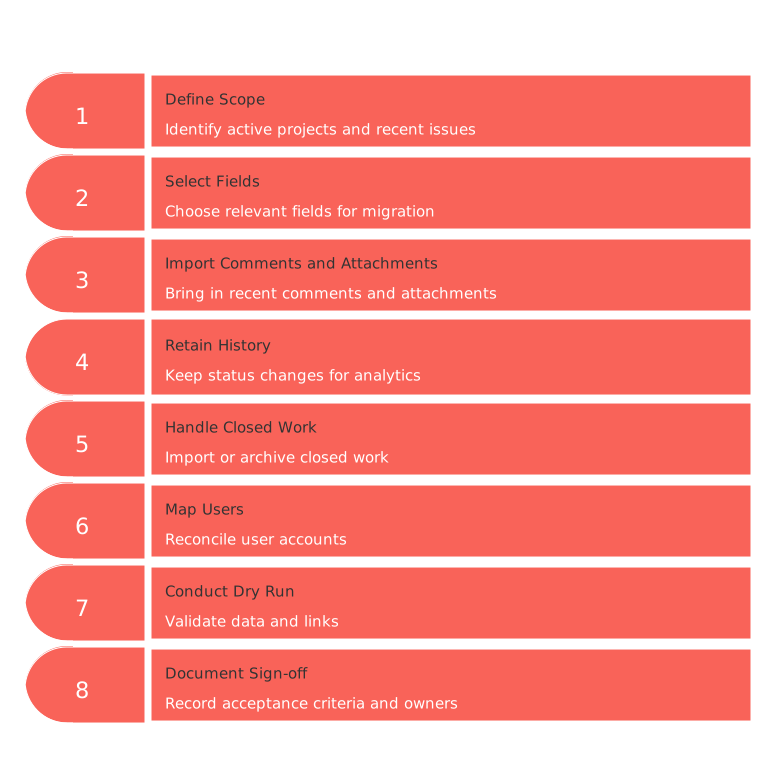
Keep the import minimal and focused, move only what teams actively use.
Scope: active projects, last 12–18 months of issues, and open epics.
Fields: title, description, status, assignee, priority, labels, and story points if applicable.
Comments and attachments: import the most recent; archive the rest.
History: retain status changes for analytics; skip noisy edits.
Closed work: import as Done and archived, or store in a read‑only Jira instance.
User mapping: reconcile emails, groups, and deactivated accounts.
Dry run: import a sample and validate counts, links, and filters.
Sign‑off: document acceptance criteria and responsible owners.
List every field with a decision: migrate, transform, drop, or archive, and note the business reason to prevent rework.
Integration template to reconnect CI/CD, SSO, and CRM when shifting to Linear
Rebuild integrations to support current business goals and avoid legacy bloat.
Identity: SSO integration with Okta or Azure AD. Enforce SCIM provisioning policies.
Code: Configure GitHub or GitLab PR links and branch naming standards.
CI/CD: Set up status checks and deploy notifications in issue threads.
Messaging: Use Slack channels for team and project notifications.
Docs: Link specifications and decisions from your central knowledge base.
CRM: Surface customer tickets or feature requests in Linear with tags.
Document integration owners, SLAs, and failure modes for each point of connection. Flag any data residency or PII flows when relevant.
Communication plan template to guide executives and managers during the Jira-to-Linear move
Communicate the rationale, benefits, and potential challenges, not just the schedule. People need context and meaning at every step.
Audiences: executives, managers, engineers, product, design, and support.
Messages: why we’re migrating, what will change, what remains the same, and when.
Channels: all‑hands meetings, Slack announcements, and manager toolkits.
Cadence: kickoff, pilot conclusion, pre‑cutover, day one, and week two.
FAQ: how to locate work, report issues, and request assistance.
Supply managers with concise scripts and slides, and provide screenshots of new workflows. Keep updates crisp, timely, and easy to access.
Training and enablement template for onboarding teams to Linear effectively
Customize training by role. Prioritize immediate wins during the first session.
Role tracks: engineer, product manager, designer, QA, support, and analyst.
Format: 45‑minute demos, hands‑on exercises, and five key shortcuts.
Artifacts: quick-reference cards, short explainer videos, and a searchable FAQ.
Champions: one per team to facilitate office hours and collect feedback.
Assessment: brief checks for issue creation, cycle planning, and filter usage.
Wrap up each session with a real project planning exercise to reinforce the learning.
Risk register template for a Jira-to-Linear migration program
Track risks in a risk register or management software, along with their owners and mitigation deadlines. Escalate issues early and ensure transparent communication.
Data loss, Mitigation: run multiple dry runs and validate imports with reports.
Adoption dip, Mitigation: deploy champions, offer on-the-floor support, and address blockers rapidly.
Permission drift, Mitigation: enforce SSO groups and conduct weekly permission audits.
Integration gaps, Mitigation: rebuild connections in stages, providing fallbacks where needed.
Velocity noise, Mitigation: reset baselines and clarify KPIs for new processes.
Scope creep, Mitigation: implement formal change control procedures and guardrails.
Compliance findings, Mitigation: complete security reviews before each transition wave.
KPI and adoption dashboard template to measure Linear success after migration
Decide baseline measures and targets before cutover. Publish the results weekly on an internal company dashboard or newsletter, ensuring full accessibility for all stakeholders.
Active users: weekly unique users by team.
Cycle health: planned vs completed issues per cycle.
Lead and cycle time: median days by issue type.
Bug SLA: P0 and P1 time to acknowledgment and resolution.
Queue hygiene: percentage of issues with both assignee and priority.
Meeting load impact: hours saved in planning meetings and standups.
License savings: compare Jira retirements with Linear seat adoption and add‑on reduction.
Annotate the dashboard with key events such as pilot completion, policy changes, or new integrations to give context for any metric spikes.
Budget and ROI template for the Jira-to-Linear change case
Make your business case clear, concise, and measurable.
Costs: Linear licenses, consulting or migration services, internal training, and labor time.
Savings: eliminated Jira licensing costs and retired marketplace add‑ons.
Productivity gains: faster planning cycles and leaner triage.
Risk reduction: fewer tools, reduced failures, and clearer audit trails.
Share results with senior leadership monthly for the first quarter. Consistently connect outcomes to delivery speed and customer experience improvement.
Related reading for PMOs planning a Jira-to-Linear migration
These resources add depth to your migration planning and template usage:
Essential charters, roadmap examples, and project planning templates for enterprise migration
Reviewing Gantt charts versus simple project trackers for clarity in status reporting
Consider whether all‑in‑one workspaces or dedicated project tools serve your business best by researching the pros and cons of each to inform your decision‑making process.
If your stack strategy is still undecided, weigh the governance benefits of all-in-one platforms against the agility of dedicated tools. Make explicit notes of trade‑offs and document them for team review.
FAQ
Why is a formal change plan crucial for a migration from Jira to Linear?
A formal change plan quells uncertainty, which is often the actual resistance rather than the new tool itself. Without a structured approach, the risk of disruption and misalignment increases, hampering the entire migration process and stakeholder confidence.
What are the key phases in a Jira-to-Linear migration roadmap?
Key phases include Discover, Design, Prepare, Pilot, and Migrate and Stabilize. Skipping any phase can undermine stakeholder alignment and data integrity, leading to potential operational chaos.
How should data be handled during migration from Jira to Linear?
Only migrate data that is actively used to minimize complexity. Excessive data transfer can lead to unnecessary bloat and confusion, undermining the value of moving to a more streamlined system like Linear.
What roles are essential for successful oversight during the migration?
Critical roles include an Executive Sponsor for approval, a Program Manager for execution, and a Product Engineering Lead for workflow design. Neglecting these can lead to unclear accountability and misalignment on key project deliverables.
How do you ensure seamless communication during a migration to Linear?
Effective communication involves clear messaging about changes, consistent updates, and accessible channels like Slack and all-hands meetings. Overlooking this can exacerbate resistance and lead to a disjointed implementation.
What are the risks if integration is poorly managed during migration?
Poor integration can result in severe workflow disruptions and loss of business-critical functions. Address gaps progressively and provide necessary backups to mitigate failures.
How do you gauge the success of a migration to Linear?
Success is measured by active user engagement, cycle health, and reduced tool complexity. Neglecting these metrics can mask underlying issues, leading to suboptimal tool adoption and productivity setbacks.
What is the role of training during a Jira-to-Linear migration?
Tailored training accelerates user adaptation and boosts confidence in using Linear. Without it, user frustration can increase, rendering the transition ineffective despite its potential benefits.

Julien Quintard
Founder & CEO at Routine03/25/2026
