Calendar-Embedded Notes: Write Where You Schedule
Why calendar-embedded notes end context switching
Your cursor sits on a meeting invite, but your notes hide in another app. That seemingly small detour drains your focus. Calendar-embedded notes keep all your context anchored to time, so you write exactly where the work happens, without chasing through tabs and tools.
Put the note where the decision will be made, on the event that hosts it.
Context switching, splitting your attention as you jump between apps or tasks, drains your focus and efficiency. It can turn quick, simple tasks into time sinks. By embedding notes directly in your calendar events, you consolidate all necessary information in one place. This setup limits context switching by letting you see each event’s history, decisions, and next steps immediately, keeping your workflow smooth and focused.
What calendar-embedded notes actually are and how they work
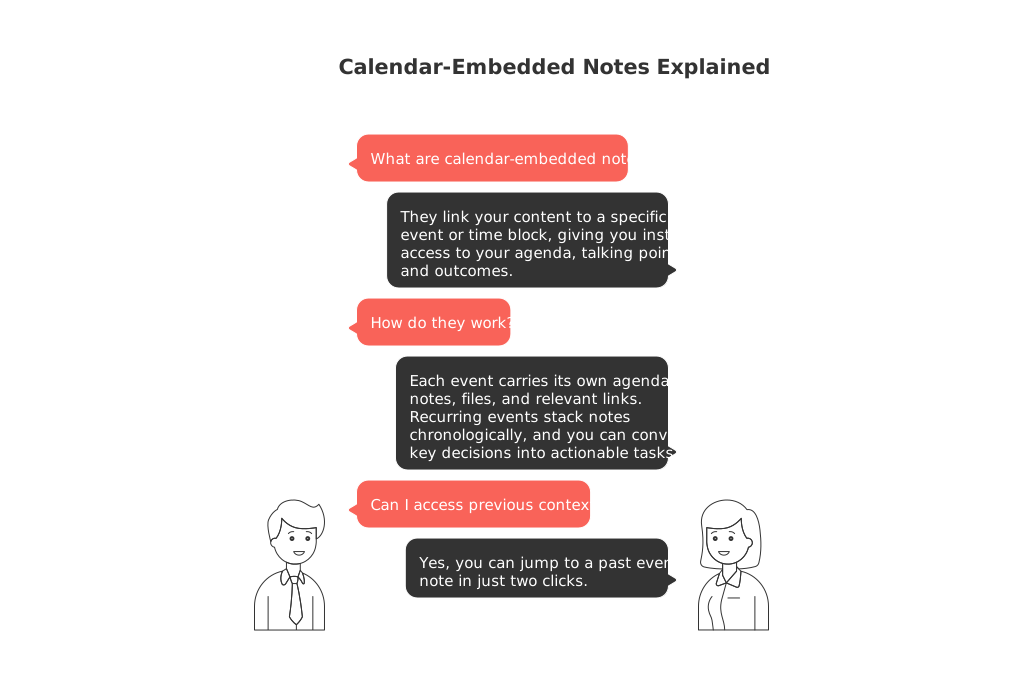
Calendar-embedded notes link your content to a specific event or time block. Open a meeting or work session, and you instantly get access to your agenda, talking points, and outcomes, no hunting or copying required.
Each event carries its own agenda, notes, files, and relevant links.
Recurring events stack notes chronologically, so you always have context at your fingertips.
Wrap up a meeting by converting key decisions into actionable tasks right from the note.
Need previous context? Jump to a past event’s note in just two clicks.
Simple setups for individuals: daily planning, journaling, and learning
Make personal workflows effortless. Connect quick notes directly to existing calendar blocks, adding context without new tools or extra steps.
Everyday examples you can start this week
Daily plan: Create a 30-minute block called “Plan + Review.” Jot down three bullets: yesterday’s wins, today’s priorities, and one risk.
Fitness: Attach workout notes to your gym time. Log routines and tweaks on each repeating event, building up a reference you can review weekly.
Learning: Block out study sessions and add summaries or key questions directly to each session’s note.
Freelance gigs: Pin briefs and client preferences to each call, so you prep faster and invoice with clarity.
Team workflows: meetings, follow-ups, and accountability within the calendar
Teams need fast handoffs and clear record keeping. When notes, agendas, and decisions are tied to the event, everyone sees the same context, so nothing important disappears into a chat thread.
Start by adding agenda bullets directly inside the calendar event. During the meeting, capture decisions and assign owners as you go. Afterward, turn actions into tasks immediately, all before closing your tab. To save setup time, try the practical guide on effective meetings with templates for agendas, minutes, and recaps.
Project management without tabs: connecting tasks, documents, and CRM to your schedule
Projects evolve over a timeline, and your calendar can visually represent key milestones and deadlines along that journey. Attach status notes to milestone reviews, and link critical specs and slides directly to their scheduled dates. When review day comes, everything you need is right there within the event.
If your team is considering new tools, compare approaches before you commit. This balanced breakdown of all‑in‑one workspaces versus dedicated project tools helps you weigh speed, structure, and long-term fit. For larger teams, structured data and consistency are especially important, while personal apps may face challenges when scaling, shared models can keep projects on track across the organization.
Choosing tools that support calendar-embedded notes without lock-in
Choose software that fits with where and how you already work. Some calendars now let you write detailed notes directly on events. Some workspaces, such as Notion and ClickUp, enable you to embed notes and tasks alongside your schedule, connecting vital information directly to your events. Other platforms, like Routine, strive to bring together projects, knowledge, CRM, and meetings all in one hub. If you choose an all-in-one solution, check that the platform supports open exports and has clear permission controls for flexibility and data safety.
What to verify before you commit
Access to event-note history for recurring meetings.
One-click task creation directly from meeting notes.
Guest access and sharing features that protect privacy.
Robust search, find notes by attendee, keyword, or date.
Export options that let you move your data without headaches.
Short playbooks: move from scattered notes to calendar-attached workflows
Weekly 1:1s
Create a recurring calendar event, keeping a single running note inside it.
Divide your note into sections: wins, roadblocks, action items, and career topics.
End each meeting by assigning task owners and due dates so nothing slips through.
Sales calls
Attach discovery questions and qualification fields directly to the event invite.
Log objections and next steps while on the call.
Convert commitments to tasks before ending the meeting.
Deep work blocks
Set a clear objective in each deep work event note.
Paste links to the single source document you’ll need.
Write a quick two-line recap at the end to keep momentum for next time.
Metrics that show you cut context switching
Keep an eye on a few simple signals, then share the results with your manager or team. You’ll see friction fade and productivity rise.
Prep time per meeting: How many minutes from opening the invite until you’re ready to start?
Time to find past decisions: How many seconds does it take to reach the right note?
Follow-up completion rate: Percentage of action items completed within 48 hours.
Number of app switches per meeting: Aim for three or fewer jumps during each session.
Common pitfalls and how to fix them
Notes spread across too many tools? Choose one platform as your event-note home and stick to it.
Agendas added too late? Write bullet points when you first send the invite.
Tasks left as plain text? Create them as formal tasks during, not after, the meeting.
Messy event titles? Use verbs and outcomes, not jargon, to make events instantly recognizable.
Mixing private and shared notes? Clearly mark personal notes on shared calendar events to avoid confusion.
When to keep notes outside the calendar
Not every note belongs inside a calendar event. For long reports, legal documents, or research that needs sourcing, keep those in separate docs. Simply link to them from your event note for quick reference. This way, your event note stays concise and action-driven.
The path forward: one schedule, one source of truth
Write where you schedule, keeping every decision anchored to a point in time. Let agendas, notes, and outcomes travel together as you work. For further tips, check the meeting templates and tooling comparisons linked above. Over time, your calendar transforms into a living record, not just a grid of boxes.
FAQ
What are calendar-embedded notes?
Calendar-embedded notes are notes linked directly to a calendar event. This eliminates the disruption of switching between apps, allowing you to access agendas and decisions right within the scheduled time block, keeping all your context in one location.
How do calendar-embedded notes improve productivity?
These notes significantly reduce context switching, which decimates productivity. By embedding notes within your calendar, you streamline access to essential information, making decisions faster and concentrating efforts on tasks rather than app navigation.
Can calendar-embedded notes be used for team collaboration?
Yes, embedding notes in calendar events ensures all team members have the same access to agendas and decisions, improving clarity and accountability. It avoids the common pitfall where critical information gets lost in chat threads or emails.
What tools support calendar-embedded notes?
Tools like Routine, Notion, and ClickUp offer features to embed notes directly within calendar events. Selecting a tool depends on your existing workflow and requires checking for features like note-export options and permission controls.
Why is context switching considered detrimental?
Context switching divides attention, elongating task duration and fracturing concentration. Integrating notes with your calendar minimizes this problem, allowing seamless transition between tasks without losing focus.
When should notes not be embedded in calendar events?
While embedding is efficient for immediate task context, complex documents like legal reports or extensive research should remain separate, linked from event notes for quick access. This segregation maintains concise, action-driven meeting notes.
What are common pitfalls when managing event notes?
Pitfalls include spreading notes across multiple tools or neglecting to convert notes into actionable tasks. A disciplined approach, starting with a single platform like Routine for notes and immediate task creation, helps maintain consistency and forward momentum.

Julien Quintard
Founder & CEO at Routine04/09/2026
