Best Note-Taking Apps for Students in 2026
How to choose a note‑taking app for students in 2026
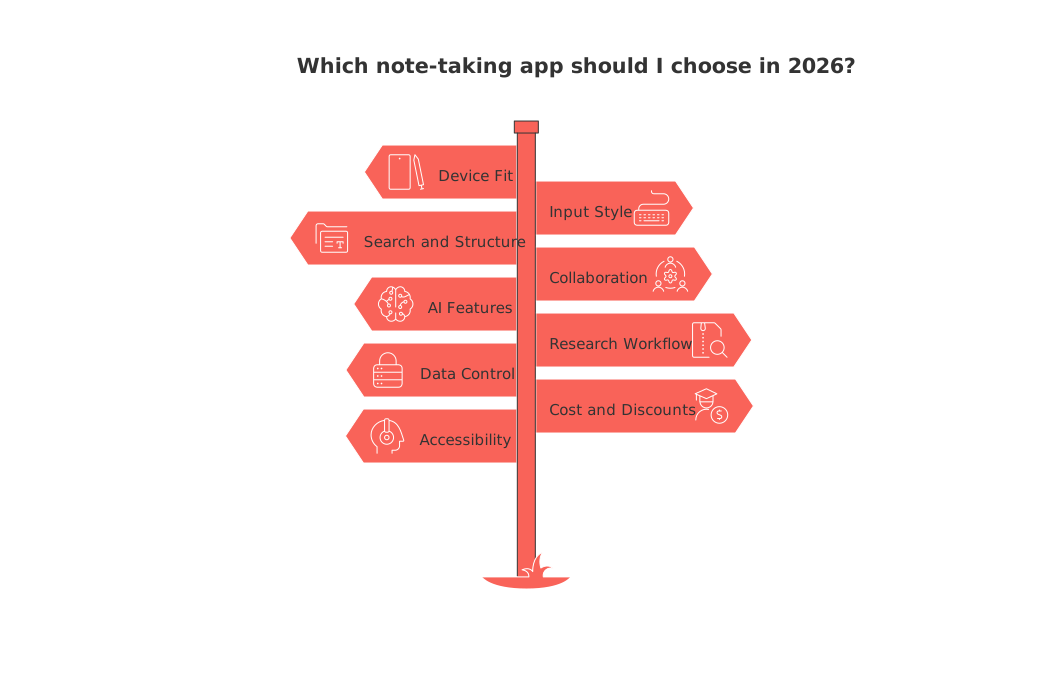
Start with your daily reality. Pick the app that fits your devices, classes, and budget, then test export, search, and collaboration.
Device fit: For iPads with a stylus, features such as handwriting and PDF markup can be beneficial. For a Chromebook, look for fast web capture and offline support.
Input style: Typing, handwriting, audio, and screenshots each matter in different majors.
Search and structure: Good tagging, folders, and links speed up revision.
Collaboration: Group projects benefit from shared pages and version history.
AI features that help, not distract: Summaries, flashcards, and Q&A should cite sources and stay inside your notes.
Research workflow: PDF highlights should flow into clean study notes with citations.
Data control: Check local files, encryption, and easy exports (.md, .pdf, .docx).
Cost and discounts: Look for student plans; avoid lock‑in.
Accessibility: Voice notes, OCR, and keyboard shortcuts reduce friction.
Best all‑in‑one workspaces for class notes and group projects
Microsoft OneNote is a great choice if you frequently use Word, PowerPoint, and Teams. Copilot in OneNote can draft outlines, extract tasks, and summarize long pages. It’s available on Windows, Mac, iPad, and rolling out on the web for eligible licenses.
Notion gives students flexible pages, databases, and strong sharing. Notion AI adds generation, editing, and Q&A that answers questions from your workspace content.
If you prefer one hub that combines tasks, documents, and lightweight CRM with notes, consider tools like Routine or Notion. Both apps balance personal study spaces and collaborative work. To weigh trade‑offs, see this comparison of all‑in‑one workspaces versus dedicated project tools.
Best handwritten and PDF‑annotation note‑taking apps for tablets
Goodnotes offers a handwriting experience that mimics the natural feel of writing on paper, plus powerful PDF annotation and handwriting search across many languages. You can export annotated PDFs and even collaborate in certain document types.
Notability is built for lectures: record audio, take handwritten notes, and get AI summaries, flashcards, and chat with your notes, handy the night before an exam.
Nebo excels at instant handwriting‑to‑text conversion and document export, great for math and formula‑heavy courses.
Write like it’s paper. Edit like it’s digital. That’s the mantra for modern tablet note apps, your handwriting should search, move, and export cleanly.
Best minimalist capture apps for quick lists and voice memos
Apple Notes searches typed and handwritten text, including text in scans and images, making it ideal for fast capture in class.
Google Keep is well suited for quick lists, shared checkboxes, and voice notes that transcribe on Android and the web. Keyboard shortcuts and accessibility support keep it speedy.
Best research and knowledge‑base apps for literature reviews and revisions
Obsidian stores notes as local Markdown files inside a “vault,” with plugins for graphs, backlinks, and even a canvas for visual study maps. You can sync or keep everything offline.
Zotero is a citation manager with a built‑in PDF reader. Highlight articles and send annotations into notes that link back to exact pages, gold for essays and lab reports.
RemNote merges notes with spaced‑repetition flashcards, an exam scheduler, and AI card generation. It’s designed for dense courses like medicine and law.
Joplin is open source, offline‑first, and supports end‑to‑end encrypted sync; great if you want Markdown and control across devices. (joplinapp.org)
Privacy‑first and offline choices students can trust
Standard Notes focuses on end‑to‑end encryption with open specs, Argon2‑based key derivation, and XChaCha20‑Poly1305. It also offers easy data export.
Anytype pursues a local‑first model with peer‑to‑peer sync and collaboration that can work without a constant cloud connection.
Practical note‑taking workflows students can set up this week
Lecture to summary in minutes
Capture the lecture in Notability or Goodnotes. Add page titles by topic.
Run AI summary or create a brief outline. Tag core formulas and dates.
Export key pages as PDF and file them in your course folder.
Steps for creating a streamlined reading pipeline for academic papers
Open PDFs in Zotero. Highlight with colors for methods, results, and limits.
Send annotations to a Zotero note. Add one‑sentence takeaways per paper.
Sync a weekly brief into Obsidian or Notion for exam review.
Group project, zero chaos
Plan tasks and meeting notes in OneNote or Notion.
Use AI to extract action items after each session, then assign owners.
Keep the final outline in a single shared page with version history.
AI in student note‑taking: what actually helps in 2026
Summaries you can trust: Use Copilot in OneNote or Notion AI to condense long pages, then verify sources.
Study aids: Generate flashcards from class notes in RemNote or quizzes inside Notability.
Q&A on your own notes: Ask questions and get answers grounded in your workspace.
If you want to go further with automation, this guide to the best no‑code AI agent for productivity in 2026 shows how to connect note hubs with study checklists and reminders.
Export, pricing, and data ownership: read this before you commit
Protect your semester’s work. Before paying, confirm three things:
Reliable exports: Your notes should leave as clean .md/.pdf/.docx without breaking links or highlights.
Student plan terms: Check renewal dates and storage limits; cancel if you switch majors or devices.
Privacy posture: Prefer local files, clear encryption info, and audited sync if you handle sensitive data.
Suggested setups for common study scenarios in 2026
iPad‑centric majors (design, engineering, medicine): Goodnotes or Notability for ink + Zotero for papers + Obsidian or Notion for final summaries.
Windows or Surface laptop: OneNote with Copilot for class notebooks and quick task extraction.
Chromebook or Android: Google Keep for capture + Zotero web + RemNote for spaced review.
Privacy‑focused students: Standard Notes or Joplin with local files and encrypted sync.
Responsible recording and academic integrity
Ask before recording lectures. Follow your school’s policies and local laws. Summaries and AI outputs should cite sources and support your own understanding, not replace it.
Verdict: pick one core app, then add a study sidekick
Choose a primary notebook based on input style and device. Add a research or spaced‑repetition tool as your sidekick. Keep exports tidy, and review a little every day.
When you juggle both solo study and group work, it helps to understand workspace choices. This article on choosing between all‑in‑one workspaces and dedicated tools can guide your long‑term setup.
Students can also explore education offers on vendor sites to lower costs; always verify current eligibility and renewal terms. For example, Notion’s student resources are a useful starting point.
FAQ
What's the best note-taking app for device compatibility?
The ideal app fits not only your device but also your daily workflow and budget. Whether it's a Chromebook, iPad, or Windows laptop, choose an app that supports stylus input, offline usage, and seamless data export like Routine does.
Why are AI features important in note-taking apps?
AI features can boost productivity through automated summaries and flashcards, but they shouldn’t distract from studying. Ensure AI tools enhance your note organization and learning rather than becoming a crutch.
Is collaboration essential in a note-taking app?
Collaboration features, like shared pages and version history, are crucial for group projects, allowing efficient task management and transparent progress tracking. Without them, projects can quickly descend into chaos.
How can I ensure my notes remain secure?
Always check for local storage options and end-to-end encryption to prevent unauthorized access. Data control is critical, and Routine helps by providing easy exports to various formats and encryption support.
What should I look for in a note-taking app if I prioritize privacy?
Prefer apps with strong encryption protocols and local-first storage options. Apps like Standard Notes and Routine's privacy-first models ensure your data is safe from third-party interference.
How does cost factor into choosing a note-taking app?
While some apps offer student discounts, always weigh the long-term costs against feature benefits. Avoid becoming locked-in with a service that doesn’t adapt as your needs or courses change.
What are the consequences of poor note export capabilities?
Poor export features can result in data loss and hinder your ability to review material effectively. Prioritize apps that provide clean export options in multiple formats to ensure seamless transitions.
Why is offline support crucial for note-taking apps?
Offline support ensures you're never at the mercy of unreliable internet. Apps that function without constant connectivity, like Routine, provide uninterrupted access to your notes and research.

Julien Quintard
Founder & CEO at Routine09/15/2026
