Best Motion Alternatives for Scheduling Tasks
Quick comparison: The top Motion alternatives for scheduling tasks
Tool | Best for replacing Motion when… | Scheduling style | Project / CRM context | Team collaboration | Setup effort | Pricing lens | Trade-offs vs Motion |
|---|---|---|---|---|---|---|---|
Routine | You need tasks to live with projects, contacts, and meeting details | Context-driven, intentional time-blocking | Unified projects, CRM, and meetings | Built for individuals and teams | Low to moderate | Per user; consolidates multiple tools | Less “auto-magic” rescheduling, fosters mindful planning |
Sunsama | Daily planning rituals are more valuable than automation | Manual, reflective scheduling | Basic; integrates with existing apps | Suited to solo pros and small teams | Low | Per user | No true auto-scheduling, light on project structure |
Akiflow | Speedily processing Slack/email into time blocks is crucial | Keyboard-driven triage and scheduling | Lightweight; relies heavily on integrations | Primarily individual, fine for small groups | Low | Per user | Surface-level project features; context held elsewhere |
Reclaim.ai | Protecting deep work and habits automatically is the core need | Automatic task/habit scheduling within set hours | Minimal; not designed for PM/CRM | Helpful for small teams | Low to moderate | Per user | Great at automation, lighter on teamwork context |
Asana | You require dependencies, workload management, and cross-team projects | Capacity-driven, scheduled by workload | Detailed project organization, lacks native CRM | Excellent for robust team collaboration | Moderate | Per user, pricing tiers | Less focus on personal auto-scheduling, emphasizes project management discipline |
ClickUp | A configurable, all-in-one PM platform is a priority | Manual scheduling with automation options | Comprehensive PM, docs, and customizable CRM | Strong teamwork capabilities | Moderate to high | Per user, feature-based tiers | Extensive power, but can feel overwhelming; setup needed |
Notion | You value flexible databases and documentation above all | Database-first planning, some time-blocking | Excellent for wikis; build-your-own CRM/PM system | Great once standardized workflows are established | Moderate (requires configuration) | Per user | No native auto-scheduling; requires custom setup |
Todoist | Simple, dependable personal task tracking is key | Manual scheduling, optional calendar sync | Basic project support | Simple sharing capabilities | Low | Per user | Extremely simple, limited for teams or complex projects |
SkedPal | Advanced personal auto-scheduling is essential | Auto-scheduling with custom time maps | Minimal; for solo productivity | Geared for individual use | Moderate | Per user | Rich automation, minimal collaboration |
Routine: The best Motion alternative for project and CRM-rich task scheduling
If “scheduling a task” means you need to update a client record, link it to a project, and connect outcomes from meetings, switching between scattered tools gets disruptive. Routine brings project management, lightweight CRM, and meetings together, so your scheduled tasks carry full context: who, what, why, and not just a calendar slot.
Why it stands out: Routine centralizes work around the task, including project progress, contact history, meeting agendas, and recaps, letting you prioritize in real context. Small teams and solo operators save time and mental bandwidth by reducing tool-switching and endless copy-paste between PM, CRM, and daily task planners.
Key advantage: Smart links between tasks, projects, contacts, and meetings ensure nothing falls through. You can assign a task straight from a client call, tie it back to the right account, and schedule it in your workflow seamlessly, never losing sight of action items.
Trade-offs: Routine opts for clarity and deliberate planning over blindly aggressive automation. If your sole priority is automatic rescheduling and you don’t need project or CRM depth, consider specialized auto-schedulers like Reclaim.ai or SkedPal.
Best suited for: Founders, consultants, and small teams managing pipelines, SOWs, or recurring client work, where every task is also an opportunity or delivery milestone.
When to switch: The right time for Routine is when a simple task update means updating client records and tying it to the project deliverable in one step.
Sunsama: A Motion alternative for thoughtful daily planning
If Motion’s recurring reshuffles wear you down, Sunsama’s reflective, intentional approach is a reset. You curate what matters, plan realistically, and commit to a balanced workload, making the planner your co-pilot instead of a surprise generator.
Why choose it: Sunsama stands out for consultants, creatives, and solo professionals who favor structure without reactive rescheduling.
Core feature: Its calm daily review supports saying “no” and focusing on only what moves you forward, a subtle but powerful concept in scheduling.
Trade-offs: Sunsama provides less inherent project structure and lacks automated scheduling. For heavier project needs, you’ll need a separate PM platform.
Best suited for: Solo professionals and very small teams seeking purpose-driven planning, not always-on automation.
When to switch: Sunsama is ideal when your day-to-day priorities shift more often than your rescheduled calendar can keep up.
Akiflow: Superior speed for task triage over deep structure
For those swamped with Slack notifications, emails, and fast-moving requests, Akiflow excels. Its quick-capture command interface and rapid-fire time blocking turn daily chaos into orderly plans at lightning speed.
Why use it: It’s designed for frictionless intake, letting you block time before distractions pile up. The command palette streamlines getting tasks from inbox to schedule in seconds.
Standout capability: Keyboard-centric controls make scheduling feel as natural as muscle memory, letting you defend your calendar rapidly.
Trade-offs: Akiflow is light on native project and CRM context; if you need depth, another tool will be needed for that layer of organization.
Best suited for: Busy operators and account managers under a barrage of requests, needing to protect time as much as manage tasks.
Reclaim.ai: Automation-driven time protection for tasks and routines
When defending deep work time and habits is the priority, Reclaim.ai is purpose-built. Set your routine windows and let it dynamically negotiate your schedule, adapting to what matters most each week.
Why pick it: It combines habit automation and task scheduling, shuffling your day with minimal manual tweaks, ensuring important, not-urgent work gets real focus.
Notable strength: Recurring routines like sales outreach, writing, or prospecting automatically find protected slots so long-term goals aren’t squeezed out.
Trade-offs: Not a full project manager or CRM; team collaboration features are minimal.
Best suited for: Individuals and small teams who want automation to guarantee focus time, not just task lists.
When to switch: Choose Reclaim.ai when “guard my deep work” is a bigger issue than managing complex projects or tracking clients.
Asana: The right Motion alternative for dependency-driven scheduling
If your scheduling complexity comes from cross-team projects and dependencies, Asana is a natural fit. Schedule work based on realistic capacity, coordinate across owners, and visualize complex project timelines.
Why select it: Asana brings structure with dependencies, workload balance, and planned handoffs to minimize shocks from rescheduling algorithms.
Distinctive benefit: It gives executive-level visibility and predictable collaboration, keeping large projects reliably on track.
Trade-offs: Focuses more on team execution than personal schedule automation; may feel heavier than necessary for individuals.
Best suited for: Teams managing launches, handoffs, multi-step approvals, or cross-functional coordination.
ClickUp: An all-in-one hub for project operations and scheduling
If workflow customization and all-in-one consolidation trump out-of-the-box simplicity, ClickUp lets you build the perfect scheduling and PM platform for your organization. Its deep configuration powers suit teams ready to centralize management, docs, automations, and reporting.
Why choose it: ClickUp supports tasks, documents, dashboards, and automations from a single place, reducing tool fragmentation for growth-minded teams.
Key edge: Flexible automations, customizable views, and feature depth for professional grade operations at scale.
Trade-offs: Initial setup takes effort and can introduce workspace sprawl if not managed; scheduling is mainly manual within its complex framework.
Best suited for: Fast-growing teams that want centralized project visibility and are willing to invest in shaping the tool to their workflows.
Notion: The database-driven Motion alternative for linking knowledge and tasks
When your pain point is scattered knowledge rather than time management, Notion’s all-purpose databases and documentation bring everything together, even if it takes initial setup and standardization.
Why it’s effective: No tool matches Notion for custom structuring; you can build your process for connecting projects, tasks, wikis, and CRM pipelines.
Outstanding feature: Notion shines at bringing order to ad-hoc knowledge, transforming informal documentation and SOPs into formal task pipelines and accountability.
Trade-offs: Lacks native auto-scheduling; maintaining consistency and building productive conventions is up to you.
Best suited for: Teams committed to clear operating templates, and individuals who enjoy hands-on workspace design.
Todoist: A dependable Motion alternative for personal task management
When heavyweight features overwhelm and dependable task tracking is all you need, Todoist’s elegant simplicity and always-synced approach are tough to beat. It’s often the well-loved “step back” from more complex tools.
Why fans love it: Low friction and a calming, simple interface make Todoist a no-fuss daily driver for solo workers.
Best aspects: Naturally parses dates, offers straightforward prioritization, and maintains a clear, focused approach to personal productivity.
Trade-offs: Basic sharing and project context; almost everything is left to manual scheduling, making it less fit for teams or highly structured projects.
Best suited for: Individuals who value reliability, speed, and clarity above depth or complexity.
SkedPal: The advanced Motion alternative for rules-based personal auto-scheduling
If granular control over exactly when you do certain work is important, SkedPal’s “time maps” let you set intelligent constraints, offering a level of automation finessed for productivity enthusiasts.
Why it’s unique: SkedPal lets users codify when types of work are permitted, then fits your tasks into the schedule automatically, adapting to changing priorities.
Standout feature: Its personal automation logic means you spend less time micro-managing and more time executing, all while maintaining flexibility and control.
Trade-offs: Primarily designed for solo use; limited in terms of collaboration, project management, or shared context.
Best suited for: Individuals who want more automation than manual planners offer, but don’t need extensive teamwork capabilities.
Decision framework: How to choose the right Motion alternative for scheduling tasks
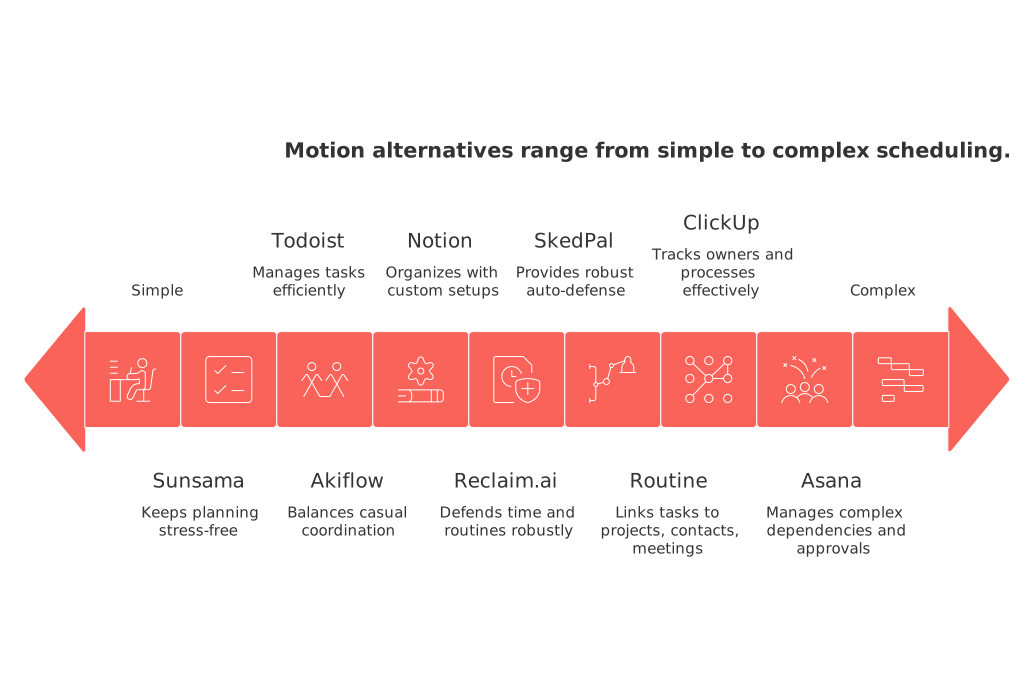
Workflow maturity: When tasks are deeply tied to project status, meeting actions, or CRM records, opt for context-rich tools like Routine or ClickUp. For simpler, early setups, Sunsama or Todoist keep planning stress-free.
Team size: Solopreneurs or very small teams do well with Sunsama, Akiflow, Reclaim.ai, or Todoist. Larger, collaborative teams needing tracked owners and processes should consider Asana or ClickUp. For mixed needs and CRM links, choose Routine.
Context requirements: If you need every task to link to projects, contacts, and meetings automatically, go with Routine. For knowledge-driven organization with custom setups, Notion is outstanding.
Scheduling complexity: Prefer mindful, reflective planning? Sunsama fits. Need robust auto-defense for time and routines? Lean into Reclaim.ai or SkedPal.
Collaboration depth: If casual coordination suffices, Akiflow or Sunsama work well. For complex dependencies, approvals, or workflows, Asana and ClickUp are more effective.
CRM, meetings, and documentation: If scheduled tasks are linked with sales pipelines or client delivery, pick a tool that keeps everything close (Routine). For sales process automations, check the guide on B2B sales automations. For planning visualizations, see advice in this project management visualization tools guide.
Conclusion: When should you move on from Motion, and where to go next?
It's time to switch when Motion’s automation starts isolating tasks from important context, or when collaboration matters more than squeezing every minute. Choose Routine if your task scheduling revolves around projects, contacts, and meetings. Select Sunsama when you want to restore intuitive, human judgment to your planning. Akiflow is the tool for rapid task triage. If automation is your shield for deep work, Reclaim.ai or SkedPal lead. And if your bottleneck is team coordination or complex structure, Asana, ClickUp, or Notion stand out. Still debating a unified workspace approach? Get balanced advice in this comparison of all-in-one vs dedicated tools to choose with confidence.
FAQ
What should I consider when switching from Motion to another task scheduling tool?
Focus on mapping out your desired outcomes, such as efficiency or collaboration improvements. Assess if your prospective tool supports advanced features you will actually use, beyond what Motion offers, to justify the switch.
How can I ensure a smooth transition from Motion to an alternative tool?
Clear mapping of tasks and priorities is crucial. Start with a small pilot group, refine based on feedback, then expand to minimize disruption and ensure alignment with team workflows.
Are all-in-one platforms better than specialized tools for task scheduling?
All-in-one platforms reduce context-switching but often have a steep learning curve and can be overkill. Specialized tools may focus better on specific aspects of task scheduling, sacrificing broad functionality for depth in particular features.
What risks come with relying on automation in scheduling tools?
Overreliance on automation can lead to disengagement and lack of awareness of task priorities. Ensure mechanisms are in place for manual oversight to avoid misalignments and overlooked crucial tasks.
How does Routine complement task scheduling and CRM functionalities?
Routine integrates lightweight CRM features and task management, centralizing client interactions and task execution. It offers a consolidated approach, maximizing efficiency but demanding careful setup to align with business rhythms.
What potential pitfalls should I watch for with automated scheduling systems like SkedPal or Reclaim.ai?
Automation-driven scheduling can risk rigidity, especially if algorithms make undesirable task assignments. Maintain flexibility and ensure user-controlled options to overwrite system-generated schedules when necessary.
Can project management and CRM be effectively managed together in a single tool?
Yes, many modern tools offer integration of project management with CRM functionalities. However, be wary of overcomplexity, ensure such integration aligns with your core operational needs without diluting focus.
Why is it important to cap work-in-progress when migrating to a new scheduling tool?
Unchecked task accumulation leads to bottlenecks and burnout. Implement strict WIP limits to promote focus, prevent task overload, and ensure manageable workloads during migration.
What are the key trade-offs when choosing Routine over Motion for task scheduling?
Routine offers a more context-rich approach, integrating projects, CRM, and meetings, unlike Motion's heavy automation. However, you trade off some automated features for clarity and intentional planning.
How does Sunsama differ from other scheduling tools when it comes to daily planning?
Sunsama emphasizes reflective and intentional scheduling rather than algorithm-driven automation, fostering mindful task prioritization but potentially requiring more manual effort for complex project needs.
Why might Akiflow not be suitable for those needing deep project management features?
Akiflow excels at quick task organization and scheduling but lacks depth in project and CRM contexts, making it less suited for teams requiring extensive project management integration.
In what scenarios should Reclaim.ai be avoided for task scheduling?
Reclaim.ai is ideal for automating deep work and routine tasks, but it lacks robust project management and team collaboration features, making it a poor fit for teams needing coordinated project execution.
What distinct advantage does Routine have for consultants and small teams?
Routine centralizes project, CRM, and meeting information around tasks, streamlining the workflow for consultants and small teams without needing to juggle multiple tools or platforms.
When is Notion a better choice than Routine for task scheduling?
If your primary need is comprehensive knowledge management and customizable databases rather than integrated task and CRM solutions, Notion provides a compelling alternative to Routine.
What makes SkedPal unique in terms of scheduling automation?
SkedPal uses time maps to provide advanced personal scheduling automation, allowing precise control over when tasks fit into your schedule but requires a solo workflow, with minimal collaboration options.
What are the risks of using a tool like Todoist for team projects?
Todoist is efficient for individuals but offers limited collaboration and project context, risking underperformance when applied to team environments needing detailed task coordination.

Julien Quintard
Founder & CEO at Routine04/28/2026
