Best Alternatives to Microsoft To Do in 2026
Quick comparison: best alternatives to Microsoft To Do (2026)
Tool | Best for | Why choose over To Do | Where it stands out | Trade‑offs to expect | Pricing context |
|---|---|---|---|---|---|
Routine | Individuals and teams needing tasks tied to projects, knowledge, and CRM | Keeps tasks, project work, and contacts connected in one place | Project management + knowledge base + lightweight CRM in one workspace | Broader scope than a simple list; brief onboarding to set structure | Free and paid tiers; per‑seat for teams |
Todoist | Personal productivity and small shared lists | Faster capture and filtering; excellent personal organization | Labels, filters, quick add | Limited project/CRM context; light collaboration | Free and paid tiers |
Notion | Knowledge‑heavy teams and creators | Tasks live inside databases and documentation | Flexible databases and relations | Setup time; can sprawl without strong conventions | Free and paid tiers |
ClickUp | Ops‑minded teams that want “one app for work” | Advanced views, custom fields, and automation | Highly configurable project structure | Complexity; governance needed to avoid bloat | Free and paid tiers; per‑user |
Asana | Cross‑functional teams needing clear ownership | Strong workflow clarity and coordination | Templates, task dependencies, permissions | Premium features at scale; less flexible than a database tool | Paid tiers by user |
Trello | Visual planners and lightweight team boards | Board‑first simplicity for shared work | Kanban with power‑ups | Limited hierarchy/reporting out of the box | Free and paid tiers |
TickTick | Individuals who want task lists plus focus rituals | Built‑in focus timer and habits | Clean personal planning | Team workflows are basic | Free and paid tiers |
Akiflow | Busy professionals triaging tasks from many inputs | Fast inbox‑to‑task triage and scheduling prompts | Command bar, deferral, quick routing | Limited project depth; no CRM/knowledge base | Paid plans |
Motion | Executives/solos with overloaded days | Auto‑prioritized daily plan | Hands‑off daily re‑planning | Can feel rigid; team planning is different | Paid plans |
Apple Reminders | Individuals fully on Apple devices | Zero‑friction capture and sharing | System‑level convenience | Apple‑only; minimal project features | Included with Apple devices |
Routine as the all‑in‑one alternative to Microsoft To Do
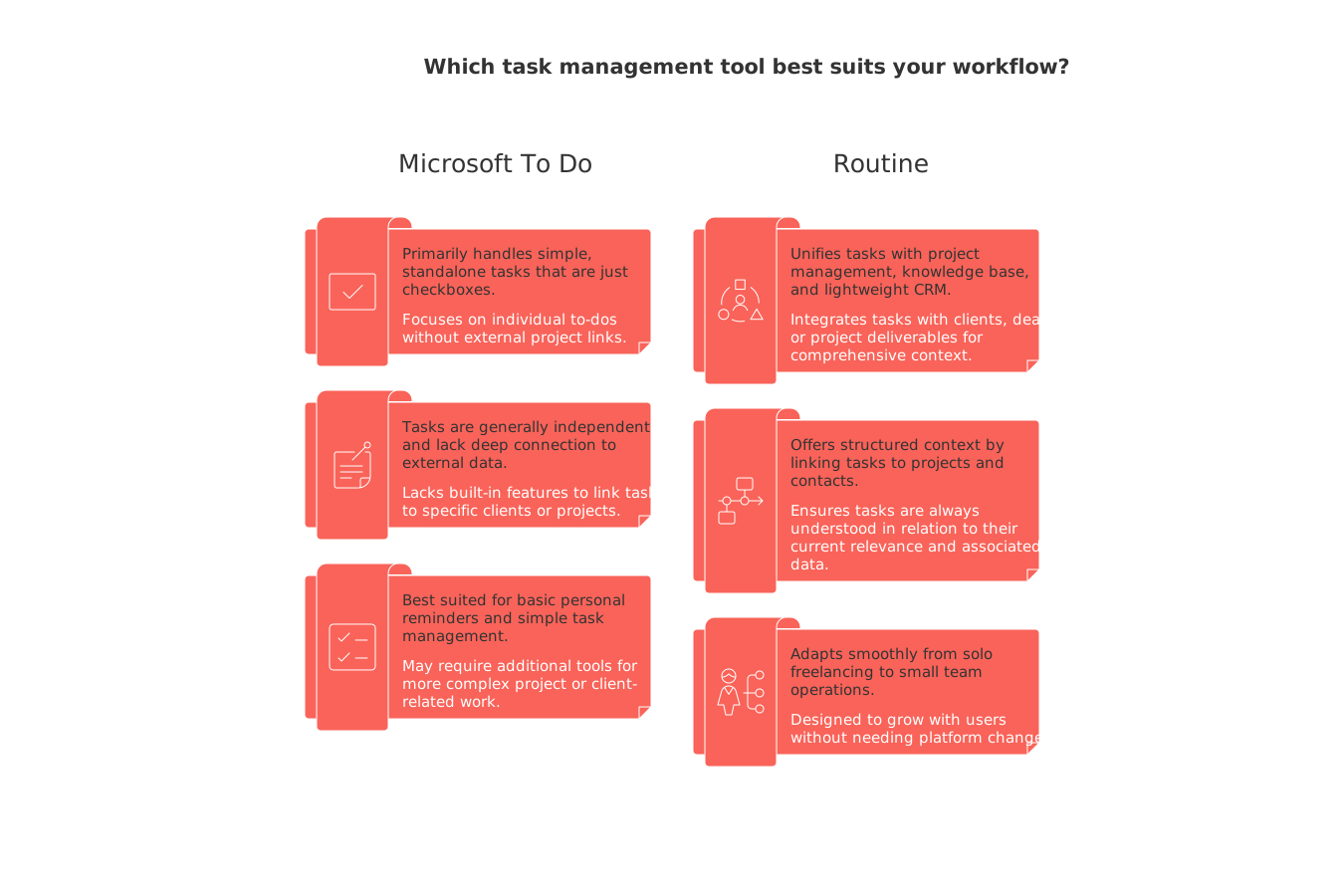
Most people begin searching for an alternative when a “task” is more than just a checkbox, it’s linked with a client, a deal, or project deliverables. Routine unifies tasks, project management, a knowledge base, and a lightweight CRM within one workspace, so your follow-ups, briefs, and account information reside together, not scattered across multiple tools. When to consider switching: You should consider switching to Routine when your tasks stop being simple personal reminders and start depending on project context, client timelines, or CRM follow-ups.
Where Routine stands out
Brings together tasks, projects, knowledge, and contacts, reducing tab-switching and repetition.
Offers structured context, tasks can be linked to projects and contacts so you always understand their current relevance.
Adapts smoothly as you grow, from solo freelancing to small team operations, without needing to change platforms.
Trade-offs and who should choose it
If your needs are limited to bare task lists, Routine’s comprehensive features may exceed what you require; it’s designed for those ready to consolidate light project tools and basic CRMs.
You might choose Routine as a result of a debate over whether to use an all‑in‑one workspace or dedicated project tools, especially if you favor a streamlined solution with integrated connections.
If you need advanced customization across large, complex teams, Notion or ClickUp are strong alternatives, offering robust governance and customization options.
Todoist as the fastest personal task manager alternative
If your main concern is capturing tasks before they slip your mind, Todoist is outstanding for speed. Natural language input, versatile labels, and powerful filters make solo planning effortless. It’s a smart upgrade from To Do if you want reliability for personal tasks, without changing your team’s systems.
Best for and trade‑offs
Ideal for individuals, freelancers, and small groups sharing simple lists.
Comes with limited project structure, no native CRM integration, and basic collaboration.
When to choose: Pick Todoist when your challenge is remembering tasks, not solving coordination or workflow issues for a team.
Notion as the flexible database alternative for knowledge‑heavy work
When your work depends on integrating tasks inside briefs, standard operating procedures, and project documents, Notion’s databases let you layer tasks within broader documentation. Tasks, pages, teammates, and assets can all be related, making for a central hub of connected information.
Where it shines and when to rethink
Shines for creators and teams who want to design bespoke databases for tasks and projects with their own relationships and workflows.
Requires upfront setup time and clear conventions, without both, work tends to sprawl and daily usage can be slowed.
Choose Notion if you'll make use of its extensive database flexibility. Opt for Routine when you want everything organized in one place, but with ready-to-use structure built in.
ClickUp as the do‑everything project platform alternative
ClickUp is appealing when your work involves intricate dependencies, multiple stakeholders, and custom fields across many teams. It’s designed for those who want to build out operational processes, not just organize tasks.
Strengths, trade‑offs, and fit
Strong at supporting complex projects with customizable views, fields, and automations.
Requires investment in configuration and oversight, and can become unwieldy without clear structure and governance.
When to switch: Choose ClickUp when the size and complexity of your backlog call for governance and clarity, rather than just speed.
Asana as the structured cross‑functional workflow alternative
When organizations need clear ownership and workflow transparency across teams, Asana offers order. Its templates, role assignments, and permissions promote project clarity without resorting to micromanagement.
Best for and considerations
Suited for teams aiming to standardize processes and enforce accountability.
Consider overall cost at scale, and note that Asana is typically less adaptable than a tool like Notion, which acts as a full database.
If you require richer context and a lightweight CRM built in, Routine may provide a more consolidated solution.
Trello as the visual kanban alternative for simple teamwork
For those who benefit from visual workflows, Trello provides a board-centric approach to managing tasks that ensures everyone knows what’s happening. It’s a logical next step from To Do if your lists are becoming unwieldy and you want a visual pipeline.
Where it fits and what to watch
Well-suited to small teams, content workflows, and personal projects that progress through visual stages.
Be mindful of Trello’s limitations, hierarchy, advanced reporting, and workflow complexity often require add-ons, or prompt a move to a different platform.
TickTick as the personal planning alternative with focus rituals
When your challenge is maintaining concentration and discipline, not collaboration, TickTick stands out with its built-in focus timer and habit features. Tasks become more actionable and routines stick better.
Best for and trade‑offs
Best for individuals seeking to blend daily rhythms and habits with traditional task lists.
Lacks strong collaborative or advanced project management features. You may need another tool if you grow into team-based or client-focused work.
Akiflow as the triage and inbox‑to‑task alternative
Some users don’t need a new platform for projects, but rather a superior way to manage the flood of incoming tasks. Akiflow excels at capturing and triaging inputs from multiple sources, transforming chaos into a prioritized action queue.
Why it makes the list
Outstanding for fast personal task capture, direct deferral, and routing items to the appropriate context via command bar.
Trade‑off: It is not a full project management tool and offers limited project structure with no CRM or knowledge base integration.
When to choose Akiflow: Akiflow is an excellent choice when you need to manage inbox chaos. It also offers functionalities to assist with project design.
Motion as the auto‑prioritized planning alternative for overloaded schedules
For users whose days are densely packed and unpredictable, Motion intelligently creates and adapts your daily plan, ensuring your schedule remains prioritized without manual reordering.
Strengths and cautions
Helps busy individuals and executives maintain order with automatic task reprioritization and planning.
May feel restrictive, and does not cater to team planning in the same way. Those who need team-based project or CRM context will be better served by other options.
Motion continuously updates a prioritized plan, streamlining your decision-making process for what to do next.
Apple Reminders as the zero‑friction Apple‑only alternative
For those deeply embedded in the Apple ecosystem who want a no-hassle approach to lists, Reminders delivers instant task capture and basic sharing. It fits especially well for private tasks and lightweight collaborative lists.
When it fits and when it doesn’t
Works well for managing family chores, personal errands, and other straightforward shared lists.
Not suitable for cross-platform teams or for projects that demand documentation, structure, or CRM context.
Final decision framework: how to pick your Microsoft To Do alternative
Workflow maturity: If you mainly need reminders for yourself, go for Todoist or TickTick. As your work becomes more entwined with projects or clients, Routine, Notion, Asana, or ClickUp are better solutions.
Team size: Solos and freelancers thrive with Todoist, TickTick, Akiflow, or Motion. For small to midsize teams, Routine, Asana, ClickUp, or Trello provide necessary structure.
Context needs: To link tasks with documentation and contacts, choose Routine or Notion. If you want minimal context, Todoist or Trello are suitable.
Scheduling complexity: For constantly changing schedules, Motion stands out; for predictable project management, Routine, Asana, or ClickUp excel.
Collaboration depth: For straightforward board-based teamwork, Trello suffices. For cross-functional alignment, Asana or ClickUp fit. For a balanced all-in-one approach, Routine combines CRM and knowledge management in a seamless workspace.
CRM/meeting/documentation requirements: If maintaining client or account context is critical, Routine’s integrated CRM and knowledge base approach is preferable to purely task-oriented apps.
If you’re also interested in visual project planning solutions, consider our resource “From ai>Gantt Charts to Project Trackers: Visualization Tools for Simple Project Management.”
Conclusion
Microsoft To Do serves well for basic personal lists. But when projects, clients, or searchable team knowledge are critical to your workflow, a straightforward list will fall short. If you’re solo and coordination isn’t an obstacle, consider Todoist, TickTick, or Akiflow. If you’re ready for structured team workspaces with context and collaboration features, Routine, Asana, ClickUp, or Notion are smart upgrades. For teams that benefit from visual clarity without the heft of a full project management suite, Trello is a helpful mid-point. Ultimately, the right tool is one that clarifies your next step, reduces repetitive work and status updates, and keeps your team aligned, choose an alternative that does more than just store tasks; pick one that drives action.
FAQ
What is the main advantage of using Routine over Microsoft To Do?
Routine combines tasks, project management, and CRM in one workspace, reducing the need for multiple tools. This integration is invaluable for professionals whose tasks intersect with projects and client management.
Is Routine suitable for solo freelancers?
Yes, Routine adapts well as you grow, from solo freelancing to small team operations. Its integrated approach can streamline your workflow, especially when tasks start to require project context or client follow-ups.
What should teams consider before switching to Notion?
Teams need to invest time in setting up clear conventions and structures. Without this, Notion's flexibility can lead to sprawling workflows, making daily use inefficient.
When might Trello become insufficient for a team?
Trello's limitations arise when project complexity demands hierarchy and reporting beyond its basic Kanban boards. Teams needing more structured project management may outgrow Trello's offerings.
How does ClickUp manage project complexity?
ClickUp offers advanced views, custom fields, and automation, essential for managing intricate dependencies and multiple stakeholders. However, without governance, its complexity can lead to tool bloat and inefficiencies.
Why might Apple Reminders not be ideal for work teams?
Apple Reminders lacks project management features and is restricted to Apple devices. It's optimal for personal use but unsuitable for cross-platform teams needing more detailed documentation and collaboration.
Can Todoist replace a CRM tool?
While Todoist is excellent for personal task management with features like labels and filters, it lacks the capabilities required for CRM. It's best used when task reminders take priority over comprehensive client management.
Is Motion a good choice for team-based project management?
Motion excels at personal task prioritization, especially when schedules are unpredictable. However, its rigid structure doesn't cater well to team planning, which typically requires more flexible and collaborative tools.
What type of user is best suited for TickTick?
TickTick is ideal for individuals focused on personal productivity, especially when integrating tasks with focus rituals. Its features are limited for those requiring advanced collaboration or project management.

Julien Quintard
Founder & CEO at Routine04/20/2026
