How to Batch Your Email Replies Without Missing Urgent Messages
Why batching email replies works when you design for urgency
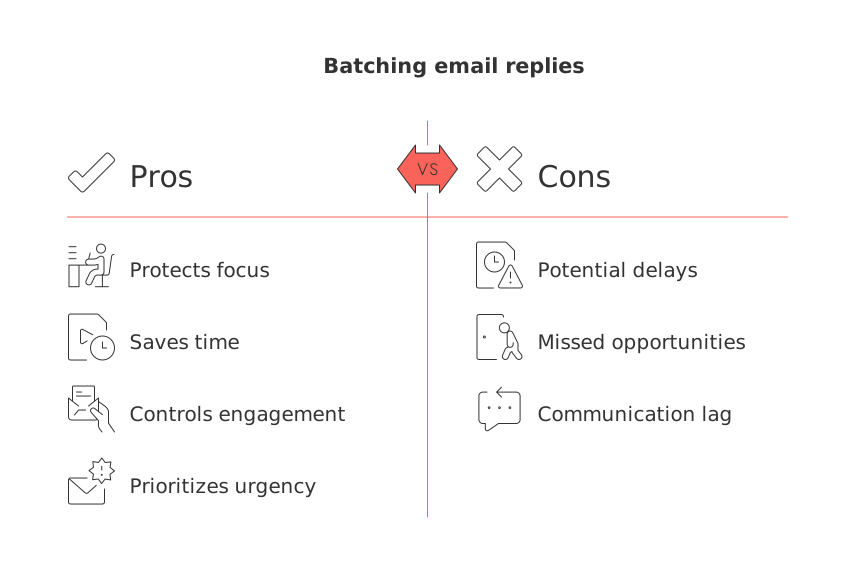
Your inbox rewards interruptions. Your focus needs long stretches. Batching gives you those stretches without risking silence on urgent issues.
Context switching costs time. Each jump to email taxes attention. Batching reduces jumps and protects deep work.
Decide what is urgent. Design a path for these items. For all other messages, create a system to handle them based on their importance.
Urgent messages bypass the queue.
Routine messages land in scheduled batches.
You control when you engage, not your inbox.
Define what “urgent” actually means for your life and work
Write a short rule set. Keep it simple and testable.
Family or safety issues: respond within 15 minutes.
Client delivery risks due today: respond within one hour.
Payments, invoices, or access problems: respond within two hours.
Everything else: reply during your next batch window.
Share these rules with clients and collaborators. Clear rules remove guesswork and reduce “just checking in” emails.
Build a fast pre‑filter so urgent messages surface instantly
Use a few strong signals. Combine sender, keywords, and channels.
Signals that work well
Specific senders: your partner, key clients, or your executive’s address.
Keywords that imply risk: “outage,” “blocked,” “contract today,” “wire,” “invoice due.”
Phone numbers in the body, which often indicate real‑time needs.
VIP lists on iOS or Priority Senders on Android for push alerts.
Route those emails to one Urgent label or folder. Allow notifications only for that label. Mute everything else.
Create two inboxes: urgent now and batched later
You need one lane for “answer now,” and another for “answer at 1 pm.”
Urgent now: messages from VIPs or matching urgent keywords.
Batched later: newsletters, updates, routine requests, and FYIs.
Consider an alias for emergencies, like you+urgent@. Request top clients to use it only for critical matters that require immediate attention.
Add a short rule: if a message is both urgent and unclear, call or text the sender for clarity before replying.
Share clear response windows and set gentle expectations
Setting clear expectations reduces unnecessary follow‑ups. Place a one‑line promise in your signature.
I check email at 11 am and 4 pm. For urgent issues, please text me.
Use a short auto‑reply during heavy weeks. Keep it friendly and precise.
Thanks for your message. I reply in my next batch window today. If this is urgent, text my number with URGENT in the first word.
The 30‑minute loop you can repeat all week
Spend five minutes scanning the Urgent folder. Resolve or schedule follow‑ups.
Spend twenty‑five minutes answering Batched Later. Work oldest to newest.
Run this loop two or three times daily. Protect mornings for real work when possible.
If a batch overruns, stop anyway. The limit keeps you honest and focused.
Move work out of email into a workspace or CRM
Email is a poor place to track deliverables. Turn threads into tasks, deals, or knowledge records the moment action appears.
Convert a client thread into a task with a due date and owner.
Attach the thread to the client’s CRM contact for context.
Store final decisions where your team can find them later.
All‑in‑one tools help here. Compare options before you commit. This guide can help you compare all‑in‑one workspaces with dedicated project tools.
Tools like Routine and Notion compete in this space. Many freelancers also consider ClickUp for simple handoffs.
Are you handling customer conversations through email, Intercom, or Front? Learn how to merge customer data from these platforms without coding and keep one clean timeline.
Automations that cut noise but keep escalation alive
Automate the easy sorting. Preserve at least one human path to you.
Flag invoices and payment emails with a finance label and two‑hour SLA.
Auto‑file newsletters into Read Later. Review them once a week.
Forward bids or RFPs to your CRM. Assign an owner on arrival.
Escalate no‑reply threads after 24 hours to SMS or a team chat.
Whitelist your emergency alias so it always notifies on your phone.
Keep rules short and transparent. Over‑automation hides real work.
Exceptions to plan for before you start batching
Some events deserve a manual override. Decide the trigger and the move.
Legal or compliance requests: log the request, then respond promptly.
Service outages: call first, email second. Document after recovery.
New client kickoff week: temporarily add a midday quick check.
Travel days: extend batch windows and tell key contacts the new plan.
Write these exceptions down. Share them with partners and assistants.
Track results and tune the system
Measure outcomes, not feelings. Adjust rules based on data.
First Response Time for Urgent: keep it under one hour.
Average Time to Reply for Batched: set a day‑specific target.
Batch Size: keep replies per batch steady to prevent overflow.
Escalations: investigate each one and refine the trigger.
If Urgent volume grows, tighten keywords or remove noisy senders. If batches become overwhelming, consider reducing newsletters, unsubscribing from irrelevant ones, or reassessing your filtering and sorting strategies.
After two weeks, review the numbers. Keep what works. Retire the rest.
FAQ
How does batching email replies increase productivity?
Batching reduces frequent context switching, allowing for focused, uninterrupted work periods. While urgent messages are prioritized, non-urgent ones wait for scheduled attention, reducing distraction and mental fatigue.
Why is it important to define \"urgent\" in email management?
Defining \"urgent\" helps to prioritize issues effectively and avoid the panic of constant interruptions. Without clear definitions, there is a risk of treating everything as urgent, which can spiral into chaos and decrease productivity.
What’s the risk of not using a pre-filter for urgent emails?
Without a pre-filter, crucial messages might get lost in a sea of routine emails, leading to missed deadlines or overlooked critical issues. A smart filtering system ensures immediate visibility for time-sensitive communication.
How can setting response windows impact client relationships?
Clearly communicated response times reduce client anxiety and the likelihood of follow-up emails. This control fosters stronger client trust, but failing to meet these expectations can quickly erode that trust.
What are the potential drawbacks of over-automation in email management?
Over-automation can create blind spots where genuinely urgent issues are ignored due to stringent rules. Maintaining a balance between automation and personal judgment is critical to ensure essential tasks are not inadvertently sidelined.
Why should work be moved from email into a CRM or workspace?
Email is an inefficient tool for tracking and managing tasks, which can lead to disorganization and missed deadlines. Converting emails into actionable items in a CRM or workspace like Routine helps maintain accountability and clarity.
How should exceptions to batching rules be handled?
Predefined exceptions should be documented and shared with teams to ensure swift responses during unusual circumstances. Failing to have exceptions can result in important tasks being delayed, especially in crisis situations.
What should you do if batch sizes become overwhelming?
If batch sizes grow unmanageable, it's crucial to reassess filtering strategies and reduce subscriptions or irrelevant content. Ignoring this can lead to burnout and inefficiencies, defeating the purpose of batching.

Julien Quintard
Founder & CEO at Routine07/28/2026
